On this page
A small team does not need an enterprise project suite. It needs a place where tasks, owners and deadlines stay visible, and where nobody has to read a manual before adding a card. We compared eight simple project management tools on price, ease of setup, free plans and the features a team of two to ten actually uses. Asana came out first for its calm all-round design, with Todoist and Trello close behind for teams that live in lists or boards. Here is what each one costs, what it does well, and where it falls short.
How we researched this
We checked each vendor's own pricing page in November 2026 and took the entry paid plan as the headline price, with monthly figures noted beside annual billing. We weighed the free plan, the time it takes to set up, and whether a small team can run the tool without an administrator. Tools with no published price were left out, and every price below comes from the vendor's own site.
Compare the tools
| Name | Best for | Starting price | Free plan | |
|---|---|---|---|---|
 Asana | Small teams that want a calm all-rounder | $10.99/user/month | Free Personal plan (up to 2 users) | Visit |
 Todoist | Teams that live in simple to-do lists | $4/user/month | Free plan (5 projects) | Visit |
 Trello | Teams that think in cards on a board | $5/user/month | Free plan | Visit |
 ClickUp | Small teams that want everything in one app | $9/user/month | Free Forever plan | Visit |
 Notion | Teams that want notes and tasks together | $10/user/month | Free plan | Visit |
 Smartsheet | Teams that plan in rows and columns | $9/user/month | No free plan; 30-day free trial | Visit |
| monday.com | Visual teams that want status at a glance | $9/seat/month | Free plan (up to 2 seats) | Visit |
 Basecamp | Teams that want one flat predictable bill | $29/month | Free plan (1 project, 3 users) | Visit |
The 8 simple project management tools for small teams, compared
1. Asana
Best for: Small teams that want a calm all-rounder
Paid tool Starting price: $10.99/user/month · Ten dollars and ninety-nine cents per user a month on Starter billed annually (thirteen dollars and forty-nine cents billed monthly); Advanced is twenty-four dollars and ninety-nine cents billed annually; a free Personal plan covers up to two users on new accounts
Free plan: Free Personal plan (up to 2 users)
A small team that wants boards, lists and timelines in one calm place will find this Asana plan costs ten dollars and ninety-nine cents per user a month billed annually, and it keeps every task, owner and due date visible without a maze of settings. Its templates cover the usual small-team work from launches to content calendars, and the free Personal plan lets a team of two try the real thing before paying. It is the safest all-rounder here for a team that wants structure without a learning curve.

What we like
- Boards, lists and timelines in one place
- Ready templates for launches and content work
- Free Personal plan for teams of two
Watch out for
- Advanced reporting sits on the dearer plan
- Automation rules are limited on Starter
How to try it
- Create a project from a template that matches the work
- Add tasks with an owner and a due date for each one
- Switch to the timeline view to spot clashes before they happen
2. Todoist
Best for: Teams that live in simple to-do lists
Paid tool Starting price: $4/user/month · Four dollars per user a month on Pro billed annually; Business is six dollars billed annually; a free plan is included
Free plan: Free plan (5 projects)
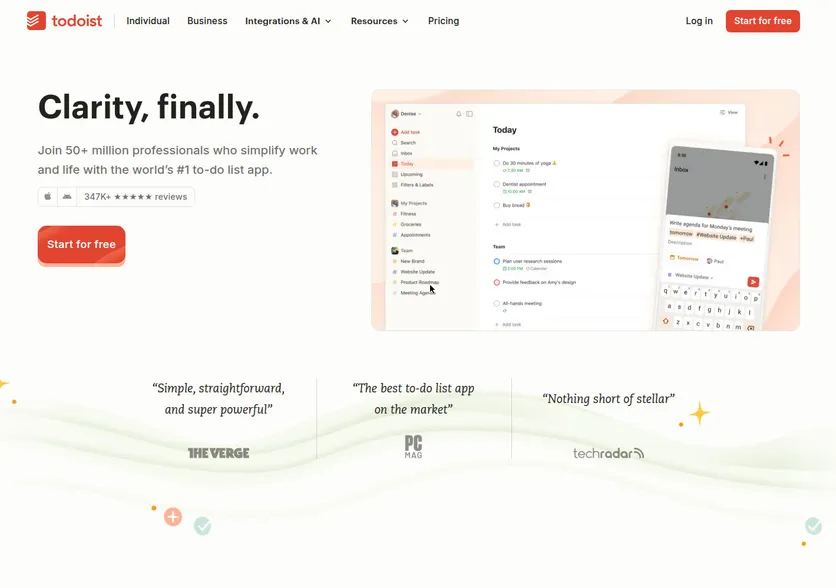
When the whole job is keeping a short to-do list shared and moving, this Todoist plan costs four dollars per user a month billed annually, and it turns tasks, priorities and reminders into a list anyone can follow. Its natural-language dates let a teammate type a plain phrase and get a real deadline, and the free plan covers five projects for a team testing the waters. It is the cheapest honest option in this list for a team that lives in lists rather than boards.
What we like
- Fastest way to capture and assign a task
- Natural-language dates that just work
- Cheapest paid plan in this list
Watch out for
- No built-in timeline or Gantt view
- Reporting is thin compared with board tools
How to try it
- Create a project and add the first tasks
- Set a priority and a due date on each task
- Share the project and check the list each morning
3. Trello
Best for: Teams that think in cards on a board
Paid tool Starting price: $5/user/month · Five dollars per user a month on Standard billed annually (six dollars billed monthly); Premium is ten dollars and Enterprise is seventeen dollars and fifty cents billed annually; a free plan is included
Free plan: Free plan
For a team that thinks in cards on a board, this Trello plan costs five dollars per user a month billed annually, and it adds unlimited boards, custom fields and checklists to the free board everyone knows. Its Butler automations move cards and set due dates without anyone remembering to do it, and the free plan is generous enough for a tiny team to run on it for months. It is the simplest visual option here, and the one new starters learn fastest.

What we like
- Easiest board for new starters to learn
- Butler automations handle routine card moves
- Generous free plan for tiny teams
Watch out for
- Reporting and timelines need the dearer Premium plan
- Large projects get unwieldy on one board
How to try it
- Create a board with columns for each stage of the work
- Add cards with checklists and due dates
- Turn on a Butler rule to move finished cards automatically
4. ClickUp
Best for: Small teams that want everything in one app
Paid tool Starting price: $9/user/month · Nine dollars per user a month on Core billed annually (twelve dollars billed monthly); Business is seventeen dollars billed annually; a free Forever plan is included
Free plan: Free Forever plan
A team that wants docs, goals and time tracking beside its tasks gets a lot for the money here, since this ClickUp plan costs nine dollars per user a month billed annually. Its views switch between list, board, calendar and Gantt without rebuilding anything, and the free Forever plan covers the basics for a team that is still finding its shape. It is the most feature-packed option in this list, which is both its appeal and its learning curve.

What we like
- Docs, goals and time tracking beside tasks
- Many views over the same work
- Free Forever plan covers the basics
Watch out for
- The sheer number of settings can overwhelm a small team
- Some views feel slower than simpler boards
How to try it
- Pick one view and set up the first project in it
- Add docs and goals to the same space
- Turn on time tracking for the tasks that need it
5. Notion
Best for: Teams that want notes and tasks together
Paid tool Starting price: $10/user/month · Ten dollars per member a month on Plus billed annually (twelve dollars billed monthly); Business is twenty dollars billed annually; Enterprise is quoted; a free plan is included
Free plan: Free plan
A team that writes its plans, notes and tasks in the same place will like this Notion plan, which costs ten dollars per member a month billed annually. Its databases turn a simple table into a tracker, a calendar or a board, and the free plan is enough for a small team to run its whole workspace. It is the best pick here for a team that wants its project tool to double as its handbook.

What we like
- One workspace for docs, notes and tasks
- Databases flex between table, board and calendar
- Free plan runs a whole small workspace
Watch out for
- Needs setup time before it feels like a project tool
- No built-in time tracking on Plus
How to try it
- Build a database for the team's tasks
- Add views for board, calendar and timeline
- Link the project pages to the team handbook
6. Smartsheet
Best for: Teams that plan in rows and columns
Paid tool Starting price: $9/user/month · Nine dollars per member a month on Pro billed annually (twelve dollars billed monthly); Business is nineteen dollars billed annually; Enterprise is quoted; Pro is capped at ten members
Free plan: No free plan; 30-day free trial
Spreadsheet lovers get a project tool that feels like home here, because this Smartsheet plan costs nine dollars per member a month billed annually. Its grid rows carry owners, dates and status, and the card and Gantt views sit on top of the same data without a second system. It suits a team that plans in rows and columns and wants reports without learning a new language.

What we like
- Grid layout that spreadsheet users already know
- Card and Gantt views over the same data
- Strong reporting for a simple tool
Watch out for
- Pro is capped at ten members
- The interface feels dated next to modern boards
How to try it
- Import the current plan as a sheet
- Add owners, dates and status to each row
- Switch to Gantt view to check the schedule
7. monday.com
Best for: Visual teams that want status at a glance
Paid tool Starting price: $9/seat/month · Nine dollars per seat a month on Basic billed annually (twelve dollars billed monthly); Standard is twelve dollars and Pro is nineteen dollars billed annually; a three-seat minimum applies and the free plan covers up to two seats. Note: one third-party read from November 18 lists Standard at fourteen dollars and Pro at twenty-two dollars; the majority of November reads agree on twelve and nineteen dollars
Free plan: Free plan (up to 2 seats)
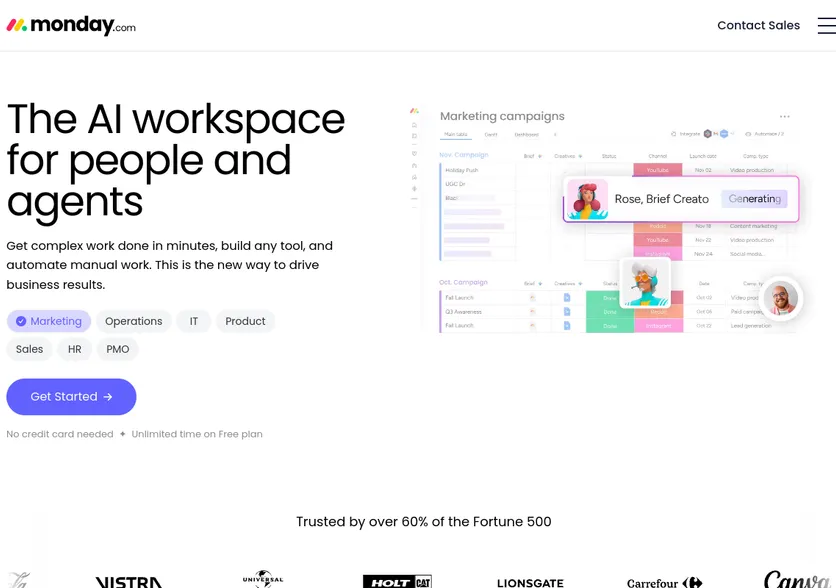
Colourful boards and status columns make progress obvious at a glance here, and this monday.com plan costs nine dollars per seat a month billed annually. Its automations nudge owners when a date slips, and the templates cover the usual small-team work from client onboarding to event planning. It is the most visual board in this list, though the three-seat minimum means a two-person team pays for a seat it does not use.
What we like
- Status columns show progress in one look
- Automations nudge owners on slipping dates
- Templates for onboarding and events
Watch out for
- Three-seat minimum, so a duo pays for an unused seat
- Costs climb fast once automations are needed
How to try it
- Start from a template that matches the project
- Set status columns for each stage
- Add an automation to remind owners of due dates
8. Basecamp
Best for: Teams that want one flat predictable bill
Paid tool Starting price: $29/month · Twenty-nine dollars a month flat on Freelancer billed annually, for three projects and five users; Pro is seventy-nine dollars, Pro Plus is ninety-nine dollars and Pro Unlimited is one hundred and ninety-nine dollars a month billed annually; the free plan covers one project and three users. Basecamp repackaged its pricing in October 2026 from per-user plans to these flat packages
Free plan: Free plan (1 project, 3 users)
A team that hates per-seat billing will welcome the flat rate here, since this Basecamp plan costs twenty-nine dollars a month flat billed annually for three projects and five users. Its message boards, to-dos, schedules and file storage sit in one calm place with no add-ons to buy, and the free plan covers a single project for a team trying it out. It is the best pick here for a team that wants one predictable bill and no seat counting.

What we like
- Flat monthly price, no per-seat counting
- Message boards, to-dos and files in one place
- Free plan covers a single project
Watch out for
- Three projects only on the entry flat plan
- No time tracking or Gantt chart
How to try it
- Set up the first project with its message board
- Add to-dos and a schedule for the launch
- Invite the team and keep discussion inside the project
Prices above were checked on each vendor’s own website on Nov 28, 2026 and can change — the vendor’s page is the final word. Vendor links are editorial: nobody paid to be listed or ranked here. Vendors who want a featured listing can see how it works on our Get listed page.
How to pick the right tool for your team
Start with how your team already thinks. A team that talks in lists will be faster in Todoist than in a board tool, and a team that thinks in cards will be faster in Trello than in a spreadsheet. Pick the tool that matches the habit, not the one with the longest feature list. Next, check the free plan properly. Most tools here give a real free tier, and a team of two or three can run on one for months before paying. Use that time to test the tool on a real project, not a demo. Finally, count the true cost. A per-seat price looks small until the team grows, so check the seat minimum and the next tier. A flat plan like Basecamp can be cheaper once the team passes five people, while a per-seat plan suits a team that stays small.
Before you buy
- Check the seat minimum before you sign up, since a two-person team can end up paying for a third seat it never uses.
- Test the free plan on a real project for at least two weeks before you pay for anything.
- Confirm the annual price, because the monthly figure is always higher and the headline rarely says so.
- Make sure the tool has the views your team needs, whether that is a board, a list, a calendar or a timeline.
- Ask who will own the tool, because a project tool with no owner goes stale within a month.
Official websites
Official websites of the products reviewed above. Features and prices were checked against these sites when this guide was written, and they can change, so confirm on the vendor site before you buy.
Frequently asked questions
What is the cheapest simple project management software for a small team?
Todoist is the cheapest paid plan in this list at four dollars per user a month billed annually, and its free plan covers five projects. Trello is close behind at five dollars per user a month, with a generous free plan of its own. For a team of two, Asana's free Personal plan may be enough without paying at all, so start there before spending anything.
Is there a free project management tool for small teams?
Yes. Asana, Todoist, Trello, ClickUp, Notion, monday.com and Basecamp all offer a free plan, though each one has limits on users, projects or features. The free tiers are genuinely usable for a team of two or three, and they are the best way to test a tool before paying. The only tool in this list without a free plan is Smartsheet, which offers a thirty-day trial instead.
Which project management tool is easiest for beginners?
Trello is the easiest to learn, because a board of cards needs no explanation and most new starters are productive within minutes. Todoist is nearly as simple for teams that prefer lists. Asana takes a little longer to set up but stays calm once it is running. The tools to avoid for beginners are ClickUp and monday.com, which offer more power but need more setup time.
Should a small team pay monthly or annually?
Annual billing is cheaper on every tool in this list, usually by around twenty percent, so it pays off once the team is settled on a tool. Monthly billing costs more but lets a team leave after a month if the tool does not fit. The safe route is to use the free plan first, then pay monthly for a month or two, and switch to annual billing once the team is sure.
What is the difference between Asana and monday.com for a small team?
Asana is calmer and simpler, with boards, lists and timelines that a small team can set up in an afternoon. monday.com is more visual, with colourful status columns and stronger automations, but it has a three-seat minimum and the price climbs faster as the team grows. A team that wants the simplest setup should pick Asana, while a team that wants visual status tracking should try monday.com.
Try Asana free for your team, or compare the other tools in this list to find the one that fits how your team works.
Browse Productivity Tools tools