On this page
How we researched this
We checked every price on the vendor pricing page on November 28, 2026, and only included tools with a published US dollar list price. NinjaOne and Kaseya VSA sell by quote only, so they are not in this list, and GoTo Resolve is excluded because its prices conflict three ways after the rebrand to LogMeIn Resolve. Prices change, so confirm the current figure on the vendor site before you buy.
Compare the tools
| Name | Best for | Starting price | Free plan | |
|---|---|---|---|---|
 TeamViewer | Teams that need remote access to any device, anywhere | $24.90/month | Free plan (personal use only) | Visit |
 Splashtop | Small teams that want cheap unattended access | $6/month | No free plan; free trial | Visit |
| LogMeIn Pro | Small businesses with a handful of office computers | $30/month | No free plan; 14-day free trial | Visit |
 ConnectWise ScreenConnect | IT teams that support users by remote session | $30/month | No free plan; free trial | Visit |
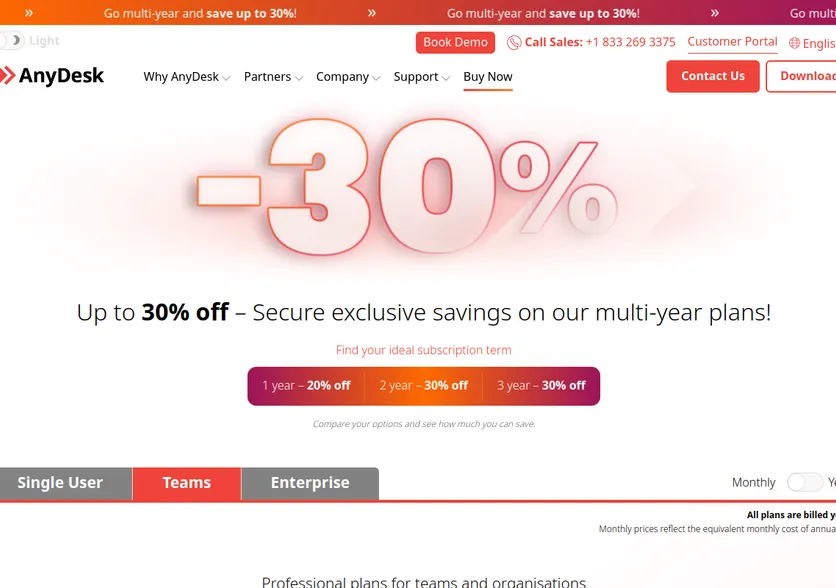
 AnyDesk | Teams that want fast sessions without per-seat pricing | $28.90/month | Free plan (personal use only) | Visit |
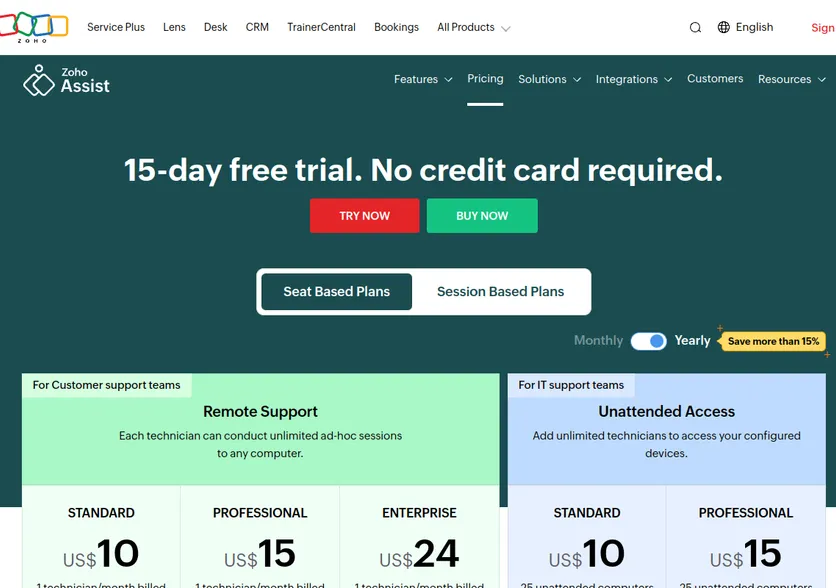
 Zoho Assist | Zoho shops that want remote support in the same suite | $10/technician/month | Free plan (1 technician, 5 unattended computers) | Visit |
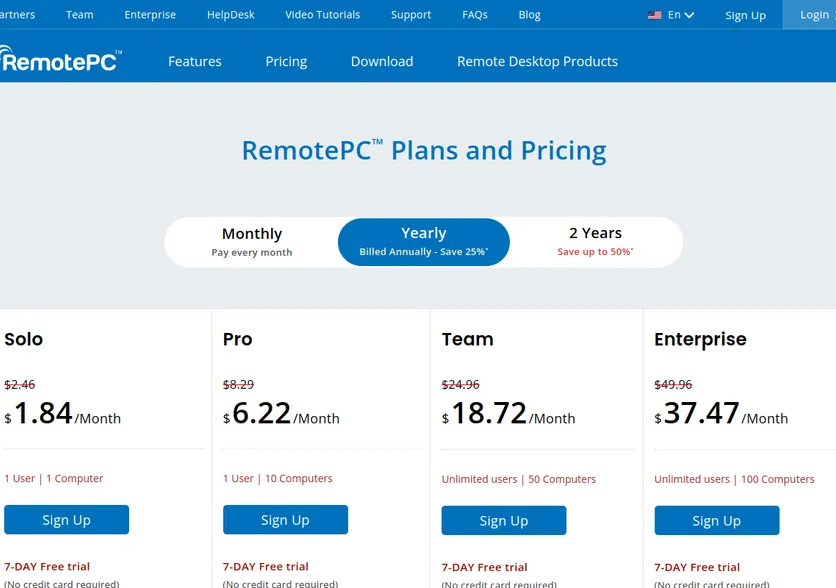
 RemotePC | Anyone who needs one home computer reachable from anywhere | $29.50/year | No free plan; free trial | Visit |
 Atera | IT departments and MSPs that want RMM plus helpdesk | $149/technician/month | No free plan; 30-day free trial | Visit |
The 8 best tools for remote management
1. TeamViewer
Best for: Teams that need remote access to any device, anywhere
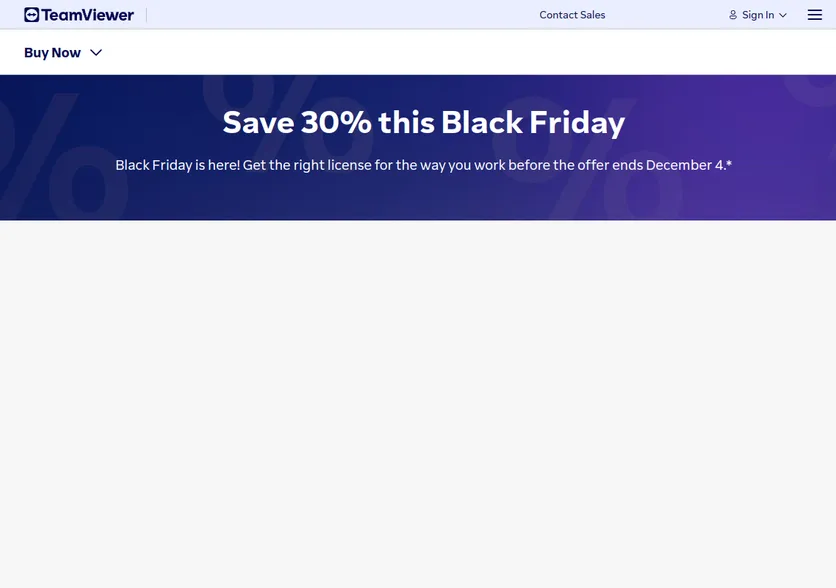
Paid tool Starting price: $24.90/month · Twenty-four dollars and ninety cents a month billed annually on Remote Access (two hundred and ninety-eight dollars and eighty cents a year); Business is fifty dollars and ninety cents, Premium is one hundred and twenty dollars and ninety cents and Corporate is two hundred and forty-five dollars and ninety cents; month-to-month prices are not published; a nine-dollar figure in some listings is a Black Friday first-year discount, not the list price
Free plan: Free plan (personal use only)
A team that needs remote access to any device gets the Remote Access plan here for twenty-four dollars and ninety cents a month billed annually, and TeamViewer covers unattended access, file transfer and remote printing at that price. Business adds more managed devices for fifty dollars and ninety cents, and Premium adds mass deployment and reporting for one hundred and twenty dollars and ninety cents. It is the most widely recognised remote tool in this list, which matters when the person on the other end has to install it.
What we like
- Works on almost any device and operating system
- Free for personal use on the entry tier
- Unattended access and file transfer included
Watch out for
- The nine-dollar figure in some listings is a Black Friday first-year discount
- Month-to-month prices are not published
How to try it
- List the computers and devices the team must reach
- Try the free personal plan to test the connection quality
- Compare Remote Access with Business on the device count
2. Splashtop
Best for: Small teams that want cheap unattended access
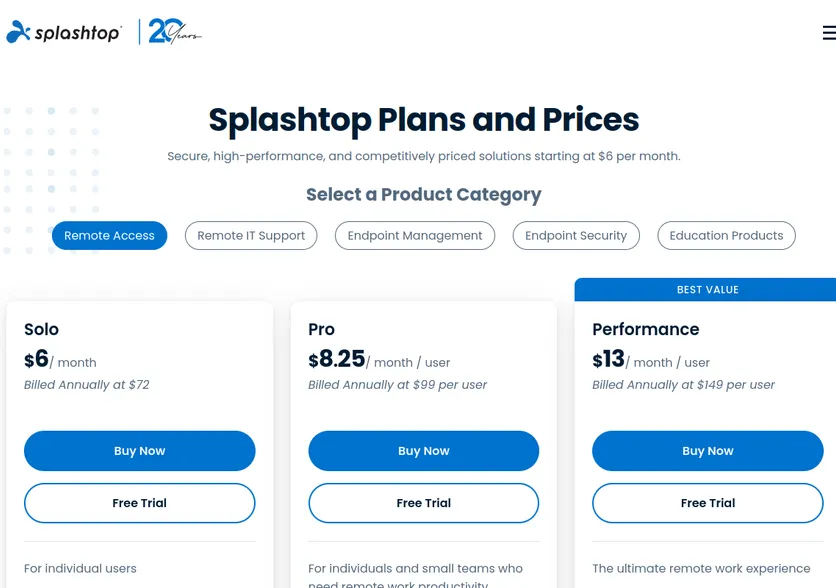
Paid tool Starting price: $6/month · Six dollars a month billed annually on Solo for two computers (seventy-two dollars a year); Pro is eight dollars and twenty-five cents per user a month and Performance is thirteen dollars per user a month; Enterprise is quoted; the Solo price rose from five dollars to six dollars on March 1, 2026; the product was formerly called Business Access and is now sold as Remote Access
Free plan: No free plan; free trial
A small team that wants cheap unattended access gets the Solo plan here for six dollars a month billed annually, and Splashtop covers two computers with remote printing and file transfer at that price. Pro adds more users and devices for eight dollars and twenty-five cents per user a month, and Performance adds four-K streaming for thirteen dollars. It is the cheapest way in this list to reach a couple of office computers from home.
What we like
- Cheapest unattended access in this list
- Good performance even on slower connections
- Simple pricing with no per-device surprises
Watch out for
- Solo covers only two computers
- Enterprise features need the quoted plan
How to try it
- Count the computers the team must reach unattended
- Start with Solo and test the connection from home
- Check whether Pro is needed for a second user
3. LogMeIn Pro
Best for: Small businesses with a handful of office computers
Paid tool Starting price: $30/month · Thirty dollars a month billed annually for Individuals, covering two computers; Power Users is seventy dollars a month for five computers and Small Businesses is one hundred and twenty-nine dollars a month for ten; monthly billing is fifty-five dollars, one hundred and thirty dollars and two hundred and thirty dollars; unlimited users on all plans
Free plan: No free plan; 14-day free trial
A small business with a handful of office computers gets the Individuals plan here for thirty dollars a month billed annually, and LogMeIn Pro covers two computers with unlimited users and remote printing at that price. Power Users adds three more computers for seventy dollars a month, and Small Businesses covers ten computers for one hundred and twenty-nine dollars a month. It suits a business where everyone needs to reach the same few office PCs.
What we like
- Unlimited users on every plan
- Simple per-computer pricing that is easy to budget
- Fourteen-day free trial with no card required
Watch out for
- No free plan, only a trial
- The price rises steeply per computer compared with Splashtop
How to try it
- Count the office computers the team must reach
- Start the fourteen-day trial with the two busiest PCs
- Compare the per-computer cost with Splashtop before buying
4. ConnectWise ScreenConnect
Best for: IT teams that support users by remote session
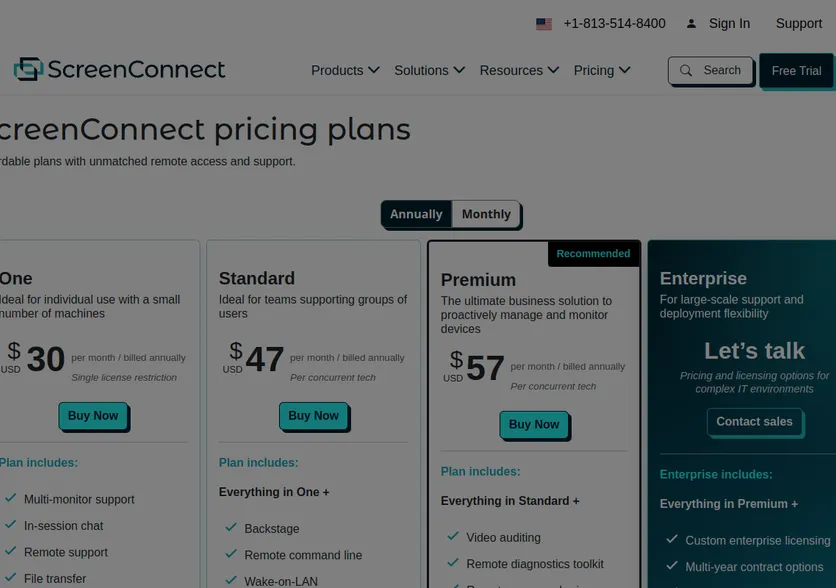
Paid tool Starting price: $30/month · Thirty dollars a month billed annually on One for one session and ten unattended agents, annual billing only; Standard is forty-seven dollars per concurrent technician a month billed annually (sixty-two dollars monthly) and Premium is fifty-seven dollars (seventy-two dollars monthly); Enterprise is quoted; a separate Remote Access plan for unattended machines starts at thirty-five dollars a month for twenty-five agents; one listing claims a free single-technician licence, which the vendor page does not confirm
Free plan: No free plan; free trial
An IT team that supports users by live remote session gets the One plan here for thirty dollars a month billed annually, and ConnectWise ScreenConnect covers one concurrent session and ten unattended agents at that price. Standard adds more concurrent technicians for forty-seven dollars per technician a month, and Premium adds advanced reporting and auditing for fifty-seven dollars. It is the best fit for a helpdesk that lives on support sessions all day.
What we like
- Built for support sessions, not just unattended access
- Strong auditing and session recording
- Separate unattended plan for managed machines
Watch out for
- The One plan is annual billing only
- A free single-technician licence is claimed in one listing but not confirmed by the vendor
How to try it
- Count the concurrent technicians the helpdesk needs
- Run the trial with the two busiest support staff
- Check whether the unattended plan fits the managed fleet
5. AnyDesk
Best for: Teams that want fast sessions without per-seat pricing
Paid tool Starting price: $28.90/month · Twenty-eight dollars and ninety cents a month billed annually on Solo; Standard is forty-nine dollars and ninety cents and Advanced is one hundred and eleven dollars and ninety cents; a twenty percent first-year discount brings those to twenty-three dollars and twelve cents, thirty-nine dollars and ninety-two cents and eighty-nine dollars and fifty-two cents, but the list prices above are the figures that renew; older listings showing fourteen dollars and ninety cents are stale
Free plan: Free plan (personal use only)
A team that wants fast sessions without per-seat pricing gets the Solo plan here for twenty-eight dollars and ninety cents a month billed annually, and AnyDesk covers unlimited devices and sessions for one user at that price. Standard adds a custom namespace and more users for forty-nine dollars and ninety cents, and Advanced adds mass deployment for one hundred and eleven dollars and ninety cents. It suits a small team that connects to many machines from one desk.
What we like
- Unlimited devices on the entry plan
- Fast connections even on weak internet
- Free for personal use
Watch out for
- A twenty percent first-year discount hides the renewing price
- Older listings showing fourteen dollars and ninety cents are stale
How to try it
- List the devices the team connects to in a week
- Try the free personal plan to test the speed
- Confirm the renewing price, not the first-year discount
6. Zoho Assist
Best for: Zoho shops that want remote support in the same suite
Paid tool Starting price: $10/technician/month · Ten dollars per technician a month billed annually on Remote Support Standard (twelve dollars billed monthly); Professional is fifteen dollars and Enterprise is twenty-four dollars; Unattended Access is ten dollars per twenty-five computers on Standard and fifteen dollars on Professional; a fifteen-day free trial needs no card
Free plan: Free plan (1 technician, 5 unattended computers)
A Zoho shop that wants remote support in the same suite gets the Remote Support Standard plan here for ten dollars per technician a month billed annually, and Zoho Assist covers unattended access, file transfer and session recording at that price. Professional adds wake-on-LAN and more features for fifteen dollars, and Enterprise adds advanced reporting for twenty-four dollars. It is the cheapest technician-priced tool in this list for a team already on Zoho.
What we like
- Cheapest per-technician price in this list
- Free plan for one technician and five computers
- Fits the rest of the Zoho suite
Watch out for
- Unattended access is priced per twenty-five computers
- Fewer advanced RMM features than Atera
How to try it
- Start on the free plan with the most-used technician
- Connect the Zoho accounts the team already uses
- Check the unattended pricing against the computer count
7. RemotePC
Best for: Anyone who needs one home computer reachable from anywhere
Paid tool Starting price: $29.50/year · Twenty-nine dollars and fifty cents a year for one computer on Consumer; SOHO is ninety-nine dollars and fifty cents a year for ten computers, Team is two hundred and ninety-nine dollars and fifty cents for fifty and Enterprise is five hundred and ninety-nine dollars and fifty cents for one hundred; a twenty-two dollar and twelve cent first-year figure in some listings is a discount, not the list price
Free plan: No free plan; free trial
Anyone who needs one home computer reachable from anywhere gets the Consumer plan here for twenty-nine dollars and fifty cents a year, and RemotePC covers one computer with file transfer and remote printing at that price. SOHO covers ten computers for ninety-nine dollars and fifty cents a year, and Team covers fifty computers for two hundred and ninety-nine dollars and fifty cents a year. It is the cheapest yearly price in this list for personal remote access.
What we like
- Cheapest yearly price in this list
- Simple plans by computer count, not per user
- Works on Windows, Mac and mobile
Watch out for
- No free plan, only a trial
- A twenty-two dollar first-year figure in some listings is a discount
How to try it
- Count the computers that need to be reachable
- Try the trial from a phone to test the mobile app
- Compare the yearly cost with Splashtop before buying
8. Atera
Best for: IT departments and MSPs that want RMM plus helpdesk
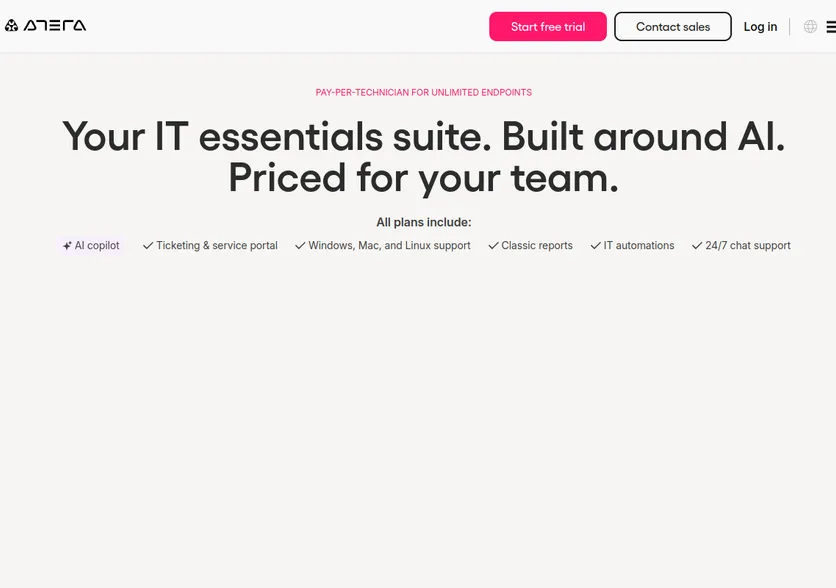
Paid tool Starting price: $149/technician/month · One hundred and forty-nine dollars per technician a month billed annually on Professional for IT departments (one hundred and sixty-nine dollars billed monthly); Expert is one hundred and eighty-nine dollars and Master is two hundred and nineteen dollars; Enterprise is quoted; managed service provider pricing is lower, Pro at one hundred and twenty-nine dollars; endpoints are unlimited and the AI Copilot is included free since the June 2026 pricing update
Free plan: No free plan; 30-day free trial
An IT department or managed service provider that wants remote monitoring plus a helpdesk gets the Professional plan here for one hundred and forty-nine dollars per technician a month billed annually, and Atera covers unlimited endpoints, patching, automation and ticketing at that price. Expert adds more automation for one hundred and eighty-nine dollars, and Master adds advanced reporting for two hundred and nineteen dollars. It is the only full RMM platform in this list, and the AI Copilot is included free since the June 2026 pricing update.
What we like
- Unlimited endpoints on every plan
- RMM plus helpdesk in one platform
- AI Copilot included free since June 2026
Watch out for
- No free plan, only a thirty-day trial
- Overkill for a team that only needs remote access
How to try it
- Count the technicians, not the endpoints, since endpoints are unlimited
- Run the thirty-day trial with the real ticket queue
- Test the patching and automation on a small group first
Prices above were checked on each vendor’s own website on Nov 28, 2026 and can change — the vendor’s page is the final word. Vendor links are editorial: nobody paid to be listed or ranked here. Vendors who want a featured listing can see how it works on our Get listed page.
How to pick remote management software that fits the fleet
Start with what the team actually manages. If the job is reaching a few office computers from home, a cheap access tool such as Splashtop or RemotePC does it for a few dollars a month, and paying for a full RMM platform would be wasted money. If the job is supporting users all day, patching machines and answering tickets, the answer is Atera or ScreenConnect, which are built for that work.
Then count the right thing. Splashtop and RemotePC charge by computer, Zoho Assist and Atera charge by technician, and TeamViewer charges by plan, so the cheapest tool on the pricing page can be the most expensive once the real numbers are in. A trial week should include a real support session, a file transfer and an unattended connection, because those three actions are the whole job.
Before you buy
- Count the computers and the technicians separately, since the pricing basis differs by tool
- Confirm whether unattended access is included or priced separately
- Check the renewing price, not the first-year discount, before comparing
- Verify the tool works on every operating system the team supports
- Test a real support session and a file transfer during the trial, not just a demo
Official websites
Official websites of the products reviewed above. Features and prices were checked against these sites when this guide was written, and they can change, so confirm on the vendor site before you buy.
Frequently asked questions
What is the cheapest remote management software?
RemotePC is the cheapest yearly price in this list at twenty-nine dollars and fifty cents a year for one computer. Splashtop Solo is six dollars a month billed annually for two computers, and Zoho Assist Standard is ten dollars per technician a month billed annually. The cheapest option depends on the count, because Splashtop and RemotePC charge by computer while Zoho Assist and Atera charge by technician.
Is TeamViewer free?
TeamViewer is free for personal use only, which covers reaching a home computer for non-commercial purposes. Business use needs a paid plan, starting at twenty-four dollars and ninety cents a month billed annually on Remote Access. A nine-dollar figure in some listings is a Black Friday first-year discount, not the list price, so the renewing price is the one to budget for.
Why is GoTo Resolve not in this list?
GoTo Resolve was rebranded to LogMeIn Resolve, and its prices now conflict three ways: forty and fifty-seven dollars per agent in one set of listings, twenty-three dollars and seventy-five cents to seventy-five dollars per agent in another, and per-endpoint figures from ninety-two cents to three dollars in a third. The old pricing page returns a not-found error, so the tool is excluded rather than drafted at a guessed price.
Do I need RMM or just remote access?
Remote access is enough when the job is reaching a computer and fixing it, which Splashtop, RemotePC and TeamViewer do well. RMM adds monitoring, patching, automation and alerting across a whole fleet, which is what Atera provides for one hundred and forty-nine dollars per technician a month. A team managing more than twenty machines usually saves time with RMM, while a smaller team does not need it.
Which tool is best for a managed service provider?
Atera is the strongest pick for a managed service provider, with unlimited endpoints, patching, automation and a helpdesk from one hundred and forty-nine dollars per technician a month, and a lower MSP ladder starting at one hundred and twenty-nine dollars. ScreenConnect is the alternative for a provider that mainly runs support sessions, at forty-seven dollars per concurrent technician a month on Standard.
Count the computers and the technicians first, then run the trial on a real support session before paying.
Browse Business Tools tools