On this page
When a system breaks at three in the morning, the alert has to reach the right person in seconds, not sit in an inbox until Monday. The eight tools below route incidents, page on-call engineers and escalate until someone answers, from a free tier for a tiny team to a full incident platform. PagerDuty leads because it is the standard for on-call routing at twenty-one dollars a user a month, and the rest are ranked on speed, escalation and value.
How we researched this
We checked every price on the vendor pricing page on November 29, 2026, and only included tools with a published US dollar list price. Opsgenie and Splunk On-Call are discontinued, and Everbridge sells by quote only, so they are not in this list. Prices change, so confirm the current figure on the vendor site before you buy.
Compare the tools
| Name | Best for | Starting price | Free plan | |
|---|---|---|---|---|
 PagerDuty | Teams whose uptime is on the line | $21/user/month | Free plan (up to 5 users) | Visit |
 ilert | Teams that want full routing without the premium price | $19/user/month | Free plan (up to 5 users) | Visit |
 xMatters | Large teams alerting across many tools | $15/user/month | Free plan (up to 5 users) | Visit |
 Squadcast | Teams that want runbooks beside alerting | $15/user/month | No free plan; 14-day free trial | Visit |
 Zenduty | Startups that need on-call on a budget | $5/user/month | Free plan (up to 5 users) | Visit |
 AlertOps | Teams that want alerts to trigger fixes | $8/user/month | Free plan (up to 5 users) | Visit |
 SIGNL4 | Field and factory teams working on mobile | $9/user/month | Free plan (Starter, up to 5 users) | Visit |
 OnPage | Teams where a missed alert is a real emergency | $13.99/user/month | No free plan; 14-day free trial | Visit |
The software notification tools, compared
1. PagerDuty
Best for: Teams whose uptime is on the line
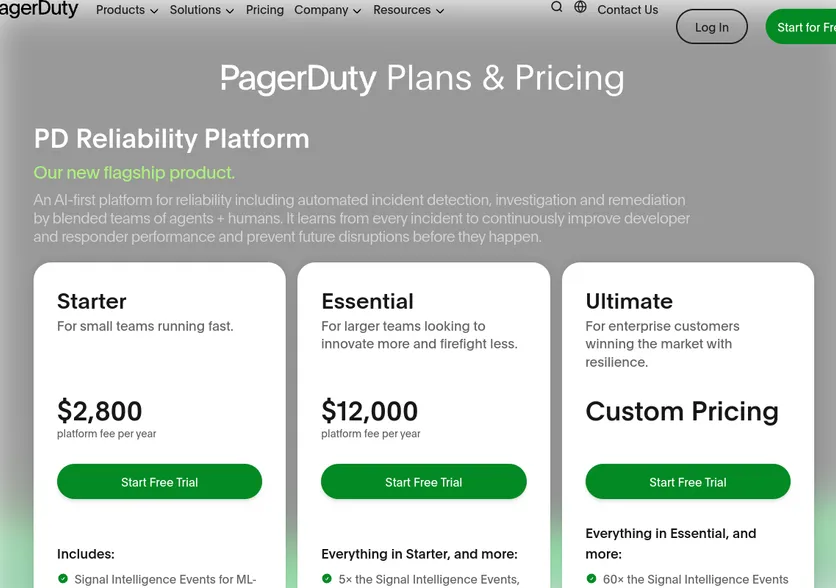
Paid tool Starting price: $21/user/month · Twenty-one dollars per user a month on Professional billed annually, or twenty-five dollars billed monthly; Business is forty-one dollars billed annually or forty-nine dollars monthly, though one October 2026 read says Business no longer appears on the pricing page and is sold in bundles instead; the free plan covers up to five users
Free plan: Free plan (up to 5 users)
A team that cannot afford a missed alert will find the standard here, since this PagerDuty plan costs twenty-one dollars per user a month billed annually on Professional. It routes incidents by schedule, escalates until someone answers, and plugs into nearly every monitoring tool. It is the safest pick in this list for a team whose uptime is on the line.
What we like
- Routes incidents by schedule and escalates automatically
- Integrates with nearly every monitoring tool
- Free plan covers up to five users
Watch out for
- Business pricing is unclear on the current page
- The full feature set needs the dearer tiers
How to try it
- Connect the monitoring tools to PagerDuty
- Set up the on-call schedule and escalation rules
- Test an incident end to end before going live
2. ilert
Best for: Teams that want full routing without the premium price
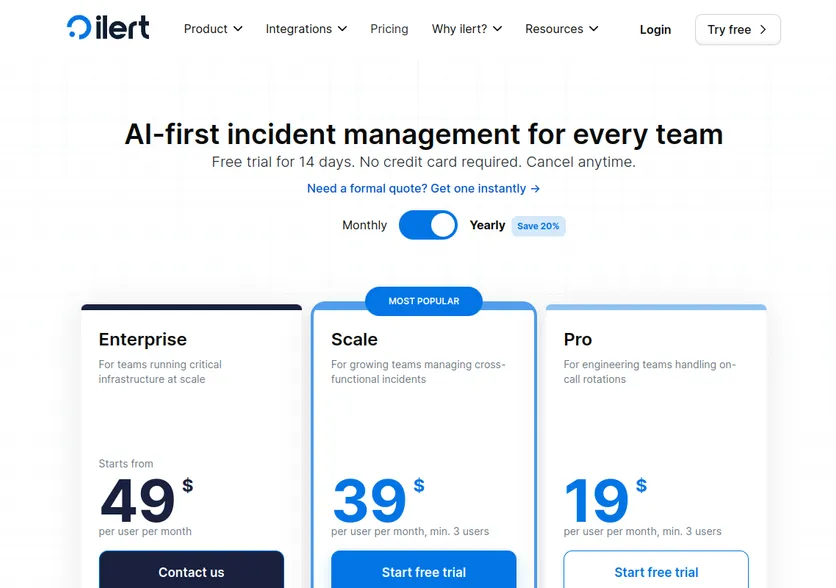
Paid tool Starting price: $19/user/month · Nineteen dollars per user a month on Pro billed annually with a three-user minimum; Scale is thirty-nine dollars a user a month, though some sources list forty-nine dollars; Enterprise starts at forty-nine dollars; yearly plans save twenty percent on monthly billing; the free plan covers up to five users
Free plan: Free plan (up to 5 users)
A team that wants PagerDuty-style routing at a lower price will find it here, because this ilert plan costs nineteen dollars per user a month billed annually on Pro. It pages by call, SMS and push, escalates through the on-call chain, and connects to the monitoring stack with a wide integration list. It is the best value pick in this list for a team that wants the full workflow without the premium price.
What we like
- Pages by call, SMS and push with escalation
- Wide integration list for monitoring tools
- Free plan covers up to five users
Watch out for
- Scale pricing is listed inconsistently across sources
- The three-user minimum applies on the Pro plan
How to try it
- Connect the alert sources to ilert
- Build the on-call rota and escalation policy
- Run a test page to check the whole chain
3. xMatters
Best for: Large teams alerting across many tools
Paid tool Starting price: $15/user/month · Fifteen dollars per user a month on Starter for up to twenty-five users, up from nine dollars in summer 2026; Base is thirty-nine dollars a user a month and Advanced is quoted; the free plan covers up to five users
Free plan: Free plan (up to 5 users)
A team that needs alerts to reach people across chat, voice and mobile will like this system, as this xMatters plan costs fifteen dollars per user a month on Starter. It sends targeted notifications through many channels, tracks who responded, and automates the first steps of incident response. It is the best pick for large teams that alert across many tools.
What we like
- Alerts reach people by chat, voice, SMS and mobile
- Tracks who responded to every notification
- Automation handles the first response steps
Watch out for
- The Starter price rose from nine to fifteen dollars in 2026
- Advanced features need a sales quote
How to try it
- Connect the monitoring and chat tools
- Set up the notification groups and channels
- Test the alert flow with a staged incident
4. Squadcast
Best for: Teams that want runbooks beside alerting
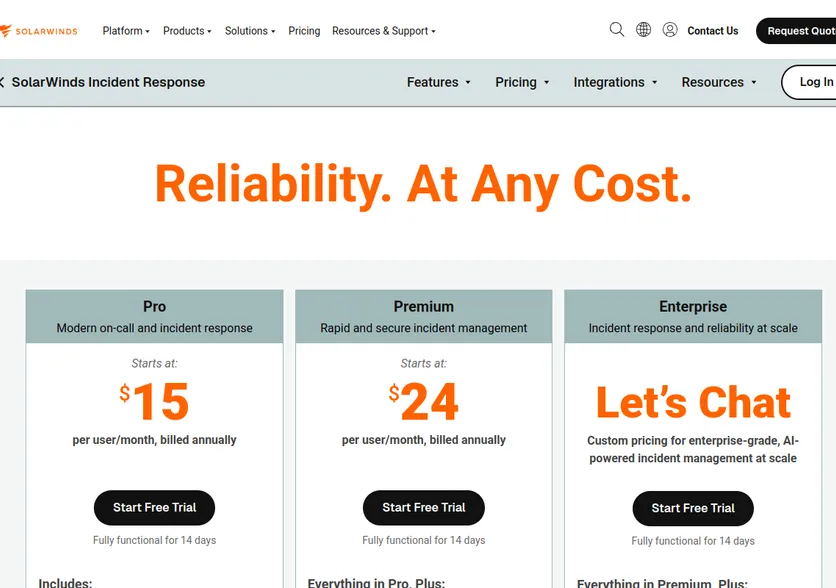
Paid tool Starting price: $15/user/month · Fifteen dollars per user a month on Pro billed annually, or twenty-four dollars on Premium, per the newest November 2026 reads; older November 2026 reads list Pro at nine dollars and Premium at sixteen dollars, so the price appears to have risen; the product is now sold as SolarWinds Incident Response
Free plan: No free plan; 14-day free trial
A team that wants incident response with runbooks built in will find it here, since this Squadcast plan costs fifteen dollars per user a month billed annually on Pro. It pages the on-call engineer, tracks the incident timeline, and runs automated runbooks while the team works. It is the best pick for teams that want response playbooks beside the alerting.
What we like
- Runbooks automate the first response steps
- Incident timelines track every action taken
- Schedules and escalations work out of the box
Watch out for
- The price rose between November 2026 reads
- Now sold under the SolarWinds name, which may confuse buyers
How to try it
- Connect the alert sources to Squadcast
- Write a runbook for the most common incident
- Test the page and runbook with a drill
5. Zenduty
Best for: Startups that need on-call on a budget
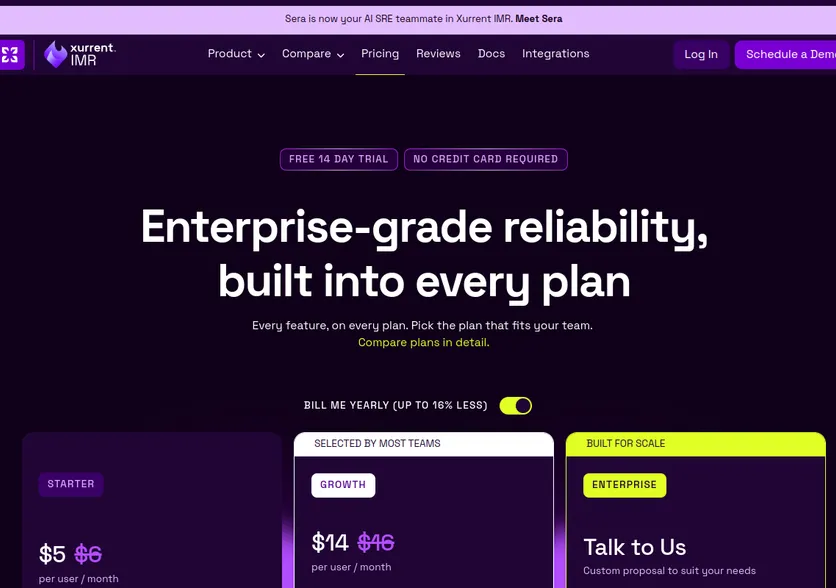
Paid tool Starting price: $5/user/month · Five dollars per user a month on Starter billed annually, or six dollars billed monthly, for up to five users; Growth is fourteen dollars billed annually or sixteen dollars monthly for up to fifty users; Enterprise is twenty-five dollars a user a month per some sources and quoted per others; the product is now sold as Xurrent IMR
Free plan: Free plan (up to 5 users)
A small team that wants reliable paging at the lowest price in this list will find it here, because this Zenduty plan costs five dollars per user a month billed annually on Starter. It routes alerts by schedule, escalates automatically, and connects to the monitoring tools a small team already uses. It is the best budget pick for a startup that needs on-call without the enterprise bill.
What we like
- Lowest entry price in this list at $5 a user
- Schedules, escalation and integrations included
- Free plan covers up to five users
Watch out for
- Enterprise pricing is listed inconsistently
- Now sold under the Xurrent name
How to try it
- Connect the monitoring tools to Zenduty
- Set up the five-user on-call rota
- Test an alert through the whole escalation chain
6. AlertOps
Best for: Teams that want alerts to trigger fixes
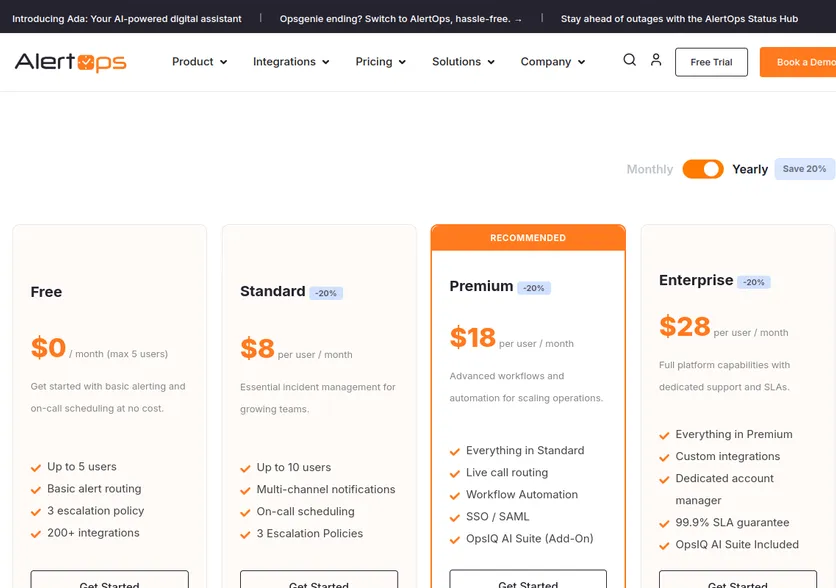
Paid tool Starting price: $8/user/month · Eight dollars per user a month on Standard billed annually, or ten dollars billed monthly, for up to ten users; Premium is about eighteen dollars billed annually or twenty-two dollars monthly; Enterprise is about twenty-eight dollars billed annually or thirty-four dollars monthly; the free plan covers up to five users
Free plan: Free plan (up to 5 users)
A team that wants alerting with workflow automation will enjoy this tool, since this AlertOps plan costs eight dollars per user a month billed annually on Standard. It routes alerts, runs automated workflows on the incident, and keeps a full log of who did what. It is the best pick for teams that want the alert to trigger the first fix by itself.
What we like
- Workflows run automatically when an alert fires
- Full incident log of every action taken
- Low entry price with a free plan for five users
Watch out for
- Premium pricing is approximate across sources
- The Standard plan caps at ten users
How to try it
- Connect the alert sources to AlertOps
- Build a workflow for the most common alert
- Test the automation with a staged incident
7. SIGNL4
Best for: Field and factory teams working on mobile
Paid tool Starting price: $9/user/month · Nine dollars per user a month on Notify and Connect; Optimize is fifteen dollars billed annually or nineteen dollars monthly; Maximize is twenty-five dollars billed annually or twenty-nine dollars monthly; Starter is free for up to five users
Free plan: Free plan (Starter, up to 5 users)
A team that lives on mobile phones will get fast alerts here, because this SIGNL4 plan costs nine dollars per user a month on Notify and Connect. Its mobile app pages engineers with a loud alert, tracks acknowledgement in real time, and lets the team chat about the incident in the app. It is the best pick for field and factory teams that work away from desks.

What we like
- Mobile app pages engineers with a loud alert
- Acknowledgement tracking in real time
- In-app chat keeps the incident talk in one place
Watch out for
- The base plan covers notification, not full incident management
- Desktop workflows are lighter than rivals
How to try it
- Install the mobile app on the on-call phones
- Set up the team and the alert channels
- Send a test alert and check acknowledgement
8. OnPage
Best for: Teams where a missed alert is a real emergency
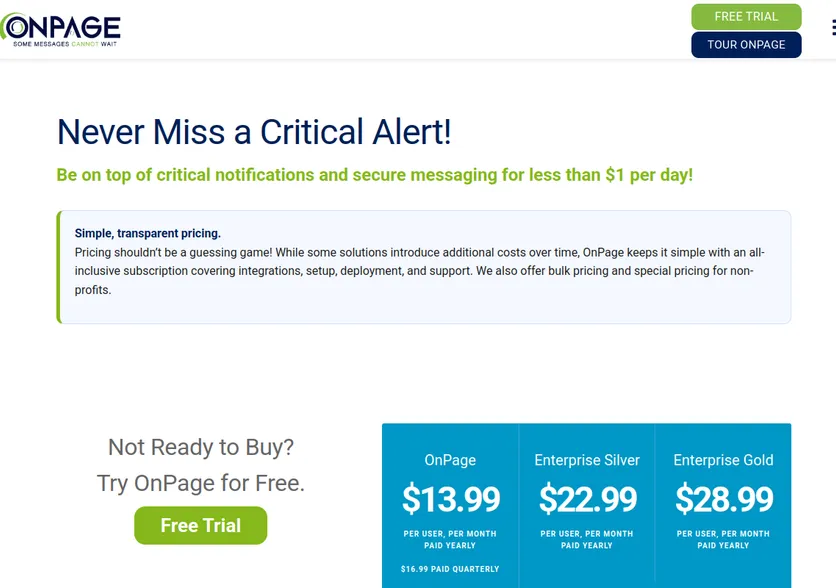
Paid tool Starting price: $13.99/user/month · Thirteen dollars and ninety-nine cents per user a month billed annually, or sixteen dollars and ninety-nine cents billed quarterly; Enterprise Silver is twenty-two dollars and ninety-nine cents and Enterprise Gold is twenty-eight dollars and ninety-nine cents; the free plan was removed in November 2026
Free plan: No free plan; 14-day free trial
A team that needs alerts to cut through the noise will find them here, since this OnPage plan costs thirteen dollars and ninety-nine cents per user a month billed annually. Its alerts override silent mode on the phone, so a critical page cannot be slept through, and escalation keeps paging until someone answers. It is the best pick for teams where a missed alert is a real emergency.
What we like
- Alerts override silent mode on the phone
- Escalation keeps paging until someone answers
- Incident audit trail included
Watch out for
- The free plan was removed in November 2026
- Quarterly billing costs more than annual
How to try it
- Install the app on the on-call phones
- Set the escalation chain for critical alerts
- Test a critical page with phones on silent
Prices above were checked on each vendor’s own website on Nov 29, 2026 and can change — the vendor’s page is the final word. Vendor links are editorial: nobody paid to be listed or ranked here. Vendors who want a featured listing can see how it works on our Get listed page.
How to set up on-call alerting that nobody sleeps through
Start with the escalation chain, because an alert that pages one person and stops is barely better than no alert at all. Check which channels the tool uses, since a page that only sends email will be missed at three in the morning. Test the whole chain with a staged incident, including a phone on silent, because the test is the only proof the system works. Keep the rota short and fair, since a burned-out on-call engineer misses alerts, and review the alert noise every month so real incidents are not buried in false alarms. Keep the phone numbers in the rota current, because an alert sent to a dead number helps nobody.
Before you buy
- Build the escalation chain first, since one person is not enough
- Check the alert channels, because email alone is missed at night
- Test the whole chain with a staged incident and a silent phone
- Keep the rota short and fair so on-call engineers stay sharp
- Review alert noise monthly so real incidents are not buried
Official websites
Official websites of the products reviewed above. Features and prices were checked against these sites when this guide was written, and they can change, so confirm on the vendor site before you buy.
Frequently asked questions
What is software notification and on-call software?
Software notification and on-call software routes alerts from monitoring tools to the right engineer, pages them by phone, SMS or app, and escalates until someone answers. It replaces a shared inbox with a system that knows who is on call, what is broken, and whether anyone has acknowledged the problem.
How much does PagerDuty cost?
PagerDuty costs twenty-one dollars per user a month on Professional billed annually, or twenty-five dollars billed monthly, with a free plan covering up to five users. Business is forty-one dollars billed annually or forty-nine dollars monthly, though one read says Business is now sold in bundles rather than listed. A ten-person team pays around two hundred and ten dollars a month on Professional.
Is there a free on-call tool?
Yes, with PagerDuty, ilert, xMatters, Zenduty, AlertOps and SIGNL4, which all offer free plans covering up to five users. A free plan is enough for a small team to run real on-call rotations. Pay only when the team grows past five users or needs the paid escalation and reporting features.
Which tool is best for a small team?
Zenduty is the best pick for a small team at five dollars a user a month on Starter, with a free plan for up to five users. SIGNL4 suits a mobile-first team at nine dollars a user a month, and AlertOps suits a team that wants workflow automation at eight dollars. Choose the cheapest tool that still pages reliably at night.
Why are Opsgenie and Splunk On-Call not in this list?
Opsgenie was shut down by Atlassian and Splunk On-Call, formerly VictorOps, is also discontinued, so neither can be bought any more. Everbridge is also absent because it sells by quote only. Every tool in this list is available to buy today with a published price on its own site.
Compare the eight tools above, then start with a free plan on the tool that pages the way your team works and test the escalation chain before going live.
Browse Developer Tools tools