On this page
A startup does not need enterprise workforce software: it needs a schedule that writes itself, a clock that staff actually use, and a price that stays low while the team is small. Homebase starts free for one location, while Deputy charges five dollars a user and Clockify costs three dollars and ninety-nine cents a seat. We read every price on the vendor pricing page on November 29, 2026, and kept only tools with a published dollar rate.
How we researched this
We read every price on the vendor pricing page on November 29, 2026, and kept only tools with a published dollar rate. We ranked the shortlist on ease of setup for a small team, mobile clock-in, and value at five to ten staff. Quote-only enterprise tools were dropped, as were tools that sell time tracking only as an unpriced add-on.
Compare the tools
| Name | Best for | Starting price | Free plan | |
|---|---|---|---|---|
 Homebase | Startups with one location that want free scheduling and time tracking | $24/location/month | Free plan (Basic, 1 location, up to 10 employees) | Visit |
 Deputy | Startups that want the cheapest per-user scheduling and time tracking | $5/user/month | No free plan; free trial available | Visit |
 Clockify | Startups that want a free start and the cheapest paid seat | $3.99/seat/month | Free plan (up to 5 users) | Visit |
 Buddy Punch | Startups with field staff that need GPS and photo verification | $4.99/user/month | No free plan; 14-day free trial | Visit |
 Rippling | Startups that want HR, payroll and time tracking in one system | $8/user/month | No free plan; demo on request | Visit |
 QuickBooks Time | Startups already running QuickBooks that want time in payroll | $20/month + $10/user | No free plan; 30-day free trial | Visit |
 When I Work | Startups with hourly staff that need simple scheduling first | $2.50/user/month | No free plan; 14-day free trial | Visit |
 Connecteam | Startups with frontline staff that want one app for the whole operation | $29/month | Free plan (Small Business, up to 10 users) | Visit |
The 8 best time and attendance tools for startups
1. Homebase
Best for: Startups with one location that want free scheduling and time tracking
Paid tool Starting price: $24/location/month · Basic is free for one location and up to ten employees; Essentials costs thirty dollars per location a month billed monthly (twenty-four dollars billed annually); Plus seventy dollars (fifty-six dollars annually); All-in-One one hundred twenty dollars (ninety-six dollars annually); every paid plan covers unlimited employees per location; a fourteen-day trial opens All-in-One.
Free plan: Free plan (Basic, 1 location, up to 10 employees)
Homebase costs twenty-four dollars per location a month billed annually on Essentials, with a free Basic plan for one location and up to ten employees. Every paid plan covers unlimited employees per location, so a growing startup never pays per head, and scheduling, time tracking and team messaging sit in one app. Payroll is a paid add-on, and the per-location price means a second site doubles the bill even with the same small team.

What we like
- Free Basic plan for one location and ten employees
- Unlimited employees on every paid plan
- Scheduling, time tracking and messaging in one app
Watch out for
- Payroll is a paid add-on
- Per-location pricing doubles the bill at a second site
How to try it
- Start on the free Basic plan for your first location
- Add your team and build the first schedule
- Turn on time tracking and the team messaging channel
2. Deputy
Best for: Startups that want the cheapest per-user scheduling and time tracking
Paid tool Starting price: $5/user/month · Lite costs five dollars per user a month billed annually (five dollars and fifty cents billed monthly); Core six dollars and fifty cents (seven dollars and twenty-five cents monthly); Pro nine dollars (ten dollars monthly); a thirty-dollar monthly minimum invoice applies; HR costs two dollars per user a month and Payroll eight dollars per user a month plus a forty-nine dollar monthly base. One guide lists Lite at four dollars and ninety cents; the November 2026 reads agree on five dollars.
Free plan: No free plan; free trial available
Deputy starts at five dollars per user a month billed annually on Lite, the cheapest per-user rate in this list. It covers scheduling, time tracking and leave management with a clean mobile app, and Core adds reporting while Pro adds labor cost controls and demand forecasting. A thirty dollar monthly minimum invoice applies, so a two-person startup pays thirty dollars a month, not ten, and Payroll costs extra on top.

What we like
- Cheapest per-user price in this list
- Clean mobile app for shift swaps and leave
- Labor cost controls on the Pro plan
Watch out for
- Thirty dollar monthly minimum invoice applies
- Payroll and HR are paid add-ons
How to try it
- Start a free trial from the pricing page
- Import your team and set their roles and pay rates
- Build the first schedule and turn on time tracking
3. Clockify
Best for: Startups that want a free start and the cheapest paid seat
Paid tool Starting price: $3.99/seat/month · Basic costs three dollars and ninety-nine cents per seat a month billed annually (four dollars and ninety-nine cents monthly); Standard five dollars and forty-nine cents (six dollars and ninety-nine cents monthly); Pro seven dollars and ninety-nine cents (nine dollars and ninety-nine cents monthly); Enterprise eleven dollars and ninety-nine cents (fourteen dollars and ninety-nine cents monthly); kiosk seats start at seventy-nine cents; a seven-day trial applies.
Free plan: Free plan (up to 5 users)
Clockify starts at three dollars and ninety-nine cents per seat a month billed annually on Basic, with a free plan for up to five users. It tracks time by project and client with reports, a kiosk mode for shared devices, and scheduling on the higher plans, so a startup can grow from free to paid without switching tools. Kiosk seats start at seventy-nine cents, and the free plan has no time tracking reports beyond the basics, so teams that need deep reporting should budget for Standard or Pro.

What we like
- Free plan for up to five users
- Cheapest paid seat in this list
- Kiosk mode for shared devices
Watch out for
- Free plan reporting is basic
- Scheduling sits on the higher plans
How to try it
- Start on the free plan with up to five users
- Create projects and invite your team
- Turn on the kiosk for a shared clock-in device
4. Buddy Punch
Best for: Startups with field staff that need GPS and photo verification
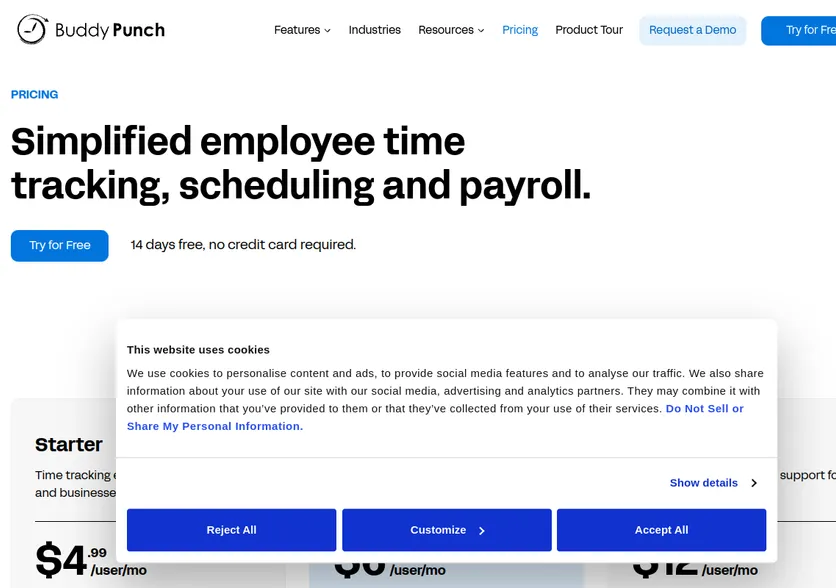
Paid tool Starting price: $4.99/user/month · Starter costs four dollars and ninety-nine cents per user a month billed annually (five dollars and ninety-nine cents monthly) plus a nineteen dollar monthly base fee; Pro six dollars and ninety-nine cents (seven dollars and ninety-nine cents monthly); Advanced twelve dollars and ninety-nine cents (thirteen dollars and ninety-nine cents monthly); Payroll costs eight dollars per user a month plus a forty-nine dollar base. One November 2026 read lists Starter at four dollars and forty-nine cents; the other November reads agree on four dollars and ninety-nine cents.
Free plan: No free plan; 14-day free trial
Buddy Punch starts at four dollars and ninety-nine cents per user a month billed annually on Starter, plus a nineteen dollar monthly base fee. It covers time tracking, scheduling and PTO with GPS and photo verification, so a startup with staff out in the field can prove where and when the clock ran. Scheduling costs one dollar per user a month extra, and Payroll adds eight dollars per user a month plus a forty-nine dollar base, so the headline rate is only part of the bill.
What we like
- GPS and photo verification built in
- Scheduling, time tracking and PTO in one app
- 14-day free trial with no card needed
Watch out for
- Nineteen dollar monthly base fee on top of seats
- Scheduling is a paid add-on
How to try it
- Start the 14-day trial from the pricing page
- Add your team and set their schedules
- Turn on GPS and photo verification for field staff
5. Rippling
Best for: Startups that want HR, payroll and time tracking in one system
Paid tool Starting price: $8/user/month · The platform costs eight dollars per user a month plus a forty dollar monthly base; US Payroll costs eight dollars per employee a month billed annually (ten dollars monthly); the Time and Attendance module itself is priced on request, so budget the platform fee plus a quoted module. One review lists the base fee at thirty-five dollars; the small-business page shows forty dollars.
Free plan: No free plan; demo on request
Rippling charges eight dollars per user a month plus a forty dollar monthly base for the platform, with US Payroll at eight dollars per employee a month. It unifies HR, payroll, IT and time tracking in one system, so a startup can onboard, pay and schedule staff without stitching tools together. The Time and Attendance module itself is priced on request, so budget the platform fee plus a quoted module, and the base fee alone makes Rippling the priciest start here.

What we like
- HR, payroll, IT and time in one system
- Strong onboarding and device management
- Payroll runs in the same app as scheduling
Watch out for
- Time and Attendance module is priced on request
- Forty dollar monthly base fee on top of seats
How to try it
- Book a demo from the pricing page
- Map your HR, payroll and time needs with sales
- Onboard your first employees and turn on time tracking
6. QuickBooks Time
Best for: Startups already running QuickBooks that want time in payroll
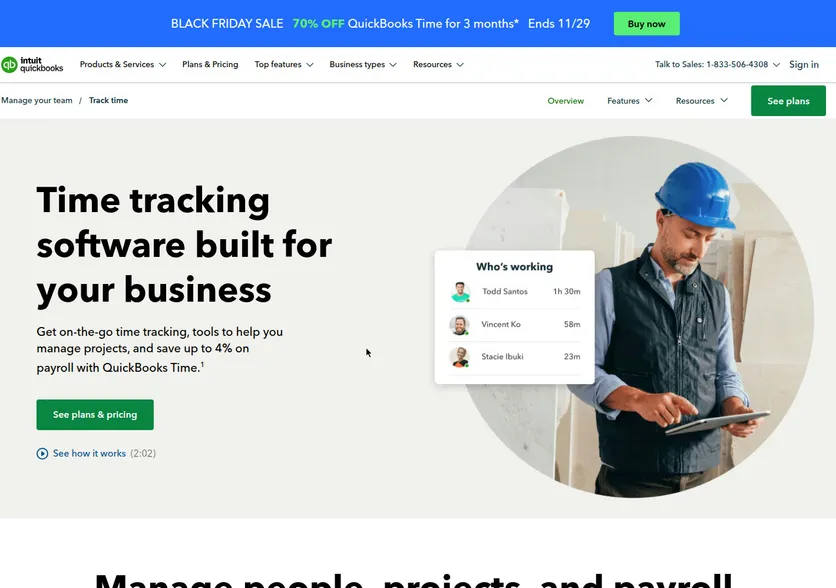
Paid tool Starting price: $20/month + $10/user · Premium costs twenty dollars a month plus ten dollars per user, billed monthly only; Elite costs forty dollars a month plus twelve dollars per user; the base fee is halved for the first three months; QuickBooks Online is required; per-user fees rose from eight and ten dollars to ten and twelve dollars on July 1, 2026.
Free plan: No free plan; 30-day free trial
QuickBooks Time costs twenty dollars a month plus ten dollars per user on Premium, billed monthly only, with a thirty-day free trial. It tracks time by job and client with GPS, mileage and scheduling, and it feeds hours straight into QuickBooks payroll and invoicing without retyping. QuickBooks Online is required, and the base fee is halved for the first three months, so the real cost depends on the QuickBooks subscription you already pay.
What we like
- Hours feed straight into QuickBooks payroll
- GPS, mileage and scheduling included
- 30-day free trial to test the flow
Watch out for
- QuickBooks Online is required
- Billed monthly only, with no annual discount
How to try it
- Start the 30-day trial from the pricing page
- Connect your QuickBooks Online account
- Set up jobs and turn on GPS time tracking
7. When I Work
Best for: Startups with hourly staff that need simple scheduling first
Paid tool Starting price: $2.50/user/month · Essentials costs two dollars and fifty cents per user a month; Pro five dollars; Premium eight dollars; the billing period is not stated on the pricing page and a five percent annual discount applies at checkout; time and attendance costs one dollar and fifty cents per user a month extra on Essentials and two dollars on Pro and Premium. The headline rate covers scheduling only, so add the time tracking fee before you budget.
Free plan: No free plan; 14-day free trial
When I Work starts at two dollars and fifty cents per user a month on Essentials, the lowest headline rate in this list. It covers scheduling with shift swaps and team messaging, and it works well for startups with hourly staff who live on their phones. The headline rate covers scheduling only, so time and attendance costs one dollar and fifty cents per user a month extra on Essentials, and the billing period is not stated on the pricing page.

What we like
- Lowest headline rate in this list
- Shift swaps and team messaging built in
- Mobile-first for hourly staff
Watch out for
- Time tracking costs extra on top of scheduling
- Billing period is not stated on the pricing page
How to try it
- Start the 14-day trial from the pricing page
- Import your team and build the first schedule
- Add the time and attendance add-on for clock-ins
8. Connecteam
Best for: Startups with frontline staff that want one app for the whole operation
Paid tool Starting price: $29/month · Basic costs twenty-nine dollars a month per hub for the first thirty users billed annually (thirty-five dollars monthly); Advanced forty-nine dollars (fifty-nine dollars monthly); Expert ninety-nine dollars (one hundred nineteen dollars monthly); extra users cost eighty cents, two dollars and fifty cents and four dollars and twenty cents on Operations; each hub is billed separately; a fourteen-day trial applies.
Free plan: Free plan (Small Business, up to 10 users)
Connecteam starts at twenty-nine dollars a month per hub for the first thirty users billed annually, with a free Small Business plan for up to ten users. Each hub covers one area such as operations or HR, with scheduling, time tracking, forms and team chat, so a startup can run the whole frontline operation from one app. Hubs are billed separately, so a team that needs two hubs pays twice, and extra users cost eighty cents to four dollars and twenty cents each depending on the plan.

What we like
- Free plan for up to ten users
- Scheduling, time tracking and chat in one app
- Per-hub pricing keeps the start cheap
Watch out for
- Each hub is billed separately
- Extra users cost more on higher plans
How to try it
- Start on the free Small Business plan
- Pick the Operations hub and add your team
- Turn on scheduling and the time clock
Prices above were checked on each vendor’s own website on Nov 29, 2026 and can change — the vendor’s page is the final word. Vendor links are editorial: nobody paid to be listed or ranked here. Vendors who want a featured listing can see how it works on our Get listed page.
How to pick a time system that survives your first hires
Count the real monthly cost at your actual headcount, not the headline rate: base fees, minimum invoices and per-hub charges can triple a cheap-looking price. Start on a free plan with your smallest team, and move to paid only when the free tier runs out of seats or reports. Test the mobile clock-in with your least technical employee, because a clock nobody uses is worse than no clock at all. Finally, check the payroll link before you commit, since retyping hours into payroll every week is the hidden cost of a cheap tool. Set the overtime rules before your first pay run, because a startup week rarely fits a tidy forty-hour pattern.
Before you buy
- Model the monthly cost at your real headcount, including base fees.
- Check whether the free plan covers your whole team or only five users.
- Test the mobile clock-in with your least technical employee.
- Confirm the payroll link works before you commit.
- Ask whether scheduling costs extra on top of time tracking.
Official websites
Official websites of the products reviewed above. Features and prices were checked against these sites when this guide was written, and they can change, so confirm on the vendor site before you buy.
Frequently asked questions
What is the cheapest time and attendance software for a startup?
Homebase Basic is free for one location and up to ten employees, and Clockify is free for up to five users. Connecteam is free for up to ten users on its Small Business plan. Among paid plans, Clockify Basic costs three dollars and ninety-nine cents a seat a month billed annually, and Deputy Lite costs five dollars per user a month with a thirty dollar monthly minimum.
Do startups need to pay per user or per location?
It depends on the tool: Homebase and Connecteam charge per location or per hub, while Deputy, Clockify, Buddy Punch and Rippling charge per user or per seat. Per-location pricing wins for startups with many staff in one place, while per-user pricing wins for tiny teams. Always model both at your real headcount, because a cheap per-user rate can beat an expensive per-location plan and the reverse is also true.
Which time tool has the best free plan?
Homebase Basic is the strongest free plan here, with scheduling and time tracking for one location and up to ten employees at no cost. Connecteam is free for up to ten users, and Clockify is free for up to five users with no time limit. Buddy Punch, Deputy, Rippling and QuickBooks Time have no free plan, so those teams start on a paid trial instead.
Does time and attendance software handle payroll?
QuickBooks Time feeds hours straight into QuickBooks payroll, and Rippling runs payroll in the same system as time tracking. Homebase, Buddy Punch and Deputy sell payroll as a paid add-on, while Clockify and Connecteam focus on time and scheduling only. Check the payroll add-on price before you buy, because it can cost more than the time tool itself.
How much should a startup with ten staff budget?
Ten staff cost nothing on Homebase Basic or Connecteam Small Business, and about forty dollars a month on Clockify Basic billed annually. Deputy Lite runs about fifty dollars a month, above its thirty dollar minimum invoice. Buddy Punch Starter costs about sixty-nine dollars a month with the base fee, and QuickBooks Time Premium costs about one hundred twenty dollars a month.
Try our free Overtime Pay Calculator — work out overtime pay in your browser, no upload, no account.
Browse Finance Calculators tools