
On this page
Internal IT teams drown in password resets and access requests, and a chatbot that resolves the routine ones is the fastest hire a help desk ever makes. The eight tools below run from seven dollars an operator a month to one hundred fifty dollars a month, and every price was checked on the vendor site on November 27, 2026. The right pick plugs into your ticketing, knows who the employee is and escalates with full context attached. Freshchat is our first pick — a free start for ten agents, Freddy AI on paid plans and a price that stays sane.
How we researched this
We started with chatbot platforms that an internal IT team can connect to a ticketing system without a long project, then read each price on the vendor pricing page on November 27, 2026 and noted the free plan or trial each one carries. We judged them for a help desk that must resolve password, access and device questions fast and escalate the rest with full context. We dropped quote-only enterprise platforms and tools with no published dollar price, because an IT budget needs a number it can defend.
Compare the tools
| Name | Best for | Starting price | Free plan | |
|---|---|---|---|---|
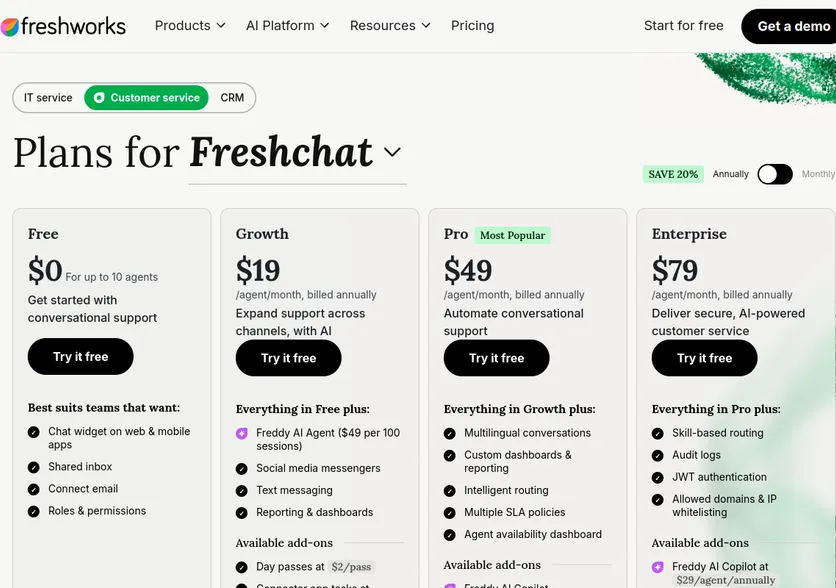
 Freshchat | IT help desks that want a free start and Freddy AI on paid plans | $19/agent/month | Free plan for up to 10 agents | Visit |
 Intercom | IT teams that want premium AI answers with a staffed inbox | $29/seat/month | No free plan; 14-day free trial | Visit |
 Zendesk | IT teams that need a full suite with SLAs and audit logs | $55/agent/month | No free plan; free trial available | Visit |
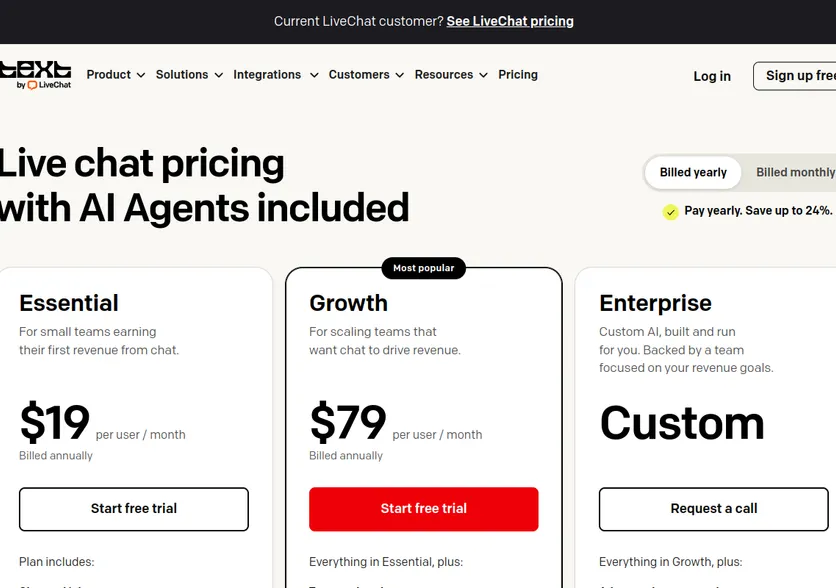
 LiveChat | IT teams that want a fast inbox with an AI agent built in | $19/user/month | No free plan; 14-day free trial | Visit |
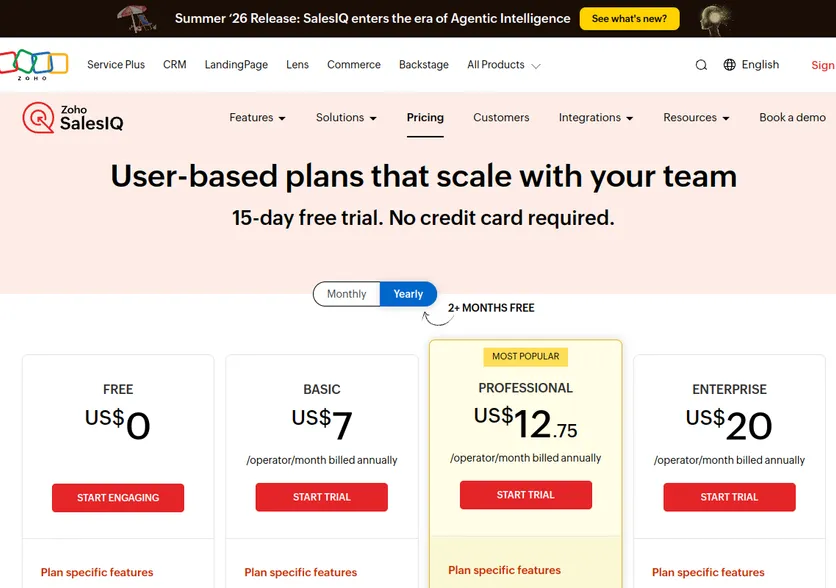
 Zoho SalesIQ | Small IT teams that need a bot on a tiny budget | $7/operator/month | Free plan for 3 operators | Visit |
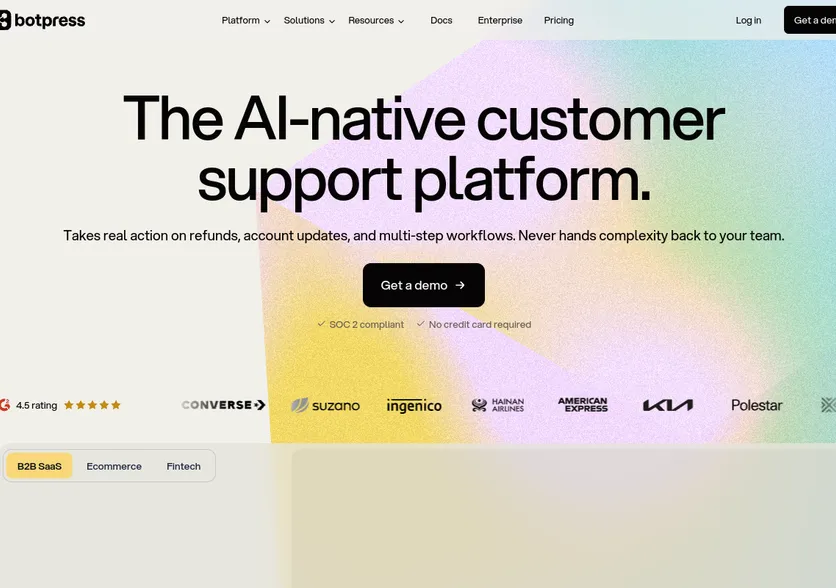
 Botpress | IT teams that want to build a serious agent with real logic | $150/month | Free plan with 100 conversations a month | Visit |
 Kommunicate | IT teams piloting bot-first support across web and email | $34/month | No free plan; 30-day free trial | Visit |
| HelpCrunch | Tiny IT teams that need chat and a knowledge base for twelve dollars | $12/member/month | No free plan; 14-day free trial | Visit |
The best chatbot software for internal IT support, compared
1. Freshchat
Best for: IT help desks that want a free start and Freddy AI on paid plans
Paid tool Starting price: $19/agent/month · Growth plan, nineteen dollars an agent a month on annual billing, or twenty-three dollars an agent a month billed monthly; Freddy AI Agent costs forty-nine dollars per one hundred sessions after five hundred free sessions
Free plan: Free plan for up to 10 agents
Internal IT teams choose Freshchat when per-agent pricing has to stay predictable as the team grows. The Growth plan lists at nineteen dollars an agent a month on annual billing and adds Freddy AI Agent plus WhatsApp, Instagram and text messaging. It fits small teams that want a real AI agent without enterprise pricing, though Freddy sessions are billed separately once the free allowance ends.
What we like
- Free plan covers up to ten agents with live chat and email
- Freddy AI Agent answers customers on paid plans
- WhatsApp and social messengers sit in the same inbox
Watch out for
- Freddy AI sessions cost extra after the free allowance
- Advanced routing and multilingual chat need the Pro plan
How to try it
- Open the Freshchat pricing page and start with the free plan
- Add your website widget and connect WhatsApp or Instagram
- Turn on Freddy AI Agent and train it on your help articles
2. Intercom
Best for: IT teams that want premium AI answers with a staffed inbox
Paid tool Starting price: $29/seat/month · Essential plan, twenty-nine dollars a seat a month on annual billing, or thirty-nine dollars a seat a month billed monthly; Fin AI costs ninety-nine cents per resolved conversation on top
Free plan: No free plan; 14-day free trial
Internal IT teams choose Intercom when AI should clear routine questions before a human steps in. The Essential plan lists at twenty-nine dollars a seat a month on annual billing, with Fin AI charged at ninety-nine cents per resolved conversation on top of seats. It fits teams that can staff a shared inbox every day, though the per-seat bill climbs fast as headcount grows.

What we like
- Fin AI resolves routine questions before a human steps in
- One inbox covers live chat, email and in-app messages
- Strong automation and reporting for growing teams
Watch out for
- No free plan, so every seat is paid from day one
- Fin outcomes add a separate usage bill on top of seats
How to try it
- Open the Intercom pricing page and start the 14-day trial
- Connect your website chat and train Fin on your help articles
- Set handoff rules so tricky chats reach a human fast
3. Zendesk
Best for: IT teams that need a full suite with SLAs and audit logs
Paid tool Starting price: $55/agent/month · Suite Team plan, fifty-five dollars an agent a month on annual billing, or sixty-nine dollars an agent a month billed monthly; AI Copilot is a separate fifty dollar add-on per agent
Free plan: No free plan; free trial available
Internal IT teams choose Zendesk when chat, email, voice and help center must share one queue. The Suite Team plan lists at fifty-five dollars an agent a month on annual billing and bundles messaging, ticketing, voice and a help center. It fits organizations that need one governed support platform, though AI Copilot costs fifty dollars more per agent a month.

What we like
- Full omnichannel suite with chat, email, voice and help center
- Strong reporting, SLAs and admin controls
- AI agents included with an allowance on every Suite plan
Watch out for
- No free plan and the per-agent bill grows with the team
- AI Copilot is a separate fifty dollar add-on per agent
How to try it
- Open the Zendesk pricing page and start a free trial
- Set up messaging and connect your help center articles
- Turn on AI agents for routine questions and route the rest
4. LiveChat
Best for: IT teams that want a fast inbox with an AI agent built in
Paid tool Starting price: $19/user/month · Essential plan, nineteen dollars a user a month on annual billing, or twenty-five dollars a user a month billed monthly; new trials use the Text plans, while legacy LiveChat plans stay in place for existing customers
Free plan: No free plan; 14-day free trial
Internal IT teams choose LiveChat when every agent needs a fast inbox with canned replies and routing. The Essential plan lists at nineteen dollars a user a month on annual billing and includes one AI agent with ten AI resolutions a month. It fits teams that answer chats all day and want AI to take the easy ones, though extra AI resolutions are billed in packs of fifty.
What we like
- Fast live chat widget with ticketing and a shared inbox
- AI agent included on every plan with human takeover
- Shopify and CRM integrations show order details in chat
Watch out for
- No free plan, only a fourteen-day trial
- AI resolutions beyond the allowance are billed in packs
How to try it
- Open the LiveChat pricing page and start the 14-day trial
- Install the widget and connect your store or CRM
- Set the AI agent loose on FAQs and keep humans for the rest
5. Zoho SalesIQ
Best for: Small IT teams that need a bot on a tiny budget
Paid tool Starting price: $7/operator/month · Basic plan, seven dollars an operator a month billed annually, or ten dollars an operator a month billed monthly, with one chatbot and twenty-five thousand bot sessions a month
Free plan: Free plan for 3 operators
Internal IT teams choose Zoho SalesIQ when Zoho CRM is already the system of record. The Basic plan lists at seven dollars an operator a month billed annually and includes one chatbot with twenty-five thousand bot sessions. It fits cost-conscious teams that want a real bot for very little, though the Answer Bot that replies from articles needs Enterprise at twenty dollars.
What we like
- Cheapest paid chatbot here at seven dollars an operator
- Visitor tracking and lead scoring built into the chat
- Free plan covers three operators with basic live chat
Watch out for
- The Answer Bot that replies from articles is Enterprise-only
- Bot sessions and visitor caps rise only on higher plans
How to try it
- Open the Zoho SalesIQ pricing page and start with the free plan
- Install the widget and set up your first Zobot flow
- Connect Zoho CRM so chats land on the right contact record
6. Botpress
Best for: IT teams that want to build a serious agent with real logic
Paid tool Starting price: $150/month · Plus plan, one hundred fifty dollars a month billed annually, or one hundred eighty-nine dollars a month billed monthly, with two hundred fifty conversations and twenty-five dollars of AI usage included
Free plan: Free plan with 100 conversations a month
Internal IT teams choose Botpress when one bot must serve web, WhatsApp and voice at once. The Plus plan lists at one hundred fifty dollars a month billed annually, with two hundred fifty conversations and twenty-five dollars of AI usage included. It fits builders who want full control over the agent, though the conversation cap means busy bots buy extra packs at sixty-five dollars per hundred.
What we like
- Open platform with a visual studio and real integrations
- Works across webchat, WhatsApp and voice channels
- Free plan covers one hundred conversations to build with
Watch out for
- Plus costs one hundred fifty dollars a month for only two hundred fifty conversations
- Extra conversation packs add up fast on a busy bot
How to try it
- Open the Botpress pricing page and start on the free plan
- Build your agent in the studio and connect your channels
- Watch conversation usage and upgrade before the cap hits
7. Kommunicate
Best for: IT teams piloting bot-first support across web and email
Paid tool Starting price: $34/month · Starter plan, thirty-four dollars a month billed annually, or forty dollars a month billed monthly, with one AI agent, one seat and two hundred fifty conversations
Free plan: No free plan; 30-day free trial
Internal IT teams choose Kommunicate when the bot must work across web, WhatsApp and email at once. The Starter plan lists at thirty-four dollars a month billed annually, with one AI agent, one seat and two hundred fifty conversations. It fits small teams piloting bot-first support, though two hundred fifty conversations a month is a small allowance and extra seats cost twenty dollars each.
What we like
- AI agent plus human inbox in one flat plan
- Helpdesk integrations with Zendesk and Freshdesk on Pro
- Model-agnostic AI with a visual bot builder
Watch out for
- Starter covers only one seat and two hundred fifty conversations
- No free plan, only a thirty-day trial
How to try it
- Open the Kommunicate pricing page and start the thirty-day trial
- Build your bot in Kompose and connect your channels
- Turn on AI summaries and handoff rules for your agents
8. HelpCrunch
Best for: Tiny IT teams that need chat and a knowledge base for twelve dollars
Paid tool Starting price: $12/member/month · Basic plan, twelve dollars a team member a month billed annually, or fifteen dollars a team member a month billed monthly, for one widget and the lowest email volume
Free plan: No free plan; 14-day free trial
Internal IT teams choose HelpCrunch when the cheapest real chatbot with a knowledge base wins. The Basic plan lists at twelve dollars a team member a month billed annually for one widget and the lowest email volume. It fits tiny teams that need chat plus email on a shoestring, though chatbots and AI agents only start on the Pro plan at twenty dollars.
What we like
- Cheapest per-seat chatbot in this comparison
- Unlimited contacts on every plan
- Chat, inbox, knowledge base and email in one tool
Watch out for
- Basic has no chatbot or AI agents at all
- The shown price rises with more members and email volume
How to try it
- Open the HelpCrunch pricing page and start the fourteen-day trial
- Install the widget and build your knowledge base
- Move to Pro when you need chatbot flows and AI agents
Prices above were checked on each vendor’s own website on Nov 27, 2026 and can change — the vendor’s page is the final word. Vendor links are editorial: nobody paid to be listed or ranked here. Vendors who want a featured listing can see how it works on our Get listed page.
What internal IT teams should pay for a chatbot
An internal chatbot lives or dies on its integrations. Password resets, account unlocks and software requests only work if the bot can talk to your identity system and your ticketing tool, so check those connectors before you check the price. A bot that answers from a static FAQ will deflect the easy questions, but a bot wired into your systems resolves them, and the difference shows up in ticket counts within a month.
Measure deflection honestly. Count the tickets the bot fully resolves without a human, not the chats it merely touches, and watch the escalation rate for the questions it gets wrong. Start with the ten most common tickets, train the bot on the exact fixes your team uses and keep a human on call for anything involving access, security or data loss.
Before you buy
- Confirm the bot connects to your ticketing system and identity provider before you buy.
- Check whether AI answers are included in the plan price or billed separately per session.
- Test the bot on your ten most common tickets, not on a demo script.
- Make sure escalations carry the full transcript and the employee identity to the agent.
- Compare the free plan agent limit against your real help desk headcount.
Official websites
Official websites of the products reviewed above. Features and prices were checked against these sites when this guide was written, and they can change, so confirm on the vendor site before you buy.
Frequently asked questions
Which chatbot software is best for internal IT support in 2026?
Freshchat is the best overall pick at nineteen dollars an agent a month on Growth, with a free plan for ten agents and Freddy AI answering on paid plans. Zoho SalesIQ is the best budget pick at seven dollars an operator a month with a real bot. Botpress is the best builder pick for IT teams that want an open platform with real logic, integrations and custom workflows.
How much does chatbot software for internal IT support cost?
The eight tools here run from seven dollars an operator a month for Zoho SalesIQ to one hundred fifty dollars a month for Botpress Plus. Most IT teams land between twelve and twenty-nine dollars a seat on HelpCrunch, Freshchat or Intercom, with AI sessions sometimes billed on top. A small help desk can start free on Freshchat or Zoho SalesIQ and pay nothing until the bot proves itself.
Can a chatbot reset passwords and unlock accounts?
Yes, if the platform connects to your identity system through an integration or API, so the bot can run the reset and confirm it worked. Botpress, Zendesk and Intercom support this kind of workflow, while simpler chat tools may only file a ticket for a human. Check the integration list for your identity provider before you buy, and keep resets behind employee verification.
How do you measure whether an IT chatbot works?
Measure full deflection, meaning tickets the bot resolves end to end without a human touching them, and track the escalation rate for questions it gets wrong. A good internal bot deflects a third or more of routine tickets within a few months. Also watch employee satisfaction, since a bot that closes tickets badly creates more work than it saves.
Is there a free chatbot for internal IT support?
Yes. Freshchat is free for up to ten agents with live chat and email, Zoho SalesIQ is free for three operators, and Botpress is free for one hundred conversations a month. Free plans suit a small help desk testing the idea, but AI answering at volume and ticketing integrations usually start on a paid plan, so budget for the upgrade once deflection proves out.
Need everyday AI help too? Try Toolsvine's free AI tools right in your browser.
Browse AI Tools (In-Browser, No API) tools


