On this page
Remote teams run on rotas, not office hours, and a missed shift in one time zone can leave a whole queue uncovered. The eight tools below cover the full range, from one-dollar-seventy-cent schedulers to all-in-one team apps with payroll built in. Every price was checked on the vendor site on November 27, 2026, and the list runs from one dollar seventy cents a user a month to thirty-nine dollars ninety-nine cents a location a month. When I Work is our first pick — the scheduler that pairs the lowest team price with the fastest rota building.
How we researched this
We started with the scheduling and workforce tools that remote teams actually use, then read each price on the vendor pricing page on November 27, 2026 and noted the free plan, the trial and the per-user or per-location billing each plan carries. We judged them for a team spread across time zones that needs rotas, time tracking and shift swaps without a manager chasing every change. We dropped Soon because its vendor pricing page lists prices in euros only, and we left out quote-only enterprise suites that a small remote team cannot price without a sales call.
Compare the tools
| Name | Best for | Starting price | Free plan | |
|---|---|---|---|---|
 When I Work | Remote teams that want the fastest rota building at the lowest team price | $2.50/user/month | No free plan; 14-day free trial | Visit |
 7shifts | Restaurant and hospitality teams that schedule by location, not by user | $39.99/location/month | Free Comp plan; 1 location, up to 15 employees | Visit |
 Connecteam | Remote teams that want scheduling, chat, forms and training in one app | $29/hub/month | Free Small Business plan; up to 10 users | Visit |
 Homebase | Small businesses that want scheduling, time clock and hiring in one place | $24/location/month | Free Basic plan; 1 location, up to 10 employees | Visit |
 Sling | Small teams that want the cheapest paid scheduling here | $1.70/user/month | Free plan; up to 30 users | Visit |
| Humanity Schedule | Healthcare and 24/7 operations that need compliance-aware scheduling | $2.75/employee/month | No free plan; 30-day free trial | Visit |
 ZoomShift | Small teams that want simple scheduling with a free tier to start on | $2/user/month | Free Essentials plan; up to 20 users, 1 location | Visit |
 Deputy | Remote teams that pay by the hour and need payroll exports beside the rota | $5/user/month | No free plan; 30-day free trial | Visit |
The contact center workforce software for remote teams, compared
1. When I Work
Best for: Remote teams that want the fastest rota building at the lowest team price
Paid tool Starting price: $2.50/user/month · Two dollars fifty cents per user a month for Essentials; Pro costs five dollars and Premium eight dollars; seats are billed in bundles of five or ten; multi-location teams pay five dollars a user on the higher framing
Free plan: No free plan; 14-day free trial
When I Work is the scheduler remote teams reach for first, with drag-and-drop rotas, shift swaps and time tracking that staff learn in minutes. This When I Work Essentials plan costs two dollars fifty cents per user a month and covers scheduling, messaging and time tracking. A team spread across time zones gets a rota everyone can read on their phone without a manager chasing every change.

What we like
- Fastest rota building in this comparison
- Staff learn it in minutes
- Cheap per-user price for small teams
Watch out for
- Seats are billed in bundles of five or ten
- Payroll and advanced reports cost extra
How to try it
- Open the When I Work site and start the 14-day trial
- Add your staff, roles and working hours
- Publish your first rota and let staff swap shifts in the app
2. 7shifts
Best for: Restaurant and hospitality teams that schedule by location, not by user
Paid tool Starting price: $39.99/location/month · Thirty-nine dollars ninety-nine cents per location a month billed annually for Essentials, or forty-four dollars ninety-nine cents billed monthly; Pro costs seventy-nine dollars ninety-nine cents and Premium one hundred thirty-four dollars ninety-nine cents; the payroll add-on costs thirty-nine dollars ninety-nine cents per location plus six dollars per employee
Free plan: Free Comp plan; 1 location, up to 15 employees
7shifts is the scheduling platform built for restaurants and hospitality, with rotas, time tracking and payroll shaped around shifts that change daily. This 7shifts Essentials plan costs thirty-nine dollars ninety-nine cents per location a month billed annually and covers scheduling and time tracking. A restaurant with one location and a rotating crew gets a rota that fits the way hospitality actually works.

What we like
- Built for restaurant and hospitality rotas
- Per-location pricing suits large crews
- Payroll add-on keeps pay in one place
Watch out for
- Per-location price is dear for tiny teams
- Payroll costs extra per employee
How to try it
- Open the 7shifts site and start with the free Comp plan
- Add your staff and set up your departments and roles
- Publish your first rota and turn on time tracking
3. Connecteam
Best for: Remote teams that want scheduling, chat, forms and training in one app
Paid tool Starting price: $29/hub/month · Twenty-nine dollars per hub a month for the first thirty users billed annually for Basic, or thirty-five dollars billed monthly; Advanced costs forty-nine dollars and Expert ninety-nine dollars; each hub is billed separately and extra users cost fifty cents to five dollars
Free plan: Free Small Business plan; up to 10 users
Connecteam is the all-in-one team app that pairs scheduling with chat, forms, training and time tracking, so deskless teams get one login for everything. This Connecteam Basic plan costs twenty-nine dollars per hub a month for the first thirty users billed annually and covers scheduling and the team hub. A remote team that needs more than a rota gets communication and training beside it.

What we like
- Scheduling plus chat, forms and training
- Free plan for up to ten users
- Mobile app that field staff actually use
Watch out for
- Each hub is billed separately, so costs add up
- Extra users cost more on the higher tiers
How to try it
- Open the Connecteam site and start with the free plan
- Set up your scheduling hub and invite your team
- Add a form or training course to test the wider app
4. Homebase
Best for: Small businesses that want scheduling, time clock and hiring in one place
Paid tool Starting price: $24/location/month · Twenty-four dollars per location a month billed annually for Essentials, or thirty dollars billed monthly; Plus costs fifty-six dollars and All-in-One ninety-six dollars; the payroll add-on costs forty-nine dollars a month plus six dollars per employee
Free plan: Free Basic plan; 1 location, up to 10 employees
Homebase is the team management tool for small businesses, pairing scheduling with a time clock, hiring and payroll in one login. This Homebase Essentials plan costs twenty-four dollars per location a month billed annually and covers scheduling and time tracking. A small shop or cafe with a rotating crew gets the rota, the clock and the hiring pipeline together.

What we like
- Scheduling, time clock and hiring in one tool
- Free plan for one location and ten employees
- Simple setup that owners finish in an afternoon
Watch out for
- Payroll costs extra per employee
- Higher tiers climb fast for multi-location teams
How to try it
- Open the Homebase site and start with the free Basic plan
- Add your staff and publish your first schedule
- Turn on the time clock and test a shift check-in
5. Sling
Best for: Small teams that want the cheapest paid scheduling here
Paid tool Starting price: $1.70/user/month · One dollar seventy cents per user a month billed annually for Premium, or two dollars billed monthly; Business costs three dollars forty cents, or four dollars billed monthly; the Free plan covers up to thirty users
Free plan: Free plan; up to 30 users
Sling is the low-cost scheduler for teams that need rotas, time tracking and messaging without paying for a full workforce suite. This Sling Premium plan costs one dollar seventy cents per user a month billed annually and covers scheduling and the time clock. A small team that just needs a rota staff can read on their phones gets it for less than a coffee per person.

What we like
- Cheapest paid plan in this comparison
- Free plan covers up to thirty users
- Simple rota that staff read on their phones
Watch out for
- Fewer features than the all-in-one tools
- Payroll needs a separate tool
How to try it
- Open the Sling site and start with the free plan
- Add your team and build your first rota
- Turn on time tracking and test a shift swap
6. Humanity Schedule
Best for: Healthcare and 24/7 operations that need compliance-aware scheduling
Paid tool Starting price: $2.75/employee/month · Two dollars seventy-five per employee a month billed annually for Essentials, up to two hundred fifty employees; Professional starts at three dollars seventy-five, with volume discounts; monthly-billed rates are not published; Enterprise is a custom quote
Free plan: No free plan; 30-day free trial
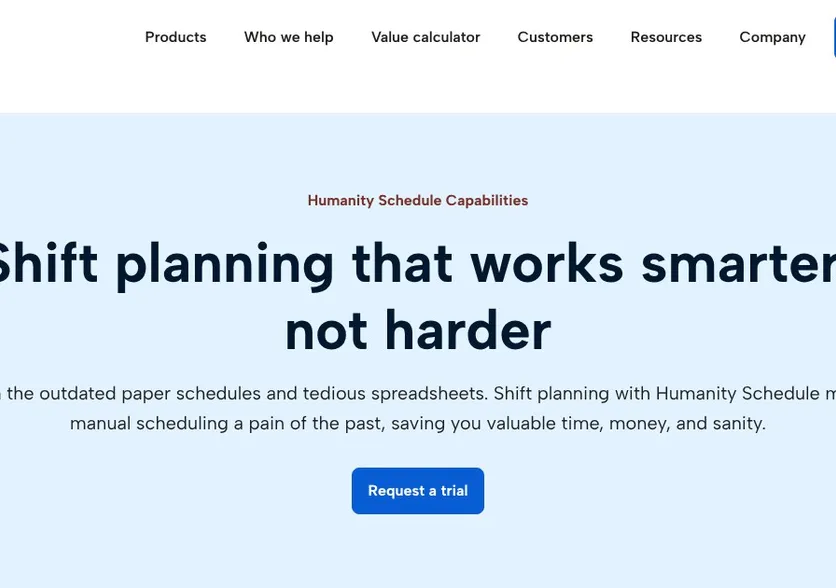
Humanity Schedule is the TCP Software scheduler built for teams that never close, with demand-based scheduling, compliance rules and skills tracking for round-the-clock operations. This Humanity Schedule Essentials plan costs two dollars seventy-five per employee a month billed annually and covers scheduling, shift swaps and time tracking. A hospital or care home that needs the right skills on every shift gets scheduling that respects the rules.
What we like
- Demand-based scheduling for 24/7 teams
- Compliance and skills tracking built in
- Geofenced clock-in for remote staff
Watch out for
- Monthly-billed rates are not published
- Essentials caps at two hundred fifty employees
How to try it
- Open the Humanity Schedule page and start the 30-day trial
- Add your staff, skills and compliance rules
- Build a demand-based rota and check the coverage gaps
7. ZoomShift
Best for: Small teams that want simple scheduling with a free tier to start on
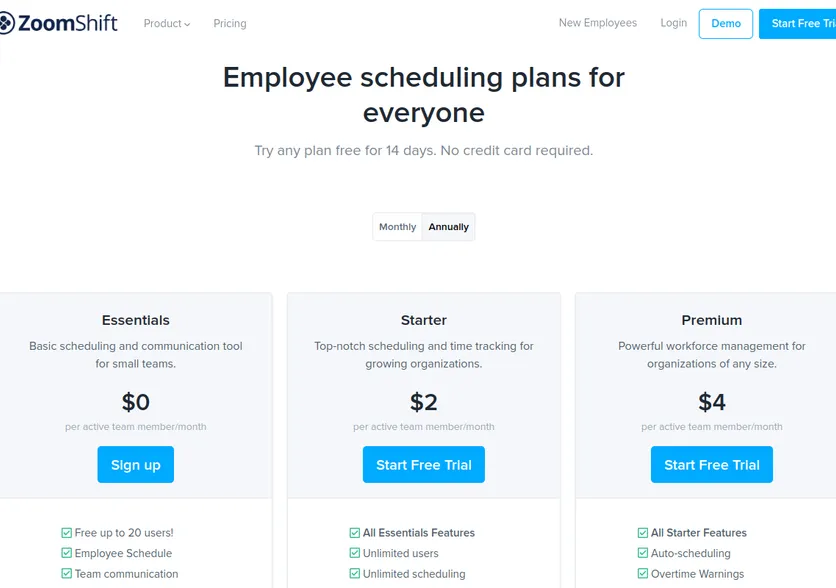
Paid tool Starting price: $2/user/month · Two dollars per active team member a month billed annually for Starter, or two dollars fifty cents billed monthly; Premium costs four dollars, or five dollars billed monthly; the Essentials plan is free for up to twenty users at one location
Free plan: Free Essentials plan; up to 20 users, 1 location
ZoomShift is the straightforward scheduler for small teams, with drag-and-drop rotas, time tracking and shift swaps in a clean interface. This ZoomShift Starter plan costs two dollars per active team member a month billed annually and covers scheduling and the time clock. A team that bills only for active members gets a fair price that drops in quiet weeks.
What we like
- Bills only for active team members
- Free Essentials tier for up to twenty users
- Clean rota that managers build in minutes
Watch out for
- Fewer integrations than the bigger tools
- Premium is needed for the best features
How to try it
- Open the ZoomShift site and start with the free Essentials plan
- Add your team and set your working hours
- Publish a rota and test a shift swap from the app
8. Deputy
Best for: Remote teams that pay by the hour and need payroll exports beside the rota
Paid tool Starting price: $5/user/month · Five dollars per user a month billed annually for Lite, or five dollars fifty cents billed monthly; Core costs six dollars fifty cents and Pro nine dollars; a thirty-dollar monthly minimum spend applies per invoice
Free plan: No free plan; 30-day free trial
For remote teams that pay by the hour, Deputy pairs the rota with time tracking, leave and payroll exports, so the hours staff work flow straight into pay. This Deputy Lite plan costs five dollars per user a month billed annually and covers scheduling and time tracking. A team that runs hourly pay across time zones gets one system from rota to payslip.

What we like
- Rota, time tracking and payroll exports together
- Training and task lists built in
- Thirty-day trial to test the full platform
Watch out for
- Thirty-dollar monthly minimum spend per invoice
- Higher tiers needed for advanced scheduling rules
How to try it
- Open the Deputy site and start the 30-day trial
- Add your staff, pay rates and leave policies
- Publish a rota and export the first payroll file
Prices above were checked on each vendor’s own website on Nov 27, 2026 and can change — the vendor’s page is the final word. Vendor links are editorial: nobody paid to be listed or ranked here. Vendors who want a featured listing can see how it works on our Get listed page.
What remote team workforce software costs in 2026
Remote workforce pricing splits into two models, per user and per location, and the cheaper one depends on team size. A one-dollar-seventy-cent per-user plan costs almost nothing for a small team, while a thirty-nine-dollar-ninety-nine-cent per-location plan wins once twenty people share one rota. Free plans cover the smallest teams, but the caps on users and locations usually force a paid plan within a season.
Trial two tools with your real rota before you commit. Check that staff can swap shifts from the phone app, that the time clock records the right hours, and that managers see who is working without chasing messages. Pick the tool whose rota staff actually follow, because a schedule nobody reads costs more than any subscription.
Before you buy
- Check whether billing is per user or per location, because a per-location price can be cheaper once the team grows past ten people.
- Confirm shift swaps and time-off requests work in the app, because remote teams live on the phone, not the desktop.
- Ask about payroll add-ons, because a scheduling tool that cannot pay staff leaves a second subscription to buy.
- Test the time clock before signing, because geofencing and photo check-ins matter more for remote teams than for office staff.
- Count active users, not total staff, because some tools bill every invited user even if they never take a shift.
Official websites
Official websites of the products reviewed above. Features and prices were checked against these sites when this guide was written, and they can change, so confirm on the vendor site before you buy.
Frequently asked questions
Which workforce software is best for remote teams in 2026?
When I Work is the best overall pick at two dollars fifty cents a user a month, with fast rota building and a fourteen-day trial. Connecteam is the best all-in-one choice at twenty-nine dollars a hub a month, adding forms, chat and training beside scheduling. Sling is the best budget pick at one dollar seventy cents a user a month, with a free plan for up to thirty users.
How much does remote team scheduling software cost?
Prices in this list run from one dollar seventy cents a user a month for Sling to thirty-nine dollars ninety-nine cents a location a month for 7shifts, with most tools landing between two and five dollars a user a month. Per-location plans look dear for small teams but win once the team passes fifteen people, while per-user plans stay cheap for small crews. Add payroll and time-tracking add-ons to the subscription before you compare totals.
Do remote teams need time tracking as well as scheduling?
Yes, if staff work from different places and hours, because a rota says when someone should work while a time clock proves when they did. Most tools in this list bundle both, so the rota and the hours stay in one place. Teams that only need a rota can start with a scheduling-only plan, but they usually add time tracking within a few months once payroll questions start.
Is there a free scheduling tool for remote teams?
Yes, Sling is free for up to thirty users and 7shifts has a free Comp plan for one location with up to fifteen employees, so a small team can run a real rota without paying. Homebase is free for one location with up to ten employees, and Connecteam is free for up to ten users. Free plans limit users, locations or features, so check the caps before you rely on them.
Need everyday business help too? Try Toolsvine's free business tools right in your browser.
Browse Business Tools tools