On this page
A cleaning business runs on recurring bookings, and the software has to handle the whole loop: the client books, the cleaner sees the job and the checklist on a phone, and the invoice goes out when the clean is done. The tools below cover that loop at prices from nineteen dollars a month to one hundred and sixty-nine, from cleaning specialists to general field-service apps. We compared eight of them on published price, cleaning features and how they fit a crew. Jobber is our first pick, because it covers the whole job cycle at a low starting price.
How we researched this
We started with the field-service tools cleaning businesses actually use, then read each price on the vendor site on November 27, 2026 and noted the trial each plan carries. We judged them for a cleaning company that books recurring cleans, sends crews to homes and needs the schedule, the checklist and the invoice to agree. We dropped quote-only field-service platforms and tools with no published price, because a cleaning business owner needs a number to budget around.
Compare the tools
| Name | Best for | Starting price | Free plan | |
|---|---|---|---|---|
 ZenMaid | Maid services that want cleaning-specific scheduling and checklists | $19/month | No free plan; 14-day free trial | Visit |
 BookingKoala | Cleaning businesses that take bookings online and charge per provider | $27/month | No free plan; 14-day free trial | Visit |
 Jobber | Cleaning businesses that want one app for quotes, scheduling and invoicing | $29/month | No free plan; 14-day free trial | Visit |
 Housecall Pro | Cleaning crews that want job tracking, estimates and payments on mobile | $59/month | No free plan; 14-day free trial | Visit |
 Kickserv | Small cleaning teams that want estimates, scheduling and invoicing for five users | $60/month | No free plan; 30-day free trial | Visit |
 Launch27 | Cleaning businesses that want unlimited users and automatic card charging | $75/month | No free plan; free trial available | Visit |
 RazorSync | Cleaning companies that need dispatch, routing and QuickBooks sync | $85/month | No free plan; free trial available | Visit |
| mHelpDesk | Cleaning companies that want a full back office with dispatch and reporting | $169/month | No free plan; trial availability not stated on the vendor site | Visit |
The field service management software for cleaning businesses, compared
1. ZenMaid
Best for: Maid services that want cleaning-specific scheduling and checklists
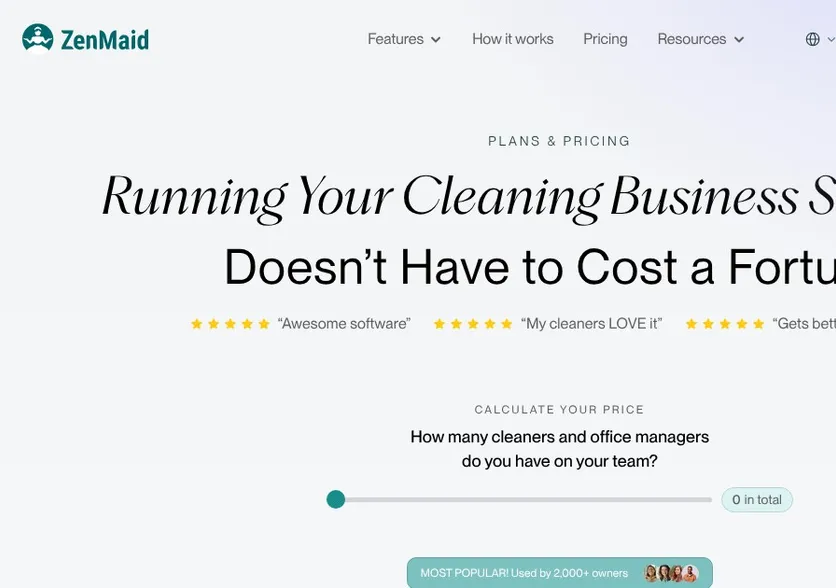
Paid tool Starting price: $19/month · Starter costs nineteen dollars a month month to month for up to forty appointments, with no annual pricing published and SMS charged extra, and no cleaner GPS; Pro costs thirty-nine dollars a month and Pro Max forty-nine; a fourteen-day trial is included and the team-size calculator may change the price
Free plan: No free plan; 14-day free trial
This ZenMaid plan is built for maid services, with cleaning checklists, recurring schedules and a team-size calculator that sets the price. Starter costs nineteen dollars a month for up to forty appointments, which suits a small cleaning business just starting to systemise. Cleaner GPS, payroll and white-label forms wait for the Pro and Pro Max plans, so check the tier before you promise the team a feature that is not included.
What we like
- Built for maid services with cleaning checklists
- Recurring schedules handle regular clients easily
- Nineteen dollars a month is the cheapest entry here
Watch out for
- No cleaner GPS on the Starter plan
- SMS reminders cost extra
How to try it
- Start the fourteen-day trial with one cleaning crew
- Build a checklist for your most common clean
- Check the team-size calculator before you pick a plan
2. BookingKoala
Best for: Cleaning businesses that take bookings online and charge per provider
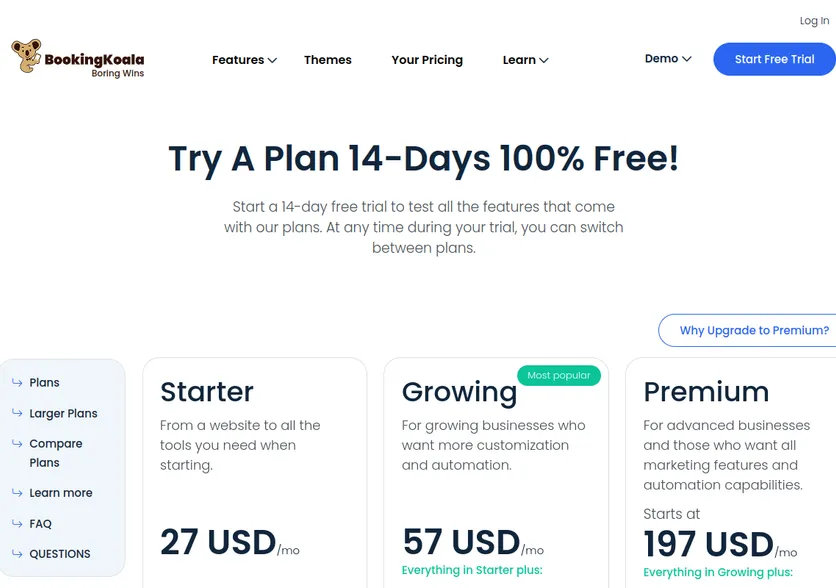
Paid tool Starting price: $27/month · Starter costs twenty-seven dollars a month for up to five providers; Growing costs fifty-seven dollars a month for up to fifteen providers and adds SMS, GPS clock-in and advanced reports, and Premium costs one hundred and ninety-seven dollars a month for up to fifty; no annual pricing is published and every team member counts as a provider
Free plan: No free plan; 14-day free trial
This BookingKoala plan is built around online booking for cleaning businesses, with customers picking a time, a service and a cleaner from the website. Starter costs twenty-seven dollars a month for up to five providers, and every team member counts as a provider, so a five-cleaner team fits the entry plan exactly. SMS reminders, GPS clock-in and advanced reports wait for Growing at fifty-seven dollars a month.
What we like
- Online booking built for cleaning businesses
- Customers pick a time and a cleaner from the website
- Twenty-seven dollars a month for up to five providers
Watch out for
- Every team member counts as a provider
- SMS and GPS clock-in wait for the Growing plan
How to try it
- Start the fourteen-day trial and set up your services
- Add your cleaners as providers and set their availability
- Test an online booking from the customer side before launch
3. Jobber
Best for: Cleaning businesses that want one app for quotes, scheduling and invoicing
Paid tool Starting price: $29/month · Core costs twenty-nine dollars a month billed annually; higher tiers add more users and automation, with Grow and Scale priced above Core
Free plan: No free plan; 14-day free trial
This Jobber plan is the cheapest general field-service starting point in this comparison and covers the whole job cycle: quote, schedule, invoice and payment. The Core plan suits a small cleaning business that books recurring cleans, and the mobile app lets cleaners check job details and collect payment on site. It is a general tool rather than a cleaning specialist, so cleaning checklists need a custom job form.

What we like
- Cheapest general field-service starting price here
- One app for quotes, scheduling, invoicing and payments
- Mobile app works well for cleaners on site
Watch out for
- No cleaning-specific checklists by default
- Advanced automation waits for the higher tiers
How to try it
- Start the fourteen-day trial with your real job list
- Build a recurring cleaning schedule for regular clients
- Test the cleaner mobile app on one job day
4. Housecall Pro
Best for: Cleaning crews that want job tracking, estimates and payments on mobile
Paid tool Starting price: $59/month · Basic costs fifty-nine dollars a month billed annually, or seventy-nine dollars month to month; higher tiers add dispatch, automation and marketing tools
Free plan: No free plan; 14-day free trial
This Housecall Pro plan covers estimates, scheduling, dispatch and payments in one mobile-first app, which fits a cleaning crew that works from cars rather than an office. The Basic plan suits a small team, and online booking plus review requests help a cleaning business win the next client in the neighbourhood. The monthly rate is seventy-nine dollars if you pay month to month, so the annual price saves a real amount.

What we like
- Mobile-first app built for crews on the road
- Estimates, scheduling and payments in one place
- Online booking and review requests win repeat work
Watch out for
- Monthly billing jumps to seventy-nine dollars
- Cleaning checklists need manual setup
How to try it
- Start the fourteen-day trial and import your customer list
- Build a recurring clean schedule for regular clients
- Turn on online booking and review requests for new jobs
5. Kickserv
Best for: Small cleaning teams that want estimates, scheduling and invoicing for five users
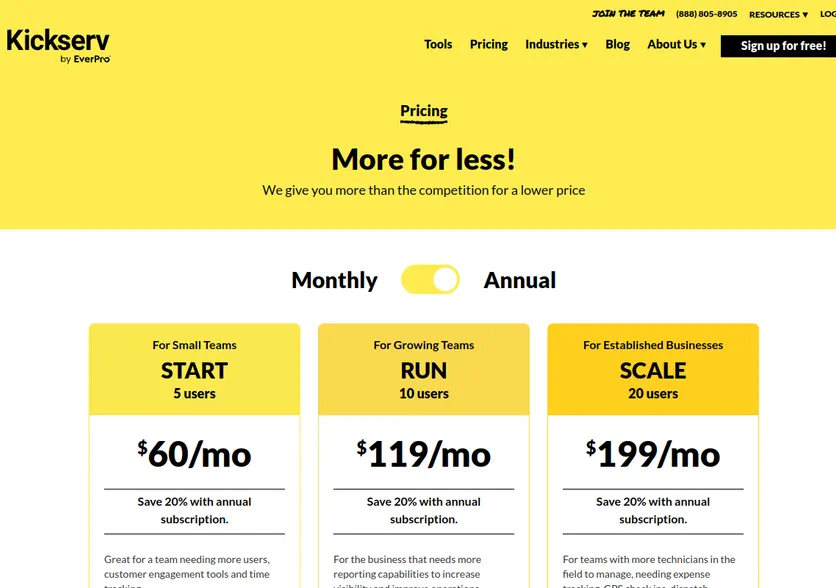
Paid tool Starting price: $60/month · Start costs sixty dollars a month billed annually, or seventy-five dollars month to month, for up to five users; Run costs one hundred and nineteen dollars a month billed annually for ten users and Scale one hundred and ninety-nine for twenty; annual billing saves twenty percent; online card fees are three point nine percent plus thirty cents
Free plan: No free plan; 30-day free trial
For a small cleaning company, this Kickserv plan covers estimates, scheduling, invoicing and customer history for up to five users, with an office and two crews. The thirty-day trial is the longest here, giving a team time to test it on real jobs before paying. Card fees of three point nine percent plus thirty cents apply to online payments, so check the payment costs against your average clean.
What we like
- Thirty-day trial, the longest in this comparison
- Five users included on the entry plan
- Estimates, scheduling and invoicing in one place
Watch out for
- Card fees of three point nine percent plus thirty cents apply
- Only five users on the entry plan
How to try it
- Start the thirty-day trial and import your customer list
- Set up a recurring cleaning schedule for regular clients
- Run one full job from quote to invoice before paying
6. Launch27
Best for: Cleaning businesses that want unlimited users and automatic card charging
Paid tool Starting price: $75/month · Base costs seventy-five dollars a month on monthly billing, or sixty-three dollars and seventy-five cents a month billed annually; Pro costs one hundred and fifty dollars a month, or one hundred and twenty-seven dollars and fifty cents annually, and Plus two hundred and ninety-nine dollars a month; the phone app, automatic card charging and multi-location support wait for Plus
Free plan: No free plan; free trial available
This Launch27 plan is built for cleaning businesses, with online booking, automatic card charging and unlimited users on the Base plan. It suits a growing team because adding cleaners does not add to the bill, which is rare in this comparison. The phone app, automatic card charging and multi-location support wait for the Plus plan at two hundred and ninety-nine dollars a month, so check the tier before you rely on a feature.
What we like
- Unlimited users on the Base plan
- Built for cleaning businesses with online booking
- Automatic card charging for recurring cleans
Watch out for
- Phone app and card charging wait for the Plus plan
- Monthly billing costs more than the annual rate
How to try it
- Start a trial and set up online booking for your services
- Connect automatic card charging for recurring cleans
- Check whether the phone app matters before picking a plan
7. RazorSync
Best for: Cleaning companies that need dispatch, routing and QuickBooks sync
Paid tool Starting price: $85/month · Solo costs eighty-five dollars a month billed annually, or ninety dollars month to month, for up to two users; Team costs one hundred and ninety-five dollars a month billed annually for up to seven users and Pro four hundred and thirty-nine for up to fifteen, with Enterprise custom; QuickBooks sync costs twenty dollars a month extra, route optimisation fifty and inventory thirty
Free plan: No free plan; free trial available
This RazorSync plan adds dispatch and routing to the standard estimate and invoice tools, which helps a cleaning company run several crews across a city. The Solo plan covers two users, and Team covers seven, so the price scales with team size rather than job count. QuickBooks sync is a twenty-dollar add-on, and route optimisation costs fifty dollars more, so the real monthly bill can run well above the headline price.
What we like
- Dispatch and routing for multiple cleaning crews
- Scales by user count, not by job count
- Strong invoicing and payment collection tools
Watch out for
- QuickBooks sync and route optimisation are paid add-ons
- Two-user limit on the entry plan
How to try it
- Book a demo and ask which plan covers your team size
- Check the QuickBooks sync add-on price before you budget
- Test dispatch and routing with two crews for a week
8. mHelpDesk
Best for: Cleaning companies that want a full back office with dispatch and reporting
Paid tool Starting price: $169/month · Pro costs one hundred and sixty-nine dollars a month for three users; Growth costs two hundred and forty-nine dollars a month for eight users and Success three hundred and seventy-four for ten; monthly billing only with no annual rate published, and the price is listed in the vendor help centre because the marketing pricing page does not load
Free plan: No free plan; trial availability not stated on the vendor site
For a cleaning company that has outgrown a simple scheduler, this mHelpDesk plan is a full back-office system with estimates, dispatch, invoicing and reporting. Pro covers three users, so a small cleaning company gets the whole system for one hundred and sixty-nine dollars a month. The price lives in the vendor help centre rather than on a marketing pricing page, and there is no annual rate published, so confirm the current price with the vendor before you budget.
What we like
- Full back office with dispatch, invoicing and reporting
- Built for service companies that outgrow simple schedulers
- Three users included on the entry plan
Watch out for
- No annual billing rate is published
- Price is only listed in the help centre, not on a pricing page
How to try it
- Open the vendor help centre and confirm the current Pro price
- Ask sales which plan covers your user count
- Trial the dispatch board with your real job list
Prices above were checked on each vendor’s own website on Nov 27, 2026 and can change — the vendor’s page is the final word. Vendor links are editorial: nobody paid to be listed or ranked here. Vendors who want a featured listing can see how it works on our Get listed page.
How a cleaning business should run its schedule
Build the recurring schedule first, because most cleaning revenue comes from regular clients on a weekly or fortnightly cycle. A tool that handles recurring jobs well saves the office hours every week, while one that treats every clean as a one-off will drown the team in admin. Put the checklist in the cleaner app, not on paper, so the office can see a clean is complete without a phone call.
Then count the real cost per cleaner, not just the headline price. BookingKoala counts every team member as a provider, RazorSync and mHelpDesk price by user, and ZenMaid prices by appointment count, so the cheapest plan on paper can become the dearest bill once the team grows. Trial the cleaner app on a real job, because a confusing app means checklists get skipped and the office loses track of the day. A two-week trial with one crew shows whether the app survives real work.
Before you buy
- Count cleaners as well as office staff when you check user limits
- Check whether cleaner GPS and checklists are on the entry plan
- Confirm the tool handles recurring cleaning schedules, not just one-off jobs
- Ask whether text reminders cost extra on your plan
- Test the cleaner mobile app on a real job before you commit
Official websites
Official websites of the products reviewed above. Features and prices were checked against these sites when this guide was written, and they can change, so confirm on the vendor site before you buy.
Frequently asked questions
What is the cheapest field service software for cleaning businesses?
ZenMaid Starter costs nineteen dollars a month for up to forty appointments, the lowest entry price here, with BookingKoala Starter at twenty-seven dollars a month for up to five providers. Jobber Core is twenty-nine dollars a month billed annually. The general field-service tools cost more as teams grow: RazorSync Solo is eighty-five dollars a month billed annually and mHelpDesk Pro is one hundred and sixty-nine dollars a month for three users.
Which software is made specifically for cleaning businesses?
ZenMaid and Launch27 are built for cleaning businesses, with cleaning checklists, recurring schedules and online booking for cleans. Jobber and Housecall Pro are general field-service tools that work well for cleaning but need checklists built by hand. A maid service that lives by checklists should pick ZenMaid, while a company that also does other home services may prefer Jobber or Housecall Pro.
Do cleaning businesses need a mobile app for cleaners?
Yes, if your cleaners work from their phones, because they need to see the day's jobs, tick off checklists and mark a clean complete without calling the office. ZenMaid, Jobber and Housecall Pro all have cleaner mobile apps. Test the app on a real job during the trial, because a confusing app means cleaners skip the checklists and the office loses track of the day.
How does pricing work when you add more cleaners?
Most of these tools charge per user or per provider, so every cleaner adds to the bill: BookingKoala counts every team member as a provider, and RazorSync and mHelpDesk price by user count. ZenMaid prices by appointment count instead, and Launch27 offers unlimited users on the Base plan. Count your cleaners before you compare prices, because the cheapest headline can become the dearest bill.
How should a cleaning business trial field service software?
Start with one crew, load your real recurring clients and run it for two weeks, because a demo with sample data hides the scheduling problems. Check that recurring cleans repeat correctly, that checklists tick off on the cleaner app and that invoices match the jobs. Measure whether the office spends less time on the phone, because that is the real saving a cleaning business buys.
Compare the eight tools above, then trial your pick with one cleaning crew for two weeks and check that bookings, checklists and invoices all line up before you move the whole team.
Browse Business Tools tools