On this page
Personal productivity is not about doing more; it is about seeing clearly what matters today and finishing it. A kanban board does that with one glance. Todoist leads the list because it turns fast capture into clean projects for five dollars a month, and the other eight tools are judged on the same test: how easily a real week of tasks moves from capture to done.
How we researched this
We checked every price on the vendor pricing page on November 28, 2026, and only included tools with a published US dollar list price. KanbanFlow and MeisterTask were left out here: KanbanFlow is covered in the manufacturing post, and MeisterTask lists its prices in euros. Prices change, so confirm the current figure on the vendor site before you buy.
Compare the tools
| Name | Best for | Starting price | Free plan | |
|---|---|---|---|---|
 Todoist | People who want fast capture and clean projects | $5/user/month | Free Beginner plan with 5 projects | Visit |
 Trello | People who want the easiest kanban board to start | $5/user/month | Free plan for up to 10 collaborators | Visit |
 Notion | People who want notes, tasks and habits in one calm workspace | $10/user/month | Free plan for individuals | Visit |
 ClickUp | People who want tasks, docs and a calendar in one app | $9/user/month | Free plan with unlimited tasks | Visit |
 monday.com | People who want one colorful board for the whole week | $9/seat/month | Free plan for up to 2 seats | Visit |
 Jira | People who already use Jira at work and want the same board at home | $9.70/user/month | Free plan for up to 10 users | Visit |
 Asana | People who want a structured project plan for personal goals | $10.99/user/month | Free plan for up to 10 users | Visit |
 Airtable | People who want lists, tables and a calendar in one database | $20/seat/month | Free plan with up to 5 editors | Visit |
 TickTick | People who want tasks, calendar, habits and a timer in one cheap app | $49.99/year | Free plan with 9 lists and 99 tasks per list | Visit |
The kanban software for personal productivity, compared
1. Todoist
Best for: People who want fast capture and clean projects
Paid tool Starting price: $5/user/month · Five dollars per user per month billed annually on the Pro plan (sixty dollars a year, seven dollars monthly); Business is eight dollars per user per month billed annually. Pro rose from four dollars on 10 December 2025
Free plan: Free Beginner plan with 5 projects
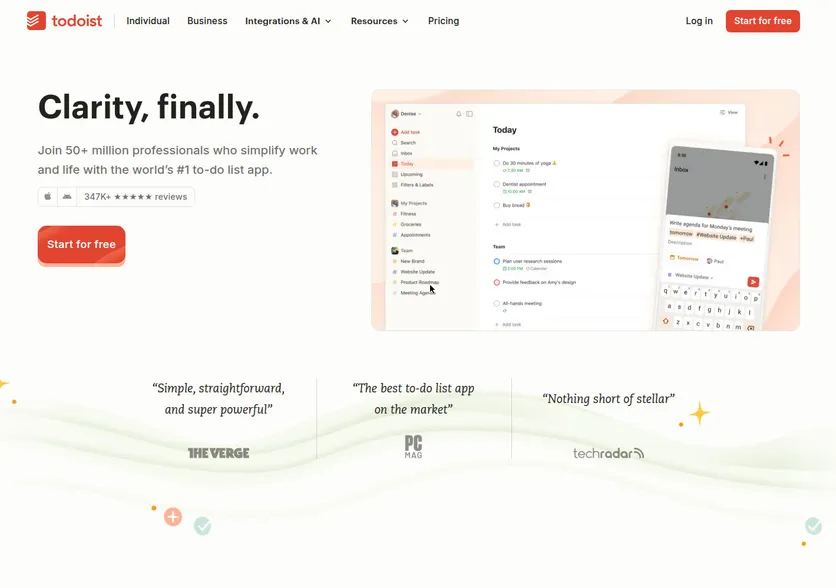
Todoist Pro is the personal productivity pick for people who capture tasks fast and want them organized without fuss, and it costs five dollars per user a month billed annually. Natural language entry turns a typed sentence into a dated task, projects hold the big areas of life, and the calendar view shows the week at a glance. Pro rose from four dollars in December 2025, and Business at eight dollars a user a month adds a shared team workspace.
What we like
- Natural language entry makes capture instant
- Clean projects and calendar view for the week ahead
- Syncs across every device without friction
Watch out for
- The free plan caps at five projects
- Team work needs the Business tier
How to try it
- Capture tasks with natural language: type it and Todoist dates it
- Organize tasks into projects for work, home and personal goals
- Review the calendar view each morning and plan the day
2. Trello
Best for: People who want the easiest kanban board to start
Paid tool Starting price: $5/user/month · Five dollars per user per month billed annually on the Standard plan (six dollars monthly); Premium is ten dollars per user per month billed annually, and the free plan covers up to ten collaborators
Free plan: Free plan for up to 10 collaborators
Trello is the easiest personal kanban board to start, because a board, a few lists and a stack of cards is all it takes to see the week. One board per project, lists for to-do, doing and done, and a card for every task with a due date and a checklist inside. Standard costs five dollars per user a month billed annually and adds unlimited boards, while Premium at ten dollars adds calendar, timeline and dashboard views.

What we like
- The simplest board here, learned in minutes
- Cards and checklists suit step-by-step personal work
- Unlimited boards on the Standard plan
Watch out for
- No timeline or dashboard views on Standard
- Automation limits are low on the entry tier
How to try it
- Create a board per project with lists for to-do, doing and done
- Add a card per task with a due date and checklist
- Drag cards across the board as the week progresses
3. Notion
Best for: People who want notes, tasks and habits in one calm workspace
Paid tool Starting price: $10/user/month · Ten dollars per user per month billed annually on the Plus plan (twelve dollars monthly); Business is twenty dollars per user per month billed annually
Free plan: Free plan for individuals
Notion Plus is the personal productivity pick for people who want their notes, tasks and habit tracker in one calm workspace, and it costs ten dollars per user a month billed annually. Pages become journals, databases become trackers, and the board view turns a task list into a kanban board. Business at twenty dollars adds admin controls, and the AI can draft, summarize and answer questions from the workspace.

What we like
- Notes, tasks and habits in one workspace
- Databases turn pages into real trackers
- AI drafting and summaries built in
Watch out for
- It is a workspace, not a dedicated task app
- Large databases can get slow
How to try it
- Build a dashboard page with tasks, notes and habits together
- Track the week on a board view of the task database
- Let Notion AI summarize the week for a quick review
4. ClickUp
Best for: People who want tasks, docs and a calendar in one app
Paid tool Starting price: $9/user/month · Nine dollars per user per month billed annually on the Core plan, with a regular price of twelve dollars shown on the vendor page; Business is seventeen dollars per user per month billed annually. The older seven-dollar Unlimited figure is stale after the November 2026 plan restructure
Free plan: Free plan with unlimited tasks
ClickUp Core is the value pick for one person who wants tasks, docs, goals and a calendar in a single app, and it costs nine dollars per user a month billed annually. The free plan already covers unlimited tasks, docs and boards, and Core adds unlimited storage, custom fields and a thousand automations a month. Business at seventeen dollars adds dashboards and workload views, and the page shows a twelve-dollar regular price behind the nine-dollar rate.

What we like
- Free plan covers unlimited tasks, docs and boards
- One app for tasks, docs, goals and calendar
- A thousand automations a month on Core
Watch out for
- The page shows a twelve-dollar regular price behind the nine-dollar rate
- The full feature set can overwhelm a solo user
How to try it
- Capture tasks in the inbox and sort them into lists
- View the week on the calendar and the work on a board
- Set automations to move cards when a task completes
5. monday.com
Best for: People who want one colorful board for the whole week
Paid tool Starting price: $9/seat/month · Nine dollars per seat per month billed annually on the Basic plan (twelve dollars monthly), with a three-seat minimum; Standard is twelve dollars and Pro is nineteen dollars per seat per month, and Basic includes no automations
Free plan: Free plan for up to 2 seats
For personal use, this monday.com Basic plan turns a week of errands, projects and goals into one colourful board where every item has an owner, a deadline and a status. Color-coded columns show what is done, what is today and what is waiting, and the free plan covers up to two seats. Basic costs nine dollars per seat a month billed annually, with a three-seat minimum on paid plans.

What we like
- Color-coded boards anyone can read at a glance
- Status, owner and deadline visible in one row
- Unlimited free viewers on paid plans
Watch out for
- Basic includes zero automations
- A three-seat minimum applies to paid plans
How to try it
- Build one board for the week with columns for each day
- Add a row per task with a deadline and status
- Check the board each morning and move the done items over
6. Jira
Best for: People who already use Jira at work and want the same board at home
Paid tool Starting price: $9.70/user/month · Nine dollars and seventy cents per user per month on monthly billing for the first hundred users, after Atlassian raised cloud list prices on 13 October 2026; annual billing is sold in user tiers, nine hundred and fifty dollars a year for up to ten users
Free plan: Free plan for up to 10 users
For personal productivity, Jira is heavier than most people need, but its free tier covers up to ten users, so a solo user pays nothing to try it. Boards, backlogs and sprint reports bring work-style structure to personal projects, and the Standard plan costs nine dollars and seventy cents per user a month for the first hundred users. It suits someone who already lives in Jira all day and wants the same board for side projects.

What we like
- Free tier covers up to ten users
- Boards and sprints bring structure to side projects
- Same tool as work, so no new learning curve
Watch out for
- Heavier than a personal task app needs to be
- Per-user pricing is banded by team size
How to try it
- Create a personal project and build the backlog
- Plan the week as a sprint with a clear set of tasks
- Review the board at the end of each week and re-plan
7. Asana
Best for: People who want a structured project plan for personal goals
Paid tool Starting price: $10.99/user/month · Ten dollars and ninety-nine cents per user per month billed annually on the Starter plan; Advanced is twenty-four dollars and ninety-nine cents per user per month, and the free plan covers up to ten users
Free plan: Free plan for up to 10 users
For one person, this Asana Starter plan turns a scattered to-do list into projects with deadlines, sections and a calendar view. A home move, a course or a side business each becomes a project with tasks, owners and dates, and the board view turns the list into a kanban board. Starter costs ten dollars and ninety-nine cents per user a month billed annually, and the free plan covers up to ten users.

What we like
- Projects turn big personal goals into dated tasks
- Board, list and calendar views in one plan
- Free plan covers up to ten users
Watch out for
- Goals and workload views need the Advanced tier
- More structure than a simple to-do list needs
How to try it
- Turn each goal into a project with tasks and deadlines
- View the project as a board or a calendar
- Review the week ahead every Sunday and re-plan
8. Airtable
Best for: People who want lists, tables and a calendar in one database
Paid tool Starting price: $20/seat/month · Twenty dollars per seat per month billed annually on the Team plan (twenty-four dollars monthly); Business is forty-five dollars per seat per month billed annually. Bending Spoons completed its acquisition of Airtable in September 2026 with no price change announced
Free plan: Free plan with up to 5 editors
For personal productivity, this Airtable Team plan turns a pile of lists into linked tables, so a habit tracker, a reading list and a budget share one workspace for twenty dollars per seat a month billed annually. The same data shows as a grid, a calendar or a kanban board, and fifty thousand records per base leave room to grow. It is the priciest tool here, and it suits someone who thinks in tables rather than tasks.

What we like
- One table powers board, calendar and grid views
- Linked tables connect habits, goals and budgets
- Fifty thousand records per base on Team
Watch out for
- The priciest tool on this list per seat
- Team bills commenters as paid seats too
How to try it
- Build a table per area of life: habits, reading, budget
- View the same data as a kanban board for daily work
- Link tables so a habit and a goal share one record
9. TickTick
Best for: People who want tasks, calendar, habits and a timer in one cheap app
Paid tool Starting price: $49.99/year · Forty-nine dollars and ninety-nine cents a year on the Premium plan (about four dollars and seventeen cents a month, or four dollars ninety-nine on monthly billing); the price rose from thirty-five dollars and ninety-nine cents during 2026, and there is no team plan
Free plan: Free plan with 9 lists and 99 tasks per list
TickTick Premium is the cheapest all-in-one personal productivity app here, and it costs forty-nine dollars and ninety-nine cents a year, or about four dollars and seventeen cents a month. One subscription covers the task list, the calendar, the habit tracker and the Pomodoro timer, with two hundred and ninety-nine lists and nine hundred and ninety-nine tasks per list. The price rose from thirty-five dollars and ninety-nine cents during 2026, so older guides quote the old figure.

What we like
- Tasks, calendar, habits and timer in one app
- Forty-nine dollars ninety-nine a year, the cheapest here
- Generous limits on Premium lists and tasks
Watch out for
- No team plan at any price
- The annual price rose from thirty-five dollars ninety-nine in 2026
How to try it
- Capture tasks and sort them into lists by area of life
- Plan the day on the calendar view with time blocks
- Track habits and run the Pomodoro timer from the same app
Prices above were checked on each vendor’s own website on Nov 28, 2026 and can change — the vendor’s page is the final word. Vendor links are editorial: nobody paid to be listed or ranked here. Vendors who want a featured listing can see how it works on our Get listed page.
How to run your week on a personal kanban board
Start with capture, not with a perfect system. Every task goes on the board the moment it appears, because a task that never gets written down never gets done. Keep three columns and no more: to-do, doing and done, and limit the doing column to three tasks so the day has a finish line. Then review the board every morning for two minutes and every Sunday for ten, because a board nobody reviews is just a list with better colors.
Before you buy
- Check whether the price is per person or per workspace, because a personal plan should cover one person
- Confirm the free tier limits before you pay, since several free plans cover a solo user well
- Ask whether the board works offline on your phone, because personal work happens everywhere
- Test the daily flow with one real week of tasks, from capture to done, before you commit
- Count the cost of calendar, habits and reminders separately, because they are often different plans
Official websites
Official websites of the products reviewed above. Features and prices were checked against these sites when this guide was written, and they can change, so confirm on the vendor site before you buy.
Frequently asked questions
What is kanban software for personal productivity?
Kanban software for personal productivity is a visual board that shows your tasks, their stage and their deadline at a glance. Cards move from to-do to doing to done, and the board shows what is stuck before the week slips away. The tools in this list add calendars, habits, reminders and databases around that board. The best one is the one you actually open every morning, not the one with the most features.
Which personal kanban tool is cheapest?
TickTick Premium costs forty-nine dollars and ninety-nine cents a year, about four dollars and seventeen cents a month, and it covers tasks, calendar, habits and a Pomodoro timer in one subscription. Todoist Pro and Trello Standard are both five dollars a month billed annually. The cheapest board is Trello, and the cheapest all-in-one is TickTick.
What does Todoist Pro cost?
Todoist Pro costs five dollars per user a month billed annually, or sixty dollars a year, and seven dollars on monthly billing. It adds three hundred projects, custom reminders, the calendar view and the full AI Assist suite to the free Beginner plan. Business at eight dollars a user a month adds a shared team workspace, but a solo user does not need it.
Notion or TickTick for personal productivity?
Notion Plus costs ten dollars per user a month billed annually, and it is the best pick when notes matter as much as tasks: journals, trackers and boards share one workspace. TickTick Premium is cheaper at forty-nine dollars ninety-nine a year and covers tasks, calendar, habits and a timer. Pick Notion for notes and TickTick for a tighter daily routine.
How should I choose a personal productivity tool?
Start with the free plan on two or three tools and run one real week through each: capture every task, plan each day and review on Sunday. The tool that makes capture fastest usually wins, because a task that never gets written down never gets done. And check the phone app carefully, since personal work happens on a phone more than on a laptop.
Compare the nine tools above, then start with a free plan on the tool that matches how you already capture tasks before you pay for a full year.
Browse Productivity Tools tools