
On this page
Small businesses waste hours switching between task lists, chats and spreadsheets, and the right productivity software pulls that work into one place where everyone can see it. The eight tools below run from about four dollars a seat a month to about thirteen dollars, and every price was checked on the vendor site on November 26, 2026. Most include a free plan for tiny teams, so start free and pay only when the limits bite. Monday is our first pick — the most flexible board for a growing small business.
How we researched this
We started with the productivity tools small businesses actually buy, then read each price on the vendor pricing page on November 26, 2026 and noted the free plan each one carries. We judged them for a team of up to ten people who need shared tasks, deadlines and simple reporting in one login, and we kept only tools with a published price.
Compare the tools
| Name | Best for | Starting price | Free plan | |
|---|---|---|---|---|
 Monday | Small businesses that want flexible visual boards for jobs, clients and stock in one place | $9/user/month | Free plan for up to 2 seats; 14-day free trial of the Pro plan | Visit |
 Asana | Small teams that want timelines and reporting to catch slipping deadlines early | $10.99/user/month | Free Personal plan for up to 2 users | Visit |
 ClickUp | Small businesses that want tasks, docs, goals and chat in one workspace | $9/user/month | Free Forever plan with no credit card required | Visit |
 Notion | Small businesses that want notes, docs and task databases in one shared workspace | $10/member/month | Free plan for individuals with limited blocks | Visit |
 Todoist | Solo owners and tiny teams that live by fast task capture and a calendar view | $5/month | Free Beginner plan for up to 5 projects | Visit |
 Trello | Small teams that want the simplest possible boards with no training needed | $5/user/month | Free plan for up to 10 collaborators per workspace | Visit |
 Toggl Track | Small businesses that bill by the hour and need clean time reports | $9/user/month | Free plan for up to 5 users | Visit |
 Clockify | Small businesses that want the cheapest path from a free timer to a real timesheet | $3.99/user/month | Free plan for up to 5 users | Visit |
The productivity software for small business, compared
1. Monday
Best for: Small businesses that want flexible visual boards for jobs, clients and stock in one place
Paid tool Starting price: $9/user/month · Basic plan, $9 a user a month billed annually or $12 billed monthly; paid plans start at 3 seats; Standard $12 and Pro $19 a month
Free plan: Free plan for up to 2 seats; 14-day free trial of the Pro plan
Monday turns a small business task list into a visual board where every job has an owner, a deadline and a status the whole team can see. This Monday Basic plan starts at nine dollars a seat a month on annual billing and covers unlimited items with free viewers, so a small team can track work without paying for every onlooker. A shop owner or service team can run jobs, stock and client follow-ups from the same board instead of juggling three apps.

What we like
- Visual boards the whole team reads at a glance
- Free viewers keep clients and part-timers out of the bill
- Hundreds of templates speed up setup
Watch out for
- Paid plans start at three seats, so a solo user pays for three
- Basic plan lists no automations, so simple boards stay manual
How to try it
- Open the Monday pricing page and start with the free plan
- Build one board for your main workflow with owners and due dates
- Invite the team as viewers first, then buy seats for editors
2. Asana
Best for: Small teams that want timelines and reporting to catch slipping deadlines early
Paid tool Starting price: $10.99/user/month · Starter plan, $10.99 a user a month billed annually or $13.49 billed monthly; Advanced $24.99 a user a month
Free plan: Free Personal plan for up to 2 users
Asana gives a small team a clear home for every project, with timelines, task owners and due dates that keep work moving without daily check-in meetings. This Asana Starter plan adds timeline and Gantt views plus reporting dashboards, so a manager can spot a slipping deadline before it becomes a missed delivery. A growing business can start on the free plan and upgrade only when the team outgrows two seats.

What we like
- Timeline and Gantt views show slipping work early
- Unlimited free guests keep clients in the loop
- Reporting dashboards replace status meetings
Watch out for
- Starter is the cheapest paid plan and still costs per user
- Time tracking needs the Advanced plan or an integration
How to try it
- Start with the free Personal plan and add one real project
- Turn the project into a timeline and assign every task an owner
- Upgrade to Starter when the team passes two seats
3. ClickUp
Best for: Small businesses that want tasks, docs, goals and chat in one workspace
Paid tool Starting price: $9/user/month · Core plan, $9 a user a month billed annually ($12 billed monthly); Business $17 a user a month billed annually
Free plan: Free Forever plan with no credit card required
ClickUp packs tasks, docs, goals and chat into one workspace, which suits a small business that wants to cancel three subscriptions and run everything in one place. This ClickUp Core plan adds unlimited storage, Gantt charts and automations on top of the free plan, so a team can build its whole workflow without an upgrade. A busy owner can track client work, internal projects and hiring from a single dashboard.

What we like
- Free Forever plan covers unlimited tasks and members
- Docs, goals and chat sit beside tasks in one place
- Automations cut repetitive card and status work
Watch out for
- List price is twelve dollars a seat, not the nine-dollar promo rate
- So many features can overwhelm a team that wants simple boards
How to try it
- Claim the Free Forever plan and build your first workspace
- Add Gantt charts and automations on a trial of the Core plan
- Move docs and goals in only after the task flow works
4. Notion
Best for: Small businesses that want notes, docs and task databases in one shared workspace
Paid tool Starting price: $10/member/month · Plus plan, $10 per member a month billed annually or $12 billed monthly; Business $20 per member a month
Free plan: Free plan for individuals with limited blocks
Notion blends notes, docs and task databases into one workspace, so a small business can keep its playbooks, meeting notes and project tracker in the same place. This Notion Plus plan lifts the block limits and adds thirty-day page history with larger file uploads, so a team can build a real company wiki. A service business can run client onboarding, internal docs and weekly planning from one shared workspace.

What we like
- One workspace holds notes, docs and task databases
- Guests stay free while members pay per seat
- Templates cover onboarding, planning and client work
Watch out for
- Plus gives only a limited trial of the AI tools, not full access
- Building a good system takes setup time up front
How to try it
- Open the Notion pricing page and start on the free plan
- Build one database for projects with owners and due dates
- Upgrade to Plus when file uploads and page history matter
5. Todoist
Best for: Solo owners and tiny teams that live by fast task capture and a calendar view
Paid tool Starting price: $5/month · Pro plan, $5 a month billed annually or $7 billed monthly; Business $8 a user a month billed annually
Free plan: Free Beginner plan for up to 5 projects
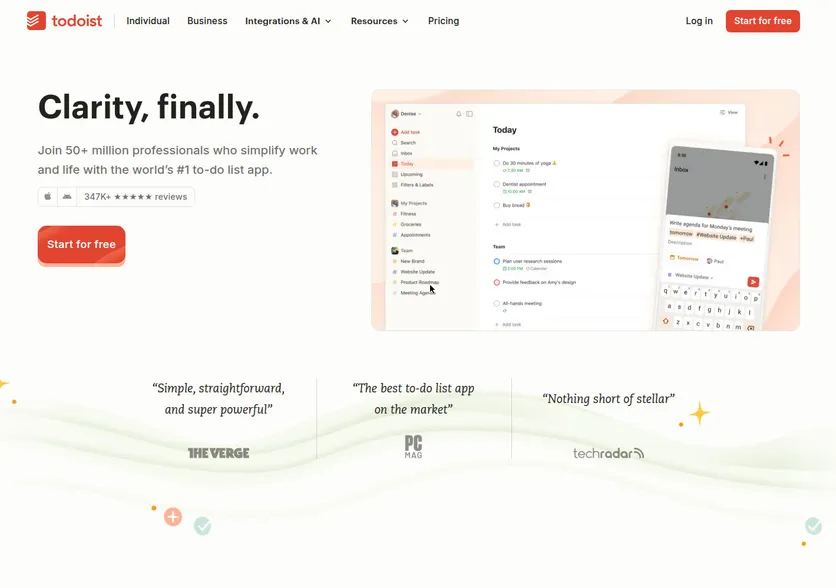
Todoist is the fastest way for a small team to capture tasks, with natural language dates that turn a typed sentence into a scheduled job in seconds. This Todoist Pro plan adds three hundred projects, custom reminders and a calendar layout, so a busy owner can plan the whole week from one list. A solo operator or tiny team that lives by the to-do list will find little here to slow them down.
What we like
- Fastest task capture with natural language dates
- Calendar layout shows the whole week at a glance
- Works on every device with instant sync
Watch out for
- Pro is priced per person, so a team of five pays five times
- No Gantt view or workload planning for bigger teams
How to try it
- Start the free Beginner plan and capture tasks for a week
- Turn on the calendar layout and set durations on key tasks
- Upgrade to Pro when five projects are no longer enough
6. Trello
Best for: Small teams that want the simplest possible boards with no training needed
Paid tool Starting price: $5/user/month · Standard plan, $5 a user a month billed annually or $6 billed monthly; Premium $10 a user a month
Free plan: Free plan for up to 10 collaborators per workspace
Trello keeps work visible on simple boards of lists and cards, which a small team can learn in an afternoon with no training session. This Trello Standard plan adds unlimited boards, custom fields and a thousand automation runs a month, so routine card moves happen on their own. A shop, studio or trades team that wants the lightest possible tracker will feel at home here.

What we like
- Simplest boards in this list, learned in an afternoon
- Standard adds a thousand automation runs a month
- Free plan covers ten collaborators per workspace
Watch out for
- Standard is per user, so guests on two boards count as billable
- Reporting stays basic next to Asana or Monday
How to try it
- Create a free workspace and build one board for real work
- Add custom fields and an automation for routine card moves
- Upgrade to Standard when the board cap or automation limit bites
7. Toggl Track
Best for: Small businesses that bill by the hour and need clean time reports
Paid tool Starting price: $9/user/month · Starter plan, $9 a user a month billed annually or $12 billed monthly; Premium $16 a user a month
Free plan: Free plan for up to 5 users
Toggl Track makes time visible, so a small business can see exactly where billable hours go and stop guessing at the end of the month. This Toggl Track Starter plan adds billable rates, project estimates and team reports, so an owner can quote jobs from real hours instead of hunches. A consultancy or agency that bills by the hour gets its money back from this tool in the first week.

What we like
- One-click timers make logging hours painless
- Billable rates turn tracked time into invoices
- Team reports show where every hour went
Watch out for
- Free plan covers only five users
- Starter has no invoicing, so bills go out from another app
How to try it
- Start the free plan and track one full week of work
- Set billable rates and project estimates on the Starter trial
- Review the team report before quoting the next job
8. Clockify
Best for: Small businesses that want the cheapest path from a free timer to a real timesheet
Paid tool Starting price: $3.99/user/month · Basic plan, $3.99 a seat a month billed annually or $4.99 billed monthly; Standard $5.49 and Pro $7.99 a seat a month
Free plan: Free plan for up to 5 users
Clockify is the cheapest route from a free timer to a real timesheet, with a free plan that covers a small team and paid plans that add billing and approvals. This Clockify Basic plan adds billable rates, a kiosk for shared clock-ins and time audits, so a team with hourly staff can run payroll from tracked hours. A small business watching every dollar gets serious time tracking for less than the price of lunch.

What we like
- Cheapest paid plan in this comparison
- Free plan covers a small team with unlimited tracking
- Kiosk mode handles shared clock-ins for hourly staff
Watch out for
- Invoicing and approvals need the Standard plan, not Basic
- Reports can feel clunky next to Toggl Track
How to try it
- Open the Clockify pricing page and start on the free plan
- Set up projects with billable rates for hourly work
- Upgrade to Basic when kiosk or time audit matters
Prices above were checked on each vendor’s own website on Nov 26, 2026 and can change — the vendor’s page is the final word. Vendor links are editorial: nobody paid to be listed or ranked here. Vendors who want a featured listing can see how it works on our Get listed page.
What productivity software costs in 2026
Most small businesses pay per seat, so the headline monthly price is only half the story, and this list runs from about four dollars a seat a month to about thirteen dollars. A five-person team on Monday Basic pays for three seats at minimum and more as it grows, while Clockify Basic stays under four dollars a seat with a free plan below it. The headline plan each vendor shows on its own pricing page is the number in the table above, checked on November 26, 2026.
Start with the free plan on two tools and run one real week of work through each, from first task to finished invoice. Compare how fast the team adopts it, how clearly deadlines show up, and whether reporting needs a second app. Pick the tool the team actually opens every morning, because the cheapest subscription is the one that gets used.
Before you buy
- Count the seats first, because Monday charges from a three-seat minimum while Clockify and Trello charge per seat with no minimum.
- Check what the free plan caps, because Todoist stops at five projects and Asana stops at two users.
- Compare annual and monthly billing, because most tools here cut the monthly rate by about a fifth on annual plans.
- Test the free plan with real work, because a tool the team ignores costs money whether it is four dollars or thirteen dollars a seat.
- Check automation caps before you buy, because Trello Standard and ClickUp Core both stop at a thousand runs a month.
Official websites
Official websites of the products reviewed above. Features and prices were checked against these sites when this guide was written, and they can change, so confirm on the vendor site before you buy.
Frequently asked questions
Which productivity software is best for a small business in 2026?
Monday is the safest default at nine dollars a seat a month on annual billing, because its boards flex from simple task lists to full job tracking and free viewers keep clients out of the bill. Clockify wins on price at under four dollars a seat a month for teams that mainly need time tracking. Todoist is the best fit for a solo owner who wants the fastest task capture and a calendar view.
How much does productivity software cost for a small business?
Most tools in this list cost between four and thirteen dollars a seat a month on annual billing, with free plans below that for tiny teams. A five-person team can pay under twenty dollars a month on Clockify Basic or about forty-five dollars on Monday Basic with its three-seat minimum. Expect the bill to grow with headcount, since every tool here charges per seat.
Is there a free productivity tool for a small business?
Yes, every tool here has a free plan, though the caps differ. Todoist Beginner covers five projects, Asana Personal covers two users, and Clockify and Toggl Track cover up to five users each. Trello Free covers ten collaborators per workspace, while ClickUp Free Forever and Notion Free cover unlimited tasks and members with tighter limits. A team of two or three can often run free for months.
Do I need separate tools for time tracking and tasks?
Not always. Toggl Track and Clockify combine timers with projects and reports, so a team that bills by the hour can run both jobs in one tool. Monday, Asana and ClickUp track tasks and deadlines well but treat time tracking as a secondary feature. If billing from hours matters, pick a tracker first and add task boards around it.
What should a small business look for in productivity software?
Look for shared tasks with owners and due dates, a view the whole team reads at a glance, and reporting that shows slipping work before it misses a deadline. Check the per-seat price against your headcount, the free plan caps, and whether time tracking or automation sits behind a higher tier. The best tool is the one your team opens every morning without being chased.
Need everyday productivity help too? Try Toolsvine's free productivity tools for small business right in your browser.
Browse Productivity Tools tools


