On this page
Developers automate for a living, so the tools they pick have to survive code review: self-hosting, webhooks, retries and observability are not extras, they are the job. The eight tools below optimise processes for developers, from a self-hosted engine that runs AI agents to an orchestrator that never lets a failed run go silent. n8n leads because it runs the same engine free on a developer's own server or paid in the cloud for twenty euros a month, and the rest are ranked on how much control they hand over.
How we researched this
We checked every price on the vendor pricing page on November 28, 2026, and only included tools with a published US dollar list price. The process tools that sell by quote, including Process Street, Kissflow, Camunda and Appian, publish no flat starting price, so they are not in this list. Prices change, so confirm the current figure on the vendor site before you buy.
Compare the tools
| Name | Best for | Starting price | Free plan | |
|---|---|---|---|---|
 n8n | Developers who want to self-host or run AI agents | €20/month | Free self-hosted plan; 14-day cloud trial | Visit |
 Make | Developers who want to prototype integrations visually | $9/month | Free plan (1,000 credits a month) | Visit |
 Zapier | Developers who want ready-made integrations fast | $19.99/month | Free plan (100 tasks a month) | Visit |
 Power Automate | Developers already living in the Microsoft suite | $15/user/month | Free plan | Visit |
 Activepieces | Developers who want flat pricing per run | $16/month | Free plan | Visit |
| Pipefy | Developers who manage work as structured processes | $39/user/month | Free plan (Starter) | Visit |
| Prefect | Developers who run data workflows that must not fail | $100/month | Free plan (Hobby, 2 users) | Visit |
| Dagster+ | Developers who think in data assets, not tasks | $10/month | No free plan; 30-day free trial | Visit |
The process optimization software for developers, compared
1. n8n
Best for: Developers who want to self-host or run AI agents
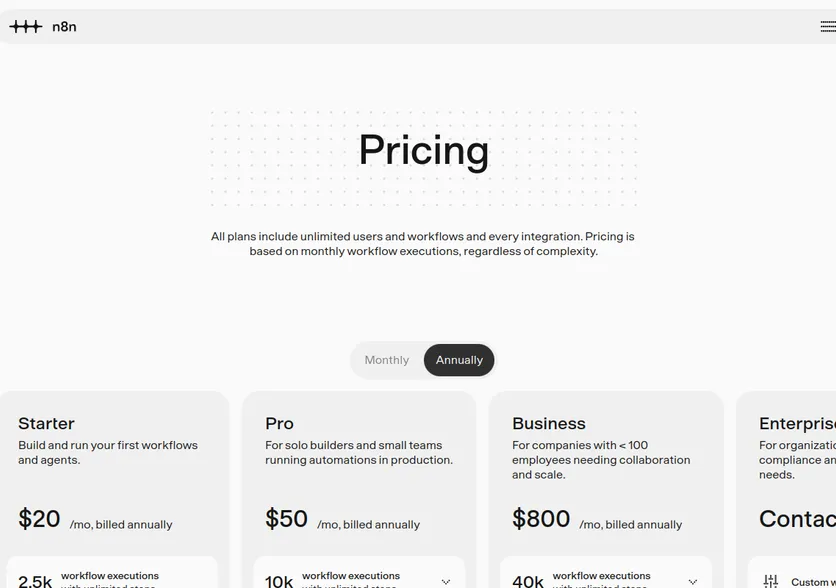
Paid tool Starting price: €20/month · Twenty euros a month billed annually on Starter (twenty-four euros billed monthly); Pro is fifty euros; Business is six hundred and sixty-seven euros and is self-hosted only; prices are in euros, not dollars, and live posts showing twenty dollars are wrong; Starter includes two thousand five hundred executions; the Community Edition is free and self-hosted
Free plan: Free self-hosted plan; 14-day cloud trial
A developer who wants the automation engine on their own server will find this n8n plan costs twenty euros a month billed annually, and it gives a technical team cloud hosting with two thousand five hundred executions and the same engine that runs free self-hosted. Workflows are code when they need to be and visual when they do not, with AI agents that chain tools together. It is the developer-native pick in this list, though the price is in euros and the cloud tiers cost more than the free self-hosted edition.
What we like
- The same engine runs free self-hosted or paid in the cloud
- Workflows are code when they need to be, visual when they are not
- AI agents that chain tools together
Watch out for
- Prices are in euros, not dollars, so convert before budgeting
- Self-hosting means owning the uptime and the updates
How to try it
- Install the Community Edition or start the cloud trial
- Build the first workflow with a webhook and a code node
- Add the AI agent node and connect the tools it should call
2. Make
Best for: Developers who want to prototype integrations visually
Paid tool Starting price: $9/month · Nine dollars a month billed annually on Core (ten dollars and fifty-nine cents billed monthly); Pro is sixteen dollars a month billed annually; Teams is twenty-nine dollars; the free plan includes one thousand credits a month
Free plan: Free plan (1,000 credits a month)
A developer who wants to see the whole data flow before shipping it will find this Make plan costs nine dollars a month billed annually, and it builds automations as visual scenarios where webhooks, filters and routers connect apps in a diagram anyone can read. A deploy event can update the tracker, notify the channel and log the release notes without a custom script. It is the fastest way to prototype an integration that would take a day to code.

What we like
- Visual scenarios anyone on the team can read
- Webhooks, filters and routers without a custom script
- Ten thousand credits a month for less than ten dollars
Watch out for
- The visual builder hides the code, so deep logic is awkward
- Credit counting is less obvious than a plain task count
How to try it
- Connect the code host, the tracker and the chat app
- Draw the deploy scenario with branches for success and failure
- Test it with a fake deploy, then switch it on
3. Zapier
Best for: Developers who want ready-made integrations fast
Paid tool Starting price: $19.99/month · Nineteen dollars and ninety-nine cents a month billed annually on Professional (twenty-nine dollars and ninety-nine cents billed monthly); Team is sixty-nine dollars a month billed annually; the free plan covers one hundred tasks a month and two-step Zaps only
Free plan: Free plan (100 tasks a month)
A developer who wires webhooks between services by hand will find this Zapier plan costs nineteen dollars and ninety-nine cents a month billed annually, and it ships thousands of ready-made integrations with filters, formatters and multi-step logic. A failed deployment can open a ticket, page the on-call engineer and post the log link before anyone notices the alert. It trades raw control for speed, which is the right trade when the workflow is standard and the deadline is near.

What we like
- Thousands of ready-made integrations with multi-step logic
- Filters and formatters without writing glue code
- The largest app library of any tool in this list
Watch out for
- Raw control is limited next to code-first tools
- Per-task pricing grows with event volume
How to try it
- Connect the code host, the tracker and the paging tool
- Build the flow from failed deploy to ticket to page
- Test it with a fake failure, then switch it on
4. Power Automate
Best for: Developers already living in the Microsoft suite
Paid tool Starting price: $15/user/month · Fifteen dollars per user a month billed annually on Premium; Process is one hundred and fifty dollars per bot a month; the free plan covers limited cloud flows; figures rest on live-post November 2026 verification
Free plan: Free plan
A developer already paying for the Microsoft suite will find this Power Automate plan costs fifteen dollars per user a month billed annually, and it connects Outlook, Teams, Excel and SharePoint with cloud flows and desktop robots under one licence. A webhook can create a Planner task, send a Teams message or update a SharePoint list without a new vendor. It is the natural automation pick for any team that already lives in the Microsoft stack.
What we like
- Cloud flows and desktop RPA under one licence
- Native connectors for Outlook, Teams, Excel and SharePoint
- Premium connectors and attended robots included
Watch out for
- Outside the Microsoft stack it has less to offer
- Desktop robots need a Windows machine to run
How to try it
- Open the flow builder from the Microsoft portal
- Connect the Outlook, Teams and SharePoint actions for the flow
- Test the flow with a real event, then switch it on
5. Activepieces
Best for: Developers who want flat pricing per run
Paid tool Starting price: $16/month · Sixteen dollars a month billed annually on Plus (twenty dollars billed monthly); one live post lists twenty dollars as the annual figure, which conflicts with the sixteen-dollar read used here; one credit per whole run no matter how many steps it has
Free plan: Free plan
A developer who hates per-task billing will find this Activepieces plan costs sixteen dollars a month billed annually, and it bills a whole run as one credit no matter how many steps it has. The open-source builder connects apps with a simple interface, and a team can self-host or run it in the cloud. It is the flat-price answer to a hosting bill, though the annual figure is listed differently in different places.
What we like
- One credit per whole run, however many steps it has
- Open-source builder a team can self-host
- A simple interface that needs no training
Watch out for
- The annual figure is listed differently in different places
- The app library is smaller than Zapier's
How to try it
- Connect the apps the workflow needs to the account
- Build the first flow and check the credit cost per run
- Test it with a real event, then switch it on
6. Pipefy
Best for: Developers who manage work as structured processes
Paid tool Starting price: $39/user/month · Thirty-nine dollars per user a month billed monthly on Business; Enterprise is seventy-eight dollars billed monthly; one directory lists thirty-three dollars for Business, likely an annual-billing rate; older reads show twenty to twenty-five dollars a month billed annually; the free Starter plan exists
Free plan: Free plan (Starter)
A developer who manages work as structured processes rather than loose tasks will find this Pipefy plan costs thirty-nine dollars per user a month billed monthly on Business, and it turns requests, approvals and handoffs into pipelines with forms, rules and automations. A bug report can move from triage to fix to release without a status meeting. It is the process-first pick in this list, though the price varies between listings and needs confirming.
What we like
- Pipelines with forms, rules and automations built in
- Requests, approvals and handoffs in one structured flow
- A free Starter plan for small teams
Watch out for
- The price varies between listings, so confirm it first
- Monthly billing only, with no annual discount shown
How to try it
- Create the pipeline for the bug or request workflow
- Add the forms, rules and approval steps for each stage
- Invite the team and run the first request end to end
7. Prefect
Best for: Developers who run data workflows that must not fail
Paid tool Starting price: $100/month · One hundred dollars a month flat for Starter (three users, twenty deployments, seventy-five serverless hours); Team is one hundred dollars per user a month for four to eight users; Enterprise is custom; Hobby is free for two users; seat-based pricing, not per-run; Prefect acquired Dagster Labs in July 2026
Free plan: Free plan (Hobby, 2 users)
A developer who runs data workflows that must not fail silently will find this Prefect plan costs one hundred dollars a month flat for Starter, and it orchestrates pipelines with retries, schedules and observability built in. A failed run retries itself, alerts the team and logs every step for debugging. It is the workflow-orchestration pick in this list, priced per seat rather than per run, which keeps the bill predictable.
What we like
- Retries, schedules and observability built in
- A flat monthly price that keeps the bill predictable
- A free Hobby plan for two users
Watch out for
- The Starter plan caps at three users and twenty deployments
- Learning the orchestration model takes a few days
How to try it
- Install the client and connect the first workflow
- Set the schedule and the retry rules for the pipeline
- Switch on the alerts and watch the first runs
8. Dagster+
Best for: Developers who think in data assets, not tasks
Paid tool Starting price: $10/month · Ten dollars a month plus four cents per credit on Solo; Starter is one hundred dollars a month plus three and a half cents per credit; Pro is by quote; serverless compute is one cent a minute; hybrid deployments carry no compute charge; thirty-day free trial; Prefect acquired Dagster Labs in July 2026 and Dagster+ remains supported with pricing unchanged
Free plan: No free plan; 30-day free trial
A developer who thinks in data assets rather than tasks will find this Dagster plan costs ten dollars a month plus four cents per credit on Solo, and it orchestrates data pipelines as assets with lineage, testing and observability built in. A broken upstream asset stops the downstream jobs before bad data reaches production. It is the data-asset pick in this list, though the per-credit pricing needs a calculator before budgeting.
What we like
- Data assets with lineage, testing and observability built in
- A low entry price for a solo developer
- Hybrid deployments with no compute charge
Watch out for
- Per-credit pricing needs a calculator before budgeting
- The learning curve is steeper than a simple automation tool
How to try it
- Define the first data assets and their upstream dependencies
- Set the schedule and the alert rules for the pipeline
- Run the first materialisation and check the lineage graph
Prices above were checked on each vendor’s own website on Nov 28, 2026 and can change — the vendor’s page is the final word. Vendor links are editorial: nobody paid to be listed or ranked here. Vendors who want a featured listing can see how it works on our Get listed page.
How to optimise a developer workflow without breaking production
Start with the failure, because that is where a developer workflow earns its keep: a run that retries itself, alerts the team and logs every step beats a workflow that fails silently at midnight. Then automate the handoffs that waste the most time, such as the deploy that updates the tracker and the alert that opens a ticket before anyone notices. Keep the code path open, since a workflow nobody can debug is worse than a workflow nobody built. Finally, test every automation with a fake event first, because a flow that fires on production data is a bug with a schedule.
Before you buy
- Confirm the tool lets you see, log and retry every run
- Check whether the price is per seat, per run or per credit
- Make sure webhooks, code steps and AI agents are included
- Ask if the tool self-hosts, so the data stays on your own server
- Test the failure path with a fake event before paying
Official websites
Official websites of the products reviewed above. Features and prices were checked against these sites when this guide was written, and they can change, so confirm on the vendor site before you buy.
Frequently asked questions
What is the best process optimization software for developers?
n8n is the best overall pick, at twenty euros a month billed annually, because the same engine runs free on a developer's own server or paid in the cloud, with AI agents that chain tools together. Make is the best visual builder at nine dollars a month. Prefect is the best pick for data workflows at one hundred dollars a month flat.
How much does n8n cost per month?
n8n Starter costs twenty euros a month billed annually, or twenty-four euros billed monthly, and it includes two thousand five hundred executions. Pro costs fifty euros a month. Business costs six hundred and sixty-seven euros and is self-hosted only. The Community Edition is free and self-hosted, and prices are in euros, not dollars.
Can I automate developer workflows for free?
Yes. n8n offers a free self-hosted Community Edition, Make offers one thousand free credits a month, Zapier offers a free plan covering one hundred tasks a month, and Prefect offers a free Hobby plan for two users. A production workflow with observability and retries needs a paid plan, with Make the cheapest at nine dollars a month.
Is Make or Zapier better for developers?
Make is better for developers who want to see the whole flow, at nine dollars a month billed annually, because visual scenarios show every webhook, filter and router on one canvas. Zapier is better for developers who want the largest app library, at nineteen dollars and ninety-nine cents a month. A developer who prototypes integrations should pick Make.
Which tool is best for data pipelines?
Prefect is the best pick for data pipelines, at one hundred dollars a month flat for Starter, because it orchestrates workflows with retries, schedules and observability built in. Dagster is the best alternative at ten dollars a month plus four cents per credit, with data assets, lineage and testing. Both beat a plain automation tool for pipelines that must not fail.
Compare the eight tools above, then start with a free trial of the tool that matches how the team already builds before paying for a full year.
Browse Business Tools tools