On this page
Enterprise projects fail on cost long before they fail on scope, and the tools that catch it early pay for themselves many times over. The seven tools below manage project costs at enterprise scale, from a nine dollar a user a month sheet to a twenty-eight dollar a user a month business platform. Smartsheet leads because it tracks costs, budgets and portfolios for nine dollars a member a month, and the rest are ranked on how clearly they show where the money goes.
How we researched this
We checked every price on the vendor pricing page on November 28, 2026, and only included tools with a published US dollar list price. Deltek Costpoint, Oracle Primavera, Procore, Planview and Clarizen sell cost management by quote, so they are not in this list. Prices change, so confirm the current figure on the vendor site before you buy.
Compare the tools
| Name | Best for | Starting price | Free plan | |
|---|---|---|---|---|
| ProjectManager | Enterprise teams controlling cost with baselines and workload | $15/user/month | No free plan; 30-day free trial | Visit |
 Smartsheet | Enterprise teams tracking cost in sheets with structure | $9/member/month | No free plan; 30-day free trial | Visit |
 Wrike | Enterprise teams that want structured work and budgets | $10/user/month | Free plan (200 active tasks) | Visit |
 Monday.com | Enterprise teams that want cost on a visual board | $9/seat/month | Free plan (up to 2 seats) | Visit |
 Asana | Enterprise teams tracking cost through portfolios | $10.99/user/month | Free plan (Personal, up to 2 users) | Visit |
 ClickUp | Enterprise teams that want docs, tasks and budgets together | $9/user/month | Free plan (Free Forever) | Visit |
 Jira | Enterprise software teams tracking cost through sprints | $9.70/user/month | Free plan (up to 10 users) | Visit |
The project cost management software for enterprise, compared
1. ProjectManager
Best for: Enterprise teams controlling cost with baselines and workload
Paid tool Starting price: $15/user/month · Fifteen dollars a user a month on Team billed annually (eighteen dollars billed monthly) for up to ten users and twenty projects; Business is twenty-eight dollars (thirty-two dollars monthly); a fourteen dollar figure in one third-party read conflicts with the vendor pages and is disclosed here
Free plan: No free plan; 30-day free trial
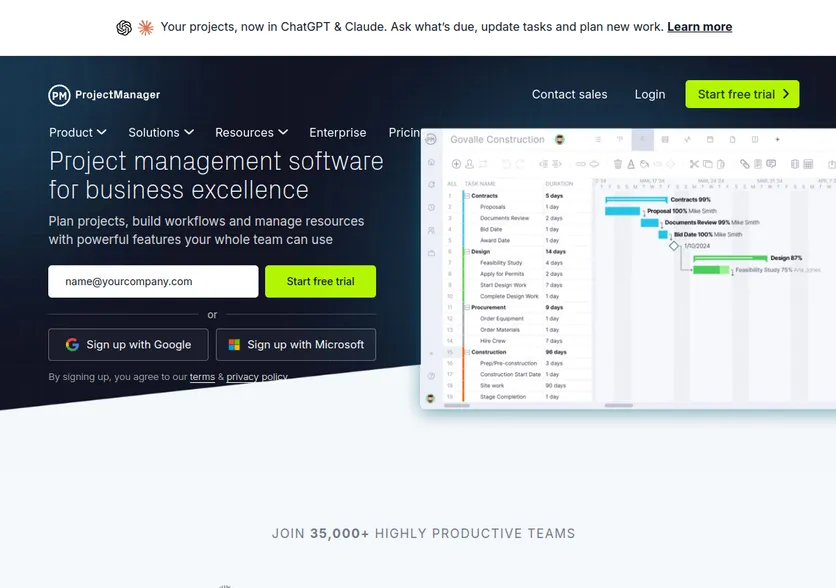
An enterprise team that controls cost with baselines and workload views gets them here, because this ProjectManager plan costs fifteen dollars a user a month billed annually. It runs Gantt charts with baselines and critical path, tracks workload across projects and builds dashboards and portfolios. The Team plan caps at ten users and twenty projects, so a large enterprise will need Business.
What we like
- Gantt with baselines and critical path
- Workload views across all projects
- Dashboards and portfolio views
Watch out for
- Team caps at ten users and twenty projects
- A fourteen dollar figure in one read conflicts
How to try it
- Set up the project with its baseline
- Assign work and track the workload
- Compare actuals against the baseline
2. Smartsheet
Best for: Enterprise teams tracking cost in sheets with structure
Paid tool Starting price: $9/member/month · Nine dollars a member a month on Pro billed annually (twelve dollars billed monthly) for one to ten members; Business is nineteen dollars (twenty-four dollars monthly); Enterprise and Advanced Work Management are quoted; the free plan is legacy and closed to new signups
Free plan: No free plan; 30-day free trial
An enterprise team that manages cost in familiar sheets with database structure gets it here, because this Smartsheet plan costs nine dollars a member a month billed annually. It tracks budgets, automates approvals and builds dashboards and reports, and viewers and contributors work free. The Pro plan caps at ten members, so a large team will need Business or Enterprise.

What we like
- Familiar sheet grid with database structure
- Budget tracking and approval automation
- Viewers and contributors are free
Watch out for
- Pro caps at ten members
- The free plan is legacy and closed to new signups
How to try it
- Build the budget sheet with its formulas
- Set up approvals and automations
- Report costs on a dashboard
3. Wrike
Best for: Enterprise teams that want structured work and budgets
Paid tool Starting price: $10/user/month · Ten dollars a user a month on Team billed annually for two to fifteen users, sold in seat blocks of five; Business is twenty-five dollars a user a month with a five-seat minimum; Pinnacle and Apex are quoted; a twenty-nine dollar Business figure in one older read is stale
Free plan: Free plan (200 active tasks)
An enterprise team that wants structured work with budgets and dashboards gets it here, because this Wrike plan costs ten dollars a user a month billed annually. It covers Gantt charts, dashboards, request forms and time tracking, and the Business tier adds resource and budget management. Licenses are sold in seat blocks of five, so a team of six pays for ten seats.

What we like
- Gantt, dashboards and request forms
- Time tracking and resource views
- Free plan for up to two hundred tasks
Watch out for
- Licenses sell in seat blocks, not per person
- Team stops at fifteen users
How to try it
- Create the project with its budget
- Assign work and track time
- Report costs on the dashboard
4. Monday.com
Best for: Enterprise teams that want cost on a visual board
Paid tool Starting price: $9/seat/month · Nine dollars a seat a month on Basic billed annually (twelve dollars billed monthly) with a three-seat minimum; Standard is twelve dollars and Pro is nineteen dollars; Enterprise is quoted
Free plan: Free plan (up to 2 seats)
An enterprise team that runs cost as a visual board everyone can read gets it here, because this Monday.com plan costs nine dollars a seat a month billed annually. It turns budgets, timelines and status into colorful boards, and the Standard and Pro tiers add automations, integrations and time tracking. Paid plans start at three seats, so the smallest bill is twenty-seven dollars a month.

What we like
- Visual boards anyone can read at a glance
- Automations and integrations from Standard
- Free plan for up to two seats
Watch out for
- Three-seat minimum on paid plans
- Enterprise pricing is quoted, not published
How to try it
- Build the budget board with its columns
- Add timelines and automations
- Share the board with stakeholders
5. Asana
Best for: Enterprise teams tracking cost through portfolios
Paid tool Starting price: $10.99/user/month · Ten dollars and ninety-nine cents a user a month on Starter billed annually (thirteen dollars and forty-nine cents billed monthly); Advanced is twenty-four dollars and ninety-nine cents; Enterprise and Enterprise Plus are quoted; seats are sold in blocks above five users
Free plan: Free plan (Personal, up to 2 users)
An enterprise team that tracks cost through goals, portfolios and workload gets it here, because this Asana plan costs ten dollars and ninety-nine cents a user a month billed annually. It runs timelines and Gantt charts, dashboards and automations, and the Advanced tier adds portfolios, goals and workload views. Seats are sold in blocks above five users, so a team of six pays for ten seats.

What we like
- Goals, portfolios and workload views
- Timeline, Gantt and dashboards
- Free Personal plan for two users
Watch out for
- Seats sell in blocks above five users
- Enterprise pricing is quoted, not published
How to try it
- Set up the portfolio with its goals
- Add projects and track their cost
- Review workload across the portfolio
6. ClickUp
Best for: Enterprise teams that want docs, tasks and budgets together
Paid tool Starting price: $9/user/month · Nine dollars a user a month on Core billed annually (twelve dollars billed monthly); Business is seventeen dollars a user a month billed annually; Max is one hundred dollars; Enterprise is quoted
Free plan: Free plan (Free Forever)
An enterprise team that wants one workspace for docs, tasks and budgets gets it here, because this ClickUp plan costs nine dollars a user a month billed annually. It covers tasks, docs, goals, sprints and dashboards, and the Business tier adds workload, time tracking and integrations. The free Forever plan covers unlimited members, so a team can test it at full size.

What we like
- Docs, tasks, goals and dashboards in one app
- Free Forever plan with unlimited members
- Workload and time tracking on Business
Watch out for
- The breadth takes time to learn well
- Enterprise pricing is quoted, not published
How to try it
- Create the workspace and its projects
- Add docs, goals and budgets
- Track time and report on dashboards
7. Jira
Best for: Enterprise software teams tracking cost through sprints
Paid tool Starting price: $9.70/user/month · Nine dollars and seventy cents a user a month on Standard at the monthly list rate for one to one hundred users; Premium is nineteen dollars and sixty cents; annual pricing is in fixed tiers, nine hundred and fifty dollars a year for up to ten users; the eight dollar and forty-eight cent figure in some reads is a derived blend, not the list price
Free plan: Free plan (up to 10 users)
An enterprise software team that tracks cost through sprints and releases gets it here, because this Jira plan costs nine dollars and seventy cents a user a month at the monthly list rate. It runs scrum and kanban boards, roadmaps and reports, and the Premium tier adds capacity planning and advanced roadmaps. Annual pricing comes in fixed tiers, starting at nine hundred and fifty dollars a year for up to ten users.

What we like
- Scrum and kanban boards with roadmaps
- Reports tied to releases and sprints
- Free plan for up to ten users
Watch out for
- Annual pricing is in fixed tiers, not per user
- The eight dollar and forty-eight cent figure is a derived blend
How to try it
- Create the project and its board
- Plan sprints and track the work
- Report cost against the release
Prices above were checked on each vendor’s own website on Nov 28, 2026 and can change — the vendor’s page is the final word. Vendor links are editorial: nobody paid to be listed or ranked here. Vendors who want a featured listing can see how it works on our Get listed page.
How an enterprise team picks cost management that survives scale
Start with the budget that already hurts, because cost management earns its keep by showing overruns while there is still time to act. Pick a tool whose trial covers a full reporting cycle, then track one live program end to end before paying. Check the seat rules, since seat blocks and tier caps turn a nine dollar headline into a much larger bill at enterprise headcount. Make sure budgets, actuals and forecasts live in the same system, or finance will keep reconciling spreadsheets. Finally, confirm the tool handles the approvals and audit trail the enterprise requires, because a cost tool without governance will be blocked by finance.
Before you buy
- Confirm the seat rules, blocks, minimums and tier caps before budgeting
- Check whether budgets, actuals and forecasts live in one system or three
- Ask if the tool reports cost per project and per portfolio, not just per task
- Make sure approvals and an audit trail meet the enterprise governance rules
- Track one live program end to end on the trial before paying
Official websites
Official websites of the products reviewed above. Features and prices were checked against these sites when this guide was written, and they can change, so confirm on the vendor site before you buy.
Frequently asked questions
What is the best project cost management software for enterprise?
Smartsheet is the best overall pick for enterprise, at nine dollars a member a month billed annually, because it tracks budgets, approvals and portfolios in a familiar sheet. ProjectManager is the best pick for control at fifteen dollars a user a month, with baselines and workload views. Wrike is the best pick for structured work at ten dollars a user a month.
How much does Smartsheet cost for enterprise?
Smartsheet costs nine dollars a member a month on Pro billed annually, or twelve dollars billed monthly, for one to ten members. Business is nineteen dollars a member a month billed annually. Enterprise and Advanced Work Management are quoted, with Enterprise starting at ten members, and the free plan is legacy and closed to new signups.
Is there a free project cost management tool for enterprise?
There is no free enterprise tier among the main picks, but ClickUp offers a Free Forever plan with unlimited members, Wrike is free up to two hundred tasks, Monday.com is free for two seats, and Asana and Jira offer free plans for small teams. These free tiers cover a pilot, and an enterprise should compare the paid plans above for scale.
What is the difference between Smartsheet and ProjectManager for cost control?
Smartsheet manages cost in a familiar sheet grid with formulas, approvals and dashboards for nine dollars a member a month. ProjectManager controls cost with Gantt baselines, critical path and workload views for fifteen dollars a user a month. Choose Smartsheet for sheet-based budgeting and ProjectManager for schedule-driven cost control.
Do enterprises need project cost management software?
An enterprise needs it once project costs live in spreadsheets and overruns surface after the money is spent. Cost management ties budgets, actuals and forecasts together, so finance sees the overrun while there is still time to act. A team can pilot free on ClickUp or Wrike and move to Smartsheet or ProjectManager for scale.
Compare the seven tools above, then start with the free ClickUp plan or the Wrike free tier on the tool that matches how the enterprise already tracks budgets before paying for a full year.
Browse Business Tools tools