On this page
An enterprise dashboard is the one screen where executives, managers and teams all see the same truth about a project. The nine tools below build that screen, from a nine dollar a user a month work tracker to a six hundred dollar a month dashboard suite. Databox leads because it pulls live metrics from dozens of sources into one dashboard for sixty-four dollars a month, and the rest are ranked on how fast the numbers stay fresh.
How we researched this
We checked every price on the vendor pricing page on November 28, 2026, and only included tools with a published US dollar list price. Tableau, Power BI, Looker and Domo sell dashboard platforms by quote or through cloud billing, so they are not in this list. Prices change, so confirm the current figure on the vendor site before you buy.
Compare the tools
| Name | Best for | Starting price | Free plan | |
|---|---|---|---|---|
| ProjectManager | Enterprise teams building dashboards from live schedules | $15/user/month | No free plan; 30-day free trial | Visit |
 Smartsheet | Enterprise teams building dashboards from familiar sheets | $9/member/month | No free plan; 30-day free trial | Visit |
 Wrike | Enterprise teams that want dashboards on structured work | $10/user/month | Free plan (200 active tasks) | Visit |
 Monday.com | Enterprise teams that want dashboards as visual boards | $9/seat/month | Free plan (up to 2 seats) | Visit |
 Asana | Enterprise teams reporting through portfolios and goals | $10.99/user/month | Free plan (Personal, up to 2 users) | Visit |
 ClickUp | Enterprise teams that want dashboards beside docs and tasks | $9/user/month | Free plan (Free Forever) | Visit |
 Databox | Enterprise teams pulling live metrics into one dashboard | $64/month | Free plan (3 data sources) | Visit |
 Klipfolio | Enterprise teams putting KPI dashboards on office screens | $120/month | No free plan; 14-day free trial | Visit |
 Geckoboard | Enterprise teams showing live KPIs on office TVs | $79/month | No free plan; 14-day free trial | Visit |
The project dashboard software for enterprises, compared
1. ProjectManager
Best for: Enterprise teams building dashboards from live schedules
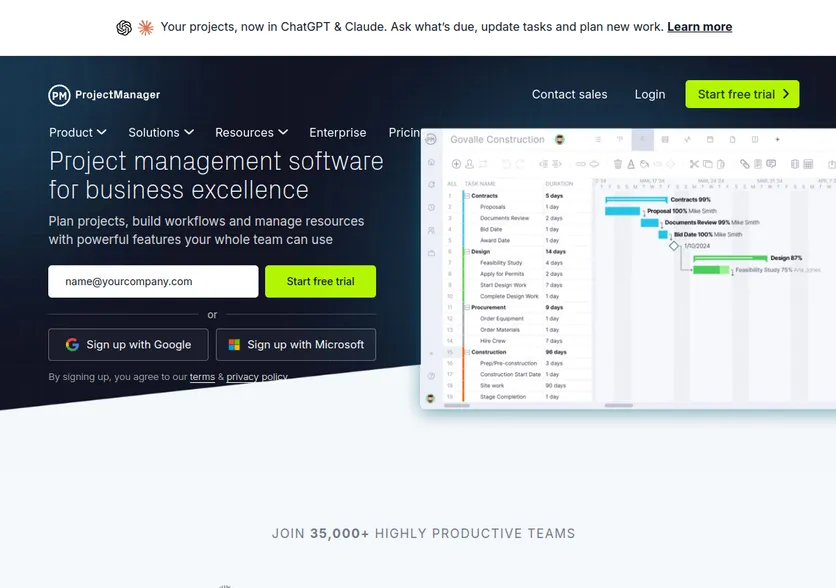
Paid tool Starting price: $15/user/month · Fifteen dollars a user a month on Team billed annually (eighteen dollars billed monthly) for up to ten users and twenty projects; Business is twenty-eight dollars (thirty-two dollars monthly); a fourteen dollar figure in one third-party read conflicts with the vendor pages and is disclosed here
Free plan: No free plan; 30-day free trial
An enterprise team that wants project dashboards built from live Gantt and workload data gets them here, because this ProjectManager plan costs fifteen dollars a user a month billed annually. It builds portfolio dashboards from schedules, baselines and workload, and the Business tier adds the full reporting set. The Team plan caps at ten users and twenty projects, so a large enterprise will need Business.
What we like
- Portfolio dashboards from live Gantt data
- Workload views across all projects
- Baselines and critical path built in
Watch out for
- Team caps at ten users and twenty projects
- A fourteen dollar figure in one read conflicts
How to try it
- Set up the projects with their baselines
- Build the portfolio dashboard
- Share it with stakeholders
2. Smartsheet
Best for: Enterprise teams building dashboards from familiar sheets
Paid tool Starting price: $9/member/month · Nine dollars a member a month on Pro billed annually (twelve dollars billed monthly) for one to ten members; Business is nineteen dollars (twenty-four dollars monthly); Enterprise and Advanced Work Management are quoted; the free plan is legacy and closed to new signups
Free plan: No free plan; 30-day free trial
An enterprise team that builds dashboards from sheets its people already use gets them here, because this Smartsheet plan costs nine dollars a member a month billed annually. It turns budget sheets into dashboards and reports, automates approvals and lets viewers read free. The Pro plan caps at ten members, so a large team will need Business or Enterprise.

What we like
- Dashboards built from live sheet data
- Approval automation beside the numbers
- Viewers and contributors are free
Watch out for
- Pro caps at ten members
- The free plan is legacy and closed to new signups
How to try it
- Build the data sheets with their formulas
- Add the dashboard widgets
- Share the dashboard with viewers
3. Wrike
Best for: Enterprise teams that want dashboards on structured work
Paid tool Starting price: $10/user/month · Ten dollars a user a month on Team billed annually for two to fifteen users, sold in seat blocks of five; Business is twenty-five dollars a user a month with a five-seat minimum; Pinnacle and Apex are quoted; a twenty-nine dollar Business figure in one older read is stale
Free plan: Free plan (200 active tasks)
An enterprise team that wants shareable dashboards on top of structured work gets them here, because this Wrike plan costs ten dollars a user a month billed annually. It covers interactive Gantt charts, dashboards and AI summaries, and the Business tier adds unlimited dashboards and shared spaces. Licenses are sold in seat blocks of five, so a team of six pays for ten seats.

What we like
- Shareable dashboards with AI summaries
- Interactive Gantt charts beside the numbers
- Free plan for up to two hundred tasks
Watch out for
- Licenses sell in seat blocks, not per person
- Team stops at fifteen users
How to try it
- Create the projects and their dashboards
- Add the widgets the team needs
- Share the dashboard link with stakeholders
4. Monday.com
Best for: Enterprise teams that want dashboards as visual boards
Paid tool Starting price: $9/seat/month · Nine dollars a seat a month on Basic billed annually (twelve dollars billed monthly) with a three-seat minimum; Standard is twelve dollars and Pro is nineteen dollars; Enterprise is quoted
Free plan: Free plan (up to 2 seats)
An enterprise team that wants dashboards as colorful boards anyone can read gets them here, because this Monday.com plan costs nine dollars a seat a month billed annually. It turns project data into boards, charts and timelines, and the Standard and Pro tiers add automations, integrations and time tracking. Paid plans start at three seats, so the smallest bill is twenty-seven dollars a month.

What we like
- Boards, charts and timelines anyone can read
- Automations and integrations from Standard
- Free plan for up to two seats
Watch out for
- Three-seat minimum on paid plans
- Enterprise pricing is quoted, not published
How to try it
- Build the boards with their data columns
- Add chart and timeline widgets
- Share the board with the team
5. Asana
Best for: Enterprise teams reporting through portfolios and goals
Paid tool Starting price: $10.99/user/month · Ten dollars and ninety-nine cents a user a month on Starter billed annually (thirteen dollars and forty-nine cents billed monthly); Advanced is twenty-four dollars and ninety-nine cents; Enterprise and Enterprise Plus are quoted; seats are sold in blocks above five users
Free plan: Free plan (Personal, up to 2 users)
An enterprise team that reports progress through portfolios and goals gets dashboards here, because this Asana plan costs ten dollars and ninety-nine cents a user a month billed annually. It builds dashboards from timelines, goals and workload, and the Advanced tier adds unlimited portfolios and native time tracking. Seats are sold in blocks above five users, so a team of six pays for ten seats.

What we like
- Dashboards from timelines, goals and workload
- Portfolios show the whole program at once
- Free Personal plan for two users
Watch out for
- Seats sell in blocks above five users
- Enterprise pricing is quoted, not published
How to try it
- Set up the portfolio with its goals
- Add the projects and their dashboards
- Review progress across the portfolio
6. ClickUp
Best for: Enterprise teams that want dashboards beside docs and tasks
Paid tool Starting price: $9/user/month · Nine dollars a user a month on Core billed annually (twelve dollars billed monthly); Business is seventeen dollars a user a month billed annually; Max is one hundred dollars; Enterprise is quoted
Free plan: Free plan (Free Forever)
An enterprise team that wants dashboards beside docs, tasks and goals gets them here, because this ClickUp plan costs nine dollars a user a month billed annually. It builds custom dashboards from tasks, time and goals, and the Business tier adds workload, time tracking and integrations. The free Forever plan covers unlimited members, so a team can build the dashboard at full size before paying.

What we like
- Custom dashboards from tasks, time and goals
- Free Forever plan with unlimited members
- Workload and time tracking on Business
Watch out for
- The breadth takes time to learn well
- Enterprise pricing is quoted, not published
How to try it
- Create the workspace and its projects
- Build the dashboard from live data
- Share it with the whole company
7. Databox
Best for: Enterprise teams pulling live metrics into one dashboard
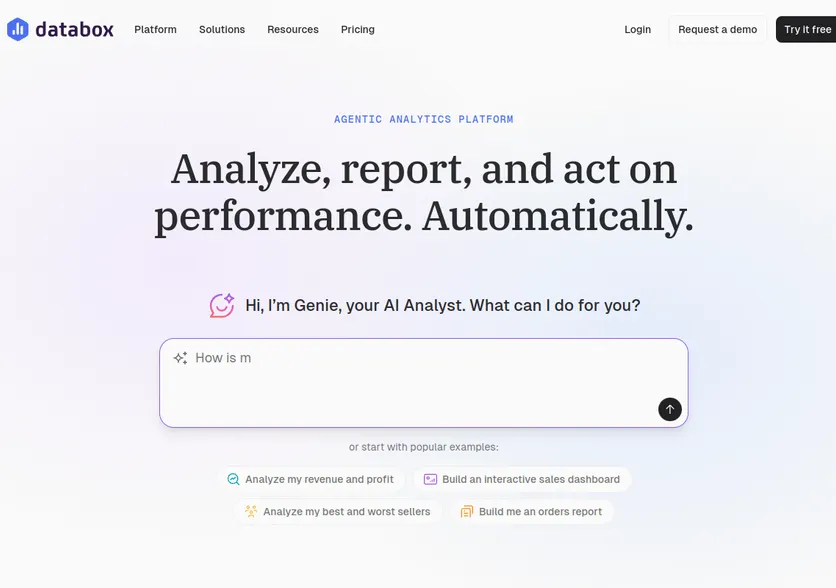
Paid tool Starting price: $64/month · Sixty-four dollars a month on Analyst billed annually (seventy-nine dollars billed monthly) for one user and five data sources; Pro is one hundred and fifty-nine dollars and Growth is three hundred and ninety-nine dollars; Premium is listed at seven hundred and ninety-nine dollars by some reads and as quoted by others; extra data sources are five dollars and sixty cents each
Free plan: Free plan (3 data sources)
An enterprise team that wants one dashboard fed by every tool it already uses gets it here, because this Databox plan costs sixty-four dollars a month billed annually. It pulls metrics from dozens of sources into live dashboards, with AI summaries and forecasting on the higher tiers. The price is per account, not per user, so the whole company can view the numbers.
What we like
- Live metrics from dozens of data sources
- Priced per account, not per user
- Free plan with three data sources
Watch out for
- Pro and Growth include only three sources each
- Premium is quoted by some reads, listed by others
How to try it
- Connect the data sources the team uses
- Build the dashboard from the metrics
- Share the live link with the company
8. Klipfolio
Best for: Enterprise teams putting KPI dashboards on office screens
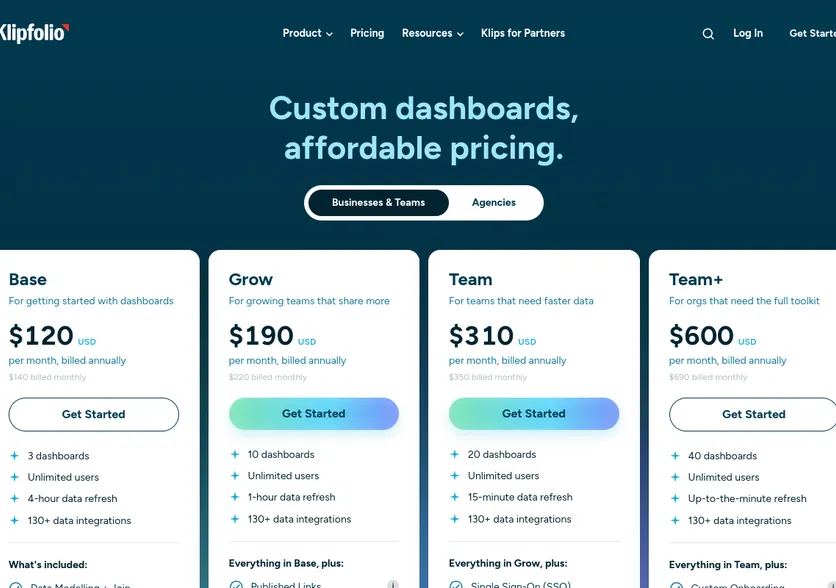
Paid tool Starting price: $120/month · One hundred and twenty dollars a month on Base billed annually (one hundred and forty dollars billed monthly) for three dashboards and unlimited users; Grow is one hundred and ninety dollars, Team is three hundred and ten dollars and Team Plus is six hundred dollars; a ninety dollar Base figure in some listings is stale
Free plan: No free plan; 14-day free trial
An enterprise team that wants KPI dashboards on office screens gets them here, because this Klipfolio plan costs one hundred and twenty dollars a month billed annually. It builds dashboards from more than one hundred and thirty integrations, refreshes them on a schedule and charges by dashboard count, not by user. Unlimited users on every plan means the whole company can view the boards.
What we like
- Dashboards from more than one hundred and thirty sources
- Unlimited users on every plan
- Refresh schedules from four hours to live
Watch out for
- No free plan, only a fourteen-day trial
- A ninety dollar Base figure in listings is stale
How to try it
- Connect the data sources the team uses
- Build the dashboard with its Klips
- Put the board on the office screen
9. Geckoboard
Best for: Enterprise teams showing live KPIs on office TVs
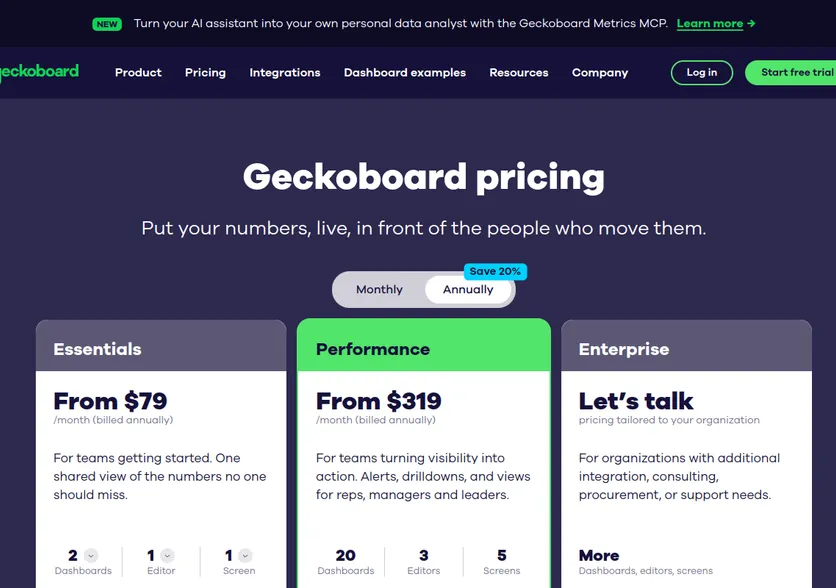
Paid tool Starting price: $79/month · Seventy-nine dollars a month on Essentials billed annually (ninety-nine dollars billed monthly) for two dashboards, one editor and one screen; Performance is three hundred and nineteen dollars; Enterprise is quoted; a thirty-five dollar Starter figure in older listings is stale
Free plan: No free plan; 14-day free trial
An enterprise team that wants simple KPI screens on the office TV gets them here, because this Geckoboard plan costs seventy-nine dollars a month billed annually. It shows live metrics on TVs, share links and Slack snapshots, with unlimited viewers on every plan. The Essentials plan covers two dashboards and one screen, so a team with more screens will add them at twenty dollars each.
What we like
- Live KPI screens on TVs and share links
- Unlimited viewers on every plan
- Snapshots to Slack, Teams and email
Watch out for
- Essentials covers only two dashboards
- A thirty-five dollar Starter figure is stale
How to try it
- Connect the data sources the team uses
- Build the two dashboards
- Send the board to the office TV
Prices above were checked on each vendor’s own website on Nov 28, 2026 and can change — the vendor’s page is the final word. Vendor links are editorial: nobody paid to be listed or ranked here. Vendors who want a featured listing can see how it works on our Get listed page.
How an enterprise team picks a dashboard people actually watch
Start with the numbers the executives already ask for, because a dashboard earns its keep by answering real questions, not by showing every metric available. Pick a tool whose trial covers a full reporting cycle, then build one live dashboard end to end before paying. Check how the tool charges, since per-user, per-dashboard and per-source pricing produce very different bills for the same company. Make sure the refresh rate matches the decision speed, because a board that updates every four hours cannot run a daily standup. Finally, confirm the dashboard can be shared as a link or a TV screen, because a dashboard locked behind logins will not reach the people who need it.
Before you buy
- Confirm how the tool charges, per user, per dashboard or per data source
- Check the refresh rate against how fast the team actually decides
- Ask if the dashboard can be shared as a link or shown on a TV screen
- Make sure the tool connects to the data sources the company already uses
- Build one live dashboard end to end on the trial before paying
Official websites
Official websites of the products reviewed above. Features and prices were checked against these sites when this guide was written, and they can change, so confirm on the vendor site before you buy.
Frequently asked questions
What is the best project dashboard software for enterprises?
Databox is the best overall pick for enterprises, at sixty-four dollars a month billed annually, because it pulls live metrics from dozens of sources into one dashboard. Klipfolio is the best pick for office wallboards at one hundred and twenty dollars a month with unlimited users. Smartsheet is the best pick for dashboards built from work data at nine dollars a member a month.
How much does Databox cost for an enterprise?
Databox costs sixty-four dollars a month on Analyst billed annually, or seventy-nine dollars billed monthly, for one user and five data sources. Pro is one hundred and fifty-nine dollars and Growth is three hundred and ninety-nine dollars a month billed annually. Premium is listed at seven hundred and ninety-nine dollars by some reads and as quoted by others, and extra sources cost five dollars and sixty cents each.
Is there a free project dashboard tool for enterprises?
There is no free enterprise dashboard tier among the main picks, but Databox offers a free plan with three data sources, ClickUp offers a Free Forever plan with unlimited members, and Wrike is free up to two hundred tasks. These free tiers cover a pilot dashboard, and an enterprise should compare the paid plans above for scale.
What is the difference between Databox and Klipfolio for dashboards?
Databox pulls live metrics from dozens of sources into dashboards priced per account, starting at sixty-four dollars a month, with AI summaries on higher tiers. Klipfolio builds KPI dashboards from more than one hundred and thirty integrations, priced by dashboard count from one hundred and twenty dollars a month with unlimited users. Choose Databox for analysis and Klipfolio for wallboards.
Do enterprises need project dashboard software?
An enterprise needs it once project status lives in separate tools and nobody can see the whole program at a glance. A dashboard pulls live numbers into one screen, so executives, managers and teams all work from the same truth. A team can pilot free on Databox or ClickUp and move to Klipfolio or Geckoboard for office screens.
Compare the nine tools above, then start with the free Databox plan or the free ClickUp plan on the tool that matches where the enterprise already keeps its project numbers before paying for a full year.
Browse Business Tools tools