On this page
A startup that sells client work needs more than a task list. It needs quotes, time tracking, budgets and invoices in one place, or the admin eats the profit. The best simple PSA software for a startup ties the work to the money without feeling like an enterprise system. We compared eight tools on price, free plans, billing features and how fast a young firm can set them up. Scoro came out first for its complete view of project finances, with Avaza and Productive close behind for firms on a tighter budget. Here is the full comparison.
How we researched this
We checked each vendor's own pricing page in November 2026 and took the entry paid plan as the headline price, with monthly figures noted beside annual billing. We weighed the free plan, whether the tool covers quotes, time, expenses and invoicing together, and how much setup a small firm needs before it pays off. Tools with no published price were left out, and every price below comes from the vendor's own site.
Compare the tools
| Name | Best for | Starting price | Free plan | |
|---|---|---|---|---|
 Scoro | Startups that need quotes, time and money together | $26/user/month | No free plan; 14-day free trial | Visit |
 BigTime | Startups that bill by accurate tracked hours | $20/user/month | No free plan; free trial | Visit |
 Avaza | Startups that need a full PSA on a tiny budget | $9.96/month | Free plan | Visit |
 Harvest | Startups that want simple time tracking and invoicing | $11/user/month | Free plan (1 seat, 2 projects) | Visit |
 Productive | Startups that want profit per project | $10/user/month | No free plan; 14-day free trial | Visit |
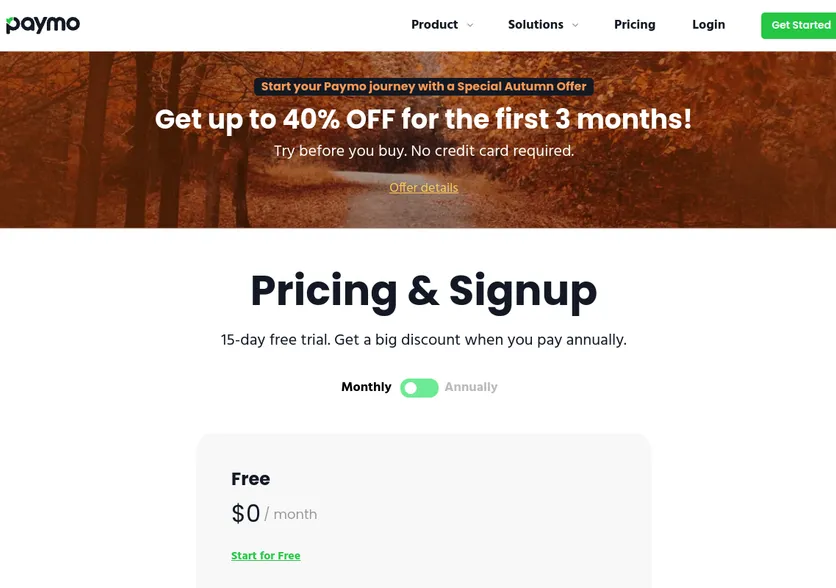
 Paymo | Startups that invoice by the hour | $5.90/user/month | Free plan | Visit |
 Teamwork | Startups whose work is mostly for clients | $9.99/user/month | Free plan | Visit |
 ClickUp | Startups that want a flexible all-in-one workspace | $9/user/month | Free Forever plan | Visit |
The 8 simple PSA tools for startups, compared
1. Scoro
Best for: Startups that need quotes, time and money together
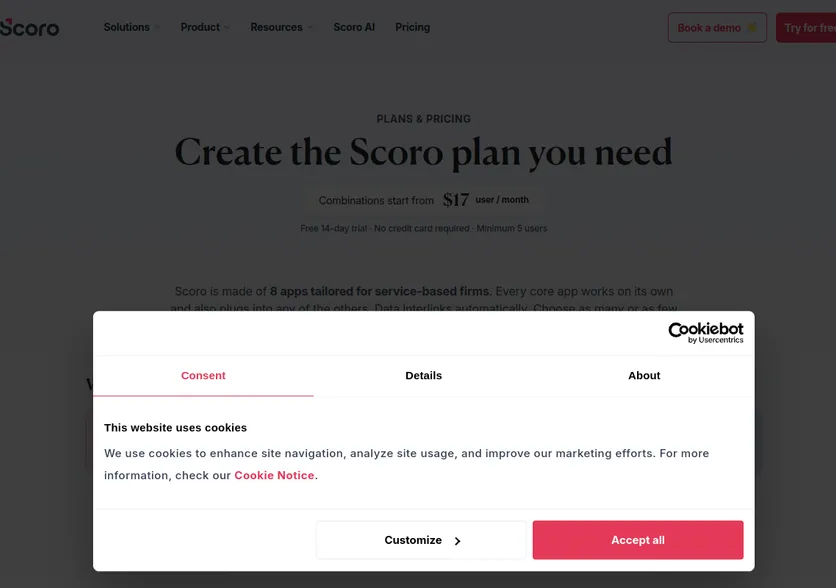
Paid tool Starting price: $26/user/month · Twenty-six dollars per user a month on Essential billed annually; Standard is thirty-seven dollars and Pro is sixty-three dollars billed annually, with a five-user minimum. Note: older reads list nineteen dollars and ninety cents, thirty-three dollars and ninety cents and fifty-five dollars and ninety cents, and the settled programme figure was twenty-nine dollar bundles; the November 2026 vendor-site reads agree on twenty-six, thirty-seven and sixty-three dollars. Reports of a new modular build-your-own plan from seventeen dollars a user a month could not be confirmed as list pricing
Free plan: No free plan; 14-day free trial
A startup that sells client work by the project needs one place for quotes, time and money, and this Scoro plan costs twenty-six dollars per user a month billed annually. Its pipeline, budgets and utilisation reports show whether a project actually makes money, and the fourteen-day trial lets a young firm test it on a live client before committing. It is the most complete PSA in this list for a startup that wants the finances beside the work.
What we like
- Pipeline, budgets and utilisation in one place
- Shows whether each project makes money
- Covers sales, delivery and billing together
Watch out for
- Five-user minimum makes it dear for a tiny team
- Setup takes real effort before it pays off
How to try it
- Create the first client project with a budget
- Log time against the project each day
- Check utilisation to see who has spare capacity
2. BigTime
Best for: Startups that bill by accurate tracked hours
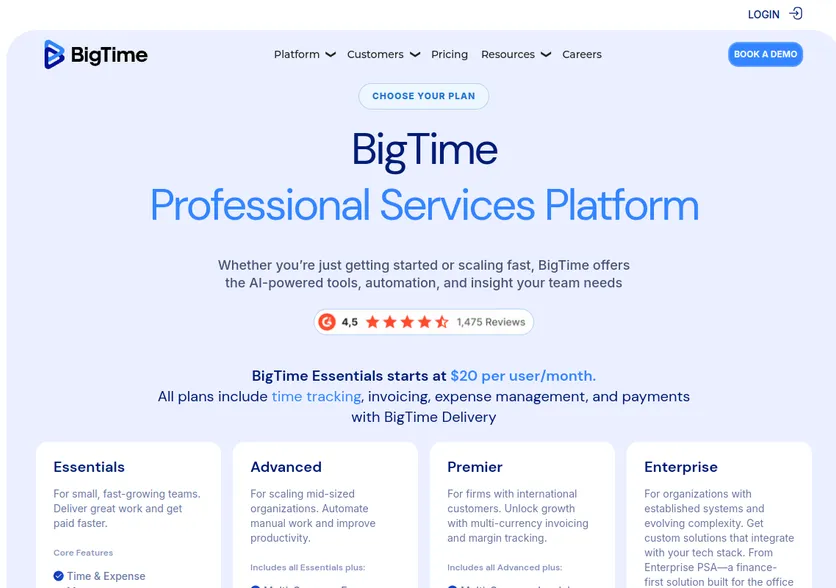
Paid tool Starting price: $20/user/month · Twenty dollars per user a month on Essentials; Advanced is thirty-five dollars and Premier is forty-five dollars; Foresight is quoted. Note: sources disagree on whether the list prices are billed monthly or annually, so the billing basis is not stated here
Free plan: No free plan; free trial
Time and billing are the heart of this tool, so this BigTime plan costs twenty dollars per user a month, and it turns tracked hours into invoices and project budgets without a second app. Its DCAA-compliant time tracking suits startups selling to government clients, and its expense capture keeps receipts beside the hours they belong to. It is the best pick here for a startup whose billing lives or dies by accurate hours.
What we like
- Hours become invoices without a second app
- Expense capture keeps receipts with the work
- DCAA-compliant tracking for government clients
Watch out for
- No free plan, only a free trial
- Project planning views are thinner than full PSA suites
How to try it
- Set up the first project with its budget
- Track time and expenses against it daily
- Generate the invoice from the tracked hours
3. Avaza
Best for: Startups that need a full PSA on a tiny budget
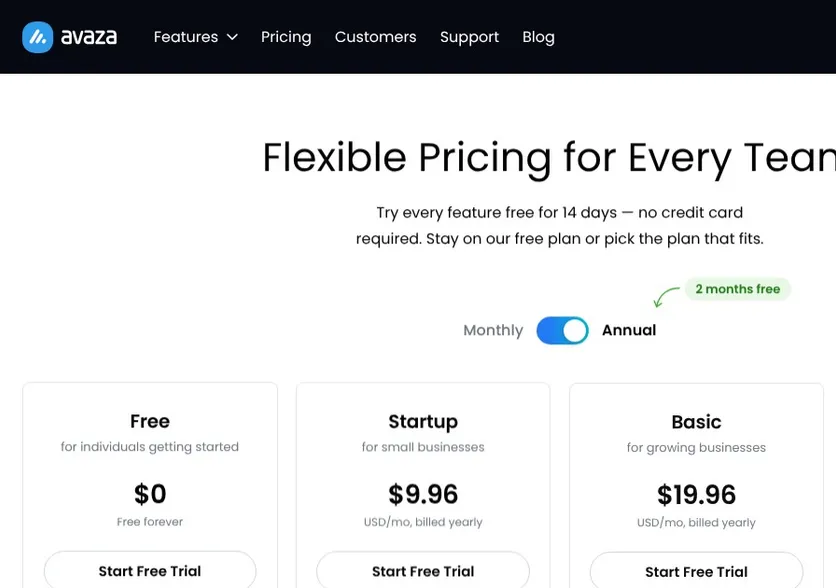
Paid tool Starting price: $9.96/month · Nine dollars and ninety-six cents a month on Startup billed annually (eleven dollars and ninety-five cents billed monthly), priced per account rather than per seat; Basic is nineteen dollars and ninety-six cents and Business is thirty-nine dollars and ninety-six cents billed annually; extra role seats cost seven dollars per user a month; a free plan is included
Free plan: Free plan
A startup on a tight budget gets a full PSA for the price of a lunch here, because this Avaza plan costs nine dollars and ninety-six cents a month billed annually, priced per account rather than per seat. Its project management, time tracking, expenses and invoicing cover the whole client workflow, and the free plan is genuinely usable for a solo founder. It is the cheapest PSA in this list by a wide margin.
What we like
- Priced per account, not per seat
- Projects, time, expenses and invoicing together
- Free plan that a solo founder can actually use
Watch out for
- Interface feels plainer than dearer rivals
- Advanced reporting needs the dearer plans
How to try it
- Create the first project with its tasks
- Track time and expenses as the work happens
- Send the invoice from inside the same app
4. Harvest
Best for: Startups that want simple time tracking and invoicing
Paid tool Starting price: $11/user/month · Eleven dollars per seat a month on Pro billed annually (thirteen dollars and seventy-five cents billed monthly); Premium is fourteen dollars billed annually; a free plan covers one seat and two projects. Note: one competitor page reports a new Teams plan from nine dollars a user a month with usage-based billing from August 2026; the vendor page lists Pro at eleven dollars
Free plan: Free plan (1 seat, 2 projects)
A startup that wants time tracking without the bloat will like this Harvest plan, which costs eleven dollars per seat a month billed annually. Its one-click timers, project budgets and simple invoices cover the essentials, and the free plan handles a solo founder with one seat and two projects. It is the simplest way here to turn hours into invoices.

What we like
- One-click timers that the team actually uses
- Project budgets that warn before they overrun
- Simple invoices from tracked time
Watch out for
- No full project management or CRM features
- The free plan is limited to one seat
How to try it
- Create a project with its hourly rate and budget
- Start the timer when work begins
- Send the invoice when the budget is reached
5. Productive
Best for: Startups that want profit per project
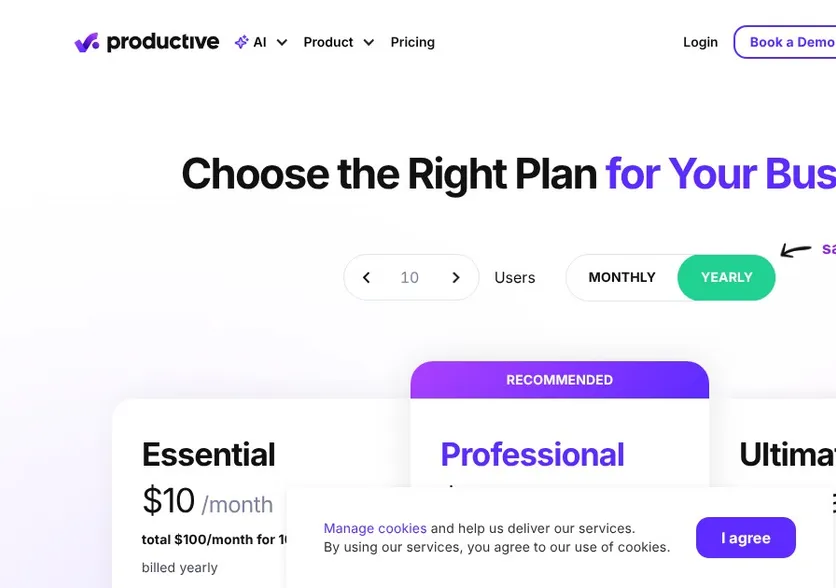
Paid tool Starting price: $10/user/month · Ten dollars per user a month on Essential billed annually (twelve dollars billed monthly); Professional is twenty-five dollars billed annually; Ultimate is quoted; a three-seat minimum applies
Free plan: No free plan; 14-day free trial
An agency-style startup gets a PSA built around profitability here, since this Productive plan costs ten dollars per user a month billed annually. Its budgets, resourcing and sales pipeline show the margin on every project, and the fourteen-day trial lets a team test it on real client work. It is the best pick here for a startup that wants to know its profit per project.
What we like
- Budgets and resourcing show the margin
- Sales pipeline beside delivery work
- Clean interface for agency-style teams
Watch out for
- Three-seat minimum, so solo founders pay extra
- No free plan, only a fourteen-day trial
How to try it
- Set up the first client project with a budget
- Assign the team and check resourcing
- Review the margin report at month end
6. Paymo
Best for: Startups that invoice by the hour
Paid tool Starting price: $5.90/user/month · Five dollars and ninety cents per user a month on Starter billed annually; Small Office is ten dollars and ninety cents and Business is sixteen dollars and ninety cents billed annually; a free plan is included
Free plan: Free plan
A startup that invoices by the hour needs its time and its billing in the same app, and this Paymo plan costs five dollars and ninety cents per user a month billed annually. Its task lists, time tracking and invoicing turn worked hours into a bill without exporting anything, and the free plan covers a solo founder getting started. It is the cheapest way in this list to run client work and billing together.
What we like
- Tasks, time tracking and invoicing together
- Worked hours become the invoice directly
- Cheapest paid plan in this list
Watch out for
- PSA features are lighter than Scoro or Productive
- No built-in sales pipeline
How to try it
- Create a project and set its hourly rate
- Track time against each task
- Generate the invoice from the tracked hours
7. Teamwork
Best for: Startups whose work is mostly for clients
Paid tool Starting price: $9.99/user/month · Nine dollars and ninety-nine cents per user a month on Basics billed annually; Accelerate is twenty-four dollars and ninety-nine cents billed annually; a free plan is included
Free plan: Free plan
Client delivery is what this tool is built for, and this Teamwork plan costs nine dollars and ninety-nine cents per user a month billed annually. Its tasks, milestones and time tracking keep client projects on schedule, and the free plan lets a founding team run its first client work before paying. It is the most client-focused PSA in this list for a startup finding its first customers.

What we like
- Tasks and milestones tied to client work
- Time tracking beside the delivery plan
- Free plan for the first client projects
Watch out for
- Financial reporting is lighter than Scoro
- Invoicing needs an integration
How to try it
- Set up a project for the first client
- Add milestones for the delivery dates
- Log time against tasks to track the cost
8. ClickUp
Best for: Startups that want a flexible all-in-one workspace
Paid tool Starting price: $9/user/month · Nine dollars per user a month on Core billed annually (twelve dollars billed monthly); Business is seventeen dollars billed annually; a free Forever plan is included
Free plan: Free Forever plan
A startup that wants its PSA to grow with it will find this ClickUp plan costs nine dollars per user a month billed annually, and it covers tasks, docs, goals and time tracking in one flexible workspace. Its custom views let a young team shape the tool around its own process instead of the other way round, and the free Forever plan is enough to start. It is the most flexible option here for a startup that does not yet know its final process.

What we like
- Tasks, docs, goals and time in one place
- Custom views shape the tool to the process
- Free Forever plan to start with
Watch out for
- The flexibility means real setup time
- PSA reporting needs the dearer Business plan
How to try it
- Create a space for the first client project
- Add docs, goals and time tracking to it
- Build a custom view for the weekly review
Prices above were checked on each vendor’s own website on Nov 28, 2026 and can change — the vendor’s page is the final word. Vendor links are editorial: nobody paid to be listed or ranked here. Vendors who want a featured listing can see how it works on our Get listed page.
How to pick the right PSA for your startup
Start with the money. A startup that bills by the hour needs time tracking and invoicing first, so Harvest or Paymo will cover the essentials for very little money. A startup that sells fixed-price projects needs budgets and utilisation reports, which is where Scoro and Productive earn their keep. Next, count the seats honestly. Most PSA tools here charge per user with a minimum, so a three-person firm can pay for five seats on Scoro or three on Productive. Avaza is the exception, because it charges per account, which makes it the cheapest option by a wide margin. Finally, test the tool on a real client project. A trial never shows the rough edges, but one live project will tell you whether the team actually logs time every day.
Before you buy
- Count the seats honestly, because a five-user minimum means a three-person firm pays for two empty seats.
- Match the tool to how you bill, since hourly work needs time tracking and fixed-price work needs budgets.
- Test the tool on a real client project during the trial, not on a demo.
- Confirm the annual price, because the monthly figure is always higher and the headline rarely says so.
- Check whether invoicing is included, because some tools here need an integration to send a bill.
Official websites
Official websites of the products reviewed above. Features and prices were checked against these sites when this guide was written, and they can change, so confirm on the vendor site before you buy.
Frequently asked questions
What is the cheapest PSA software for a startup?
Avaza is the cheapest by a wide margin at nine dollars and ninety-six cents a month billed annually, priced per account rather than per seat. Paymo is next at five dollars and ninety cents per user a month, though it is lighter on PSA features. Scoro is the dearest in this list, but its five-user minimum means the real floor is much higher than the headline price suggests.
Is there a free PSA tool for startups?
Yes. Avaza, Harvest, Teamwork and ClickUp all offer a free plan, though each one limits users, projects or features. Avaza's free plan is genuinely usable for a solo founder, while Harvest's covers one seat and two projects. Scoro, BigTime and Productive have no free plan, only a fourteen-day trial, so a startup on a tight budget should start with Avaza.
What is the difference between a PSA tool and project management software?
Project management software tracks tasks, owners and deadlines. A PSA tool adds the money side: quotes, time tracking, expenses, budgets and invoicing, so a firm can see whether each project actually makes a profit. A startup that sells its time should use a PSA tool, while a startup doing internal product work can manage with plain project management software.
Should a startup pay monthly or annually for PSA software?
Annual billing is cheaper on every tool in this list, usually by around twenty percent, so it pays off once the firm is settled. Monthly billing costs more but lets a startup leave after a month if the tool does not fit. The safe route is to use the free plan or trial first, then pay monthly for a month or two, and switch to annual billing once the team logs time every day.
Which PSA tool is best for a startup that bills by the hour?
Harvest is the simplest fit, because its one-click timers, project budgets and invoices cover the essentials without bloat. Paymo is nearly as simple and cheaper per seat, with task lists beside the time tracking. BigTime is the strongest choice for a startup selling to government clients, thanks to its DCAA-compliant time tracking, though it has no free plan.
Try Scoro free for fourteen days on a live client project, or compare the other tools in this list to find the PSA that fits how your startup bills.
Browse Business Tools tools