On this page
A Sitecore developer team needs more than good code. It needs one place for the code, the reviews and the decisions, or the work drifts apart. The best Sitecore developers software for remote teams is a set of tools that keeps the whole team pointed at the same release, and we compared eight of them on price, free plans and how well they fit a Sitecore workflow. GitHub came out first for its code platform that most Sitecore developers already use, with Slack and Figma close behind for the chat and the design handoff. Here is the full comparison.
How we researched this
We checked each vendor's own pricing page in November 2026 and took the entry paid plan as the headline price, with monthly figures noted beside annual billing. We weighed the free plan, how well the tool fits a Sitecore development workflow, and whether a distributed team can use it without extra admin. Sitecore itself is priced by custom quote, so it is not in this list, and every price below comes from the vendor's own site.
Compare the tools
| Name | Best for | Starting price | Free plan | |
|---|---|---|---|---|
 GitHub | Remote Sitecore teams that need code and reviews | $4/user/month | Free plan | Visit |
 GitLab | Remote teams that want DevOps in one place | $29/user/month | Free plan (up to 5 users) | Visit |
 Jira | Remote teams that plan Sitecore work in sprints | $9.70/user/month | Free plan (up to 10 users) | Visit |
 Confluence | Remote teams that must keep decisions written down | $7.15/user/month | Free plan (up to 10 users) | Visit |
 Slack | Remote teams that live in chat | $7.25/user/month | Free plan | Visit |
 Zoom | Remote teams that meet and demo often | $14.16/user/month | Free Basic plan | Visit |
 Notion | Remote teams that want docs and tasks together | $10/user/month | Free plan | Visit |
 Figma | Remote teams handing designs to developers | $16/user/month | Free Starter plan (3 design files) | Visit |
The 8 tools for remote Sitecore developer teams, compared
1. GitHub
Best for: Remote Sitecore teams that need code and reviews
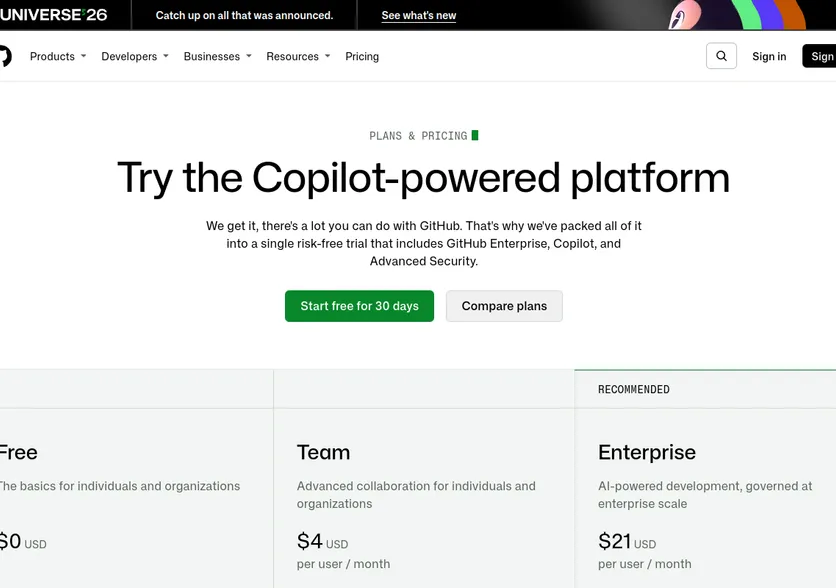
Paid tool Starting price: $4/user/month · Four dollars per user a month on Team; Enterprise Cloud is twenty-one dollars per user a month; the free plan covers unlimited private repositories with two thousand Actions minutes a month. Team includes three thousand Actions minutes and two gigabytes of Packages storage
Free plan: Free plan
A remote Sitecore team needs one place for code, reviews and automation, and this GitHub plan costs four dollars per user a month on Team. Its protected branches, required reviewers and code owners keep Sitecore solutions tidy across time zones, and the free plan covers unlimited private repositories for a team getting started. It is the cheapest code platform here, and the one most Sitecore developers already use.
What we like
- Protected branches and required reviewers
- Actions automation beside the code
- Cheapest paid plan in this list
Watch out for
- Sitecore-specific deployment needs extra setup
- Advanced security sits on Enterprise
How to try it
- Create the repository for the Sitecore solution
- Turn on branch protection and required reviewers
- Add an Actions workflow for builds
2. GitLab
Best for: Remote teams that want DevOps in one place
Paid tool Starting price: $29/user/month · Twenty-nine dollars per user a month on Premium billed annually; Ultimate is custom-quoted; the free tier is limited to five users per top-level group and includes four hundred compute minutes a month. Premium includes ten thousand compute minutes and five hundred gigabytes of storage
Free plan: Free plan (up to 5 users)
A remote Sitecore team that wants planning, CI and security in one tool will find this GitLab plan costs twenty-nine dollars per user a month billed annually on Premium. Its merge requests, pipelines and built-in scanning carry a Sitecore build from commit to deploy without a chain of tools, and the free tier covers five users for a small team. It is the most all-in-one DevOps platform here for a team that wants fewer tools.

What we like
- Planning, CI and security in one tool
- Ten thousand compute minutes a month
- Self-hosting option for strict clients
Watch out for
- Dearest code platform in this list
- Free tier is capped at five users
How to try it
- Create the project and import the Sitecore code
- Set up the pipeline for builds and tests
- Add the merge request rules for reviews
3. Jira
Best for: Remote teams that plan Sitecore work in sprints
Paid tool Starting price: $9.70/user/month · Nine dollars and seventy cents per user a month on Standard at the monthly list price (one to one hundred users); Premium is nineteen dollars and sixty cents; annual plans are sold in fixed tiers, starting at nine hundred and fifty dollars a year for up to ten users. The eight dollars and forty-eight cents figure seen in some listings is a derived blended figure, not the list price
Free plan: Free plan (up to 10 users)
A remote Sitecore team that tracks work in sprints will find this Jira plan costs nine dollars and seventy cents per user a month on Standard at the monthly list price. Its boards, backlogs and roadmaps keep distributed developers pointed at the same release, and the free plan covers ten users for a team starting out. It is the standard tracker here for a team that plans in sprints.

What we like
- Boards, backlogs and roadmaps together
- Standard tracker for agile teams
- Free plan for ten users
Watch out for
- Setup takes time before it feels simple
- Annual plans are sold in fixed tiers
How to try it
- Create the project and set up the board
- Add the backlog and plan the first sprint
- Link issues to the code in GitHub or GitLab
4. Confluence
Best for: Remote teams that must keep decisions written down
Paid tool Starting price: $7.15/user/month · Seven dollars and fifteen cents per user a month on Standard at the monthly list price (one to one hundred users); annual tiers start at seven hundred and twenty dollars a year for up to ten users; a free plan covers up to ten users
Free plan: Free plan (up to 10 users)
A remote Sitecore team that must keep its decisions written down will find this Confluence plan costs seven dollars and fifteen cents per user a month on Standard at the monthly list price. Its pages, templates and spaces hold architecture notes, runbooks and meeting records beside the Jira work, and the free plan covers ten users. It is the best pick here for a team that loses knowledge across time zones.

What we like
- Pages and templates for architecture notes
- Sits beside Jira work
- Free plan for ten users
Watch out for
- Needs discipline or pages go stale
- Search is weaker than dedicated wikis
How to try it
- Create a space for the Sitecore project
- Write the architecture decisions as pages
- Link the pages to the Jira epics
5. Slack
Best for: Remote teams that live in chat
Paid tool Starting price: $7.25/user/month · Seven dollars and twenty-five cents per user a month on Pro billed annually (eight dollars and seventy-five cents billed monthly); Business Plus is fifteen dollars billed annually; Enterprise Plus is quoted; a free plan is included. Note: a fifty percent off promotion for three months is running and is not the list price
Free plan: Free plan
A remote Sitecore team that lives in chat will find this Slack plan costs seven dollars and twenty-five cents per user a month billed annually on Pro. Its channels, huddles and integrations keep developers, testers and clients in one conversation, and the free plan covers the basics for a team trying it out. It is the default chat tool here for a team spread across time zones.

What we like
- Channels keep each project separate
- Huddles for quick voice chats
- Thousands of integrations
Watch out for
- Message history is capped at ninety days on free
- Channel sprawl needs real housekeeping
How to try it
- Create a channel for each Sitecore project
- Connect GitHub and Jira for alerts
- Set up a huddle for the daily standup
6. Zoom
Best for: Remote teams that meet and demo often
Paid tool Starting price: $14.16/user/month · Fourteen dollars and sixteen cents per user a month on Pro billed annually (sixteen dollars and ninety-nine cents billed monthly); Business is eighteen dollars and thirty-three cents billed annually; Enterprise is quoted; the free Basic plan caps group meetings at forty minutes. Note: the annual Pro price rose from thirteen dollars and thirty-three cents in March 2026, and older guides still list fourteen dollars and ninety-nine cents
Free plan: Free Basic plan
A remote Sitecore team that meets face to face will find this Zoom plan costs fourteen dollars and sixteen cents per user a month billed annually on Pro. Its thirty-hour meetings, cloud recording and AI Companion summaries keep standups, reviews and client demos running smoothly, and the free Basic plan covers short calls. It is the most reliable meeting tool here for a team that demos often.

What we like
- Thirty-hour meetings with cloud recording
- AI Companion summaries after each call
- Screen sharing for live demos
Watch out for
- Pro is limited to nine licences per account
- Only hosts need a licence, which confuses budgeting
How to try it
- Schedule the recurring standup meeting
- Record the demo for the client
- Share the AI summary after the call
7. Notion
Best for: Remote teams that want docs and tasks together
Paid tool Starting price: $10/user/month · Ten dollars per member a month on Plus billed annually (twelve dollars billed monthly); Business is twenty dollars billed annually; Enterprise is quoted; a free plan is included
Free plan: Free plan
A remote Sitecore team that keeps its docs and tasks together will find this Notion plan costs ten dollars per member a month billed annually on Plus. Its databases track tickets, decisions and release notes in one workspace, and the free plan is enough for a small team to run its whole operation. It is the most flexible workspace here for a team that hates scattered docs.

What we like
- One workspace for docs, notes and tasks
- Databases track tickets and decisions
- Free plan runs a whole small workspace
Watch out for
- Needs setup time before it feels like a tracker
- No built-in time tracking on Plus
How to try it
- Build a database for the Sitecore tickets
- Add views for board and calendar
- Link release notes to the ticket database
8. Figma
Best for: Remote teams handing designs to developers
Paid tool Starting price: $16/user/month · Sixteen dollars per Full seat a month on Professional billed annually (twenty dollars billed monthly); Dev seats are twelve dollars and Collab seats are three dollars billed annually; Organization is fifty-five dollars a seat a month; the free Starter plan caps at three design files. Note: Figma replaced per-product seats with unified Full, Dev and Collab seat types in March 2025
Free plan: Free Starter plan (3 design files)
A remote Sitecore team that hands designs to developers will find this Figma plan costs sixteen dollars per Full seat a month billed annually on Professional. Its browser-based canvas, shared libraries and Dev Mode let designers and developers work on the same file from anywhere, and viewers are free. It is the standard design handoff tool here for a team that builds Sitecore front ends.

What we like
- Shared libraries keep designs consistent
- Dev Mode for clean developer handoff
- Viewers and commenters are free
Watch out for
- Dev seats are a separate price from Full seats
- Branching needs the dearer Organization plan
How to try it
- Create the design file with the shared library
- Share it with developers as viewers
- Use Dev Mode to hand off the finished screens
Prices above were checked on each vendor’s own website on Nov 28, 2026 and can change — the vendor’s page is the final word. Vendor links are editorial: nobody paid to be listed or ranked here. Vendors who want a featured listing can see how it works on our Get listed page.
How to pick the right tools for your remote Sitecore team
Start with the code. A Sitecore team needs a code platform first, and GitHub is the cheapest and most familiar, while GitLab suits a team that wants planning, CI and security in one place. Next, sort the communication. Slack carries the daily chat, Zoom carries the meetings and demos, and Confluence carries the decisions that must outlive the chat. Finally, check the seat math. Figma charges by seat type, Zoom charges only for hosts, and GitLab caps its free tier at five users, so the cheapest headline price is not always the cheapest bill. Pick the tools the team already knows, because a remote team has no time to learn a new stack mid-project.
Before you buy
- Check the seat math before you buy, because seat types and host-only licences change the real bill.
- Pick tools the team already knows, since a remote team has no time to learn a new stack mid-project.
- Make sure decisions live in a document, not in chat, or knowledge will vanish across time zones.
- Test the free plan with the whole team for at least two weeks before you pay for anything.
- Confirm the annual price, because the monthly figure is always higher and the headline rarely says so.
Official websites
Official websites of the products reviewed above. Features and prices were checked against these sites when this guide was written, and they can change, so confirm on the vendor site before you buy.
Frequently asked questions
What is the cheapest tool for remote Sitecore developer teams?
GitHub is the cheapest paid plan in this list at four dollars per user a month on Team, with a free plan that covers unlimited private repositories. Confluence is next at seven dollars and fifteen cents per user a month, and Slack at seven dollars and twenty-five cents. GitLab is the dearest at twenty-nine dollars per user a month, though it replaces several tools at once.
Is there free software for remote Sitecore developer teams?
Yes. GitHub, GitLab, Jira, Confluence, Slack, Zoom, Notion and Figma all offer a free plan, though each one has limits on users, history or features. GitHub's free plan is the most generous, with unlimited private repositories, while GitLab's is capped at five users. The free tiers are a genuine way to run a small team before paying anything.
What is the difference between GitHub and GitLab for a Sitecore team?
GitHub is a code platform with reviews, automation and a huge community, and it is the tool most Sitecore developers already know. GitLab is a full DevOps platform that adds planning, CI pipelines and built-in security scanning in one place. A team that wants the simplest code workflow should pick GitHub, while a team that wants fewer tools overall should pick GitLab.
Do remote Sitecore teams need Jira and Confluence together?
Most do. Jira tracks the work in sprints, with boards, backlogs and roadmaps, while Confluence holds the decisions, architecture notes and runbooks beside it. The two are sold separately but designed to work together, and both offer a free plan for ten users. A team that already uses Notion for docs can skip Confluence, but it should still keep decisions in writing.
Which tools should a remote Sitecore team start with?
Start with GitHub for the code, Slack for the chat and Confluence for the decisions, because all three have free plans and cover the core of remote work. Add Jira once the team plans in sprints, Zoom once demos and client meetings grow, and Figma once designers hand off front ends. That stack costs little to start and grows with the team.
Try GitHub free with unlimited private repositories, or compare the other tools in this list to build the stack that fits how your remote Sitecore team works.
Browse Developer Tools tools