On this page
Remote teams market across time zones, which means the social calendar never sleeps and nobody is in the same room when a post goes wrong. The nine tools below give distributed teams shared calendars, async approvals, assignments and analytics, from a six-dollar-per-channel starter to a full suite. Buffer leads on value at six dollars per channel a month, and the rest are ranked on how well they keep a team spread across continents posting as one brand.
How we researched this
We checked every price on the vendor pricing page on November 28, 2026, and only included tools with a published US dollar list price. Quote-only enterprise platforms publish no prices, so they are not in this list. Prices change, so confirm the current figure on the vendor site before you buy.
Compare the tools
| Name | Best for | Starting price | Free plan | |
|---|---|---|---|---|
 Sprout Social | Distributed teams that need one source of truth | $79/seat/month | 30-day free trial | Visit |
 Hootsuite | Remote teams running ten accounts across time zones | $99/month | 30-day free trial | Visit |
 Buffer | Small remote teams that want the calendar to just work | $6/channel/month | Free plan (3 channels) | Visit |
 Later | Remote teams that plan the feed as a shared grid | $25/month | 14-day free trial | Visit |
 SocialPilot | Remote teams handling several brands across time zones | $30/month | 14-day free trial | Visit |
 Sendible | Remote agencies that need async client approvals | $29/month | 14-day free trial | Visit |
 Agorapulse | Distributed teams where social never closes | $79/user/month | 30-day free trial | Visit |
| CoSchedule | Remote teams that plan campaigns and social together | $29/month | Free plan | Visit |
| Planable | Remote teams that approve posts by preview, not spreadsheet | $33/month | Free trial (first 50 posts) | Visit |
The social media marketing software for remote teams, compared
1. Sprout Social
Best for: Distributed teams that need one source of truth
Paid tool Starting price: $79/seat/month · Seventy-nine dollars per seat a month on Essentials billed annually; $99 month to month; Standard is $199, Professional is $299 and Advanced is $399; social listening is a paid add-on with custom pricing, so confirm the total
Free plan: 30-day free trial
Distributed teams that need one source of truth for every post and reply will find it here, because this Sprout Social plan costs seventy-nine dollars per seat a month billed annually. The shared calendar, smart inbox and tasking work across time zones without a meeting, and approvals happen async in the tool. It is the most complete remote workflow in this list, at a per-seat price that follows headcount.

What we like
- Shared calendar and inbox work across time zones
- Async approvals need no meeting to publish
- Tasking keeps ownership clear without chat threads
Watch out for
- Listening is a paid add-on with custom pricing
- Per-seat pricing follows headcount as the team grows
How to try it
- Connect profiles and set up the shared calendar
- Assign tasks and turn on async approvals
- Review the team report across time zones weekly
2. Hootsuite
Best for: Remote teams running ten accounts across time zones
Paid tool Starting price: $99/month · Ninety-nine dollars a month on Professional billed annually for 1 user and 10 accounts; Team is $249 a month and Business is $739; no free plan since 2023; 30-day free trial
Free plan: 30-day free trial
Remote teams that run ten accounts from three continents need a dashboard that never sleeps, and this Hootsuite plan costs ninety-nine dollars a month billed annually for one user and ten accounts. Streams show every account at once, assignments hand work across time zones, and the Team tier adds the roles a distributed group needs. It suits remote teams that have outgrown a shared spreadsheet.

What we like
- Streams show every account at once, from anywhere
- Assignments hand work across time zones
- Team plans add the roles a distributed group needs
Watch out for
- No free plan, only a thirty-day trial
- One user on Professional, so teams need the Team tier
How to try it
- Connect all ten accounts to one dashboard
- Set up teams and assign streams by region
- Hand off the queue at the end of each shift
3. Buffer
Best for: Small remote teams that want the calendar to just work
Paid tool Starting price: $6/channel/month · Six dollars per channel a month on Essentials; $5 a month billed annually; Team is $12 a channel a month; free plan covers 3 channels; per-channel rate falls above 10 channels; prices last changed November 2025
Free plan: Free plan (3 channels)
A remote team of two or three that posts daily from different cities will get going fastest here, because this Buffer plan costs six dollars per channel a month. The queue is simple enough that nobody needs training, drafts and approvals work async, and the free plan covers three channels. It suits a small distributed team that wants the calendar to just work.

What we like
- Queue simple enough that nobody needs training
- Drafts and approvals work async across time zones
- Free plan covers three channels
Watch out for
- Approvals are lighter than on the dedicated team tools
- No listening features on any plan
How to try it
- Connect the team's channels to one queue
- Set up drafts and the approval step
- Fill the queue and hand off across time zones
4. Later
Best for: Remote teams that plan the feed as a shared grid
Paid tool Starting price: $25/month · Twenty-five dollars a month on Starter; $18.75 a month billed annually; Growth is $50 a month and Scale is $110; Starter covers 1 social set with up to 8 profiles and 30 posts per profile a month; no free plan per a November 20, 2026 re-check; 14-day free trial
Free plan: 14-day free trial
Remote teams that plan the feed as a grid will like the shared visual calendar here, because this Later plan costs twenty-five dollars a month for one social set with up to eight profiles. Everyone sees the same grid before anything posts, media libraries keep assets in one place, and approvals happen on the calendar itself. It suits a distributed team whose feed is its brand.

What we like
- Shared visual calendar everyone sees before posting
- Media library keeps team assets in one place
- Approvals happen on the calendar itself
Watch out for
- One social set on Starter, so more brands cost more
- No free plan, only a fourteen-day trial
How to try it
- Connect the eight profiles to one social set
- Build the shared visual calendar for the month
- Approve the grid async before the schedule runs
5. SocialPilot
Best for: Remote teams handling several brands across time zones
Paid tool Starting price: $30/month · Thirty dollars a month on Essentials; $25.50 a month billed annually; Standard is $50 a month and Premium is $100; Essentials covers 7 accounts and 1 user; a Black Friday promotion to $21 a month runs until December 18, 2026 and is not the list price; 14-day free trial
Free plan: 14-day free trial
A remote team that handles several brands from different time zones gets strong value here, because this SocialPilot plan costs thirty dollars a month for seven accounts and one user. The shared calendar, bulk scheduling and client approvals cover the daily workflow without a meeting, and white-labelled reports keep clients happy. It is the best multi-account remote tool in this list for the price.

What we like
- Seven accounts on the entry plan
- Bulk scheduling covers a whole month at once
- White-labelled reports for clients
Watch out for
- One user on Essentials, so teams pay for more seats
- A short promotion price is not the list price
How to try it
- Connect the seven accounts to one calendar
- Bulk-schedule the month and set up approvals
- Hand off the queue across time zones
6. Sendible
Best for: Remote agencies that need async client approvals
Paid tool Starting price: $29/month · Twenty-nine dollars a month on Creator billed monthly; $25 a month billed annually; Traction is $89 a month and Scale is $199; one source claims Creator was renamed to Core at $35 a user a month in August 2026, but most September to November 2026 reads show Creator at $29; confirm live
Free plan: 14-day free trial
Remote agencies that need clients to approve posts without a call will like this one, because this Sendible plan costs twenty-nine dollars a month for one user and six profiles. Approval workflows run async, the dashboard shows every client's queue at once, and scheduled reports go out without a meeting. It is the best agency-shaped remote tool in this list for the price.

What we like
- Approval workflows run async without a call
- Dashboard shows every client's queue at once
- Scheduled reports go out without a meeting
Watch out for
- One source claims the Creator plan was renamed and repriced
- One user on the entry plan, so teams pay more
How to try it
- Connect client profiles and set up approval workflows
- Build each client's calendar and send for approval
- Publish approved posts and report monthly
7. Agorapulse
Best for: Distributed teams where social never closes
Paid tool Starting price: $79/user/month · Seventy-nine dollars per user a month on Standard billed annually; $99 month to month; Professional is $119 a month billed annually and Advanced is $149; the free plan ended July 6, 2026; 30-day free trial
Free plan: 30-day free trial
Remote teams that answer customers around the clock need an inbox that never sleeps, and this Agorapulse plan costs seventy-nine dollars per user a month billed annually. The unified inbox assigns conversations across shifts, the shared calendar keeps the whole team aligned, and ten profiles come with every tier. It suits a distributed team where social never closes.

What we like
- Unified inbox assigns conversations across shifts
- Ten profiles included on every tier
- Shared calendar keeps the whole team aligned
Watch out for
- The free plan ended in July 2026
- Per-user pricing adds up for larger teams
How to try it
- Connect profiles and set up the unified inbox
- Assign conversations across shifts and time zones
- Review team response times weekly
8. CoSchedule
Best for: Remote teams that plan campaigns and social together
Paid tool Starting price: $29/month · Twenty-nine dollars a month on Starter billed annually; $39 month to month; Professional is $49 a month billed annually and Suite starts from $69 a month; free plan covers 1 profile and 15 scheduled posts; an October 14, 2026 read records the old per-user Marketing Calendar at $29 a user a month, superseded by the new plan-based pricing
Free plan: Free plan
Remote marketing teams that plan campaigns, not just posts, will like the calendar that holds both, because this CoSchedule plan costs twenty-nine dollars a month billed annually for one user and three profiles. Blog posts, social posts and campaigns share one calendar, so the team in one time zone can see what the team in another is launching. It is the best pick when social is part of a bigger marketing plan.

What we like
- One calendar holds blog posts, social and campaigns
- Three profiles on the entry plan
- Free plan to start with one profile
Watch out for
- One user on Starter, so teams pay for more seats
- The old per-user pricing still appears in some listings
How to try it
- Connect three profiles and build the marketing calendar
- Plan campaigns with social posts attached
- Share the calendar with the whole remote team
9. Planable
Best for: Remote teams that approve posts by preview, not spreadsheet
Paid tool Starting price: $33/month · Thirty-three dollars a month on Basic billed annually; $39 month to month; Pro is $49 a month billed annually; Basic covers 4 pages, 60 posts a month and unlimited users; analytics and inbox are paid add-ons; plans repriced October 31, 2026, when Basic rose from $13 a month
Free plan: Free trial (first 50 posts)
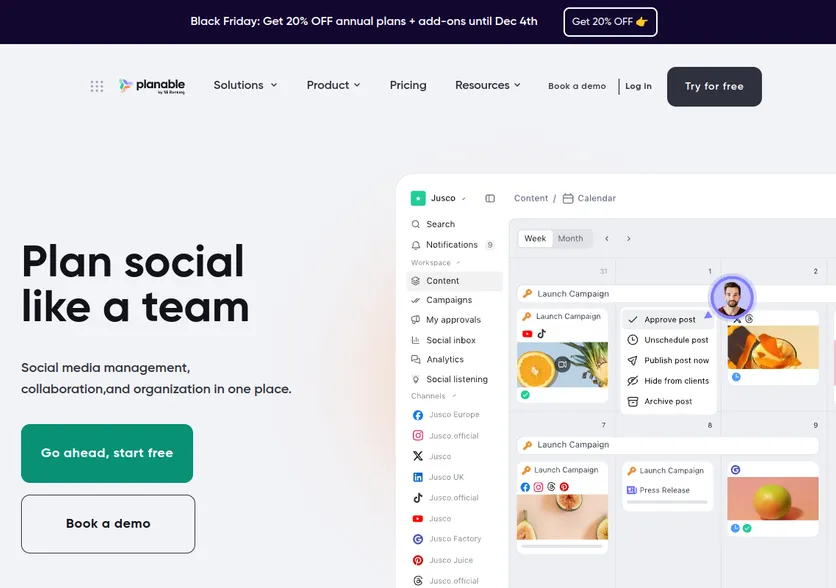
Remote teams that approve posts by looking at them, not by reading a spreadsheet, will love this one, because this Planable plan costs thirty-three dollars a month billed annually for four pages and sixty posts a month. Unlimited users can comment and approve for free, and the preview shows each post exactly as followers will see it. It is the best async approval tool in this list for a distributed team.
What we like
- Unlimited users can comment and approve for free
- Previews show each post exactly as followers see it
- Four pages and sixty posts a month on Basic
Watch out for
- Analytics and inbox are paid add-ons
- Plans repriced in October 2026, with Basic up from thirteen dollars
How to try it
- Connect four pages and invite the whole team free
- Draft posts and collect comments async
- Approve the preview and schedule the month
Prices above were checked on each vendor’s own website on Nov 28, 2026 and can change — the vendor’s page is the final word. Vendor links are editorial: nobody paid to be listed or ranked here. Vendors who want a featured listing can see how it works on our Get listed page.
How to market as one team across five time zones
Write the handoff into the calendar, not into a chat thread, because the teammate waking up in another time zone needs to see what is posting, what is approved and what is stuck without asking anyone. Approve async and in writing, so a post is never held up waiting for a meeting that spans three continents. Keep one shared inbox for replies, since a customer should never get two answers from two shifts. Review the week together once, at a time that is fair to everyone, and let the tool carry the rest.
Before you buy
- Confirm the tool supports async approvals, since a remote team cannot wait for a meeting to publish
- Check how many users the entry plan allows, because some tools charge per seat and others do not
- Ask whether the calendar shows all time zones clearly, since a post timed wrong is a post wasted
- Test the shared inbox handoff between shifts before buying, because replies must not double up
- Make sure the tool covers every network the team posts to, not just the famous ones
Official websites
Official websites of the products reviewed above. Features and prices were checked against these sites when this guide was written, and they can change, so confirm on the vendor site before you buy.
Frequently asked questions
What is social media marketing software for remote teams?
It is software that lets a team spread across locations and time zones plan, approve, schedule and publish social marketing from one shared calendar. It adds async approvals, assignments, a shared inbox and analytics, so the team in one time zone can hand work to the team in another without a meeting. Good tools keep the brand consistent while nobody shares an office.
How much does social media marketing software cost for a remote team?
Prices in this list run from six dollars per channel a month for Buffer to ninety-nine dollars a month for Hootsuite Professional. Most tools start between twenty-five and thirty-three dollars a month, with per-user pricing on Sprout Social and Agorapulse and unlimited users on Planable. A remote team should check the user limits first, since per-seat pricing can dwarf the headline price.
How do remote teams approve social posts without meetings?
They use approval workflows built into the tool, where a writer drafts a post, a reviewer comments or approves it in writing, and the post publishes on schedule without anyone meeting. Planable is built for exactly this, with unlimited users commenting and approving for free, and Loomly, Sendible and Sprout Social all offer the same flow. The key is that approval happens in the tool, not in a chat thread.
Which tool is best for a remote team on a budget?
Buffer is the cheapest honest start at six dollars per channel a month with a free plan for three channels, and it suits a small remote team best. Planable is the best pick when the team needs async approvals, at thirty-three dollars a month with unlimited users. SocialPilot is the best value for a team handling several brands, at thirty dollars a month for seven accounts.
Which social media marketing tool is best for a remote team?
Planable leads for async approvals at thirty-three dollars a month with unlimited users, which is the feature remote teams feel most. CoSchedule is the best pick when social is part of a bigger marketing calendar, from twenty-nine dollars a month. Sprout Social is the most complete remote workflow, from seventy-nine dollars a seat a month, for teams that can pay for it.
Compare the nine tools above, then start with a free plan or trial on the one that fits how the team actually works across time zones, and write the handoff into the calendar.
Browse Social Media Tools tools