On this page
Support work is chat under pressure: a customer waiting, a queue growing, a teammate with the answer. The eight tools below cover that job for support teams of every size, from a free workspace for a three-person desk to an omnichannel inbox that pulls every channel into one queue. Slack leads because support teams already know it, and its channels and integrations cost seven dollars and twenty-five cents per user a month, while the rest are ranked on how fast they get a customer an answer.
How we researched this
We checked every price on the vendor pricing page on November 29, 2026, and only included tools with a published dollar list price. Twist is left out because its maker is closing it in March 2027, and Zoho Cliq is left out because its published prices disagree across sources. Prices change, so confirm the current figure before you buy.
Compare the tools
| Name | Best for | Starting price | Free plan | |
|---|---|---|---|---|
 Slack | Support teams that already use Slack | $7.25/user/month | Free plan (limited message history) | Visit |
 Pumble | Support desks that want free unlimited chat | $2.49/seat/month | Free plan with unlimited users and message history | Visit |
 Rocket.Chat | Support teams that answer many channels | $8/user/month | Free self-hosted Community Edition | Visit |
 Chanty | Small support desks that want chat plus tasks | $3/user/month | Free plan for up to 5 members | Visit |
 Microsoft Teams | Support teams already on Microsoft 365 | $4/user/month | Free plan (limited meetings and chat) | Visit |
 Flock | Support desks that want light chat | $4.50/user/month | Free plan (Starter, up to 20 members) | Visit |
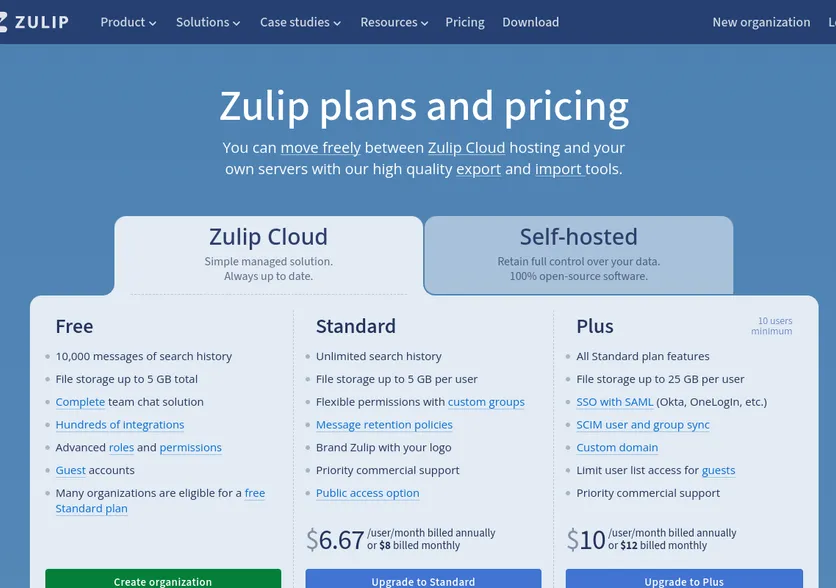
 Zulip | Support desks that need one thread per issue | $6.67/user/month | Free plan on Zulip Cloud; self-hosting free | Visit |
 Google Chat | Support teams already on Google Workspace | $7/user/month | Free with a personal Google account; paid plans start at seven dollars per user a month | Visit |
The team messaging software for customer support teams, compared
1. Slack
Best for: Support teams that already use Slack
Paid tool Starting price: $7.25/user/month · Seven dollars and twenty-five cents per user a month billed annually ($8.75 billed monthly); Business Plus is $15 per user a month billed annually; Enterprise Grid is quoted
Free plan: Free plan (limited message history)
Support teams already live in this app, which is why it leads here, since this Slack plan costs seven dollars and twenty-five cents per user a month billed annually, and it keeps channels and file sharing in one searchable place. A channel per queue keeps the work visible, huddles give agents a quick voice room for a hard case, and the app directory connects the helpdesk and CRM the team already uses. The per-user price climbs with headcount, so count agents and leads before signing up.

What we like
- Channels keep every project conversation in one searchable place
- Thousands of integrations connect the apps a team already uses
- Huddles and clips make quick voice and video check-ins easy
Watch out for
- Message history and storage are capped on the free plan
- Costs climb fast as headcount grows on per-user billing
How to try it
- Create a channel for each project or team and invite the people on it
- Connect the apps the team already uses from the app directory
- Pin the key files and decisions so new joiners catch up fast
2. Pumble
Best for: Support desks that want free unlimited chat
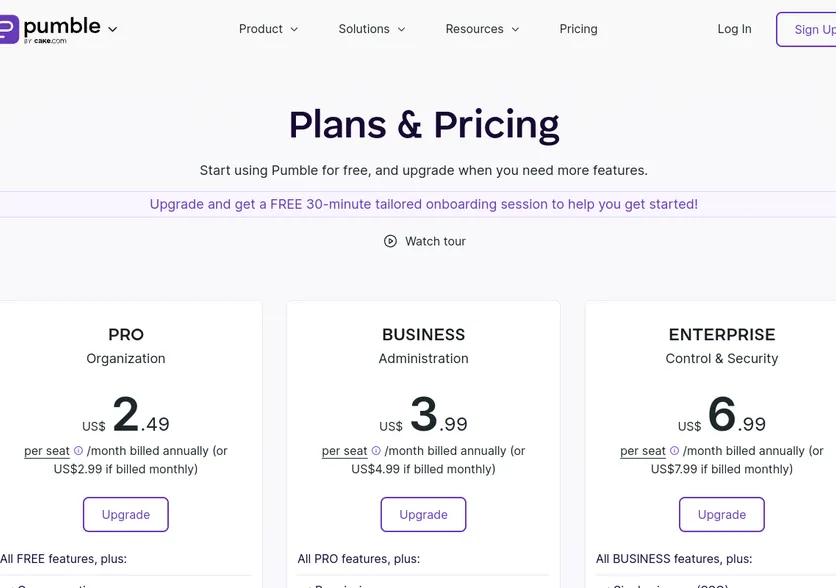
Paid tool Starting price: $2.49/seat/month · Two dollars and forty-nine cents per seat a month billed annually on Pro ($2.99 billed monthly); Business is $3.99 ($4.99 billed monthly) and Enterprise is $6.99 ($7.99 billed monthly)
Free plan: Free plan with unlimited users and message history
A support desk that wants unlimited users and history without a bill starts here, because this Pumble plan costs two dollars and forty-nine cents per seat a month billed annually, and the free plan already covers both. Channels, threads and calls cover everyday support chat, and the interface is clean enough for a new agent to learn in an afternoon. It has no omnichannel inbox, so a desk that answers customers across many channels will outgrow it sooner.
What we like
- Unlimited users and message history even on the free plan
- Channels threads and calls cover everyday team chat
- The interface is clean and quick to learn
Watch out for
- Integrations are fewer than Slack or Teams offer
- Admin controls are basic on the lower tiers
How to try it
- Create a workspace and invite the whole agency for free
- Set up a channel per client and one per internal team
- Use threads to keep client discussions from tangling
3. Rocket.Chat
Best for: Support teams that answer many channels
Paid tool Starting price: $8/user/month · Eight dollars per user a month billed annually on Pro; the figure is listed as uncertain in the brief, so confirm it on the vendor page; the Community Edition is free and self-hosted for up to fifty users
Free plan: Free self-hosted Community Edition
When customers write in from the website, email and social at once, this Rocket.Chat plan costs eight dollars per user a month billed annually, and it pulls every message into one queue the team works through together. Live chat widgets drop onto any website in minutes, and the self-hosted Community Edition is free for a team that must keep conversations on its own servers. It is the only true support queue here, which is why it earns its place despite a busier interface.
What we like
- Omnichannel inbox pulls chat email and social into one queue
- Self-hosting keeps support conversations on the team's servers
- Live chat widgets drop onto any website in minutes
Watch out for
- The interface feels busier than simpler chat tools
- Some advanced features need the paid plans
How to try it
- Install the server or start a cloud workspace
- Connect the website live chat widget to one channel
- Set up the omnichannel queue and assign agents to it
4. Chanty
Best for: Small support desks that want chat plus tasks
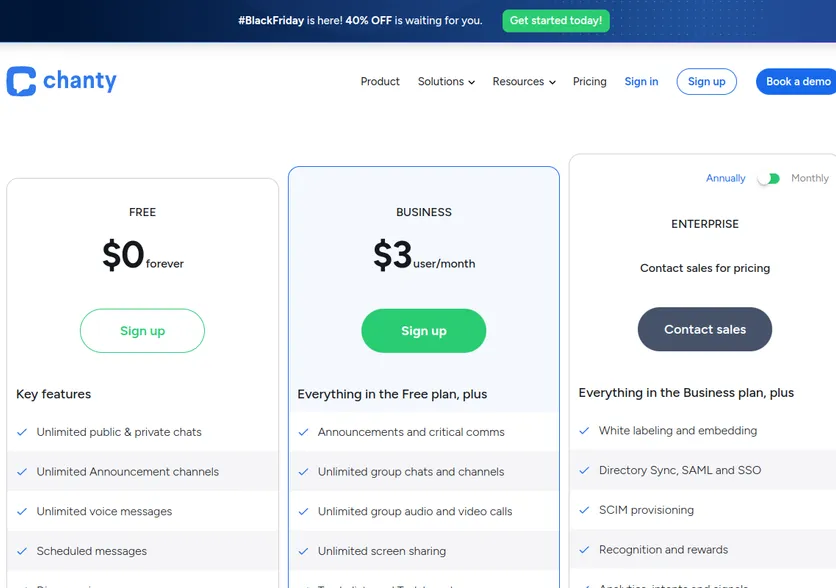
Paid tool Starting price: $3/user/month · Three dollars per user a month billed annually on Business ($4 billed monthly); the free plan covers up to five members; Enterprise is quoted
Free plan: Free plan for up to 5 members
A small support desk that wants chat, tasks and calls in one window finds it here, because this Chanty plan costs three dollars per user a month billed annually, and it covers the daily work without a maze of settings. The free plan covers up to five members, audio and video calls start from any conversation, and messages turn into tasks with owners and due dates. It suits a desk of two or three agents better than a large team with complex routing needs.
What we like
- Chat tasks and calls live in one simple window
- The free plan covers a small team without a card
- Audio and video calls start from any conversation
Watch out for
- Integrations are fewer than the big chat platforms offer
- Search and history limits show on the free plan
How to try it
- Create a team and add a channel per client
- Turn messages into tasks with owners and due dates
- Start a call from the channel when text stops being enough
5. Microsoft Teams
Best for: Support teams already on Microsoft 365
Paid tool Starting price: $4/user/month · Four dollars per user a month billed annually on Teams Essentials; the monthly figure is reported as four dollars and eighty cents in one November 2026 read and four dollars and fifty cents in another, so confirm it at checkout; Teams is also included in the Microsoft 365 Business plans
Free plan: Free plan (limited meetings and chat)
A support team that already lives in the Microsoft suite gets its chat here, since this Microsoft Teams plan costs four dollars per user a month billed annually, and it puts chat, meetings and files where the team already works. Channels keep the support queue separate from internal talk, and recording and transcription are built into every meeting. It is the cheapest paid option here, though a desk that needs an omnichannel inbox should look at Rocket.Chat.

What we like
- Chat meetings and files sit in the same Microsoft home
- Channels keep client work separate from internal talk
- Recording and transcription are built into every meeting
Watch out for
- The interface can feel crowded with many teams and channels
- Some admin controls need the wider Microsoft 365 plans
How to try it
- Create a team per client and a channel per workstream
- Add the shared files to the channel so nothing lives in email
- Schedule recurring meetings from inside the channel
6. Flock
Best for: Support desks that want light chat
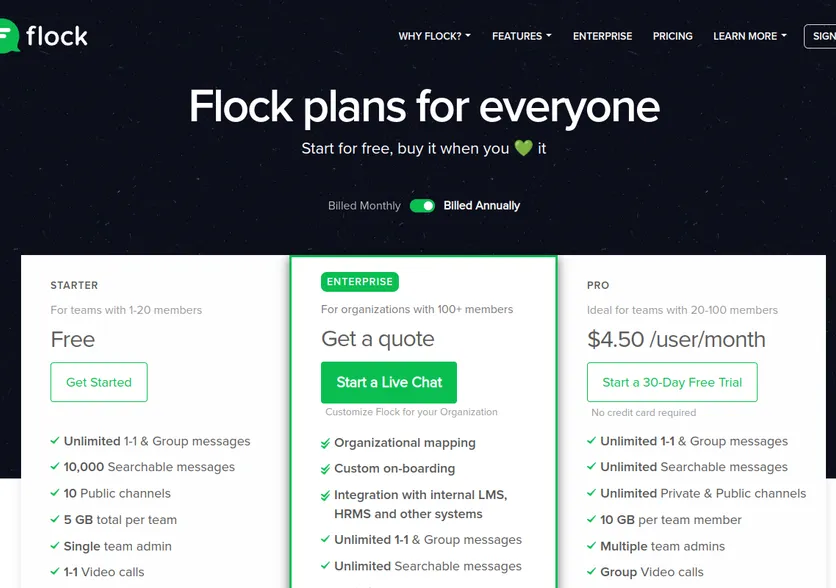
Paid tool Starting price: $4.50/user/month · Four dollars and fifty cents per user a month billed annually on Pro, aimed at teams of twenty to one hundred members; the free Starter plan covers up to twenty members with ten thousand searchable messages; one older live post lists the free cap as ten users
Free plan: Free plan (Starter, up to 20 members)
Support teams that want a light chat app with polls and reminders built in find it here, because this Flock plan costs four dollars and fifty cents per user a month billed annually, and it covers channels, video calls and to-dos. The free Starter plan covers up to twenty members, so a small desk can run support chat for nothing while it grows. It lacks the deep integrations of the bigger apps, which matters once the desk connects a helpdesk and a CRM.
What we like
- Channels polls and reminders cover daily team chat
- Video and audio calls start inside any conversation
- The free plan suits a small team getting started
Watch out for
- The app ecosystem is smaller than the leading chat tools
- Some teams find the interface less polished than rivals
How to try it
- Create a team and add channels for each client
- Use polls to settle small decisions without a meeting
- Add the to-do app to track follow-ups inside chat
7. Zulip
Best for: Support desks that need one thread per issue
Paid tool Starting price: $6.67/user/month · Six dollars and sixty-seven cents per user a month billed annually on Cloud Standard ($8 billed monthly); Plus is $10 per user a month billed annually ($12 billed monthly) with a ten-user minimum; the free Cloud plan keeps ten thousand searchable messages
Free plan: Free plan on Zulip Cloud; self-hosting free
Support teams that lose threads in busy channels will like the topic model here, since this Zulip plan costs six dollars and sixty-seven cents per user a month billed annually, and every channel splits into topics that keep each issue separate. One thread per issue means no customer repeats the story, and search finds any past answer in seconds. The model takes a day or two to learn, but a desk that handles many issues will feel the difference within a week.
What we like
- Topics keep every thread separate inside a channel
- Open source code can be self-hosted for full control
- Keyboard shortcuts make power users fast
Watch out for
- The topic model takes new users a day or two to learn
- The mobile app is functional rather than polished
How to try it
- Create a stream per client and topics per work item
- Teach the team to reply in topics so threads stay separate
- Star the key messages and check the unread view daily
8. Google Chat
Best for: Support teams already on Google Workspace
Paid tool Starting price: $7/user/month · Seven dollars per user a month billed annually on Google Workspace Business Starter ($8.40 billed monthly); Standard is $14 and Plus is $22 per user a month billed annually
Free plan: Free with a personal Google account; paid plans start at seven dollars per user a month
A support team on Google Workspace gets its messaging here, since this Google Chat plan costs seven dollars per user a month billed annually, and it sits beside Gmail and Drive in the same account. Spaces group messages, files and tasks per queue or product, and search across Gmail, Drive and Chat finds any past answer fast. Video calls open in Meet with one click, which suits a desk that escalates hard cases to a call.
What we like
- Spaces group messages files and tasks per client or project
- Search across Gmail Drive and Chat finds anything fast
- Video calls open in Meet with one click from any message
Watch out for
- Threading is lighter than dedicated chat apps offer
- Admin controls are thinner than enterprise chat platforms
How to try it
- Create a space for each client and invite the delivery team
- Pin the brief and key files at the top of the space
- Assign tasks inside the space so follow-ups stay visible
Prices above were checked on each vendor’s own website on Nov 29, 2026 and can change — the vendor’s page is the final word. Vendor links are editorial: nobody paid to be listed or ranked here. Vendors who want a featured listing can see how it works on our Get listed page.
How a support team keeps chat fast without losing the customer
Give the queue a home of its own, separate from internal chatter, because an agent who hunts for the thread answers late. Write the common answers down once where every agent can paste them in seconds, and pin the escalation path at the top so nobody guesses who handles a hard case. Hand over a conversation with a short note, never a bare forward, so the customer does not repeat the whole story. Each week, read the slowest threads together and fix the answer, the routing or the staffing that caused the delay.
Before you buy
- Give the support queue its own channel, separate from internal chat
- Check whether customers can reach the team by chat, email and social in one inbox
- Make sure agents can hand a conversation over with a note, not a bare forward
- Test the mobile app, because support leads answer urgent threads away from desks
- Confirm the tool keeps a searchable history long enough to review old tickets
Official websites
Official websites of the products reviewed above. Features and prices were checked against these sites when this guide was written, and they can change, so confirm on the vendor site before you buy.
Frequently asked questions
What is the best messaging software for a support team?
Slack is the best overall pick for a support team, at seven dollars and twenty-five cents per user a month on Pro, because teams already know it. Rocket.Chat is the best pick when support needs an omnichannel queue, at eight dollars per user a month on Pro. Pumble is the best value, with unlimited users and message history free and Pro from two dollars and forty-nine cents a seat a month.
Can a support team use messaging software for free?
Yes, Pumble offers unlimited users and history free, Chanty covers up to five members free, and Slack offers a free plan with limited history. Rocket.Chat offers a free self-hosted Community Edition, and Zulip offers a free Cloud plan. A small support desk can run on a free plan, though history limits and queue features are the usual reason to start paying.
How is Rocket.Chat different from Slack for support?
Rocket.Chat is built for support queues, with an omnichannel inbox that pulls website chat, email and social messages into one place. Slack is built for team chat, with channels and integrations that suit internal coordination. A support team that answers customers across many channels should pick Rocket.Chat, while a team that mostly coordinates internally should pick Slack.
Do support teams need a separate channel per customer issue?
A separate thread per issue is the cleaner pattern, and Zulip enforces it best by splitting every channel into topics. Slack and Pumble support threads inside channels, which works when agents use them consistently. The rule that matters is one thread per customer issue, with the handover note attached, so no customer ever repeats the whole story to a second agent.
What is the cheapest messaging tool for support teams?
Pumble is the cheapest route, with unlimited users and message history free and Pro from two dollars and forty-nine cents a seat a month. Chanty follows at three dollars per user a month on Business, with a free plan for up to five members. Microsoft Teams Essentials costs four dollars per user a month and suits a support team already on Microsoft 365, while Rocket.Chat at eight dollars is the cheapest true omnichannel option here.
Compare the eight tools above, then start with a free trial or the free plan on the tool that matches how the support team already answers customers.
Browse Business Tools tools