On this page
Nonprofit teams answer to donors and grant makers for every hour, so timesheets have to be exact, cheap and easy enough that staff actually fill them in. The eight tools below cover that job for organisations of every size, from a free plan that handles a tiny team to a full operations app for field workers. TimeCamp leads because it starts at three dollars and ninety-nine cents per user a month with a free plan for unlimited users, and the rest are ranked on how well they turn tracked hours into grant-ready reports.
How we researched this
We checked every price on the vendor pricing page on November 29, 2026, and only included tools with a published US dollar list price. The big enterprise workforce suites that sell by quote, including ADP Workforce Now, Workday and UKG, publish no prices, so they are not in this list. Prices change, so confirm the current figure on the vendor site before you buy.
Compare the tools
| Name | Best for | Starting price | Free plan | |
|---|---|---|---|---|
 TimeCamp | Nonprofits that want automatic tracking on a tiny budget | $3.99/user/month | Free plan (unlimited users and projects) | Visit |
 Clockify | Nonprofits that invoice funders for exact hours | $5.49/seat/month | Free plan (up to 5 users) | Visit |
 Toggl Track | Nonprofits with staff split across several programmes | $9/user/month | Free plan (up to 3 users) | Visit |
 Harvest | Nonprofits that invoice funders for time and expenses | $9/seat/month | Free plan (1 seat, 2 projects) | Visit |
 Deputy | Nonprofits scheduling volunteers beside paid staff | $5/user/month | No free plan; 14-day free trial | Visit |
 Sling | Small nonprofits that want the cheapest time clock | $1.70/user/month | Free plan (up to 30 users, scheduling only) | Visit |
 Homebase | Nonprofits working from a single location | $24/location/month | Free plan (1 location, up to 10 employees) | Visit |
 Connecteam | Nonprofits mixing field workers and office staff | $29/month | Free plan (up to 10 users, all hubs) | Visit |
The timesheet software for nonprofits, compared
1. TimeCamp
Best for: Nonprofits that want automatic tracking on a tiny budget
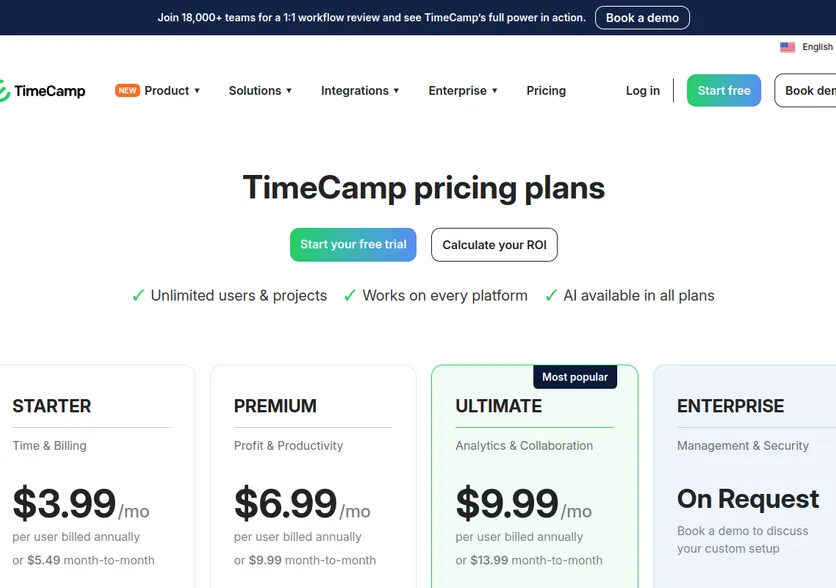
Paid tool Starting price: $3.99/user/month · Three dollars and ninety-nine cents per user a month billed annually on Starter ($5.49 month to month); Premium is $6.99 and Ultimate is $9.99; free plan covers unlimited users and projects
Free plan: Free plan (unlimited users and projects)
A nonprofit that tracks grant hours on a tight budget starts here, because this TimeCamp plan costs three dollars and ninety-nine cents per user a month billed annually, and its free plan covers unlimited users and projects. Its automatic time tracking fills timesheets from the apps staff already use, and the invoicing and budgeting tools tie hours straight to each grant. It is the cheapest paid starting point in this list for a small team that still needs proper reporting.
What we like
- Automatic tracking fills timesheets from apps staff already use
- Free plan covers unlimited users and projects
- Invoicing and budgeting tie hours straight to each grant
Watch out for
- The cheapest plan has no invoicing, which sits on Premium
- Automatic tracking needs setup time before it learns the team
How to try it
- Create one project per grant and invite the team
- Turn on automatic tracking so hours fill in by themselves
- Export the grant report and check it against the budget
2. Clockify
Best for: Nonprofits that invoice funders for exact hours
Paid tool Starting price: $5.49/seat/month · Five dollars and forty-nine cents per seat a month billed annually on Standard ($6.99 month to month); Basic is $3.99 a seat a month billed annually and Pro is $7.99; free plan covers up to five users
Free plan: Free plan (up to 5 users)
A nonprofit that bills donors and grant makers for exact hours gets a clean fit here, since this Clockify plan costs five dollars and forty-nine cents per seat a month billed annually. Its reports split hours by project, client and task, so a grant report takes minutes instead of a weekend, and the free plan covers up to five users for teams that are just starting out. It is the best pick in this list for grant invoicing because the reporting is built for billable work.

What we like
- Reports split hours by project, client and task
- Free plan covers up to five users
- Simple timer that staff learn in minutes
Watch out for
- The cheapest paid plan has no invoicing features
- Advanced reports and forecasting sit on the dearer tiers
How to try it
- Create a project for each grant and funder
- Ask staff to start the timer when work begins
- Run the project report and export it for the funder
3. Toggl Track
Best for: Nonprofits with staff split across several programmes
Paid tool Starting price: $9/user/month · Nine dollars per user a month billed annually on Starter ($12 month to month); Premium is $16 a user a month billed annually ($24 month to month), though some older listings show Premium at $18, so confirm at checkout; free plan covers up to three users
Free plan: Free plan (up to 3 users)
A nonprofit with staff who split time across several programmes will like the simple timer here, because this Toggl Track plan costs nine dollars per user a month billed annually. Its one-click timer and project tags make logging hours painless, and the summary reports show where every funded hour went. It suits a team that wants accurate records without a heavy setup or a long learning curve.

What we like
- One-click timer with project tags for easy logging
- Summary reports show where every funded hour went
- Works on web, desktop and mobile in one account
Watch out for
- Invoicing and billable rates sit on the dearer tiers
- No built-in scheduling for volunteer rotas
How to try it
- Set up a project for each programme and funder
- Tag every timer entry with its project
- Review the summary report each week before approving hours
4. Harvest
Best for: Nonprofits that invoice funders for time and expenses
Paid tool Starting price: $9/seat/month · Nine dollars per seat a month billed annually on Teams ($11 month to month); Enterprise is $14 a seat a month billed annually ($17.50 month to month); free plan covers one seat and two projects; new Flex usage billing adds charges for active projects, clients, tasks and invoicing on top, with rates unpublished
Free plan: Free plan (1 seat, 2 projects)
A nonprofit that invoices funders for time and expenses will find a natural home here, since this Harvest plan costs nine dollars per seat a month billed annually. Its invoicing turns tracked hours into donor-ready bills in a few clicks, and its budget alerts warn the team before a grant runs over. The new Flex usage billing adds charges for active projects and invoicing on top, so check the current terms before committing.

What we like
- Invoicing turns tracked hours into donor-ready bills
- Budget alerts warn the team before a grant runs over
- Clean reports that funders can read at a glance
Watch out for
- Flex usage billing adds charges on top of the seat price
- No free plan beyond one seat and two projects
How to try it
- Create a project for each grant with its budget
- Track time and expenses against the project daily
- Send the invoice straight from the tracked hours
5. Deputy
Best for: Nonprofits scheduling volunteers beside paid staff
Paid tool Starting price: $5/user/month · Five dollars per user a month billed annually on Lite ($5.50 month to month); Core is $6.50 and Pro is $9; a $30 minimum monthly spend applies per invoice; payroll is an $8 per user a month add-on plus a $49 base fee
Free plan: No free plan; 14-day free trial
A nonprofit that schedules volunteers alongside paid staff gets both jobs done here, because this Deputy plan costs five dollars per user a month billed annually. Its scheduling, time clock and leave tools live in one app, and the mobile app lets volunteers clock in from any site. It is the best compliance pick here for a team that must prove who worked, when and where.

What we like
- Scheduling, time clock and leave in one app
- Mobile app lets volunteers clock in from any site
- Audit trail proves who worked each shift
Watch out for
- A $30 minimum monthly spend applies per invoice
- Payroll is a separate add-on with its own base fee
How to try it
- Add every site and role the team works in
- Publish the rota and let staff swap shifts in the app
- Approve the timesheets each week from the dashboard
6. Sling
Best for: Small nonprofits that want the cheapest time clock
Paid tool Starting price: $1.70/user/month · One dollar and seventy cents per user a month billed annually on Premium ($2 month to month); Business is $3.40 ($4 month to month); free plan covers up to 30 users for scheduling only, with no time clock; 15-day trial
Free plan: Free plan (up to 30 users, scheduling only)
A nonprofit that needs the cheapest possible time clock will find it here, since this Sling plan costs one dollar and seventy cents per user a month billed annually. Its time clock, scheduling and team chat sit in one simple app, and the free plan covers up to thirty users for scheduling only. It fits a small team that wants a working time clock without a big monthly bill.

What we like
- Cheapest paid time clock in this list
- Free plan covers up to 30 users for scheduling
- Team chat sits beside the rota in one app
Watch out for
- The free plan has no time clock at all
- Reporting is basic next to the dearer tools
How to try it
- Invite the team and set up the first rota
- Turn on the time clock for the paid plan
- Check the weekly hours report before payroll
7. Homebase
Best for: Nonprofits working from a single location
Paid tool Starting price: $24/location/month · Twenty-four dollars per location a month billed annually on Essentials ($30 month to month); Plus is $56 and All-in-One is $96; Basic is free for one location with up to ten employees; paid tiers cover unlimited employees per location
Free plan: Free plan (1 location, up to 10 employees)
A nonprofit that runs a single community centre or shop will like the per-location pricing here, because this Homebase plan costs twenty-four dollars per location a month billed annually. Its time clock, scheduling and team messaging cover unlimited employees at that one site, and the free Basic plan handles a location with up to ten employees. It is the simplest budget pick for a team that works from one place.

What we like
- One flat fee covers unlimited employees per location
- Free Basic plan handles a location with up to 10 employees
- Time clock, scheduling and messaging in one app
Watch out for
- Per-location pricing gets costly with several sites
- Advanced hiring and HR tools sit on the dearer tiers
How to try it
- Add the location and invite the team
- Set the time clock rules for the site
- Approve hours weekly from the dashboard
8. Connecteam
Best for: Nonprofits mixing field workers and office staff
Paid tool Starting price: $29/month · Twenty-nine dollars a month billed annually on Operations Basic ($35 month to month) for the first 30 users; Advanced is $49 and Expert is $99; each hub is priced separately, so three hubs on Basic cost $87 a month; free Small Business plan covers up to 10 users across all hubs
Free plan: Free plan (up to 10 users, all hubs)
A nonprofit with field workers and office staff in one team gets a whole operations app here, because this Connecteam plan costs twenty-nine dollars a month billed annually for the first thirty users. Its time clock, scheduling, forms and chat live in one mobile app, and the free Small Business plan covers up to ten users across every hub. It is the best free starting point in this list for a tiny team that needs more than a timer.

What we like
- Time clock, scheduling, forms and chat in one app
- Free plan covers up to 10 users across every hub
- Mobile-first design suits staff who rarely sit at a desk
Watch out for
- Each hub is priced separately, so costs add up
- The interface can feel busy for teams that only need a timer
How to try it
- Pick the hubs the team needs and invite everyone
- Set up the time clock and the first forms
- Run the hours report at the end of the week
Prices above were checked on each vendor’s own website on Nov 29, 2026 and can change — the vendor’s page is the final word. Vendor links are editorial: nobody paid to be listed or ranked here. Vendors who want a featured listing can see how it works on our Get listed page.
How to set up timesheets a nonprofit team will actually use
Start with one project per grant, because hours that land in the right bucket from day one make the quarterly report a copy-and-paste job instead of a reconstruction. Give every staff member and volunteer the same simple rule: log hours daily, never in a Friday rush, and approve them weekly so mistakes are caught while the work is still fresh. Keep the free plan or the cheapest tier until the team proves it will use the tool, then pay for the reporting and invoicing features that save the finance officer real time. Review the grant report once a month and fix any miscoded hours before the funder asks.
Before you buy
- Confirm the tool can split hours by grant, project and funder for clean reports
- Check whether volunteers can clock in free or if every user adds to the bill
- Ask if invoicing and budget alerts are included or locked behind a higher tier
- Make sure the mobile app works offline for staff who visit sites without signal
- Test the tool with a real grant report before paying for a full year
Official websites
Official websites of the products reviewed above. Features and prices were checked against these sites when this guide was written, and they can change, so confirm on the vendor site before you buy.
Frequently asked questions
What is the best timesheet software for nonprofits?
TimeCamp is the best value for most nonprofits, at three dollars and ninety-nine cents per user a month with a free plan for unlimited users and projects. Clockify is the better pick for grant invoicing, because its reports split hours by project, client and task. Connecteam suits teams that also need scheduling and forms in one app, and its free plan covers up to ten users.
Can a nonprofit track time for free?
Yes, TimeCamp offers a free plan with unlimited users and projects, Clockify is free for up to five users, and Homebase is free for one location with up to ten employees. Sling is also free for up to thirty users for scheduling, though its time clock needs the paid plan. A small nonprofit can run on any of these free tiers without paying, and only upgrades when reporting needs grow.
How much does Clockify cost for a nonprofit?
Clockify costs five dollars and forty-nine cents per seat a month billed annually on Standard, or six dollars and ninety-nine cents month to month. The cheaper Basic plan is three dollars and ninety-nine cents a seat a month billed annually, and Pro is seven dollars and ninety-nine cents. The free plan covers up to five users, so a tiny team can start without paying anything.
Which timesheet tool works best for volunteers?
Deputy works well for volunteers because scheduling, time clock and leave live in one app and the mobile app lets volunteers clock in from any site. Sling is the cheapest option, at one dollar and seventy cents per user a month billed annually, with a free plan for up to thirty users. Homebase also fits, since its paid tiers cover unlimited employees at one location for one flat fee.
Do timesheet tools help with grant reporting?
Yes, the best ones split hours by project, client, task and funder, so a grant report is a filtered export rather than a manual rebuild. Clockify and Harvest are the strongest here, because their reports are built for billable work and invoicing. Set up one project per grant from the start, and approve hours weekly, so the figures a funder sees are always clean and current.
Compare the eight tools above, then start with TimeCamp or Clockify on the free plan and run one real grant report before paying for a full year.
Browse Business Tools tools