On this page
Enterprise video email is less about recording a clip and more about knowing who watched it, for how long, and what they did next, all inside the CRM the sales team already lives in. The eight tools below cover that job for large teams, from a twenty-dollar seat to a full video platform with signals and automation. BombBomb leads because it is built for relationship video at scale, at thirty-six dollars per user a month, and the rest are ranked on tracking, CRM depth and admin control.
How we researched this
We checked every price on the vendor pricing page on November 29, 2026, and only included video email tools with a published US dollar list price. Covideo was left out because its pricing page redirects to a quote request and publishes no plan price, and OneMob was left out because its current list price could not be verified cleanly. Prices change, so confirm the current figure on the vendor site before you buy.
Compare the tools
| Name | Best for | Starting price | Free plan | |
|---|---|---|---|---|
 BombBomb | Enterprise sales teams sending personal video daily | $36/user/month | No free plan; 14-day free trial | Visit |
 Dubb | Enterprise teams that want recording plus campaigns in one seat | $42/user/month | Free Starter plan | Visit |
 Hippo Video | Enterprise buyers who want the lowest per-seat video email price | $20/user/month | Free plan | Visit |
 Vidyard | Enterprise teams that need video tied to pipeline data | $59/seat/month | Free plan (5 recordings a month) | Visit |
 Loom | Enterprise teams recording walkthroughs and async replies at scale | $15/user/month | Free Starter plan | Visit |
 Sendspark | Enterprise pods personalising video at volume | $49/month | 7-day free trial, no free tier | Visit |
 Wistia | Enterprise marketing teams that run video as a channel | $79/month | Free plan with 25 GB storage and 1 user | Visit |
 Bonjoro | Enterprise teams sending welcome and onboarding video | $25/month | No free plan; free trial | Visit |
The video email software for enterprise, compared
1. BombBomb
Best for: Enterprise sales teams sending personal video daily
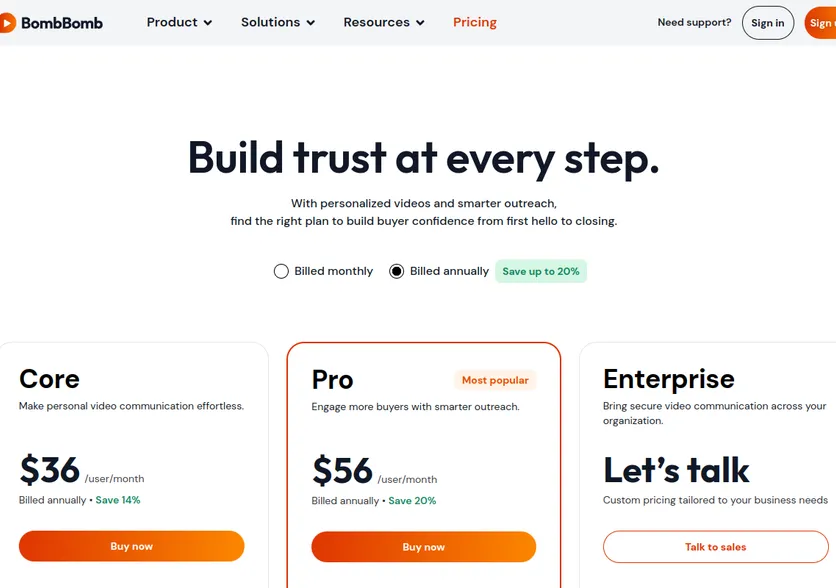
Paid tool Starting price: $36/user/month · Thirty-six dollars per user a month on the Core plan billed annually; monthly billing is forty-two dollars per user a month; Pro is fifty-six dollars per user a month billed annually and adds campaigns, contacts and CRM integrations
Free plan: No free plan; 14-day free trial
For an enterprise sales team that sends personal video to prospects every day, this BombBomb plan costs thirty-six dollars per user a month on the Core plan billed annually. It records from Gmail, Outlook or a phone, alerts the rep when a prospect watches, and keeps every video on brand with captions and custom pages. It is the most focused relationship-video tool here, with no free tier to fall back on.
What we like
- Records from Gmail, Outlook, browser and phone apps
- Watch alerts show who viewed and for how long
- Pro adds campaigns, contacts and CRM integrations
Watch out for
- No free plan, only a fourteen-day trial that needs a card
- Everyone on a team account shares the same plan level
How to try it
- Record a short personal video from Gmail or Outlook
- Send it with a branded thumbnail and a clear call to action
- Check the watch alert, then follow up while the video is fresh
2. Dubb
Best for: Enterprise teams that want recording plus campaigns in one seat
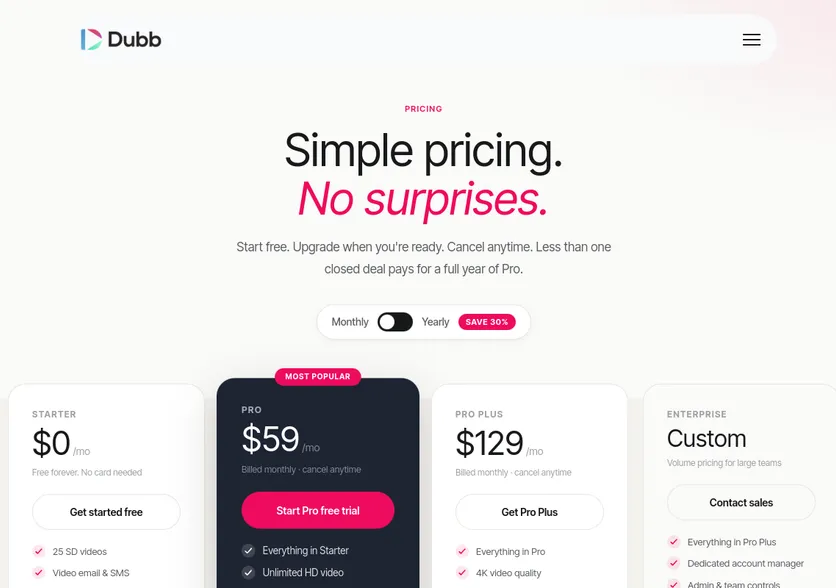
Paid tool Starting price: $42/user/month · Forty-two dollars per user a month on the Pro plan billed annually; monthly billing is fifty-nine dollars per user a month; Pro Plus is ninety dollars per user a month billed annually; Starter is free with twenty-five standard-definition videos
Free plan: Free Starter plan
An enterprise team that wants video email plus campaigns in one seat will get the most here, because this Dubb plan costs forty-two dollars per user a month on the Pro plan billed annually. It combines recording, landing pages, email and text campaigns, a teleprompter and an AI writing suite, with named viewer tracking on every send. It is the broadest video email tool in this list for the price.
What we like
- Recording, landing pages and email plus text campaigns together
- Named viewer tracking on every video sent
- Free Starter plan lets a team test before buying seats
Watch out for
- Pro Plus is a steep jump for four-K video and automation
- The AI Sales Agent is a separate fifty-dollar monthly add-on
How to try it
- Record the video with the teleprompter on screen
- Build the landing page with a call to action
- Send by email or text and watch the viewer tracking
3. Hippo Video
Best for: Enterprise buyers who want the lowest per-seat video email price
Paid tool Starting price: $20/user/month · Twenty dollars per user a month on the Pro plan billed annually; monthly billing is thirty dollars per user a month; Teams is sixty dollars per user a month billed annually; Enterprise is eighty dollars per user a month with a ten-seat minimum
Free plan: Free plan
For an enterprise buyer watching the per-seat bill, this Hippo Video plan costs twenty dollars per user a month on the Pro plan billed annually, the lowest entry seat in this list. It covers recording, personalised videos at scale, sales pages and captions, with a free plan to start on. Note that its text-to-video product is priced separately, so check which price list matches the job before signing.

What we like
- Lowest entry seat price in this list
- Personalised videos at scale with sales pages
- Free plan covers the basics for a small pilot
Watch out for
- Useful allowances like flows and captions rise sharply on Teams
- Single sign-on and roles are Enterprise only
How to try it
- Record the video from the browser or the desktop app
- Personalise the thumbnail and sales page for the prospect
- Send it and check which prospects watched it through
4. Vidyard
Best for: Enterprise teams that need video tied to pipeline data
Paid tool Starting price: $59/seat/month · Fifty-nine dollars per seat a month on the Starter plan billed annually; monthly billing is eighty-nine dollars per seat a month; Teams and Enterprise are custom; a Video Agent add-on is available
Free plan: Free plan (5 recordings a month)
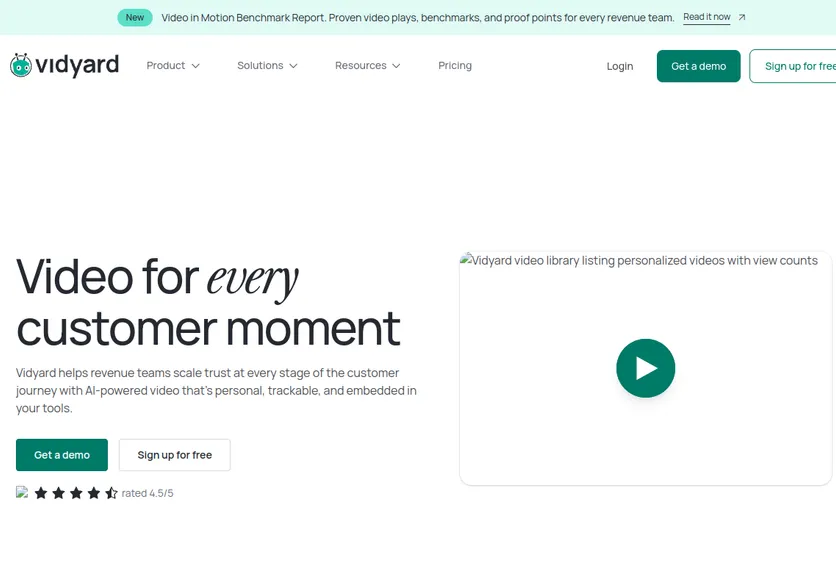
When an enterprise team needs to know exactly how a video moved a deal, this Vidyard plan costs fifty-nine dollars per seat a month on the Starter plan billed annually. Its viewer analytics tie watch time to contacts and accounts, and the video pages carry calls to action that feed the CRM. It is the deepest tracking tool here, and the one that justifies its seat price with pipeline data.
What we like
- Viewer analytics tied to contacts and accounts
- Video pages with calls to action that feed the CRM
- Free plan with five recordings a month for a pilot
Watch out for
- Teams and Enterprise pricing are custom, not published
- The dearest self-serve seat in this list
How to try it
- Record the video and add a call to action
- Send the video page link by email
- Review the viewer analytics in the CRM before the follow-up call
5. Loom
Best for: Enterprise teams recording walkthroughs and async replies at scale
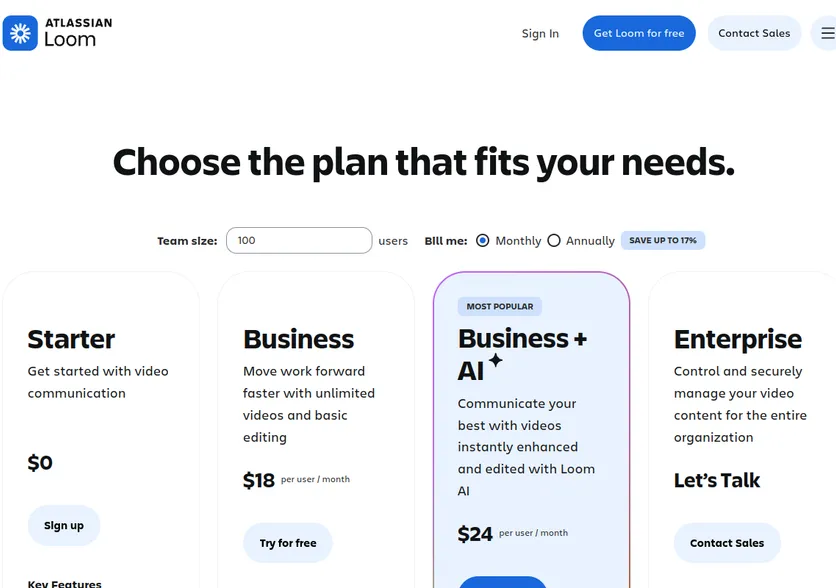
Paid tool Starting price: $15/user/month · Fifteen dollars per user a month on the Business plan billed annually; monthly billing is eighteen dollars per user a month; Business plus AI is twenty dollars per user a month billed annually or twenty-four dollars billed monthly
Free plan: Free Starter plan
For an enterprise team that records walkthroughs and replies more than it records sales pitches, this Loom plan costs fifteen dollars per user a month on the Business plan billed annually. It removes the recording caps, adds uploads and downloads, four-K capture and branding control, and the AI tier adds summaries, chapters and meeting notes. It is the simplest async video tool here, and the easiest to roll out widely.
What we like
- Unlimited videos and recording time on paid plans
- Simple enough for the whole company to adopt
- AI tier adds summaries, chapters and meeting notes
Watch out for
- No campaign or CRM depth for outbound sales teams
- AI features sit on the dearer Business plus AI plan
How to try it
- Record the screen and camera for the walkthrough
- Trim the pauses and add a custom thumbnail
- Share the link in email or chat and check who watched
6. Sendspark
Best for: Enterprise pods personalising video at volume
Paid tool Starting price: $49/month · Forty-nine dollars a month on the Solo plan billed monthly, or thirty-nine dollars a month billed annually; one seat with one hundred dynamic video minutes; higher plans add seats and minutes
Free plan: 7-day free trial, no free tier
A small enterprise pod that personalises video at volume will move fast here, because this Sendspark plan costs forty-nine dollars a month on the Solo plan billed monthly, or thirty-nine dollars a month billed annually. It merges a prospect name, company or website into each video automatically, so one recording becomes hundreds of personal sends. It is the best pick in this list for dynamic personalisation.

What we like
- Dynamic personalisation merges names and companies into each video
- One recording becomes hundreds of personal sends
- Simple setup for a small pod without admin overhead
Watch out for
- No free tier, only a seven-day trial
- Priced per account, so extra seats add cost fast
How to try it
- Record one base video for the campaign
- Upload the prospect list with names and companies
- Generate the personalised versions and send them out
7. Wistia
Best for: Enterprise marketing teams that run video as a channel
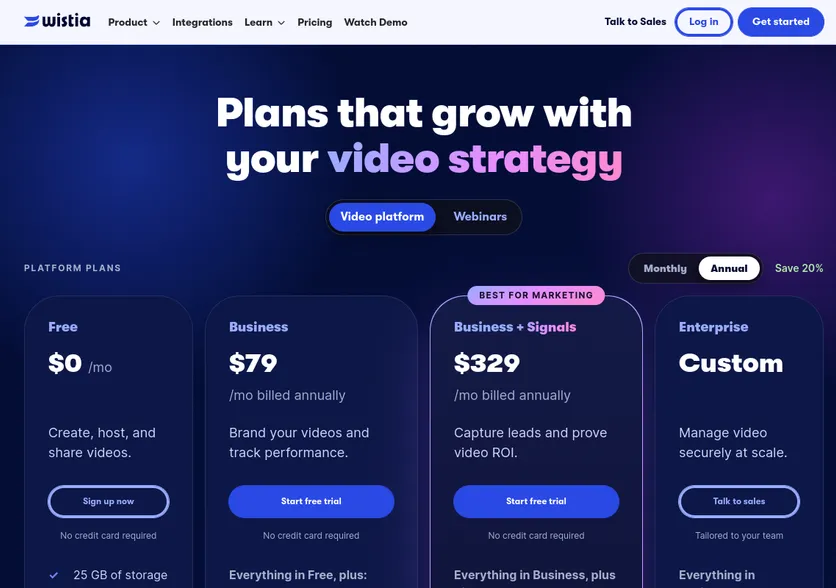
Paid tool Starting price: $79/month · Seventy-nine dollars a month on the Business plan billed annually; monthly billing is ninety-nine dollars a month; Business plus Signals is three hundred and twenty-nine dollars a month billed annually
Free plan: Free plan with 25 GB storage and 1 user
For an enterprise marketing team that treats video as a channel, this Wistia plan costs seventy-nine dollars a month on the Business plan billed annually. It hosts the video library, builds branded channels and Soapbox-style video emails, and tracks engagement per viewer with heatmaps. It is the best pick here when the video library matters as much as the send.
What we like
- Branded video channels and a full hosting library
- Heatmaps show exactly which seconds held attention
- Soapbox recording built in for quick video emails
Watch out for
- Priced per account, so the seat math differs from per-user tools
- Signals and deep analytics sit on the dearer plan
How to try it
- Upload the video to the branded channel
- Record a quick Soapbox reply for the prospect
- Send the link and review the engagement heatmap
8. Bonjoro
Best for: Enterprise teams sending welcome and onboarding video
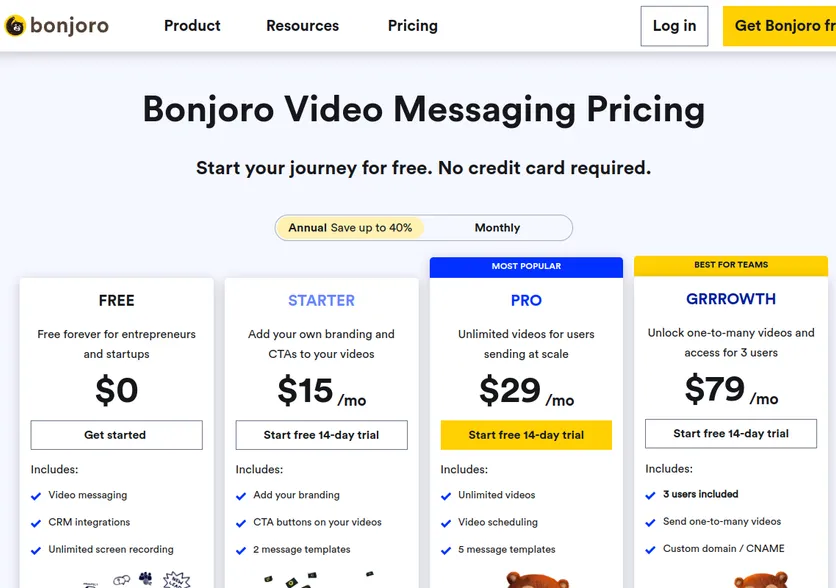
Paid tool Starting price: $25/month · Twenty-five dollars a month on the Starter plan billed monthly; annual billing drops it to about fifteen dollars a month, or one hundred and eighty dollars a year, according to a November 2026 read; higher plans add team seats and integrations
Free plan: No free plan; free trial
An enterprise team that wins customers with a personal welcome video will like this Bonjoro plan, which costs twenty-five dollars a month on the Starter plan billed monthly. It triggers a video task the moment a new customer signs up, records it on a phone, and tracks the reply, which suits onboarding and retention far better than cold outreach. Its annual figure rests on a single November 2026 read, so confirm it on the pricing page before budgeting.
What we like
- Triggers a video task the moment a customer signs up
- Phone recording keeps welcome videos fast and personal
- Built for onboarding and retention rather than cold outreach
Watch out for
- No free plan, only a trial
- Annual pricing is a single-source figure, so confirm it first
How to try it
- Connect the signup trigger to the customer list
- Record a short welcome video on the phone
- Send it and reply when the customer writes back
Prices above were checked on each vendor’s own website on Nov 29, 2026 and can change — the vendor’s page is the final word. Vendor links are editorial: nobody paid to be listed or ranked here. Vendors who want a featured listing can see how it works on our Get listed page.
How to roll out video email across a large team
Start with one sales pod, not the whole company, because the winning playbook shows up in the first month of real sends. Agree the template before buying seats: the thumbnail, the call to action and the follow-up timing matter more than the camera. Check the CRM integration on a live account, since a video tool that cannot log a view against a contact will never prove its value. Price the rollout at the plan the team will need in a year, including the campaign and analytics tiers, so the pilot price does not hide the real cost.
Before you buy
- Confirm the tool logs video views against contacts in the CRM the team already uses
- Check whether single sign-on and admin controls sit on the plan being priced, not a higher tier
- Test the tool on a real prospect list before buying seats for the whole team
- Make sure branded pages and thumbnails match the company brand without custom work
- Ask whether per-seat or per-account pricing fits the team size planned for next year
Official websites
Official websites of the products reviewed above. Features and prices were checked against these sites when this guide was written, and they can change, so confirm on the vendor site before you buy.
Frequently asked questions
What is the best video email software for enterprise?
BombBomb is the best overall pick for enterprise, at thirty-six dollars per user a month, because it is built for relationship video with watch alerts and CRM integrations on the Pro plan. Vidyard is the best choice for deep tracking at fifty-nine dollars a seat a month, and Hippo Video is the best value at twenty dollars per user a month with a free plan.
How much does video email software cost for enterprise?
Enterprise video email in this list runs from twenty dollars per user a month for Hippo Video and fifteen dollars per user a month for Loom Business to thirty-six dollars for BombBomb, forty-two dollars for Dubb, forty-nine dollars for Sendspark, fifty-nine dollars a seat for Vidyard and seventy-nine dollars a month for Wistia. Teams and Enterprise tiers above these are usually custom priced.
Can enterprise teams try video email for free?
Yes. Hippo Video, Dubb, Vidyard, Loom and Wistia all offer free plans, and BombBomb and Sendspark offer free trials. The free plans cap recordings, videos or storage, so they suit a pilot with one pod, but a full rollout will need a paid plan. Start the pilot on a free plan, prove the watch rate, then price the seats.
Does video email work with a CRM?
The stronger tools in this list integrate with Salesforce, HubSpot and similar CRMs, logging video views against contacts so a rep can follow up while the video is fresh. BombBomb adds those integrations on its Pro plan, Vidyard ties watch time to accounts, and Dubb includes CRM contacts on Pro. Check the integration list on the plan being priced, not just on the homepage.
Is BombBomb or Dubb better for enterprise video email?
BombBomb is better for pure relationship video, with a focused workflow and watch alerts at thirty-six dollars per user a month. Dubb is better for teams that also want campaigns, landing pages and text sending in the same seat, at forty-two dollars per user a month. Choose BombBomb for one-to-one sales video and Dubb when the team needs campaigns as well.
Compare the eight video email tools above, then run a pilot with one sales pod on a free plan or trial before buying seats for the whole enterprise team.
Browse Business Tools tools