On this page
Interview editing is mostly trimming: cutting pauses, false starts and tangents until only the good answers remain. The nine tools below cover that job for solo editors and small teams, from a transcript editor that cuts video by deleting words to a professional timeline that costs once and never bills again. Descript leads because it lets an editor trim an interview by editing its transcript for twenty-four dollars a person a month, and the rest are ranked on how fast they turn a long recording into a tight cut.
How we researched this
We checked every price on the vendor pricing page on November 29, 2026, and only included tools with a published US dollar list price. CapCut and Clipchamp were verified too, with CapCut Standard at nine dollars and ninety-nine cents a month and Clipchamp Premium at eleven dollars and ninety-nine cents, but they did not make the final nine. Prices change, so confirm the current figure on the vendor site before you buy.
Compare the tools
| Name | Best for | Starting price | Free plan | |
|---|---|---|---|---|
 Descript | Interview editors who want to cut video by editing text | $24/person/month | Free plan | Visit |
 Kapwing | Small teams that edit interviews together in a browser | $16/member/month | Free plan | Visit |
 VEED | Editors who publish captioned interview clips for social media | $12.25/seat/month | Free plan | Visit |
 OpusClip | Interviewers who turn long recordings into short vertical clips | $14.50/month | Free plan | Visit |
 Adobe Premiere Pro | Professional editors cutting interviews for clients | $22.99/month | 7-day free trial | Visit |
 Final Cut Pro | Mac editors who want speed and a one-time purchase | $299.99 one-time | 90-day free trial | Visit |
 DaVinci Resolve Studio | Skilled editors who want pro colour and audio without a subscription | $295 one-time | Free plan | Visit |
 Camtasia | Interviewers who record tutorials, demos and training videos | $179.88/year | Free trial available | Visit |
 Filmora | Beginners who want templates and AI help on a budget | $49.99/year | Free plan with watermark | Visit |
How to trim an interview without losing the good answers
1. Descript
Best for: Interview editors who want to cut video by editing text
Paid tool Starting price: $24/person/month · Twenty-four dollars per person a month on Creator billed annually, or thirty-five dollars billed monthly; Hobbyist is sixteen dollars a month billed annually and Business is fifty dollars
Free plan: Free plan
An interview editor who hates scrubbing timelines will love this approach, since this Descript plan costs twenty-four dollars per person a month billed annually and turns the recording into an editable transcript. Delete a sentence in the text and the video cut follows, which makes trimming a long interview as fast as editing a document. It is the quickest way to cut a rambling answer down to its best lines.

What we like
- Transcript editing makes trimming as fast as editing a document
- Filler-word removal cleans up ums and pauses in one pass
- Studio Sound and Overdub polish the audio without a second app
Watch out for
- Creator caps transcription hours, so long interviews cost more
- Heavy effects work still needs a traditional timeline editor
How to try it
- Import the interview and let Descript transcribe it
- Delete filler words and weak answers from the transcript
- Export the trimmed cut with captions for publishing
2. Kapwing
Best for: Small teams that edit interviews together in a browser
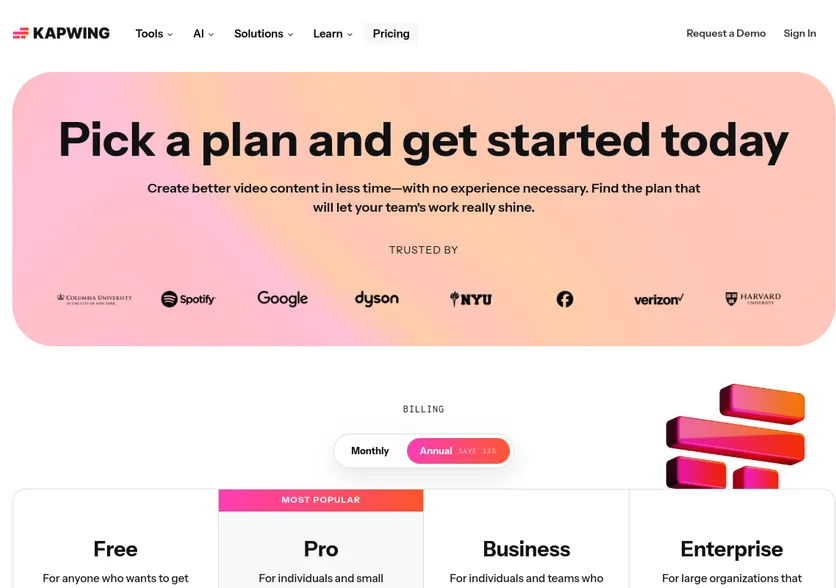
Paid tool Starting price: $16/member/month · Sixteen dollars per member a month on Pro billed annually, or twenty-four dollars billed monthly; Business is fifty dollars a month billed annually and adds one thousand credits a month
Free plan: Free plan
A small team that edits interviews in a browser will move fast here, because this Kapwing plan costs sixteen dollars per member a month billed annually and puts trimming, captions and clips in one shared workspace. Smart Cut finds the silences automatically, and the transcript view lets anyone on the team tighten a quote. It is the best browser pick for a team that publishes interview clips every week.
What we like
- Smart Cut removes silences and dead air automatically
- Transcript view lets the whole team tighten quotes
- Captions and social clips are built into the same editor
Watch out for
- Browser editing feels slower than a desktop app on long files
- Pro caps monthly credits, so heavy months push you up a tier
How to try it
- Upload the interview to a shared Kapwing workspace
- Run Smart Cut, then tighten quotes in the transcript view
- Add captions and export the clip in the right aspect ratio
3. VEED
Best for: Editors who publish captioned interview clips for social media
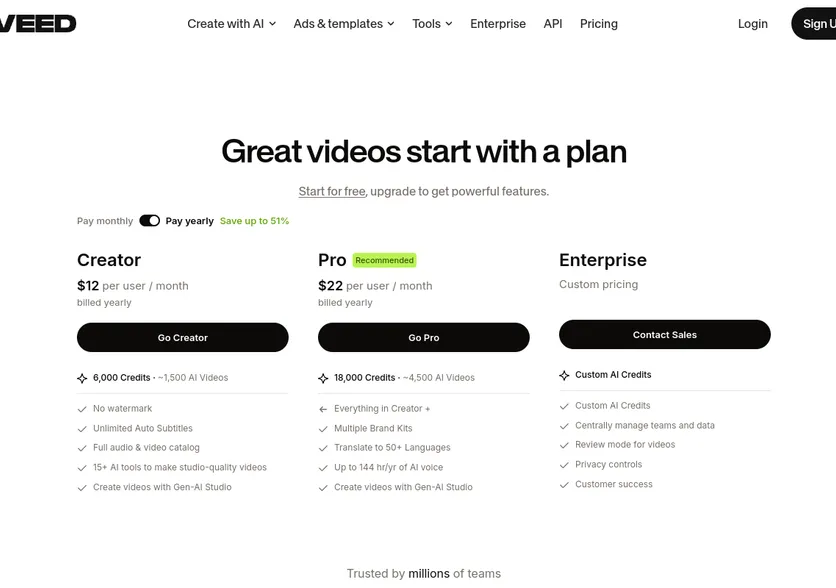
Paid tool Starting price: $12.25/seat/month · Twelve dollars and twenty-five cents per seat a month on Creator billed yearly, or twenty-five dollars billed monthly; Pro is twenty-two dollars and eight cents billed yearly and adds 4K export and translation; one guide lists Creator at one hundred and sixteen dollars a year, so confirm the rate at checkout
Free plan: Free plan
An editor who publishes captioned interview clips will get the most from this tool, since this VEED plan costs twelve dollars and twenty-five cents per seat a month billed yearly and treats subtitles as the main event. Auto subtitles, styled word-by-word captions and one-click silence removal turn a long interview into shareable clips in minutes. It is the best pick for interviewers who live on social video.
What we like
- Auto subtitles and styled captions are built in from the start
- Silence removal tightens long answers in one click
- Translation into fifty plus languages sits on the Pro plan
Watch out for
- VEED prices have moved several times during 2026, so check at checkout
- The free plan caps exports at 720p and adds a watermark
How to try it
- Upload the interview and generate auto subtitles
- Cut silences and weak answers on the timeline
- Style the captions and export the clip for social media
4. OpusClip
Best for: Interviewers who turn long recordings into short vertical clips
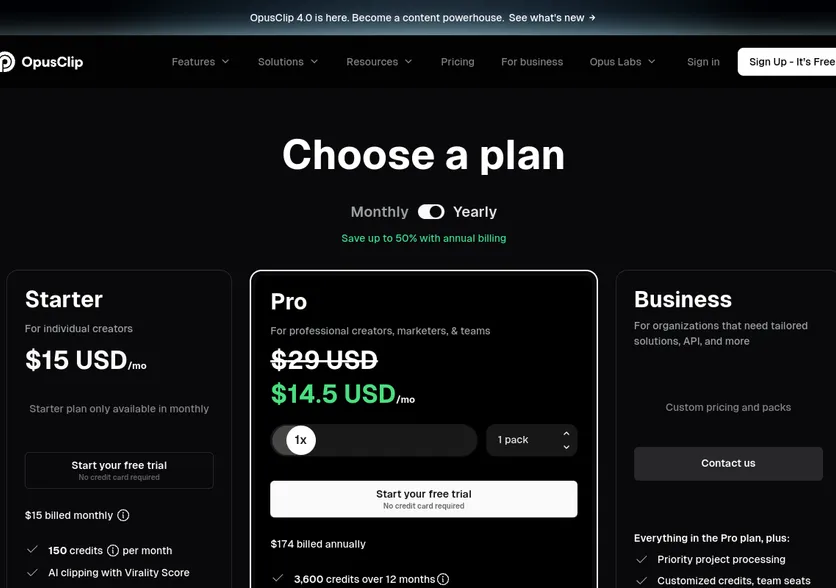
Paid tool Starting price: $14.50/month · Fourteen dollars and fifty cents a month on Pro billed yearly, or twenty-nine dollars billed monthly; Starter is fifteen dollars a month for one hundred and fifty credits and is sold monthly only, while Pro carries three hundred credits a month
Free plan: Free plan
An interviewer who needs short clips from a long recording will save hours here, because this OpusClip plan costs fourteen dollars and fifty cents a month billed yearly and finds the best moments in an interview automatically. Its AI scores each clip for virality, adds captions and reframes the shot for vertical video. It is the fastest way to turn one long interview into a week of short clips.
What we like
- AI finds the strongest moments in a long interview automatically
- Virality scores rank clips before you spend time editing them
- Captions and vertical reframing are built into every clip
Watch out for
- Starter is monthly only, so the cheaper annual rate needs Pro
- Clips are AI-chosen, so a human still has to check each one
How to try it
- Upload the full interview and let the AI find clip moments
- Review the virality scores and keep the best clips
- Export the captioned clips in vertical format for Shorts and Reels
5. Adobe Premiere Pro
Best for: Professional editors cutting interviews for clients
Paid tool Starting price: $22.99/month · Twenty-two dollars and ninety-nine cents a month on the single-app plan billed annually, or thirty-four dollars and forty-nine cents month to month; Adobe marks the annual figure as first-year pricing for new subscribers, so check the renewal rate before committing
Free plan: 7-day free trial
A professional editor who cuts interviews for clients will want the industry standard here, since this Adobe Premiere Pro plan costs twenty-two dollars and ninety-nine cents a month on the annual plan. Text-based editing trims by the transcript, speech enhancement cleans up room tone, and the Creative Cloud link keeps After Effects and Audition one click away. It is the safest pick when interview work is client work.
What we like
- Text-based editing trims interviews by the transcript
- Speech enhancement cleans up noisy interview audio
- Deep integration with After Effects, Audition and Photoshop
Watch out for
- Subscription only, so the cost never stops while you edit
- The annual rate is marked as first-year pricing for new subscribers
How to try it
- Import the interview and generate a transcript
- Cut weak answers in text-based editing mode
- Enhance the speech, add captions and export the master
6. Final Cut Pro
Best for: Mac editors who want speed and a one-time purchase
Paid tool Starting price: $299.99 one-time · Two hundred and ninety-nine dollars and ninety-nine cents one time on the Mac App Store; Apple Creator Studio is twelve dollars and ninety-nine cents a month or one hundred and twenty-nine dollars a year and adds the iPad version plus Logic Pro and more
Free plan: 90-day free trial
A Mac editor who wants speed and a price that never repeats will be happiest here, because this Final Cut Pro licence costs two hundred and ninety-nine dollars and ninety-nine cents one time. The magnetic timeline keeps clips in sync while you trim, and Apple Silicon rendering makes long interview exports fast. It is the best one-time buy for a Mac-based interview editor.
What we like
- Magnetic timeline keeps interview clips in sync while trimming
- Very fast rendering on Apple Silicon Macs
- One-time price with a ninety-day free trial to test it
Watch out for
- Mac and iPad only, so Windows editors cannot use it
- Some premium content is only in the Creator Studio subscription
How to try it
- Import the interview and skim it with the magnetic timeline
- Trim pauses and weak answers with blade and range tools
- Add captions and export the finished interview
7. DaVinci Resolve Studio
Best for: Skilled editors who want pro colour and audio without a subscription
Paid tool Starting price: $295 one-time · Two hundred and ninety-five dollars one time for the Studio licence, with free updates for life; the free DaVinci Resolve covers most editing, colour and audio work with no watermark
Free plan: Free plan
An editor who wants Hollywood-grade colour and audio without a subscription will find it here, because this DaVinci Resolve Studio licence costs two hundred and ninety-five dollars one time. The free version already handles multicam interviews, 4K export and Fairlight audio, and Studio adds noise reduction, more effects and higher-end workflows. It is the best value professional editor in this list for a skilled interviewer.
What we like
- Free version is the most capable free editor available
- Studio adds noise reduction, Magic Mask and HDR tools
- Editing, colour, effects and audio live in one app
Watch out for
- The interface packs in pro tools that take time to learn
- No transcript-based trimming like Descript or Premiere
How to try it
- Import the interview and cut it on the cut or edit page
- Use Fairlight to clean up the interview audio
- Grade the footage and export the finished cut
8. Camtasia
Best for: Interviewers who record tutorials, demos and training videos
Paid tool Starting price: $179.88/year · One hundred and seventy-nine dollars and eighty-eight cents a year on Essentials billed yearly; Starter is thirty-nine dollars a year with watermarked exports, Create is two hundred and forty-nine dollars and Pro is five hundred and ninety-nine dollars
Free plan: Free trial available
An interviewer who records screen and webcam together will get the most from this tool, since this Camtasia plan costs one hundred and seventy-nine dollars and eighty-eight cents a year and records both on separate tracks. Text-based editing cuts the interview by the words, and quizzes and captions turn it into training material. It is the best pick for interview-style tutorials and demos.
What we like
- Records screen, webcam and microphone on separate tracks
- Text-based editing cuts interviews by the words spoken
- Quizzes and captions turn interviews into training material
Watch out for
- Essentials is the cheapest plan with watermark-free exports
- Subscription only since the 2025 release, with no one-time licence
How to try it
- Record the interview with screen and webcam together
- Cut weak answers with text-based editing
- Add captions and quizzes, then export the lesson
9. Filmora
Best for: Beginners who want templates and AI help on a budget
Paid tool Starting price: $49.99/year · Forty-nine dollars and ninety-nine cents a year on Basic; Advanced is fifty-nine dollars and ninety-nine cents and Premium is ninety-nine dollars and ninety-nine cents; a perpetual licence is also sold, with listings quoting seventy-nine dollars and ninety-nine cents or eighty-nine dollars and ninety-nine cents
Free plan: Free plan with watermark
A beginner who wants templates and AI help on a budget will move fastest here, because this Filmora plan costs forty-nine dollars and ninety-nine cents a year and trims with a friendly timeline, auto captions and motion tracking. It handles multicam interview footage without the learning curve of a pro editor, and the perpetual licence suits editors who dislike subscriptions. It is the cheapest friendly editor in this list for interview work.
What we like
- Friendly timeline with templates, captions and AI help
- Cheapest friendly editor in this list at under fifty dollars a year
- A perpetual licence is available for editors who dislike subscriptions
Watch out for
- Basic includes no monthly AI credits for heavy AI use
- Less precise than a pro editor for long multicam interviews
How to try it
- Import the interview clips and sync them on the timeline
- Trim pauses and add auto captions
- Apply a template and export the finished interview
Prices above were checked on each vendor’s own website on Nov 29, 2026 and can change — the vendor’s page is the final word. Vendor links are editorial: nobody paid to be listed or ranked here. Vendors who want a featured listing can see how it works on our Get listed page.
How to trim an interview without losing the good answers
Listen to the whole interview once, because the best quote often sits inside a rambling answer. Cut the pauses and false starts first, then the tangents, and then tighten the wording, since trimming in that order keeps the speaker sounding natural. Keep a copy of the full recording, and export a captioned version for social clips, because most viewers watch interviews with the sound off. Check the audio levels on headphones, since a clean voice matters more than a fancy transition.
Before you buy
- Test the tool on a real interview file before paying, including a long recording with crosstalk
- Check whether captions are automatic or manual, because typing them yourself costs hours per interview
- Confirm the export quality you need, since free tiers often cap resolution or add a watermark
- Ask if transcript editing is included, because cutting by text is far faster than scrubbing a timeline
- Make sure the tool handles your camera files, including multicam and 4K footage, without converting first
Official websites
Official websites of the products reviewed above. Features and prices were checked against these sites when this guide was written, and they can change, so confirm on the vendor site before you buy.
Frequently asked questions
What is the best video trimming software for interview editors?
Descript is the best overall pick, because it turns the interview into a transcript and lets you trim by deleting words, for twenty-four dollars a person a month billed annually. DaVinci Resolve Studio is the best value at two hundred and ninety-five dollars once, and Kapwing is the best browser option at sixteen dollars a member a month.
Can I trim a video by editing its transcript?
Yes, with Descript, Adobe Premiere Pro and Camtasia, which all offer text-based editing that cuts the video when you delete words in the transcript. Descript is the most direct, since the transcript is the editor itself. Premiere Pro adds text-based editing to a full professional timeline, and Camtasia pairs it with screen and webcam recording for tutorials.
Is there a good free video trimming tool for interviews?
Yes, DaVinci Resolve is free with no watermark and handles multicam interviews, 4K export and Fairlight audio, which covers most interview work. Descript, Kapwing and VEED all have free plans too, though exports may be capped or watermarked. Filmora has a free plan with a watermark, and Final Cut Pro offers a ninety-day free trial.
How much does Adobe Premiere Pro cost in 2026?
Adobe Premiere Pro costs twenty-two dollars and ninety-nine cents a month on the single-app plan billed annually, or thirty-four dollars and forty-nine cents month to month. Adobe marks the annual figure as first-year pricing for new subscribers, so check the renewal rate before committing. A seven-day free trial is included.
Which tool is best for turning interviews into short clips?
OpusClip is the best pick for short clips, because its AI finds the strongest moments in a long interview, scores them for virality, adds captions and reframes them for vertical video, from fourteen dollars and fifty cents a month billed yearly. VEED and Kapwing also cut captioned social clips quickly, and both start cheaper than a desktop editor.
Compare the nine tools above, then try the free plan or trial on the one that matches how you edit, and trim a real interview in it before paying.
Browse Video Tools tools