On this page
A wide-column database stores data in rows with thousands of columns, which is how the biggest systems in the world handle billions of events a day. The seven tools below cover that job for enterprise teams, from a free open-source download to a managed service that bills by the node-hour. Google Cloud Bigtable leads because it scales to petabytes with single-digit millisecond latency for sixty-five cents per node per hour, and the rest are ranked on how well they fit the cloud the team already runs.
How we researched this
We checked every price on the vendor pricing page on November 29, 2026, and only included tools with a published US dollar price. ScyllaDB Cloud is left out because it publishes no list price and bills by a quote, and Aiven for Apache Cassandra is left out because its published prices disagree across sources. Prices change, so confirm the current figure on the vendor site before you buy.
Compare the tools
| Name | Best for | Starting price | Free plan | |
|---|---|---|---|---|
 Google Cloud Bigtable | Google Cloud teams with huge time-series data | $0.65/node/hour | No free plan; new-account Google Cloud trial credit | Visit |
 Amazon Keyspaces | AWS teams that need Cassandra without servers | $0.625/million writes | Free tier (first 3 months) | Visit |
 Azure Cosmos DB | Azure teams that need global distribution | $23.36/month | Free tier (1,000 RU/s and 25 GB) | Visit |
 DataStax Astra DB | Teams that want managed Cassandra with a free credit | $0.25/GB/month | Free $25 monthly credit | Visit |
 YugabyteDB Aeon | Teams that want Cassandra compatibility plus SQL | $125/vCPU/month | Free single-node Sandbox | Visit |
 Apache Cassandra | Teams that run their own clusters at scale | $0 | Free open-source software | Visit |
 Apache HBase | Hadoop teams that need wide-column storage | $0 | Free open-source software | Visit |
The wide column database software for enterprise, compared
1. Google Cloud Bigtable
Best for: Google Cloud teams with huge time-series data
Paid tool Starting price: $0.65/node/hour · $0.65 per node per hour on Enterprise in us-central1, about $468 a month for a single node; Enterprise Plus is $0.85; 1-year committed use is $0.52; 3-year is $0.39; SSD storage is about $0.17 per GB a month
Free plan: No free plan; new-account Google Cloud trial credit
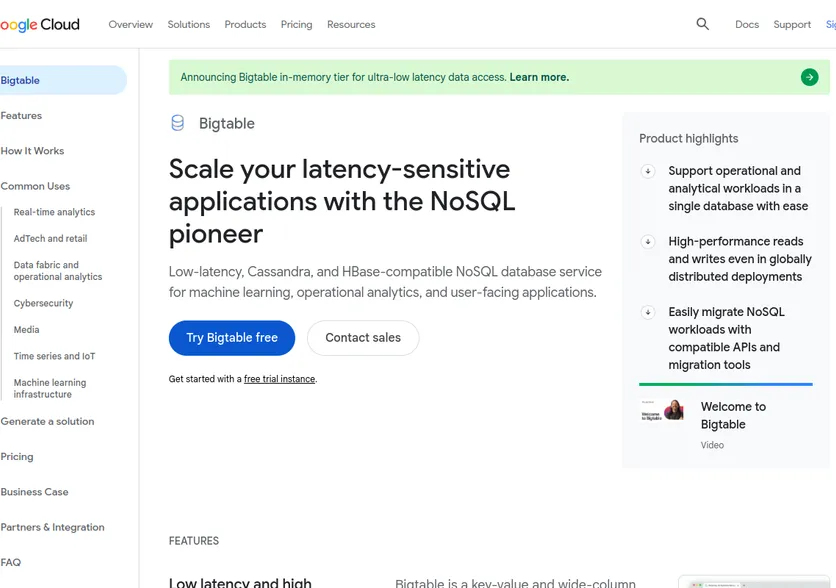
A Google Cloud team storing billions of rows needs a database that never slows down, and this Google Cloud Bigtable plan costs sixty-five cents per node per hour. Its managed wide-column engine handles time-series, analytics and IoT data at petabyte scale, and it plugs straight into BigQuery for analysis. It is the obvious pick for a team already on Google Cloud.
What we like
- Scales to petabytes with single-digit millisecond latency
- Managed service with no cluster tuning
- Integrates with BigQuery and the Google Cloud stack
Watch out for
- About $468 a month for a single node before storage
- No free plan, only a trial credit
How to try it
- Create a Bigtable instance in the Cloud console
- Design the row key around the access pattern
- Load data and set the retention policy
2. Amazon Keyspaces
Best for: AWS teams that need Cassandra without servers
Paid tool Starting price: $0.625/million writes · $0.625 per million write request units and $0.125 per million read request units on demand in US East; older $1.45 per million listings predate the November 2024 price cut; storage is $0.25 per GB a month; provisioned capacity is also available
Free plan: Free tier (first 3 months)
An AWS team that wants Cassandra without running servers will like the metered price here, because this Amazon Keyspaces plan costs sixty-two point five cents per million writes. Its serverless Cassandra API scales with the workload and costs almost nothing when tables sit quiet, and the free tier covers the first three months. It suits a team that already lives on AWS.
What we like
- Serverless Cassandra API with no cluster to run
- Pay per request, so quiet tables cost almost nothing
- Free tier covers the first three months
Watch out for
- Older listings show pre-cut $1.45 per million prices
- Some Cassandra features are not supported
How to try it
- Create a keyspace in the AWS console
- Define the tables with the Cassandra data model
- Connect the application with the Cassandra driver
3. Azure Cosmos DB
Best for: Azure teams that need global distribution
Paid tool Starting price: $23.36/month · $0.008 per 100 RU/s per hour, which is $5.84 per 100 RU/s a month; the 400 RU/s minimum works out to about $23.36 a month; autoscale is $0.012 per 100 RU/s per hour; serverless is $0.25 per million RUs; storage is $0.25 per GB a month
Free plan: Free tier (1,000 RU/s and 25 GB)
An Azure team that needs data in many regions at once needs global distribution built in, and this Azure Cosmos DB plan costs twenty-three dollars and thirty-six cents a month for the four hundred RU/s minimum. Its Cassandra API runs wide-column workloads with five-nines availability options, and the free tier covers one thousand RU/s and twenty-five GB. It is the pick for a team already on Azure.
What we like
- Global distribution with five-nines availability options
- Multiple APIs including Cassandra and MongoDB
- Free tier with 1,000 RU/s and 25 GB
Watch out for
- Throughput maths takes care to budget
- Serverless pricing suits spiky workloads better than steady ones
How to try it
- Create a Cosmos DB account and pick the Cassandra API
- Set the throughput and the partition key
- Connect the application and test the queries
4. DataStax Astra DB
Best for: Teams that want managed Cassandra with a free credit
Paid tool Starting price: $0.25/GB/month · Metered: storage is $0.25 per GB a month, reads are $0.37 per million RUs, writes are $0.62 per million RUs; every plan includes a $25 a month recurring free credit; IBM acquired DataStax in May 2025 and sells it inside watsonx.data, so confirm the RU conversion before signing
Free plan: Free $25 monthly credit
A team that wants managed Cassandra with a free credit to start will like this, because this DataStax Astra DB plan costs twenty-five cents per gigabyte a month for storage. Its serverless engine charges per read and write on top, and the twenty-five dollar monthly credit covers small workloads entirely. It suits a team that wants Cassandra without operating a cluster.
What we like
- Twenty-five dollar monthly credit covers small workloads
- Serverless Cassandra with no operations
- Vector search included for AI workloads
Watch out for
- Sold inside IBM watsonx.data, so confirm the RU conversion
- Metered pricing needs monitoring to avoid surprises
How to try it
- Create a free Astra DB database
- Load the data with the bulk loader or the API
- Connect the application with the Cassandra driver
5. YugabyteDB Aeon
Best for: Teams that want Cassandra compatibility plus SQL
Paid tool Starting price: $125/vCPU/month · $125 per vCPU a month on Standard; Professional is $167 per vCPU a month; Enterprise is quoted; storage is $0.10 per GB a month; the YCQL API is Cassandra-compatible while YSQL is PostgreSQL-compatible
Free plan: Free single-node Sandbox
A team that wants Cassandra compatibility and real SQL in one database gets both here, because this YugabyteDB Aeon plan costs one hundred and twenty-five dollars per vCPU a month. Its YCQL API speaks Cassandra's language while YSQL covers PostgreSQL workloads, and the free Sandbox cluster lets a team test before paying. It is the flexible pick for a team that cannot choose one API.
What we like
- YCQL API speaks Cassandra's language
- Distributed SQL with PostgreSQL compatibility too
- Free single-node Sandbox for testing
Watch out for
- Per-vCPU pricing adds up on big clusters
- Enterprise features need the quoted tier
How to try it
- Start a free Sandbox cluster
- Connect with the Cassandra driver over YCQL
- Test the workload, then size the production cluster
6. Apache Cassandra
Best for: Teams that run their own clusters at scale
Paid tool Starting price: $0 · $0 licence cost: Apache Cassandra is free open-source software under the Apache licence; you pay only for the servers, storage and operations to run it
Free plan: Free open-source software
A team with the engineers to run its own cluster pays nothing for the software here, because this Apache Cassandra plan costs nothing to download under the Apache licence. Its peer-to-peer design scales linearly across data centres and has proven itself at massive scale, and every managed service in this list builds on its model. It suits a team that values control over convenience.
What we like
- No licence cost under the Apache licence
- Proven at massive scale across many data centres
- Linear scaling by adding nodes
Watch out for
- You operate, patch and tune the cluster yourself
- Tuning the data model takes real expertise
How to try it
- Download the Apache Cassandra binary
- Configure the cluster and the replication factor
- Create the keyspace and start loading data
7. Apache HBase
Best for: Hadoop teams that need wide-column storage
Paid tool Starting price: $0 · $0 licence cost: Apache HBase is free open-source software under the Apache licence; you pay only for the servers, storage and operations to run it
Free plan: Free open-source software
A Hadoop team that needs wide-column storage inside its own cluster will find it here, because this Apache HBase plan costs nothing to download under the Apache licence. Its strong consistency and HDFS foundation suit random reads and writes at scale, and it plugs into the Hadoop tools the team already runs. It is the pick for a team already committed to Hadoop.
What we like
- No licence cost under the Apache licence
- Built for the Hadoop ecosystem and HDFS
- Strong consistency for random reads and writes
Watch out for
- Needs a Hadoop cluster to run on
- Operating it takes Hadoop expertise
How to try it
- Set up the Hadoop cluster and HBase
- Design the table schema around the row key
- Load data and monitor the region servers
Prices above were checked on each vendor’s own website on Nov 29, 2026 and can change — the vendor’s page is the final word. Vendor links are editorial: nobody paid to be listed or ranked here. Vendors who want a featured listing can see how it works on our Get listed page.
How to choose a wide-column database without overpaying for it
Design the row key before anything else, because a wide-column database that is keyed wrong cannot be fixed with more nodes. Model the queries first and the tables second, since the access pattern decides the schema and not the other way round. Start on the cheapest tier that fits the workload, such as a free credit or a serverless plan, and measure the real request rate before committing to provisioned throughput. Watch the bill weekly for the first month, because metered databases punish a bad query faster than any fixed price would.
Before you buy
- Confirm the pricing model fits the workload, since metered and provisioned plans bill very differently
- Check whether the database runs in the cloud the team already uses, to avoid data transfer fees
- Ask if the Cassandra API is fully compatible, since some features differ between vendors
- Make sure the free tier or credit covers a real test, not just a hello-world database
- Test the database on the real access pattern before committing, including the busiest query
Official websites
Official websites of the products reviewed above. Features and prices were checked against these sites when this guide was written, and they can change, so confirm on the vendor site before you buy.
Frequently asked questions
What is wide column database software?
It is a database that stores data in rows with many columns, designed for massive scale and fast writes across many servers. Good examples include Google Cloud Bigtable, Apache Cassandra and Azure Cosmos DB, which handle billions of rows for time-series, analytics and internet-of-things workloads. The tools in this list all publish a price, except the two open-source options, which are free to download.
How much does Google Cloud Bigtable cost?
Bigtable costs sixty-five cents per node per hour on Enterprise in US Central, which works out to about four hundred and sixty-eight dollars a month for a single node before storage. Enterprise Plus costs eighty-five cents per node per hour, and a one-year committed-use discount brings the rate to fifty-two cents. Storage costs about seventeen cents per gigabyte a month on SSD.
Can I use a wide-column database for free?
Yes, in two ways. Apache Cassandra and Apache HBase are free open-source software under the Apache licence, so the download costs nothing and you pay only for the servers. DataStax Astra DB includes a twenty-five dollar monthly credit that covers small workloads entirely, and Amazon Keyspaces offers a free tier for the first three months.
Which wide-column database is best for AWS teams?
Amazon Keyspaces is the best pick for an AWS team, at sixty-two point five cents per million writes with no servers to run. It speaks the Cassandra API, scales with the workload and costs almost nothing when tables sit quiet. A team that needs full Cassandra features should run Apache Cassandra itself or use DataStax Astra DB instead.
Do I need a managed service or self-hosted Cassandra?
A managed service suits a team that wants to move fast without hiring database operators, since the vendor handles patching, scaling and backups. Self-hosted Cassandra suits a team with the expertise to run it and the scale to justify the effort, since the software itself is free. Most enterprise teams start managed and self-host only when the bill or the control demands it.
Compare the seven tools above, then start on a free tier, credit or Sandbox and move to the paid plan that matches the workload once the real request rate is measured.
Browse Developer Tools tools