
Convert SRT subtitles to TTML without uploading your files. Paste the subtitle text or drop a .srt file, and the TTML version appears instantly — every cue keeps its exact start and end time. Copy the result or download it as a .ttml file.
SRT (SubRip) is the plain-text subtitle format almost every player reads. TTML (Timed Text Markup Language) is the XML format broadcasters and streaming services use: each cue is a paragraph element inside a timed document. If the video needs web subtitles instead, SRT to VTT is the browser format, and SRT to ASS adds styling.
How to use
- Paste your SRT subtitles into the input box, or drop a .srt file to load it.
- The TTML output appears automatically, with every cue as a paragraph in the document body.
- Copy the result, or download it as a .ttml file with the Download button.
- Check the first and last cues in your player — if the timing looks right there, the whole file is right.
Why use Toolsvine
TTML is an XML document, not a text file with times, so a hand-written conversion means escaping every angle bracket and building the structure yourself. This converter builds the document locally in your browser, gives every cue its own paragraph with begin and end times, and pins the text to the bottom center of the screen with a layout region — no upload, no account, no XML wrestling.
What is TTML?
TTML, or Timed Text Markup Language, is the W3C standard for timed text: an XML document where each subtitle cue is a paragraph element with begin and end times. Broadcasters, streaming services, and captioning tools use it because XML can carry layout, styling, and metadata alongside the words.
The document this tool writes has a head with one layout region — bottom, centered, 80 percent wide and 15 percent tall, starting 10 percent from the left and 80 percent from the top — and a body with one div holding a paragraph per cue. The language is set to English, and every cue's text is XML-escaped, so an ampersand or an angle bracket in the dialogue never breaks the document.
What changes in the conversion
| Detail | TTML |
|---|---|
| Document | A full TTML document with head and body |
| Cues | One <p> per cue, with begin and end times |
| Timestamps | Rewritten as HH:MM:SS.mmm, like 00:00:01.000 |
| Layout | One region: bottom center, 80% wide |
| Text | XML-escaped, unchanged in meaning |
TTML timestamps look like VTT's — hours, minutes, seconds, dot milliseconds — which makes them easy to check by eye. The begin and end attributes hold the same times the SRT cues held, so a cue from 1 second to 4.5 seconds becomes begin="00:00:01.000" end="00:00:04.500". Nothing is rounded: the milliseconds carry over exactly.
Worked example: two SRT cues become TTML paragraphs
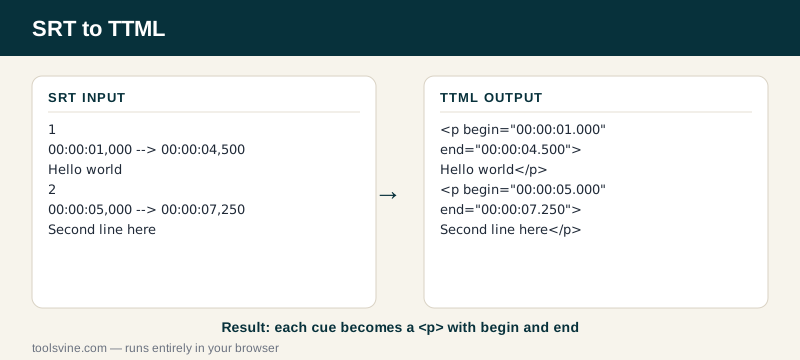
Press Sample and the tool loads two cues: "Hello world" from 1 second to 4.5 seconds, and "Second line here" from 5 seconds to 7.25 seconds. Each cue becomes one paragraph inside the document body, with its own begin and end times. The head holds the layout region and stays the same for every file.
Example input:
1\n00:00:01,000 --> 00:00:04,500\nHello world\n\n2\n00:00:05,000 --> 00:00:07,250\nSecond line here
Becomes — the two paragraphs from the document body:
<p begin="00:00:01.000" end="00:00:04.500">Hello world</p>\n<p begin="00:00:05.000" end="00:00:07.250">Second line here</p>
Try it yourself: change the second cue's end time from 7.25 to 8 seconds in the SRT and watch the second paragraph become end="00:00:08.000". Then open the .ttml file in a text editor and find the region in the head — change the extent to 80% 20% if you want the text block taller. If the subtitles need to reach YouTube instead, the SRT to SBV converter writes the format YouTube's uploader expects.
Where is TTML used?
TTML is used by broadcasters, streaming services, and professional captioning workflows — anywhere subtitles need layout, styling, or metadata that plain-text formats cannot carry. Netflix, broadcast caption files, and many media asset systems accept TTML as an interchange format for subtitles.
For a web page, VTT is still the better pick — browsers read it natively and TTML needs extra tooling. Choose TTML when a broadcaster, a streaming platform, or a captioning vendor asks for it by name, and keep your SRT as the master copy: it converts to any of these formats in seconds.
Frequently asked questions
Will the subtitle timings stay exact when converting SRT to TTML?
Yes — timings are carried over to the millisecond and written as begin and end attributes on each paragraph. The moments each line appears and disappears do not move at all. A cue from 1 second to 4.5 seconds becomes begin="00:00:01.000" end="00:00:04.500", which is the same interval written in TTML's clock format.
Is converting SRT to TTML free?
Yes, completely free with no account and no file-size games. The conversion runs in your browser, so your subtitles never leave your device. You can convert one cue or a two-hour feature film's worth of subtitles and the price stays the same: nothing.
Can I upload a .srt file instead of pasting?
Yes — drop the file on the box above and its text loads into the input automatically. You can also paste from your clipboard, which is handy for subtitles copied out of an editor. Either way, the file is read on your device and never uploaded anywhere.
What if my SRT file has errors?
The tool shows a plain-English error naming the problem — for example a cue with a missing timestamp — instead of producing a broken file. Fix that cue and the conversion runs. Blank cues and cues that end before they start are dropped quietly, since they cannot play anyway.
Can I change where the subtitles appear on screen?
Yes. The layout region sits in the document head, with an origin of 10% 80% and an extent of 80% 15% — bottom center, in other words. Change the origin and extent values to move the block, or add a second region and point some paragraphs at it. The converter keeps one region because most subtitle files need exactly one.