
Convert SRT subtitles to VTT without uploading your files. Paste the subtitle text or drop a .srt file, and the VTT version appears instantly — every cue keeps its exact start and end time. Copy the result or download it as a .vtt file.
SRT (SubRip) is the plain-text subtitle format almost every player and editor understands. VTT (WebVTT) is the web's subtitle format — the one browsers and HTML5 video players read. If your subtitles need styling instead, SRT to ASS adds fonts and colors, and VTT to SRT runs the trip in reverse.
How to use
- Paste your SRT subtitles into the input box, or drop a .srt file to load it.
- The VTT output appears automatically, with every cue's timing preserved to the millisecond.
- Copy the result, or download it as a .vtt file with the Download button.
- Check the first and last cues in your player — if the timing looks right there, the whole file is right.
Why use Toolsvine
Turning SRT into VTT is a small job that usually means uploading a script to a website you have never heard of — awkward when the subtitles belong to an unreleased video. This converter runs locally in your browser, keeps every cue's timing to the millisecond, and never asks for an account or an email address.
What is SRT, and what is VTT?
SRT and VTT are both plain-text subtitle formats built from the same idea: numbered cues with a start time, an end time, and one or two lines of text. SRT is the older format every desktop player reads, and VTT is its web-native successor — the format the HTML5 video element and most streaming platforms expect.
The two formats differ in small ways that matter. VTT files start with the line WEBVTT, timestamps use a dot instead of a comma (00:00:01.000, not 00:00:01,000), and cue numbers are optional — this converter keeps them, so each cue is still easy to find. The words and the timings never change: only the container changes.
What changes in the conversion
| Detail | VTT |
|---|---|
| Header | WEBVTT added at the top |
| Timestamps | Comma becomes a dot: 00:00:01,000 → 00:00:01.000 |
| Cue numbers | Kept, in order |
| Text | Unchanged |
| Timings | Unchanged, to the millisecond |
Blank cues are dropped and cues are renumbered in order, so a file with a stray empty cue comes out clean. If a cue's end time is not after its start time, it is dropped too — a cue that ends before it starts cannot play, so the converter refuses to keep it rather than writing a broken file.
Worked example: two SRT cues become VTT
Press Sample and the tool loads two cues: "Hello world" from 1 second to 4.5 seconds, and "Second line here" from 5 seconds to 7.25 seconds. The conversion changes three things and nothing else: the WEBVTT header appears, every comma in a timestamp becomes a dot, and the cue numbers stay exactly where they were.
Example input:
1\n00:00:01,000 --> 00:00:04,500\nHello world\n\n2\n00:00:05,000 --> 00:00:07,250\nSecond line here
Becomes:
WEBVTT\n\n1\n00:00:01.000 --> 00:00:04.500\nHello world\n\n2\n00:00:05.000 --> 00:00:07.250\nSecond line here
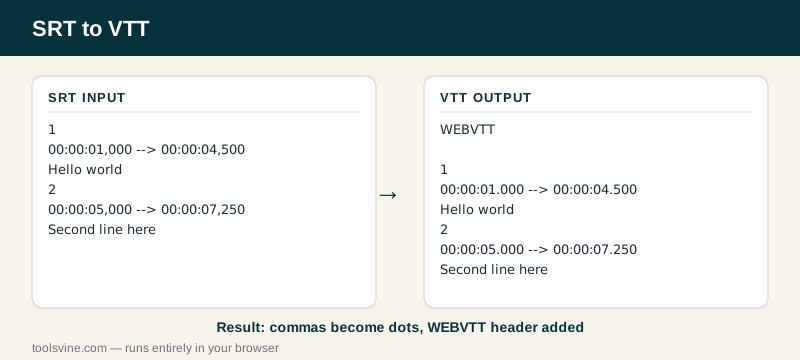
Try it yourself: change the second cue's end time from 7.25 to 8 seconds in the SRT and watch the VTT update — 00:00:08.000, with the dot. Then save the file and open it beside a video in your browser: the video element reads VTT natively, no player software needed. If the video goes to YouTube instead, the SRT to SBV converter writes the format YouTube's uploader expects.
Where does VTT work?
VTT works in every modern browser through the HTML5 video element, and in most streaming platforms, video hosts, and online course tools. If you are putting subtitles on a web page, a course video, or a streaming upload, VTT is almost always the format to use.
Desktop players like VLC read VTT too, but SRT is still the safer pick for a DVD player or an older TV: those often refuse VTT outright. The rule is simple — web and streaming means VTT, desktop and discs mean SRT — and this converter plus the VTT to SRT converter cover both directions.
Frequently asked questions
Will the subtitle timings stay exact when converting SRT to VTT?
Yes — timings are carried over to the millisecond, and only the timestamp format changes: commas become dots. The moments each line appears and disappears do not move at all. Because SRT and VTT both store time the same way, the conversion is lossless — a round trip from SRT to VTT and back gives you the same timings you started with.
Is converting SRT to VTT free?
Yes, completely free with no account and no file-size games. The conversion runs in your browser, so your subtitles never leave your device. You can convert one cue or a two-hour feature film's worth of subtitles and the price stays the same: nothing.
Can I upload a .srt file instead of pasting?
Yes — drop the file on the box above and its text loads into the input automatically. You can also paste from your clipboard, which is handy for subtitles copied out of an editor. Either way, the file is read on your device and never uploaded anywhere.
What if my SRT file has errors?
The tool shows a plain-English error naming the problem — for example a cue with a missing timestamp — instead of producing a broken file. Fix that cue and the conversion runs. Blank cues and cues that end before they start are dropped quietly, since they cannot play anyway.
Does VTT support styling like bold or colors?
A little. VTT supports a few inline tags — bold, italic, and voice spans — but most players ignore them, and this converter does not add any styling of its own. If you need real control over fonts, colors, and position, convert to ASS instead: it carries a full style sheet with the subtitles.