

On this page
Engineering leaders used to guess how delivery was going, and the guess was usually wrong. LinearB is the pick that replaces the guess with numbers: DORA metrics, cycle time and team health in one dashboard, with automation that nudges stuck work forward. This guide compares eight AI software development analytics tools, from $20 to $54 a developer a month, with live 2026 prices, free plans and trials, so a team can pick by size and budget instead of by sales pitch.
How we researched this
We checked the pricing page of every vendor on this list on November 26, 2026, and kept only tools that publish a real dollar price. Each tool had to report delivery or code metrics from real repositories, not from self-reported surveys alone. We compared entry prices, free plans, trial length and how the bill scales as the team grows.
Compare the tools
| Name | Best for | Starting price | Free plan | |
|---|---|---|---|---|
 LinearB | Engineering leaders who want DORA metrics with workflow automation | $29/user/mo | No free plan, free trial available | Visit |
 Code Climate | Teams that want code quality and velocity metrics from one platform | $20/contributor/mo | Free plan | Visit |
 Swarmia | Teams that want delivery metrics plus developer experience surveys | $45/dev/mo | Free for teams under 10 developers | Visit |
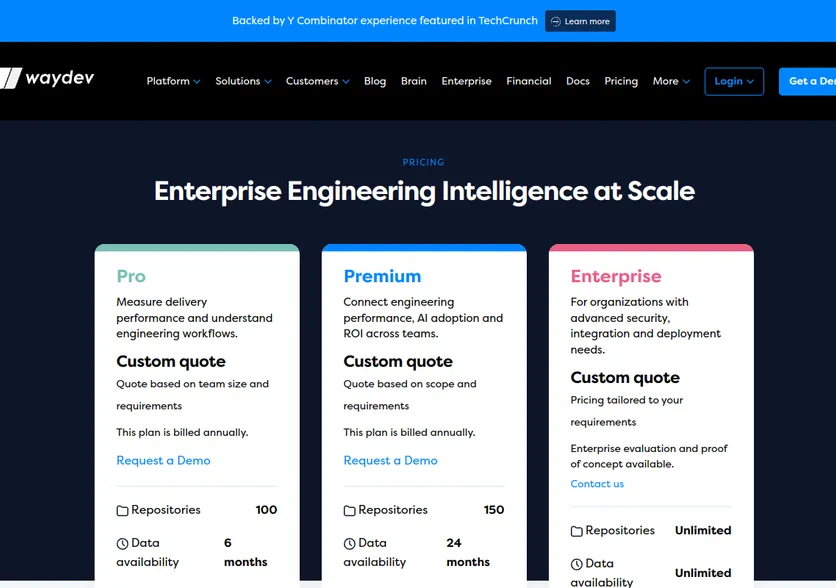
 Waydev | Leaders who want per-contributor productivity metrics and forecasting | $54/active contributor/mo | 14-day free trial, no free plan | Visit |
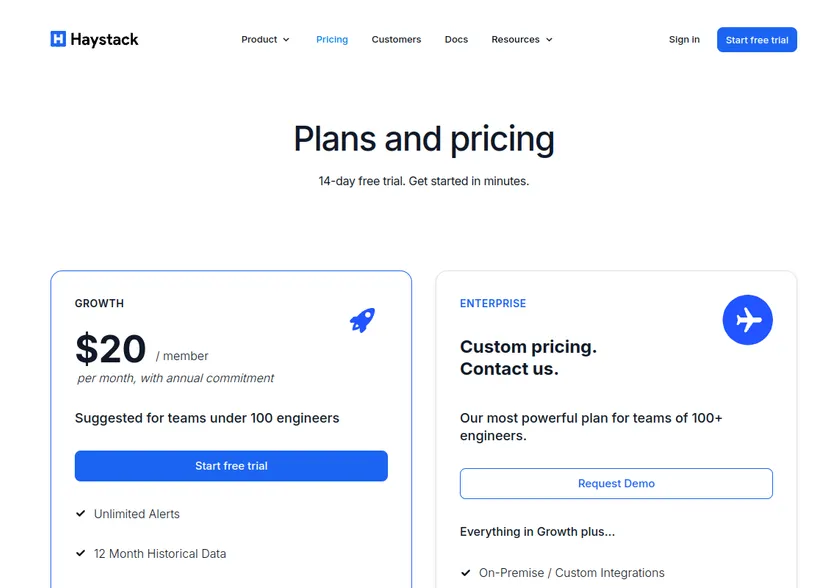
 Haystack | Small teams that want simple delivery analytics without a big bill | $20/member/mo | 14-day free trial, no free plan | Visit |
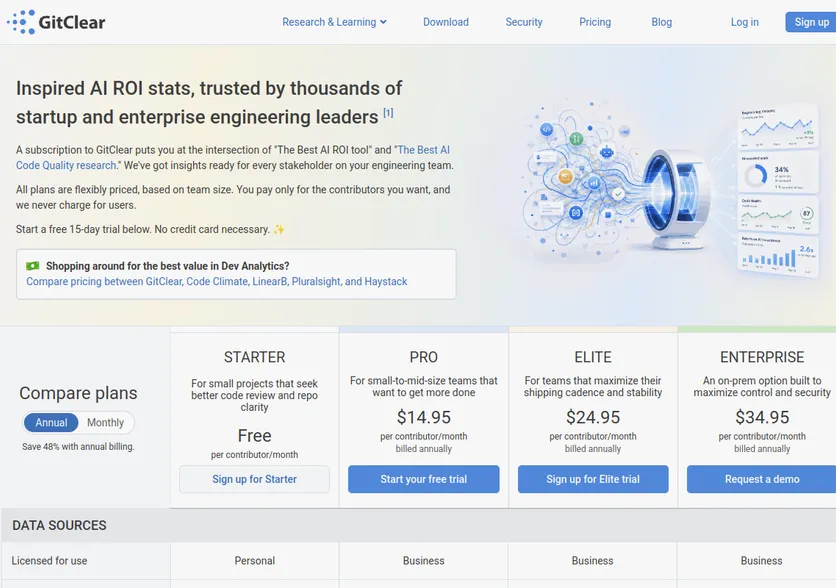
 GitClear | Teams that want code-level metrics and AI code attribution | $29/contributor/mo | Free Starter plan | Visit |
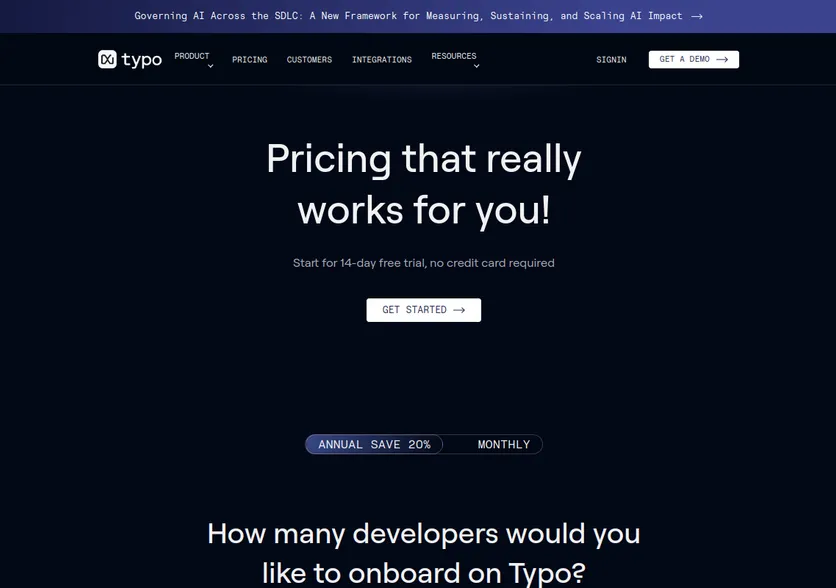
 Typo | Budget-conscious teams that want delivery analytics with AI code review | $25/dev/mo | Free plan (up to 10 developers) | Visit |
 Axify | Teams that want DORA metrics tied to AI tool adoption and cost | $29/active contributor/mo | No free plan, 14-day trial | Visit |
The AI software development analytics tools, compared
1. LinearB
Best for: Engineering leaders who want DORA metrics with workflow automation
Paid tool Starting price: $29/user/mo · Essentials is $29 a user a month billed annually with a 50-user minimum; Enterprise is $59 a user a month
Free plan: No free plan, free trial available
LinearB turns delivery data into DORA metrics, cycle time and team health views, with automation that moves stuck work forward. This LinearB Essentials plan costs $29 a user a month and covers the core delivery metrics for teams that want one source of truth. A 50-user minimum applies on paid plans, and the Enterprise tier adds custom metrics and security controls for larger organizations.
What we like
- DORA metrics are ready out of the box
- Automation nudges stuck pull requests forward
- Team health views surface burnout risk early
Watch out for
- The 50-user minimum prices out small teams
- No free plan for trying it long term
How to try it
- Open the LinearB pricing page and start a trial
- Connect your repositories and issue tracker
- Review the DORA dashboard for your last sprint
2. Code Climate
Best for: Teams that want code quality and velocity metrics from one platform
Paid tool Starting price: $20/contributor/mo · Pro is $20 a contributor a month; Free is $0 and Enterprise is $30 a contributor a month
Free plan: Free plan
Code Climate measures code quality, test coverage and delivery velocity, and scores every pull request against maintainability rules. This Code Climate Pro plan costs $20 a contributor a month and adds unlimited repositories with deeper quality insights for active teams. A free plan covers a first project, while the Enterprise tier adds security features and support for larger organizations.
What we like
- Quality scores appear on every pull request
- Velocity metrics sit next to code health
- Free plan covers a first project
Watch out for
- A comparison table from GitClear claims pricing is no longer published
- Quality scoring needs time to calibrate on a new codebase
How to try it
- Open the Code Climate pricing page and start the free plan
- Connect a repository and run a first analysis
- Review the quality scores on an open pull request
3. Swarmia
Best for: Teams that want delivery metrics plus developer experience surveys
Paid tool Starting price: $45/dev/mo · Standard is $45 a developer a month billed annually; Enterprise is $55 a developer a month; add-on modules are $5 to $23 a developer a month
Free plan: Free for teams under 10 developers
Swarmia connects delivery data with developer feedback, so a team sees both the numbers and how engineers feel about the work. This Swarmia Standard plan costs $45 a developer a month and adds working agreements, surveys and deeper analytics for growing teams. Teams with fewer than 10 developers use it free, and the Enterprise tier adds custom modules and support.
What we like
- Developer surveys sit next to delivery data
- Free for teams under 10 developers
- Working agreements turn metrics into action
Watch out for
- Paid plans start above the cheapest rivals
- Add-on modules raise the bill per developer
How to try it
- Open the Swarmia pricing page and check the free tier
- Connect your repositories and chat tool
- Set a working agreement and watch the dashboard
4. Waydev
Best for: Leaders who want per-contributor productivity metrics and forecasting
Paid tool Starting price: $54/active contributor/mo · Premium is $54 an active contributor a month; Pro is $899 a year flat; older $29 per contributor figures are stale
Free plan: 14-day free trial, no free plan
Waydev tracks developer output, code review time and sprint progress, and forecasts delivery dates from real commit history. This Waydev Premium plan costs $54 an active contributor a month and adds the full metric set with forecasting for teams that plan by data. A flat Pro plan covers a whole team for one yearly price, which suits teams with many occasional contributors.
What we like
- Delivery forecasts use real commit history
- Per-contributor metrics are detailed
- Flat Pro plan suits teams with many contributors
Watch out for
- Older price lists show $29, which is stale
- No free plan beyond the trial
How to try it
- Open the Waydev pricing page and start the free trial
- Connect your repositories and issue tracker
- Check the forecast for your current sprint
5. Haystack
Best for: Small teams that want simple delivery analytics without a big bill
Paid tool Starting price: $20/member/mo · Growth is $20 a member a month with an annual commitment; Enterprise is custom for teams over 100 engineers; 14-day trial needs no card
Free plan: 14-day free trial, no free plan
Haystack keeps delivery analytics simple, with DORA metrics, cycle time and alerts for stuck pull requests in one clean view. This Haystack Growth plan costs $20 a member a month and covers teams under 100 engineers with a year of historical data. An annual commitment applies, and the Enterprise tier adds custom support for organizations above 100 engineers.
What we like
- One published price keeps budgeting simple
- Unlimited alerts cover stuck work and anomalies
- A full year of history is included
Watch out for
- Only one paid tier below Enterprise
- Annual commitment is required on Growth
How to try it
- Open the Haystack pricing page and start the free trial
- Connect your Git provider of choice
- Set an alert for stuck pull requests
6. GitClear
Best for: Teams that want code-level metrics and AI code attribution
Paid tool Starting price: $29/contributor/mo · Pro is $29 a contributor a month billed monthly, or $14.95 billed annually; Elite is $24.95 and Enterprise is $34.95 billed annually
Free plan: Free Starter plan
GitClear reads Git history at the code level, scoring durable output against rework and attributing lines to the AI model that wrote them. This GitClear Pro plan costs $29 a contributor a month and covers 25 repositories with three years of history and AI data deep dives. Annual billing cuts the rate to about $15 a contributor a month, and the Elite tier adds far more history and analysis capacity.
What we like
- AI code attribution is the deepest on this list
- Diff Delta filters out churn and duplication
- Free Starter plan covers three repositories
Watch out for
- Annual and monthly rates differ by almost half
- Deep analysis needs a long commit history to shine
How to try it
- Open the GitClear pricing page and start the free Starter plan
- Connect a repository and let it analyze history
- Open the AI attribution view for a recent sprint
7. Typo
Best for: Budget-conscious teams that want delivery analytics with AI code review
Paid tool Starting price: $25/dev/mo · Starter is $25 a developer a month billed monthly, or $20 billed annually; Pro is $28 billed annually; Enterprise is custom
Free plan: Free plan (up to 10 developers)
Typo is an engineering intelligence platform that tracks delivery speed, code health and developer experience in one place. This Typo Starter plan costs $25 a developer a month and adds sprint insights, contributor analytics and burnout tracking for growing teams. Annual billing drops the rate to $20 a developer a month, and the Pro tier adds automated code reviews and AI pull request summaries.
What we like
- Only active developers are billed each month
- Free plan covers up to 10 developers
- Burnout signals are built into the dashboard
Watch out for
- Starter keeps only six months of data history
- Code review automation needs the Pro tier
How to try it
- Open the Typo pricing page and start the free plan
- Connect your repositories and chat tool
- Review the delivery insights for your team
8. Axify
Best for: Teams that want DORA metrics tied to AI tool adoption and cost
Paid tool Starting price: $29/active contributor/mo · Pro is $29 an active contributor a month billed annually; Enterprise is custom; data is hosted in Canada
Free plan: No free plan, 14-day trial
Axify connects delivery metrics with AI usage, showing which tools and models actually move the work forward. This Axify Pro plan costs $29 an active contributor a month and covers DORA metrics, flow analysis and delivery forecasting for the whole team. Billing is annual, and only contributors active in the last 30 days are charged, so occasional contributors cost nothing.
What we like
- AI adoption and cost sit next to delivery data
- Only active contributors are billed
- Daily well-being surveys add a human signal
Watch out for
- No free plan beyond the 14-day trial
- Fewer public reviews than the bigger platforms
How to try it
- Open the Axify pricing page and start the free trial
- Connect your Git provider and issue tracker
- Review the AI adoption view against delivery metrics
Prices above were checked on each vendor’s own website on Nov 26, 2026 and can change — the vendor’s page is the final word. Vendor links are editorial: nobody paid to be listed or ranked here. Vendors who want a featured listing can see how it works on our Get listed page.
How to read the price before you commit
Prices on this list run from $20 to $54 a developer a month, and the billing unit is the whole story: most tools charge per active contributor, so a team with many occasional committers pays less than the seat count suggests. A $20 plan looks cheap until the annual commitment locks in, and a $54 plan looks steep until forecasting saves a missed deadline. Before paying, run the trial on a real sprint with real pull requests and watch which metrics actually change a decision. Check whether AI code attribution, surveys and history are included or gated behind a higher tier.
Before you buy
- Count only the developers who actually commit code, because most tools bill on active contributors, not seats.
- Check which metrics come from your own repositories and which need a separate integration to work.
- Run the trial on a real sprint with real pull requests, not on a demo repository.
- Ask how AI-generated code is measured, because attribution changes the story the dashboard tells.
- Confirm data history length, because short retention hides trends across quarters.
Official websites
Official websites of the products reviewed above. Features and prices were checked against these sites when this guide was written, and they can change, so confirm on the vendor site before you buy.
Frequently asked questions
What is the cheapest AI software development analytics tool here?
GitClear is the cheapest at scale, with Pro at about $15 a contributor a month on annual billing and a free Starter plan. Typo is close, at $20 a developer a month annually with a free plan for up to 10 developers. Haystack is also $20 a member a month, but it has no free plan, only a trial.
What are DORA metrics?
DORA metrics measure deployment frequency, lead time for changes, change failure rate and time to restore service. They come from the DevOps Research and Assessment group and are the standard way to judge whether a team ships quickly and safely. Most tools on this list report all four.
Do small teams need an engineering analytics tool?
Yes, if you manage more than a handful of developers. The tools surface stuck pull requests, slow reviews and AI code that does not survive, which are hard to see by hand. A team of two or three can manage with the free plans, but the paid tiers pay for themselves once delivery slips become expensive.
Which tools measure developer experience, not just output?
Swarmia and Typo both include developer experience surveys, which catch burnout and friction that raw numbers miss. Axify adds a daily one-question well-being survey. If team health matters as much as velocity, pick one of these three over a pure metrics platform.
How should I choose between these tools?
Start with the free plan or trial on two tools and connect the same repositories to both. Compare the DORA numbers after two weeks and ask the team which dashboard they actually open. The right tool is the one that changes a decision, not the one with the most charts.
Building something of your own? Try the free code and developer tools on Toolsvine right in your browser.
Browse Developer Tools tools


