
On this page
A calendar that only works on one platform breaks the moment you switch from iPhone to Windows, so cross-platform sync decides the pick. The eight tools below run from five dollars a month to twenty-five dollars a month, and every price was checked on the vendor site on November 27, 2026. Native apps on iPhone, a real Windows app or web access, and task planning decide the rest. Fantastical is our first pick, the most polished calendar for Apple and Windows users, with natural language entry and scheduling links.
How we researched this
We started with the calendar apps that run on both iPhone and Windows, then read each price on the vendor pricing page on November 27, 2026 and checked native apps, web access and free plans. We judged them for a person who moves between an iPhone and a Windows computer and needs one calendar with tasks, scheduling links and reliable sync. We dropped Apple Calendar, Google Calendar and Notion Calendar because all three are free with no paid plan to compare, and BusyCal and Timepage because neither offers a Windows version.
Compare the tools
| Name | Best for | Starting price | Free plan | |
|---|---|---|---|---|
 Fantastical | Apple and Windows users who want the most polished calendar | $56.99/year | Free version for basic use | Visit |
 Morgen | Professionals who plan tasks onto the day | $15/month | No free plan; 14-day free trial | Visit |
 Any.do | People who want tasks and calendar events in one cheap app | $4.99/month | Free Personal plan; free trial of Premium | Visit |
 Vimcal | People who live in back-to-back meetings | $25/month | Free plan on iOS only; free trial of paid plan | Visit |
 Sunsama | Mindful planners who want a guided daily ritual | $17/month | No free plan; 14-day free trial | Visit |
 OneCal | People whose work and personal calendars live on different providers | $5/month | No free plan; 14-day free trial | Visit |
 Akiflow | People with a scattered task list to block into the day | $19/month | No free plan; 7-day free trial with card required | Visit |
 Calendly | People who book meetings with clients and outsiders | $10/month | Free plan for 1 event type and 1 calendar connection | Visit |
The calendar software for ios and windows, compared
1. Fantastical
Best for: Apple and Windows users who want the most polished calendar
Paid tool Starting price: $56.99/year · Premium lists at fifty-six dollars and ninety-nine cents a year, or six dollars and ninety-nine cents a month; a free version covers basic use
Free plan: Free version for basic use
For Apple and Windows users, Fantastical is the most polished calendar app here, merging Google, Microsoft 365, Exchange, iCloud and CalDAV calendars into one fast interface with natural language entry. This Fantastical Premium plan lists at fifty-six dollars and ninety-nine cents a year, or six dollars and ninety-nine cents a month, with a free version for basic use. A person who manages several work and personal accounts gets calendar sets, meeting polls and scheduling links, though Android is not supported.
What we like
- Most polished interface of any calendar here
- Natural language entry for fast event creation
- Calendar sets, meeting polls and scheduling links
Watch out for
- No Android version, Apple and Windows only
- Premium features need the paid plan
How to try it
- Open the Flexibits site and download Fantastical free
- Connect your Google, Microsoft and iCloud calendars
- Type an event in plain language and watch it appear
2. Morgen
Best for: Professionals who plan tasks onto the day
Paid tool Starting price: $15/month · Pro lists at fifteen dollars a month on annual billing, or thirty dollars billed monthly, with a fourteen-day free trial and no free plan
Free plan: No free plan; 14-day free trial
For professionals who plan tasks onto the day, Morgen layers Google, Outlook, iCloud, Fastmail and Zoho calendars into one view and pulls tasks in from Notion, Todoist, ClickUp and Linear. This Morgen Pro plan lists at fifteen dollars a month on annual billing, or thirty dollars billed monthly, with a fourteen-day free trial and no free plan. A person juggling several work and personal calendars gets time blocking and an AI planner, though Morgen is the dearest solo planner here on monthly billing.

What we like
- Calendars and tasks planned together in one view
- AI planner suggests a plan each morning
- Works on Mac, Windows, Linux, iPhone and Android
Watch out for
- No free plan after the fourteen-day trial
- Dearest solo planner here on monthly billing
How to try it
- Open the Morgen pricing page and start the fourteen-day trial
- Connect your calendars and your task apps
- Drag a task onto the day as a time block
3. Any.do
Best for: People who want tasks and calendar events in one cheap app
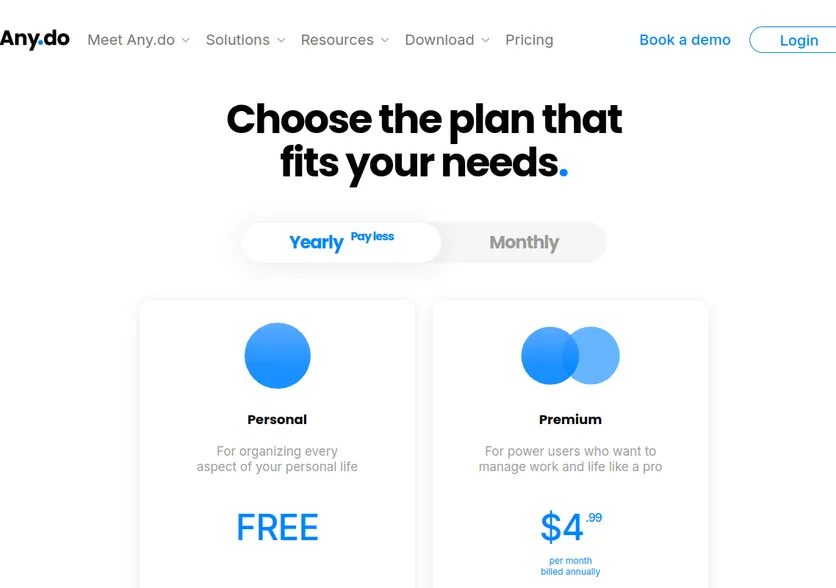
Paid tool Starting price: $4.99/month · Premium lists at four dollars and ninety-nine cents a month on annual billing, or seven dollars and ninety-nine cents billed monthly; the Personal plan is free
Free plan: Free Personal plan; free trial of Premium
For people who want tasks and calendar events in one cheap app, Anydo pairs to-do lists with a calendar, daily planner and reminders that sync across iPhone, Android, Mac and Windows. This Any.do Premium plan lists at four dollars and ninety-nine cents a month on annual billing, or seven dollars and ninety-nine cents billed monthly, with a free Personal plan. A person who plans the day from a task list gets the cheapest paid upgrade here, though the calendar is simpler than Fantastical or Morgen.
What we like
- Cheapest paid upgrade in this list
- Tasks, lists and calendar in one simple app
- Syncs across iPhone, Android, Mac and Windows
Watch out for
- Calendar is simpler than Fantastical or Morgen
- Advanced features need the Premium plan
How to try it
- Open the Anydo pricing page and check the Premium plan
- Start with the free Personal plan and add your tasks
- Sync the calendar across iPhone and Windows
4. Vimcal
Best for: People who live in back-to-back meetings
Paid tool Starting price: $25/month · Lists at twenty-five dollars a month on annual billing, or thirty-five dollars billed monthly, with a free plan on iPhone only
Free plan: Free plan on iOS only; free trial of paid plan
For people who live in meetings, Vimcal is the fast calendar built for heavy schedulers, with time zone tools, keyboard shortcuts and booking links on Mac, Windows and iPhone. This Vimcal plan lists at twenty-five dollars a month on annual billing, or thirty-five dollars billed monthly, with a free plan on iPhone only. A person who books back-to-back meetings across time zones gets the fastest scheduling workflow here, though the desktop app costs more than Fantastical or Morgen.
What we like
- Fastest scheduling workflow for heavy meeting loads
- Time zone tools and keyboard shortcuts built in
- Runs on Mac, Windows and iPhone
Watch out for
- Dearest calendar here on monthly billing
- Free plan exists only on iPhone
How to try it
- Open the Vimcal pricing page and check the annual rate
- Try the free plan on iPhone first
- Book a meeting across time zones and test the workflow
5. Sunsama
Best for: Mindful planners who want a guided daily ritual
Paid tool Starting price: $17/month · Pro lists at seventeen dollars a month on annual billing, or twenty-two dollars billed monthly, with a fourteen-day free trial
Free plan: No free plan; 14-day free trial
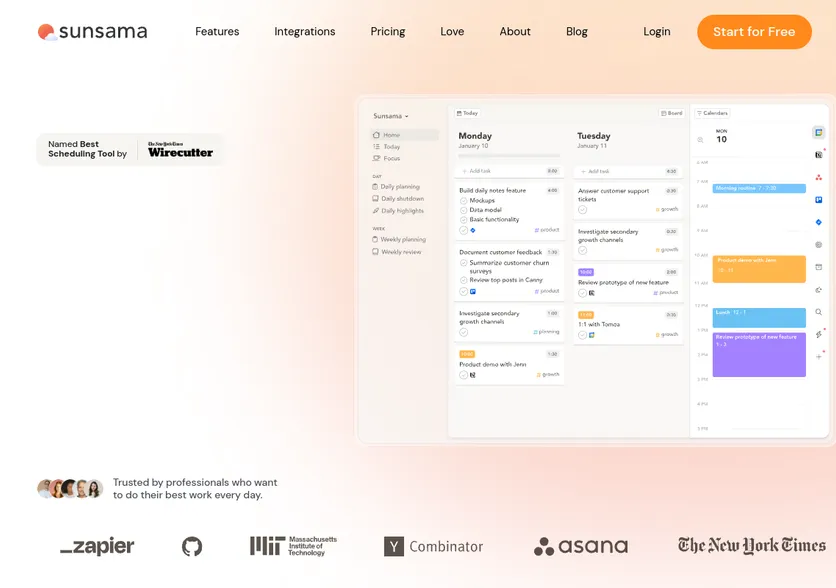
For mindful planners, Sunsama is the guided daily planning ritual, helping you choose what matters, time-block it onto the calendar and review the day in one calm interface. This Sunsama Pro plan lists at seventeen dollars a month on annual billing, or twenty-two dollars billed monthly, with a fourteen-day free trial. A professional who wants intentional days rather than auto-scheduling gets a planning ritual, though Sunsama plans the day rather than automating it.
What we like
- Guided daily planning ritual in a calm interface
- Connects Google, Outlook and Apple calendars
- Runs on Mac, Windows, iPhone and Android
Watch out for
- Plans the day rather than automating it
- No free plan after the fourteen-day trial
How to try it
- Open the Sunsama pricing page and start the fourteen-day trial
- Plan tomorrow morning with the guided ritual
- Time-block your top tasks onto the calendar
6. OneCal
Best for: People whose work and personal calendars live on different providers
Paid tool Starting price: $5/month · Lists at five dollars a month on annual billing, with a fourteen-day free trial and no free plan
Free plan: No free plan; 14-day free trial
For people whose work and personal calendars live on different providers, OneCal keeps them in step, syncing events between Google and Outlook so a meeting never double-books. This OneCal plan lists at five dollars a month on annual billing, with a fourteen-day free trial and no free plan. A person with a work calendar and a family calendar on different services gets reliable sync at the lowest price here, though OneCal syncs calendars rather than replacing your calendar app.
What we like
- Lowest price in this list at five dollars a month
- Stops double-booking across providers
- Works with Google and Outlook calendars
Watch out for
- Syncs calendars rather than replacing your calendar app
- No free plan after the fourteen-day trial
How to try it
- Open the OneCal pricing page and start the fourteen-day trial
- Connect your Google and Outlook calendars
- Create a test event and watch it sync both ways
7. Akiflow
Best for: People with a scattered task list to block into the day
Paid tool Starting price: $19/month · Pro lists at nineteen dollars a month on annual billing, or thirty-four dollars billed monthly, with a seven-day free trial that needs a card
Free plan: No free plan; 7-day free trial with card required
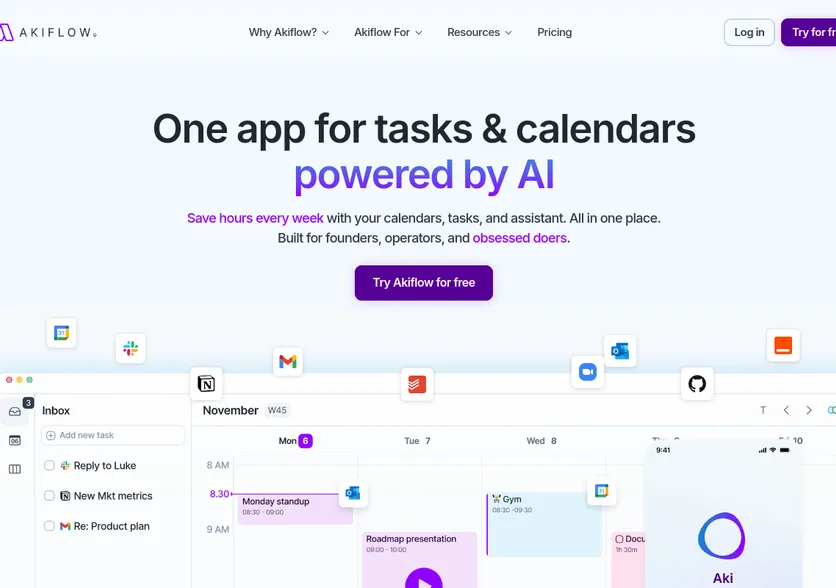
For people with a scattered task list, Akiflow blocks tasks onto the calendar with time blocking, an AI assistant and integrations for Google and Outlook calendars. This Akiflow Pro plan lists at nineteen dollars a month on annual billing, or thirty-four dollars billed monthly, with a seven-day free trial that needs a card. A person who wants every task on the calendar gets powerful time blocking, though the trial is short and needs a card up front.
What we like
- Powerful time blocking with an AI assistant
- Pulls tasks from many apps onto one calendar
- Works on web, desktop and mobile
Watch out for
- Seven-day trial is short and needs a card
- Monthly billing costs nearly double the annual rate
How to try it
- Open the Akiflow pricing page and check the Pro plan
- Start the seven-day trial and connect your calendars
- Drag your task list onto the calendar as time blocks
8. Calendly
Best for: People who book meetings with clients and outsiders
Paid tool Starting price: $10/month · Standard lists at ten dollars per seat a month on annual billing, or twelve dollars billed monthly; the free plan covers one event type and one calendar connection
Free plan: Free plan for 1 event type and 1 calendar connection
For people who book meetings with outsiders, Calendly is the scheduling link standard, letting anyone pick a time from your availability without the email back-and-forth. This Calendly Standard plan lists at ten dollars per seat a month on annual billing, or twelve dollars billed monthly, with a free plan for one event type and one calendar connection. A person who schedules with clients gets booking links on iPhone and Windows, though Calendly schedules meetings rather than managing your whole calendar.

What we like
- Scheduling link standard that clients already know
- Free plan for one event type and one calendar
- Works on iPhone, Android and the web on Windows
Watch out for
- Schedules meetings rather than managing your calendar
- Teams plan costs sixteen dollars per seat a month
How to try it
- Open the Calendly pricing page and check the Standard plan
- Create a booking link from your Google or Outlook calendar
- Share the link with a client and let them pick a time
Prices above were checked on each vendor’s own website on Nov 27, 2026 and can change — the vendor’s page is the final word. Vendor links are editorial: nobody paid to be listed or ranked here. Vendors who want a featured listing can see how it works on our Get listed page.
What calendar software for iOS and Windows costs in 2026
Calendar apps for iPhone and Windows are cheap, because the range here runs from five dollars a month for OneCal to twenty-five dollars a month for Vimcal, and most people pay under twenty dollars. The real choice is between a calendar that manages your whole day and a tool that only syncs or schedules. Fantastical at fifty-six dollars and ninety-nine cents a year and Morgen at fifteen dollars a month manage the whole day, while OneCal at five dollars a month only syncs calendars and Calendly at ten dollars a month only books meetings. Buy the tool that matches the job, not the cheapest headline.
Test the sync on both devices before you pay, because a calendar that looks perfect on iPhone can lag on Windows. Connect your Google, Microsoft and iCloud accounts, create a test event on the iPhone and watch it appear on Windows within a minute. Check the free plan first, because Fantastical, Anydo and Calendly all offer free tiers that cover basic use. Pick the calendar you will open every morning, because the best planning features help nobody if the app stays closed.
Before you buy
- Test sync on both devices, because a calendar that lags on Windows wastes the iPhone app.
- Check the free plan first, because Fantastical, Anydo and Calendly cover basic use free.
- Match the tool to the job, because syncing and scheduling are not the same as planning.
- Confirm your calendar providers are supported, because not every app connects to every service.
- Compare annual totals, because monthly billing costs nearly double on several tools here.
Official websites
Official websites of the products reviewed above. Features and prices were checked against these sites when this guide was written, and they can change, so confirm on the vendor site before you buy.
Frequently asked questions
Which calendar software is best for iOS and Windows in 2026?
Fantastical is the best overall pick at fifty-six dollars and ninety-nine cents a year, as the most polished calendar for Apple and Windows users with natural language entry. Morgen is the best pick for task planning at fifteen dollars a month, with calendars and tasks in one view. OneCal is the best budget pick at five dollars a month, with reliable sync between Google and Outlook calendars.
How much does calendar software for iOS and Windows cost?
Paid calendars in this list run from five dollars a month for OneCal to twenty-five dollars a month for Vimcal, with Anydo Premium at four dollars and ninety-nine cents, Calendly Standard at ten dollars, Fantastical Premium at fifty-six dollars and ninety-nine cents a year, Morgen Pro at fifteen dollars, Sunsama at seventeen dollars and Akiflow at nineteen dollars, all on annual billing.
Is Fantastical available on Windows?
Yes, Fantastical now offers a Windows app alongside its Mac, iPhone and iPad apps, so it covers the iPhone and Windows combination in this list. It merges Google, Microsoft 365, Exchange, iCloud and CalDAV calendars into one interface, with calendar sets, meeting polls and scheduling links on Premium. Android is not supported, so Android users should look at Morgen or Anydo instead.
Can I use a calendar app for free on iPhone and Windows?
Yes, Apple Calendar, Google Calendar and Notion Calendar are all free and sync across iPhone and Windows, and Fantastical, Anydo and Calendly all offer free tiers with basic features. Free calendars cover viewing, creating and sharing events, while paid plans add natural language entry, scheduling links, task planning and advanced sync. Start free, then pay when the free tier limits your day.
What is the difference between a calendar app and a scheduling tool?
A calendar app like Fantastical or Morgen manages your whole day, with events, tasks, reminders and time blocking in one place. A scheduling tool like Calendly only books meetings, letting outsiders pick a time from your availability without managing the rest of your day. A sync tool like OneCal only keeps two calendars in step. Most people need a calendar app first, then add scheduling or sync as needed.
Need everyday productivity help too? Try Toolsvine's free productivity tools right in your browser.
Browse Productivity Tools tools


