
On this page
When a service goes down at 2 a.m., a startup needs the right person woken in minutes, not a ticket queue that waits until morning. The best critical event management software turns a monitoring alert into a phone call, a push notification and an escalation chain that never drops the ball. The eight platforms below run from $5 to $21 per user a month, and every one offers a free plan or a free trial. PagerDuty is our first pick — the best-known incident platform, and the safest default when uptime is on the line.
How we researched this
We started with the critical event platforms startups actually buy, then read each price on the vendor pricing page on November 26, 2026 and noted the alert limits and free trial each plan carries. We judged them for a small team that runs its own on-call rotation and needs the right engineer reached fast, day or night. We kept the list to tools with a published price and dropped any tool whose price we could not verify.
Compare the tools
| Name | Best for | Starting price | Free plan | |
|---|---|---|---|---|
 PagerDuty | Startups that want the best-known incident platform with deep monitoring integrations | $21/month | Free plan | Visit |
| ilert | Small teams that want AI-assisted incident response at a low per-user price | $19/month | Free plan; 14-day free trial | Visit |
| Squadcast | Startups that want clean on-call rotations with status pages on the higher tier | $15/month | 14-day free trial | Visit |
| AlertOps | Growing teams that want simple per-user pricing with no overage charges | $8/month | Free plan; 14-day free trial | Visit |
| SIGNL4 | Tiny teams that want reliable mobile alerting for under $10 a user | $9/month | Free plan; 30-day free trial | Visit |
| OnPage | Healthcare and IT teams that need HIPAA-compliant critical messaging | $13.99/month | 7-day free trial | Visit |
| Zenduty | Budget startups that want the cheapest on-call plan on this list | $5/month | 14-day free trial | Visit |
| Spike | Small teams moving off Opsgenie that want WhatsApp and Telegram alerts | $7/month | 14-day free trial | Visit |
The critical event platforms, compared
1. PagerDuty
Best for: Startups that want the best-known incident platform with deep monitoring integrations
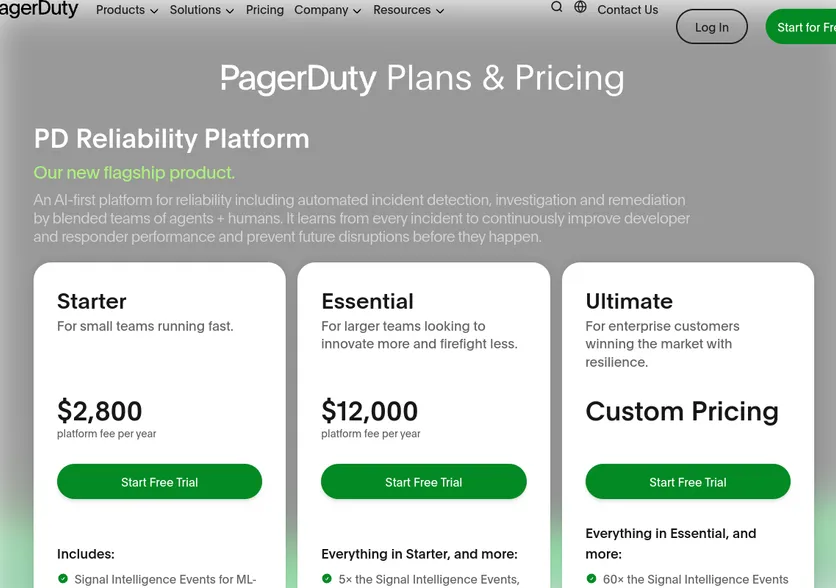
Paid tool Starting price: $21/month · Professional plan, per user per month on annual billing; Free plan available; Business is about $41 a month and Digital Operations is quoted
Free plan: Free plan
PagerDuty is the incident platform most engineers already know, and that familiarity means a startup can set up on-call rotations without teaching the team a new system. This PagerDuty Professional plan covers on-call scheduling, escalations, event grouping and integrations with the monitoring tools a startup already runs. It is the safest pick when an outage touches paying customers and the response has to be fast, logged and defensible.
What we like
- Best-known name in incident response
- Huge integration library for monitoring tools
- Event grouping cuts alert noise fast
Watch out for
- Professional costs about $21 a month per user
- Advanced automation needs the higher tiers
How to try it
- Open the PagerDuty pricing page and start the Professional trial
- Connect your monitoring tool and build an on-call schedule for the team
- Trigger a test alert and confirm the right engineer gets paged
2. ilert
Best for: Small teams that want AI-assisted incident response at a low per-user price
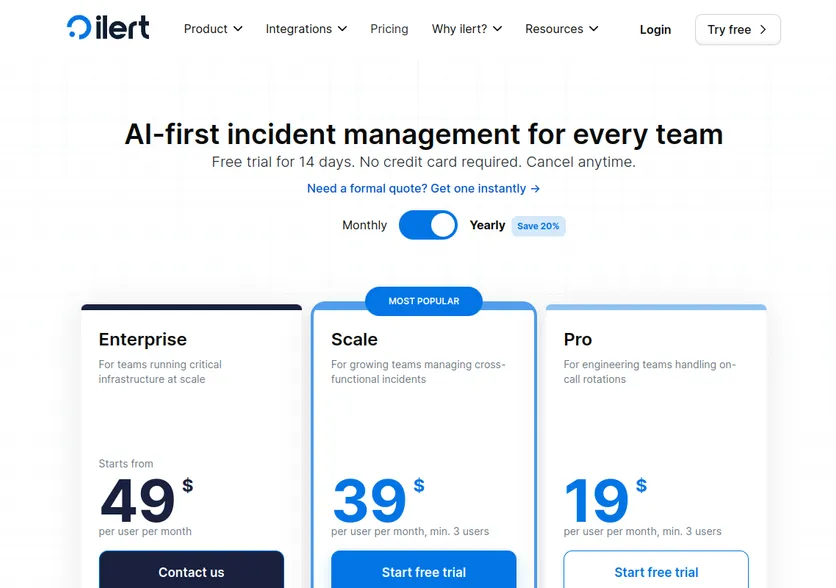
Paid tool Starting price: $19/month · Pro plan, per user per month with a 3-user minimum on annual billing; Scale is about $39 a month; Free plan covers up to 5 users
Free plan: Free plan; 14-day free trial
ilert pairs classic on-call scheduling with AI that triages alerts and drafts postmortems, so a small team spends less time sorting noise. This ilert Pro plan adds unlimited SMS and voice notifications, single sign-on and unlimited viewer users for managers who only need to watch. It is a strong pick for a startup that wants modern AI features without paying enterprise prices.
What we like
- AI triage and postmortem drafts included
- Unlimited SMS and voice alerts on Pro
- Free plan covers up to 5 users
Watch out for
- Pro needs at least 3 paid users
- Enterprise features need the Scale plan
How to try it
- Open the ilert pricing page and start the 14-day trial
- Connect a monitoring source and set up an escalation policy
- Send a test alert and check the AI triage summary
3. Squadcast
Best for: Startups that want clean on-call rotations with status pages on the higher tier
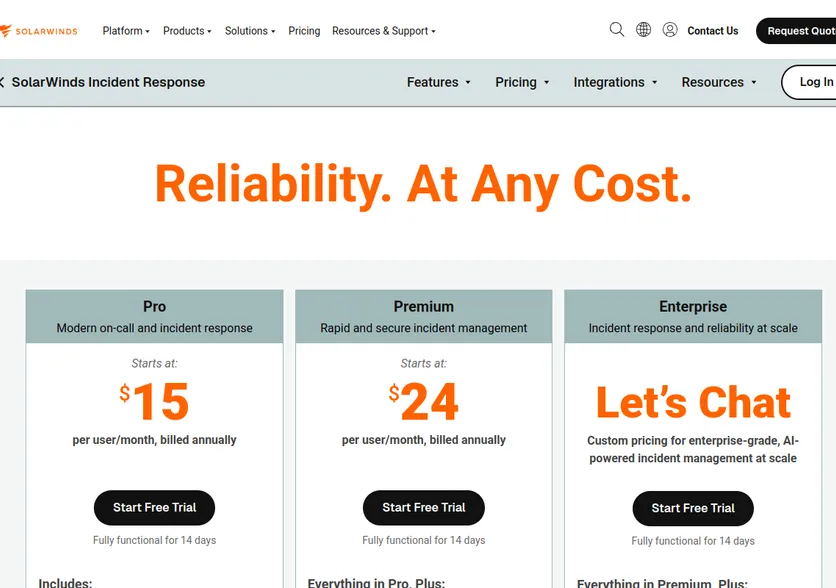
Paid tool Starting price: $15/month · Pro plan, per user per month billed annually; Premium is about $24 a month; Enterprise is quoted
Free plan: 14-day free trial
Squadcast, now part of SolarWinds Incident Response, is built for teams that want clean on-call rotations and a status page without enterprise complexity. This Squadcast Pro plan includes schedules, escalations, automation rules and postmortem templates at one of the lowest prices here. It is the right pick when a startup outgrows a shared phone and needs a real rotation that everyone can trust.
What we like
- Simple setup a small team learns fast
- Automation rules and runbooks on Premium
- 14-day trial on every plan
Watch out for
- Premium costs about $24 a month per user
- Status pages need the Premium tier
How to try it
- Open the Squadcast pricing page and start the 14-day trial
- Build a rotation and add escalation rules for the team
- Run a test incident and review the postmortem template
4. AlertOps
Best for: Growing teams that want simple per-user pricing with no overage charges
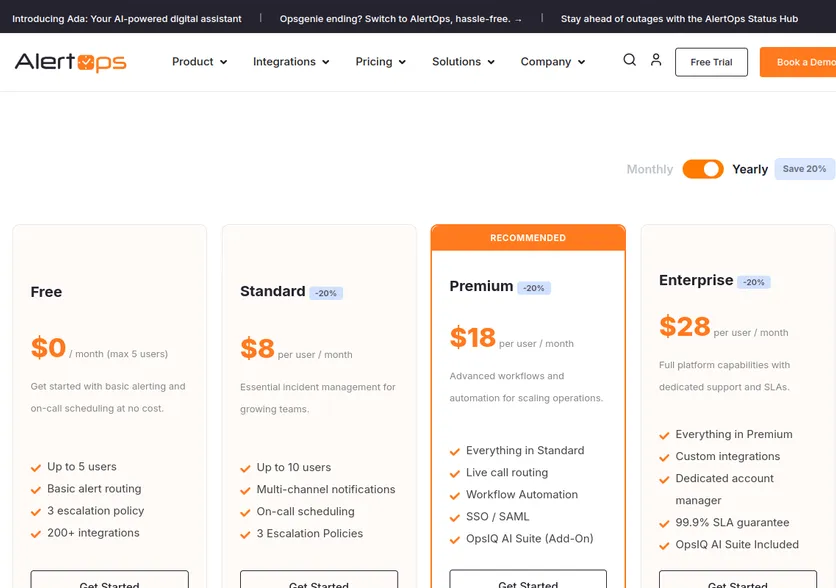
Paid tool Starting price: $8/month · Standard plan, per user per month on annual billing ($10 a month billed monthly); Premium is about $18 a month and Enterprise about $28 a month on annual billing; Free plan covers up to 5 users
Free plan: Free plan; 14-day free trial
AlertOps keeps incident management simple, with flat per-user pricing and no overage charges for the alerts a startup sends. This AlertOps Standard plan covers automated escalations, on-call scheduling, heartbeat monitoring and chat integrations for growing teams. It is the best fit when a startup wants enterprise-grade alerting with a bill it can predict to the dollar.
What we like
- No overage charges on any plan
- Free plan covers up to 5 users
- Status pages included on Enterprise
Watch out for
- Standard caps SMS and voice allowances
- AI features are paid add-ons on Standard
How to try it
- Open the AlertOps pricing page and start the 14-day trial
- Connect a monitoring tool and set up team-based alert routing
- Trigger a test alert and confirm the escalation chain works
5. SIGNL4
Best for: Tiny teams that want reliable mobile alerting for under $10 a user
Paid tool Starting price: $9/month · Notify & Connect plan, per user per month on annual billing; Optimize is about $15 a month and Maximize about $25 a month; Starter is free for up to 5 users
Free plan: Free plan; 30-day free trial
SIGNL4 is the lightest tool on this list, built around a mobile app that pushes critical alerts with an override that cannot be silenced by accident. This SIGNL4 Notify and Connect plan adds text and voice alerts, tracking logs and persistent notifications for teams that live on their phones. It is the right choice for a tiny team that needs reliable alerting for under $10 per user.

What we like
- Cheapest reliable alerting here at $9 a user
- Free Starter plan for up to 5 users
- 30-day trial on the full Maximize plan
Watch out for
- Duty scheduling needs the $15 Optimize plan
- Call routing needs the $25 Maximize plan
How to try it
- Open the SIGNL4 pricing page and start the 30-day trial
- Install the mobile app and connect an alert source
- Send a test alert and confirm the persistent notification arrives
6. OnPage
Best for: Healthcare and IT teams that need HIPAA-compliant critical messaging
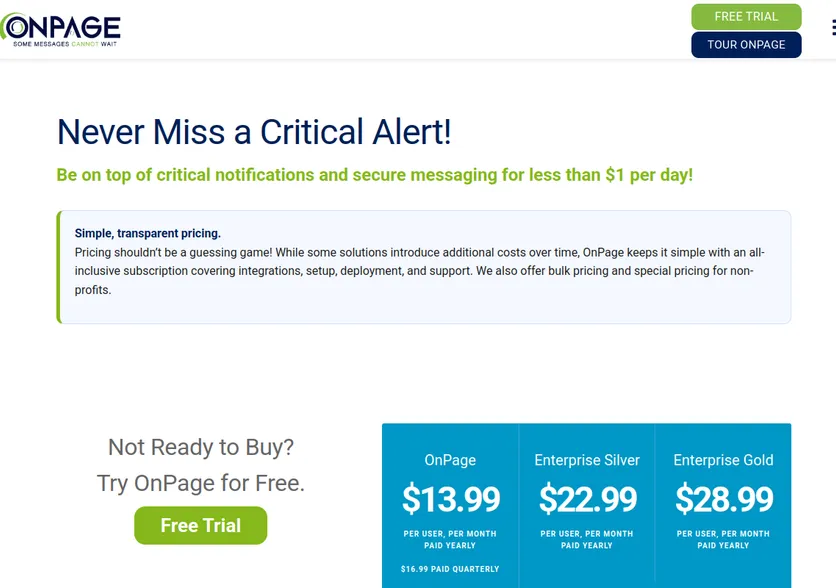
Paid tool Starting price: $13.99/month · OnPage plan, per user per month paid yearly; $16.99 a month paid quarterly; Enterprise Silver is about $22.99 a month
Free plan: 7-day free trial
OnPage is a pager app with a fixed monthly fee, built for teams where a missed alert can mean a missed patient or a failed system. This OnPage plan covers persistent alert-until-read notifications, on-call scheduling, audit trails and HIPAA-compliant messaging in one subscription. It is the strongest pick for healthcare and IT teams that need every critical message acknowledged and logged.
What we like
- Fixed fee with no per-alert surprises
- HIPAA compliant with a full audit trail
- Alert-until-read means nothing is missed
Watch out for
- Quarterly billing costs $16.99 a user
- Dedicated lines and call routing are add-ons
How to try it
- Open the OnPage pricing page and request the free trial
- Install the app and set up an on-call schedule
- Send a test page and confirm the alert-until-read notification
7. Zenduty
Best for: Budget startups that want the cheapest on-call plan on this list
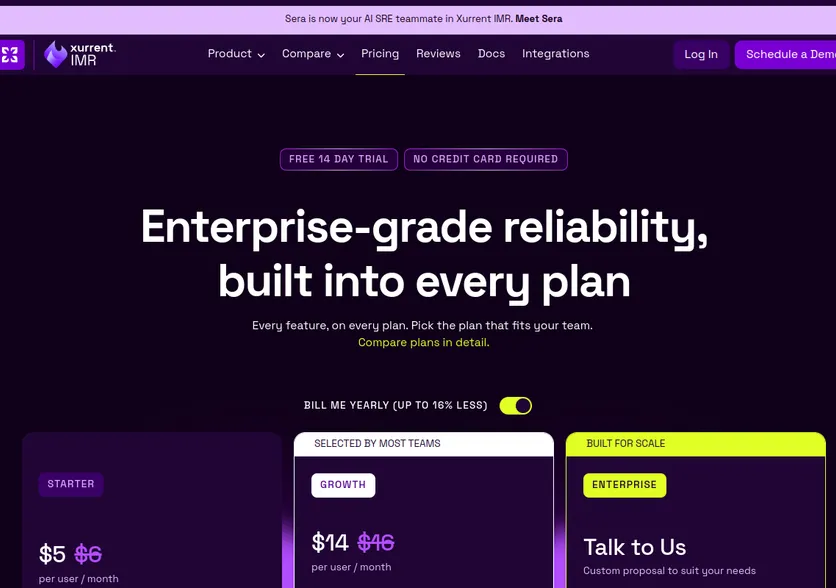
Paid tool Starting price: $5/month · Starter plan, per user per month billed yearly ($6 a month billed monthly); Growth is about $14 a month on yearly billing; Enterprise is quoted
Free plan: 14-day free trial
Zenduty, now Xurrent IMR, is the cheapest paid plan on this list, and it still covers the on-call essentials a startup needs. This Zenduty Starter plan includes incident response, on-call schedules and Slack integrations for $5 per user a month on yearly billing. It is the best pick when budget is the deciding factor and the team just needs reliable paging that works.
What we like
- Lowest paid price here at $5 a user
- 14-day trial with no credit card
- Slack-first incident handling
Watch out for
- Starter covers only one team
- Growth costs about $14 a month on yearly billing
How to try it
- Open the Zenduty pricing page and start the 14-day trial
- Connect Slack and build the first on-call schedule
- Trigger a test incident and watch the escalation fire
8. Spike
Best for: Small teams moving off Opsgenie that want WhatsApp and Telegram alerts
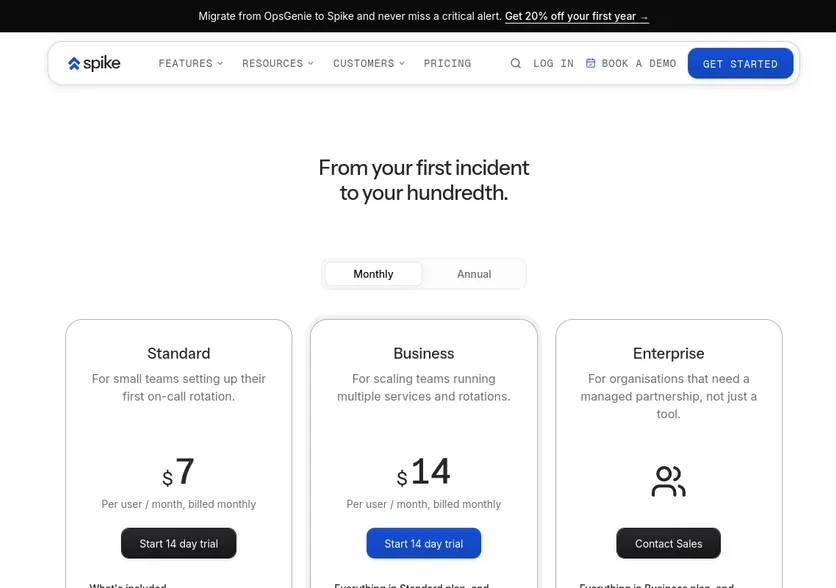
Paid tool Starting price: $7/month · Standard plan, per user per month billed monthly; Business is about $14 a month; Enterprise is quoted
Free plan: 14-day free trial
Spike is the new home for teams leaving Opsgenie, with a modern on-call tool that adds WhatsApp and Telegram alerts alongside phone and SMS. This Spike Standard plan covers on-call scheduling, live call routing and a status page for $7 per user a month. It is the right pick for a small team that wants its alerts on the chat apps it already opens every day.
What we like
- WhatsApp and Telegram alerts included
- 20% off the first year for Opsgenie switchers
- Status page on the Standard plan
Watch out for
- Standard caps phone and SMS alerts at 100 a month
- Unlimited phone alerts need the $14 Business plan
How to try it
- Open the Spike pricing page and start the 14-day trial
- Import the on-call rotation and connect Slack or Discord
- Send a test alert and confirm it arrives on WhatsApp
Prices above were checked on each vendor’s own website on Nov 26, 2026 and can change — the vendor’s page is the final word. Vendor links are editorial: nobody paid to be listed or ranked here. Vendors who want a featured listing can see how it works on our Get listed page.
What critical event software costs in 2026
Prices on this list run from $5 to $21 per user a month, and the cheapest plan is not always the cheapest deal. Alert allowances matter most: Spike caps phone and SMS alerts at 100 a month on Standard, while ilert, AlertOps and Squadcast include far more generous allowances on their paid tiers. Seat minimums matter too, because ilert Pro needs three users and PagerDuty Professional is priced per responder. The prices below use the headline plan each vendor shows on its own pricing page, checked on November 26, 2026.
Before you buy
- Count how many responders need paging, because every tool here charges per user and the bill grows with each on-call engineer.
- Check the phone and SMS allowance before you buy: Spike Standard includes 100 alerts a month, while ilert Pro offers unlimited SMS and voice.
- Test the mobile alert on a real phone, because a notification that can be silenced by accident defeats the whole point of the tool.
- Ask who counts as a paid seat: viewers and stakeholders are free or cheap on ilert, AlertOps and Squadcast, but responders always pay.
- Try it on a real incident first: every tool here offers a free plan or a free trial, and SIGNL4 gives 30 days on its fullest plan.
Official websites
Official websites of the products reviewed above. Features and prices were checked against these sites when this guide was written, and they can change, so confirm on the vendor site before you buy.
Frequently asked questions
Which critical event management platform is best for a startup in 2026?
PagerDuty Professional, at about $21 a month per user, is the safest default because engineers already know it and it connects to almost every monitoring tool. Zenduty is better if budget matters most, since Starter costs about $5 a month per user. Spike wins for teams moving off Opsgenie that want alerts on WhatsApp and Telegram as well as phone and SMS.
What is the cheapest critical event management software for a startup?
Zenduty Starter, at about $5 a month per user on yearly billing, is the cheapest paid plan here. Spike Standard costs about $7 a month per user billed monthly, and SIGNL4 Notify and Connect costs about $9 a month per user. SIGNL4 also has a free Starter plan for up to 5 users, and AlertOps and ilert both offer free plans for small teams.
Do I pay per user or per alert for critical event software?
Every tool here charges per user per month, so the bill grows with each responder on the rotation. Alert allowances sit on top of that: Spike Standard includes 100 phone and SMS alerts a month, while ilert Pro and Squadcast Premium offer unlimited notifications. Count your responders first, then check the alert cap on the plan you like.
Can I try critical event management software before paying?
Yes, every tool here offers a free plan or a free trial. SIGNL4 gives 30 days on its fullest plan, while ilert, AlertOps, Squadcast, Zenduty and Spike all offer 14-day trials with no credit card required. OnPage offers a 7-day trial of its phone app. Start a trial with a real on-call rotation, not a test account, to see how alerts actually reach your team.
What alert limit should a startup watch before buying?
Watch the phone and SMS allowance, because that limit decides the real cost once incidents pile up. Spike Standard includes 100 alerts a month shared across phone and SMS, and OnPage charges extra for dedicated lines and live call routing. PagerDuty, ilert and AlertOps include far more generous allowances, so compare the cap against how many incidents your team handles in a busy month.
Need more developer tools? Browse free code, network and security tools on Toolsvine, all free in your browser.
Browse Developer Tools tools


