
On this page
A clinic runs on checklists, and a missed follow-up can delay care. ClickUp leads this list because it combines tasks, docs, goals and chat in one place at a price a small clinic can afford. The eight project tools below were priced live on November 27, 2026, from four dollars a user a month, and every one offers a free plan or a free trial to start with.
How we researched this
We started with the project tools clinics actually use, then read each price on the vendor's own site on November 27, 2026 and noted the free plan, the task views and the per-seat cost. We judged them for a clinic that needs clear checklists and follow-ups without a big budget.
Compare the tools
| Name | Best for | Starting price | Free plan | |
|---|---|---|---|---|
 ClickUp | Small clinics needing tasks, docs and chat in one place | $9/user/month | Free Forever plan | Visit |
 Asana | Clinics running checklists and follow-ups | $10.99/user/month | Free Personal plan | Visit |
 Monday.com | Clinics needing one shared board | $9/seat/month | Free plan | Visit |
 Smartsheet | Clinics planning in spreadsheets | $9/member/month | 30-day free trial | Visit |
 Wrike | Clinics juggling cross-department projects | $10/user/month | Free plan | Visit |
 Teamwork | Clinics tying projects to time and billing | $10.99/user/month | Free plan (up to 5 users, 2 projects) | Visit |
 Basecamp | Small clinics wanting calm, simple organization | $29/month | Free plan (1 project) | Visit |
 Zoho Projects | Clinics on a tight budget needing Gantt charts | $4/user/month | Free plan (up to 5 users) | Visit |
The project management tools for clinics, compared
1. ClickUp
Best for: Small clinics needing tasks, docs and chat in one place
Paid tool Starting price: $9/user/month · Core plan, $9 a user a month billed annually ($12 billed monthly); Business $17 a user a month billed annually
Free plan: Free Forever plan
Small clinics need docs, tasks and chat in one place, not five tools. ClickUp combines tasks, docs, goals and chat, with a Free Forever plan that covers a small team. Unlimited starts at seven dollars per user a month billed annually.

What we like
- Huge feature set for the price
- Docs, goals and chat in one place
- Free Forever plan for small teams
Watch out for
- Feature depth can overwhelm new users
- Business tier is needed for advanced automations
How to try it
- Start the Free Forever plan and create a space
- Add lists, tasks and docs for your clinic
- Upgrade to Unlimited when you need more
2. Asana
Best for: Clinics running checklists and follow-ups
Paid tool Starting price: $10.99/user/month · Starter plan, $10.99 per user a month billed annually; monthly billing is $13.49; Advanced is $24.99 a month billed annually
Free plan: Free Personal plan
Clinics run on checklists, and a missed step can delay care. Asana turns clinic workflows into clear tasks, timelines and boards that the whole team can follow. Starter starts at about eleven dollars per user a month billed annually, with a free plan for small teams.

What we like
- Clear task lists, timelines and boards
- Strong templates for clinical workflows
- Good integrations with common work tools
Watch out for
- Starter plan limits some automation features
- Per-user pricing adds up for large hospitals
How to try it
- Start the free Personal plan and create a project
- Add tasks, owners and due dates
- Switch to a timeline view to track progress
3. Monday.com
Best for: Clinics needing one shared board
Paid tool Starting price: $9/seat/month · Basic plan, $9 per seat a month billed annually; monthly billing is $12; Standard is $12 and Pro is $19 a month billed annually; three-seat minimum
Free plan: Free plan
A clinic needs one board where front desk, nurses and managers see the same day. Monday.com offers visual boards, templates and automations that keep appointments, supplies and follow-ups on track. Basic starts at nine dollars per seat a month billed annually, with a three-seat minimum.

What we like
- Visual boards that are easy to read at a glance
- Many templates for clinics and operations
- Automations save repetitive admin work
Watch out for
- Three-seat minimum on paid plans
- Basic plan lacks time tracking and formulas
How to try it
- Start a free trial and pick a project template
- Add your team and assign the first tasks
- Set up automations for status changes
4. Smartsheet
Best for: Clinics planning in spreadsheets
Paid tool Starting price: $9/member/month · Pro plan, $9 per member a month billed annually; monthly billing is $12; Business is $19 a month billed annually with a three-seat minimum; the free plan was discontinued in 2025
Free plan: 30-day free trial
Clinics that plan in spreadsheets need those sheets to become real projects. Smartsheet turns familiar grids into tracked work with Gantt views, owners and due dates. Pro starts at nine dollars per member a month billed annually, and the free plan is gone.

What we like
- Spreadsheet-style grids teams already understand
- Strong Gantt and resource views
- Good for regulated, auditable workflows
Watch out for
- Free plan was discontinued in 2025
- Business tier needs a three-seat minimum
How to try it
- Start the 30-day Business trial and import a sheet
- Set up columns, owners and due dates
- Share the sheet with your care team
5. Wrike
Best for: Clinics juggling cross-department projects
Paid tool Starting price: $10/user/month · Team plan, $10 per user a month billed annually for 2 to 15 users; Business is $25 a month billed annually; no monthly-billing price is published
Free plan: Free plan
A clinic juggling projects across departments needs flexible views. Wrike offers boards, tables and dashboards with request forms and approvals for cross-team work. Team starts at ten dollars per user a month billed annually for two to fifteen users.

What we like
- Flexible project views for many work styles
- Strong request forms and approvals
- Good for cross-department projects
Watch out for
- Team plan covers only 2 to 15 users
- No monthly-billing price is published
How to try it
- Start the free plan and create a project
- Build a workflow with custom statuses
- Add dashboards to track team workload
6. Teamwork
Best for: Clinics tying projects to time and billing
Paid tool Starting price: $10.99/user/month · Deliver plan, $10.99 per user a month billed annually; monthly billing is $13.99; Grow is $19.99 and Scale is $54.99 a month billed annually; the vendor page also shows $9.99 in its comparison table
Free plan: Free plan (up to 5 users, 2 projects)
Clinics that deliver services for clients need projects tied to time and billing. Teamwork combines project delivery with time tracking and billing, built for client-facing teams. Deliver starts at about eleven dollars per user a month billed annually.

What we like
- Built for client-facing project delivery
- Time tracking and billing in one place
- Good templates for service teams
Watch out for
- Vendor page shows two different Deliver prices
- Free plan covers only five users and two projects
How to try it
- Start the free plan and create your first project
- Add tasks, milestones and time tracking
- Invite clients to view progress
7. Basecamp
Best for: Small clinics wanting calm, simple organization
Paid tool Starting price: $29/month · Freelancer plan, $29 a month flat; Pro Unlimited is a flat $199 a month billed annually or $329 monthly for unlimited users and projects
Free plan: Free plan (1 project)
A small clinic needs calm, simple organization without a learning curve. Basecamp keeps to-dos, messages and schedules in one quiet place that any staff member can use. Freelancer costs 29 dollars a month flat, and Pro Unlimited is a flat 199 dollars a month billed annually.

What we like
- Simple, calm interface with no learning curve
- Flat $199 plan for unlimited users
- Message boards, to-dos and schedules in one place
Watch out for
- No Gantt charts or advanced reporting
- Freelancer covers 3 projects
How to try it
- Start a free trial and create your first project
- Add to-dos, messages and a schedule
- Invite your team and clients to the project
8. Zoho Projects
Best for: Clinics on a tight budget needing Gantt charts
Paid tool Starting price: $4/user/month · Premium plan, $4 per user a month billed annually; monthly billing is $5; Enterprise is $9 a month billed annually
Free plan: Free plan (up to 5 users)
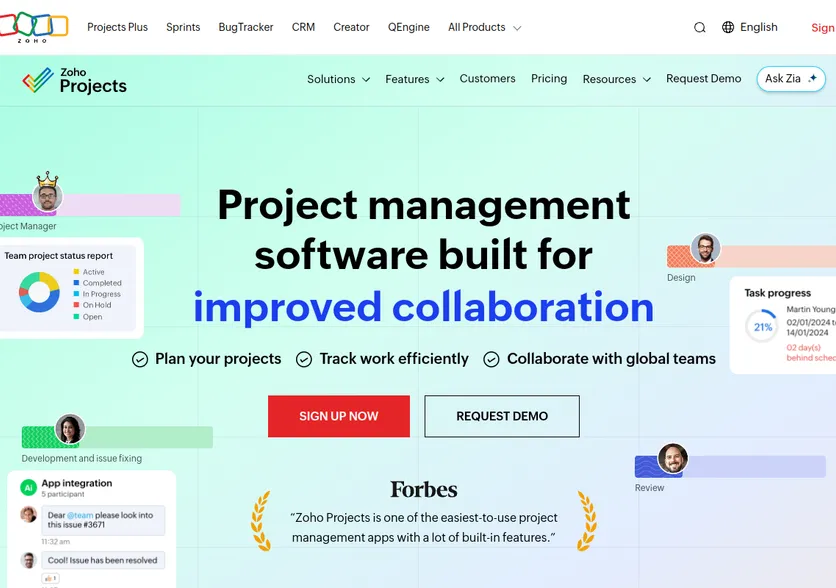
A clinic on a tight budget needs Gantt charts without enterprise prices. Zoho Projects offers Gantt charts, dependencies and time tracking for four dollars per user a month billed annually. A free plan covers up to five users, which suits a single clinic.
What we like
- Very low price per user
- Gantt charts and dependencies included
- Integrates with the wider Zoho suite
Watch out for
- Free plan covers only five users
- Enterprise tier doubles the per-user price
How to try it
- Start the free plan and create a project
- Add tasks with dependencies and a Gantt view
- Invite your team and track time
Prices above were checked on each vendor’s own website on Nov 27, 2026 and can change — the vendor’s page is the final word. Vendor links are editorial: nobody paid to be listed or ranked here. Vendors who want a featured listing can see how it works on our Get listed page.
What project software costs a clinic in 2026
Clinic project tools here run from free to 45 dollars a month, with most charging per user. A small clinic can often run on a free plan, but check the limits: free plans cap users, projects or features, and the jump to paid can be steep. Count every staff member who needs a seat, including part-time and front-desk staff, then compare the monthly total. Trial the tool with one real workflow, like patient follow-ups, before rolling it out to the whole clinic. Also check whether the tool offers templates for clinical workflows, because a good template saves days of setup.
Before you buy
- Count every staff member who needs a seat, including part-time and front-desk staff.
- Trial the tool with one real workflow, like patient follow-ups, before rollout.
- Check the limits on the free plan, since the jump to paid can be steep.
- Confirm the tool works on the devices your clinic actually uses.
- Ask whether guests and contractors consume paid seats.
Official websites
Official websites of the products reviewed above. Features and prices were checked against these sites when this guide was written, and they can change, so confirm on the vendor site before you buy.
Frequently asked questions
Which project management tool is best for clinics?
ClickUp is the best all-round pick for clinics, because it combines tasks, docs, goals and chat in one place at a price a small clinic can afford. Asana suits clinics that want clear timelines, while Zoho Projects is the cheapest paid option at four dollars per user a month. The right choice depends on team size and whether you need docs alongside tasks.
How much does project software cost a clinic?
A small clinic can often run on a free plan, and paid plans here run from four dollars per user a month for Zoho Projects to 29 dollars a month flat for Basecamp Freelancer, with Pro Unlimited at a flat 199 dollars a month billed annually. Most clinics fit plans between seven and twenty-nine dollars a month. Count every staff member who needs a seat, including part-time and front-desk staff, then compare the monthly total.
Can project software help with patient follow-ups?
Yes, project software helps with patient follow-ups when tasks, owners and due dates are set for each case. Asana and Monday.com offer templates for follow-up workflows, while ClickUp adds docs and reminders in one place. Never store detailed patient records in a project tool unless it meets your privacy rules, and keep clinical data in your health record system.
Do clinics need Gantt charts?
Clinics need Gantt charts when projects have dependencies, like a renovation or a new service launch. Zoho Projects, Smartsheet and Teamwork all include Gantt views, while simpler tools like Basecamp skip them. For daily checklists and follow-ups, a board or list view is usually enough, so choose Gantt only when your projects have real dependencies.
What is the best free project tool for a clinic?
ClickUp offers the strongest free plan here, with tasks, docs and goals for small teams at no cost. Asana and Monday.com also offer free plans, though they limit users or features, and Zoho Projects covers up to five users free. Check the limits before you build on a free plan, because the jump to paid can be steep when your team grows.
Need the everyday productivity jobs too? Track time, plan tasks and organize work free on Toolsvine right in your browser.
Browse Productivity Tools tools


