
On this page
Temporary workers need time tracking that starts fast, works from a phone and pays correctly to the hour. The seven tools below run from $2.50 a user a month to $20 a month plus $10 a user, and most offer a free plan or trial to test first. Clockify is our first pick, because its free plan covers unlimited users and its Standard plan costs only $5.49 a seat a month.
How we researched this
We started with the time tracking tools temp teams actually run, then read each price on the vendor site or in a live post that verified it days earlier. We judged them for a team that hires by the hour and needs GPS clock-in, scheduling and payroll-ready hours from phones. We kept only tools with a verifiable published price and dropped any vendor whose price we could not confirm.
Compare the tools
| Name | Best for | Starting price | Free plan | |
|---|---|---|---|---|
 Clockify | Temp teams that want a free plan for unlimited users | $5.49/user/month | Free plan for unlimited users | Visit |
 Toggl Track | Teams that want the simplest timer and reports | $9/user/month | Free plan for up to 5 users | Visit |
 Harvest | Temp teams that bill clients by the hour | $11/user/month | Free plan for 1 seat and 2 projects | Visit |
 Deputy | Temp teams that need scheduling plus time tracking | $5/user/month | No free plan; free trial available | Visit |
 When I Work | Small temp teams that want the cheapest scheduling | $2.50/user/month | No free plan; 14-day free trial, no card | Visit |
 Homebase | Hourly teams that want scheduling, hiring and HR together | $30/location/month | No free plan listed; free trial available | Visit |
 QuickBooks Time | Teams already running QuickBooks payroll | $20/month + $10/user | No free plan; free trial available | Visit |
The hourly time tracking tools, compared
1. Clockify
Best for: Temp teams that want a free plan for unlimited users
Paid tool Starting price: $5.49/user/month · Standard $5.49 per seat a month billed annually ($6.99 billed monthly); Basic plan costs less; free plan covers unlimited users
Free plan: Free plan for unlimited users
Clockify is the cheapest way to start, because its free plan covers unlimited users with time tracking, a timer and basic reporting. The Clockify Standard plan adds projects, billable rates, approvals and scheduling for a low monthly price per seat on annual billing. It fits a temp team that wants to track every hour without paying for every worker from day one.

What we like
- Free plan for unlimited users
- Low $5.49 Standard price on annual billing
- Timer, timesheets and reports in one place
Watch out for
- Scheduling and approvals wait for the paid plan
- No built-in payroll, so hours export elsewhere
How to try it
- Start on the free plan with your whole temp roster
- Test the mobile timer and GPS clock-in on a real shift
- Upgrade to Standard when you need approvals and scheduling
2. Toggl Track
Best for: Teams that want the simplest timer and reports
Paid tool Starting price: $9/user/month · Starter $9 per user a month billed annually ($12 billed monthly); Premium costs more
Free plan: Free plan for up to 5 users
Toggl Track is the simplest timer here, built around one-click tracking that temp workers can start without training. The Toggl Track Starter plan costs $9 per user a month on annual billing and adds billable rates, project templates and time audits. It suits a team that values clean reports and a timer everyone actually uses over a deep feature list.

What we like
- One-click timer that needs no training
- Clean reports that payroll can read at a glance
- Billable rates and project templates on Starter
Watch out for
- No scheduling or GPS clock-in on the cheaper plans
- Per-user pricing adds up for large temp rosters
How to try it
- Start the free trial and track one real week of shifts
- Test the one-click timer on a worker phone
- Check the reports against your payroll hours
3. Harvest
Best for: Temp teams that bill clients by the hour
Paid tool Starting price: $11/user/month · Pro $11 per user a month billed annually; free plan covers one seat and two projects
Free plan: Free plan for 1 seat and 2 projects
Harvest is the billing-first pick, pairing time tracking with invoicing so temp hours turn into client bills without retyping. The Harvest Pro plan costs $11 per user a month on annual billing and covers unlimited projects, expenses and invoicing. It fits a staffing team that bills clients for temp hours and needs the invoice to match the timesheet exactly.

What we like
- Time tracking plus invoicing in one tool
- Free plan for one seat and two projects
- Expenses and approvals built into Pro
Watch out for
- No free scheduling or GPS clock-in features
- Per-user pricing climbs for large rosters
How to try it
- Start on the free plan with one seat and two projects
- Track a week of temp hours and raise an invoice from them
- Test expenses and approvals before you pay
4. Deputy
Best for: Temp teams that need scheduling plus time tracking
Paid tool Starting price: $5/user/month · Lite $5 per user a month billed annually ($5.50 billed monthly); Core $6.50 and Pro $9 a user a month
Free plan: No free plan; free trial available
Deputy is the scheduling-first pick, combining rosters, shift swaps and time tracking so temp workers always know where to be. The Deputy Lite plan costs $5 per user a month on annual billing and covers scheduling, time tracking and communication. It suits a team that hires by the shift and needs the roster and the clock to agree.

What we like
- Scheduling and time tracking in one roster
- Low $5 Lite price on annual billing
- Shift swaps and team messaging included
Watch out for
- Payroll and HR features wait for higher plans
- Per-user pricing grows with the roster
How to try it
- Start a trial and build your next roster in Deputy
- Test clock-in from a worker phone at a real shift
- Check the timesheet export against your payroll system
5. When I Work
Best for: Small temp teams that want the cheapest scheduling
Paid tool Starting price: $2.50/user/month · Essentials $2.50 per user a month for a single location; Pro $5 and Premium $8 a user a month; 14-day free trial
Free plan: No free plan; 14-day free trial, no card
When I Work is the cheapest scheduling pick, costing about two and a half dollars per user a month for a single location on the Essentials plan. The When I Work app covers scheduling, time tracking and team messaging, with a 14-day free trial to test it all. It fits a small temp team that needs a shared roster and a clock without paying for HR features it will never use.

What we like
- Lowest scheduling price here at $2.50 a user
- Scheduling, time tracking and messaging in one app
- 14-day free trial with no card
Watch out for
- Essentials covers one location only
- Payroll and HR tools cost extra on higher plans
How to try it
- Start the 14-day free trial with your real roster
- Publish one week of shifts and test clock-in
- Check the price for multiple locations before you grow
6. Homebase
Best for: Hourly teams that want scheduling, hiring and HR together
Paid tool Starting price: $30/location/month · Essentials $30 per location a month; Plus $70 and All-in-One $120 per location a month
Free plan: No free plan listed; free trial available
Homebase is the all-in-one pick for hourly teams, covering scheduling, time tracking, hiring and HR from one dashboard. The Homebase Essentials plan costs $30 per location a month, which makes it cheap for a single site with many temp workers. It suits a business that hires temps constantly and wants the job post, the roster and the timesheet in one place.

What we like
- Scheduling, hiring, time tracking and HR in one
- Per-location pricing suits teams with many workers
- Free hiring tools for hourly roles
Watch out for
- Per-location pricing climbs with every site
- Payroll is a paid add-on, not included
How to try it
- Start with Essentials at your busiest location
- Post a temp job and track applicants in Homebase
- Test the timesheet export against your payroll
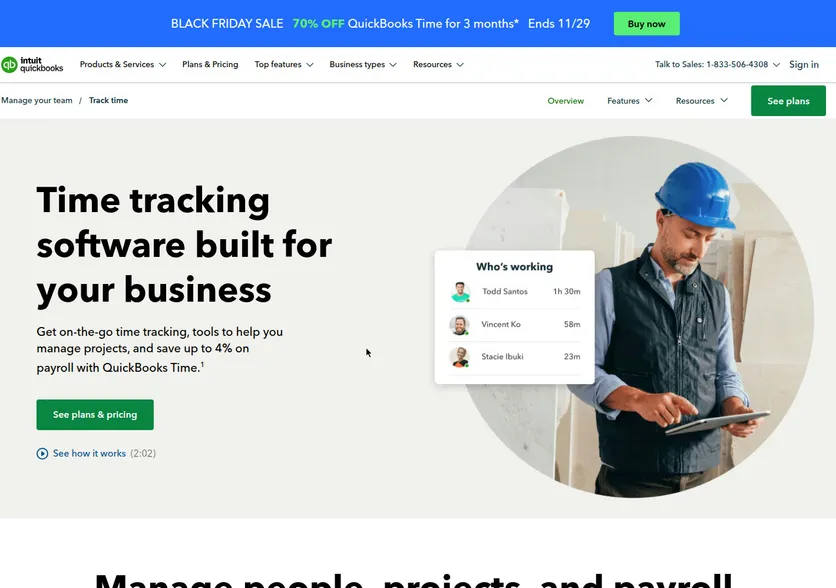
7. QuickBooks Time
Best for: Teams already running QuickBooks payroll
Paid tool Starting price: $20/month + $10/user · Time Premium $20 base a month plus $10 per user a month, billed monthly; Elite costs more
Free plan: No free plan; free trial available
QuickBooks Time is the natural pick for teams already on QuickBooks, because tracked hours flow straight into payroll without exports. The QuickBooks Time Premium plan costs $20 a month plus $10 per user a month, with GPS tracking, scheduling and overtime alerts included. It fits a temp team that wants the timesheet and the paycheck to come from the same system.
What we like
- Hours flow straight into QuickBooks payroll
- GPS tracking and scheduling included
- Overtime alerts catch costly mistakes early
Watch out for
- Base fee plus per-user pricing adds up fast
- Best value only if you already use QuickBooks
How to try it
- Connect QuickBooks Time to your QuickBooks payroll
- Test GPS tracking on a worker phone for one week
- Check the overtime alerts against your pay rules
Prices above were checked on each vendor’s own website on Nov 27, 2026 and can change — the vendor’s page is the final word. Vendor links are editorial: nobody paid to be listed or ranked here. Vendors who want a featured listing can see how it works on our Get listed page.
Before you buy, check the temp-team fit
Start with your roster size, because per-user tools like When I Work at $2.50 a user and Deputy at $5 a user stay cheap for small teams, while Clockify is free for unlimited users. Then check the payroll link, since QuickBooks Time at $20 plus $10 a user earns its price only when hours flow straight into payroll. Finally, test the phone experience, because temp workers clock in from job sites, not desks, and a timer they cannot find will not get used.
The other cost to watch is the payroll error, because one wrong timesheet can cost more than a year of software. A tool whose hours flow cleanly into payroll pays for itself the first time it catches an overtime mistake or a missed shift. Ask each vendor how the export works with your payroll system, and test it on one real pay cycle before you roll it out. The cheapest tracking tool is the one your workers actually clock in with, not the one with the lowest price per user.
Before you buy
- Count your temp workers and price each tool at that headcount, not the headline rate.
- Test GPS clock-in from a worker phone at a real job site.
- Check that timesheets export cleanly into your payroll system.
- Confirm scheduling, shift swaps and messaging are included or paid extras.
- Run a trial on one real week of shifts before you roll it out to the whole roster.
Official websites
Official websites of the products reviewed above. Features and prices were checked against these sites when this guide was written, and they can change, so confirm on the vendor site before you buy.
Frequently asked questions
Which time tracking software is best for temporary workers in 2026?
Clockify is the best pick for most temp teams, because its free plan covers unlimited users and Standard costs only $5.49 a seat a month. When I Work is better if you want the cheapest scheduling at $2.50 a user a month, and Deputy wins when the roster and the clock must agree. The right choice depends on your headcount, your scheduling needs and whether you already run QuickBooks.
Is there free time tracking software for temporary workers?
Yes, Clockify offers a free plan for unlimited users with time tracking, a timer and basic reporting. Toggl Track has a free plan for up to 5 users, and Harvest offers a free plan for one seat and two projects. The other tools here offer free trials instead, so a small temp team can start free on Clockify and only pay when it needs scheduling and approvals.
How much does hourly time tracking software cost per month?
Prices here run from $2.50 per user a month for When I Work Essentials to $11 per user a month for Harvest Pro, with Clockify Standard at $5.49 and Deputy Lite at $5 a user a month. QuickBooks Time costs $20 a month plus $10 per user, and Homebase charges $30 per location a month. Work out the total at your real headcount, since per-user prices scale with every hire.
Do temp workers need GPS clock-in?
GPS clock-in matters when temp workers start at different job sites, because it proves where and when each shift began and ends. Deputy, QuickBooks Time and Clockify all offer GPS tracking on their paid plans, which cuts buddy punching and payroll disputes. If your temps always work at one site, a simple timer is enough, but ask the vendor whether GPS is included or a paid extra.
Can time tracking software handle payroll for temp workers?
Some tools handle payroll directly and others export hours to it. QuickBooks Time sends hours straight into QuickBooks payroll, which is its main advantage. Clockify, Toggl Track, Harvest, Deputy, When I Work and Homebase export timesheets that payroll can read, but you should test the export format against your payroll system before you commit to a plan.
Need the everyday time math too? Work out hours, overtime and pay free on Toolsvine right in your browser.
Browse Business Tools tools


