
On this page
A dev team lives in its collaboration tools — chat, tasks, docs and boards — and the wrong pick means work scattered across five apps that nobody checks. The nine tools below run from four dollars a user a month to twenty-nine dollars flat, and every price was checked on the vendor site on November 26, 2026. Most offer a free plan or trial, so you can run a sprint through two of them before paying. Slack is our first pick — the chat hub that starts at seven dollars a user a month and works from day one.
How we researched this
We started with the collaboration apps that development teams actually buy, then read each price on the vendor pricing page on November 26, 2026 and noted the free plan or trial each one carries. We judged them for a team that needs chat, tasks and docs in one place without an enterprise budget. We kept only tools with a published price, and we dropped any app whose price we could not verify on the vendor site.
Compare the tools
| Name | Best for | Starting price | Free plan | |
|---|---|---|---|---|
 Slack | Teams that want chat-led collaboration with the best integrations | $7.25/user/month | Free plan available | Visit |
 Microsoft Teams | Teams that run on Microsoft 365 and want chat, meetings and files together | $4/user/month | Free plan available | Visit |
 Jira | Software teams that plan sprints and track bugs in one place | $9.70/user/month | Free for up to 10 users | Visit |
 Asana | Teams that want clear task ownership and timelines | $10.99/user/month | Free Personal plan | Visit |
 Monday | Teams that want visual boards and flexible workflows | $9/seat/month | No free tier published on the pricing page | Visit |
 ClickUp | Teams that want one tool for docs, tasks, chat and goals | $9/user/month | Free plan available | Visit |
 Linear | Software teams that want fast issue tracking with keyboard-first speed | $10/user/month | Free for up to 250 issues | Visit |
 Notion | Teams that want docs, wikis and tasks in one flexible workspace | $10/member/month | Free plan available | Visit |
 Basecamp | Teams that want simple project management without per-seat pricing traps | $29/month | Free personal tier with 1 project and 1 GB | Visit |
The software dev team collaboration apps, compared
1. Slack
Best for: Teams that want chat-led collaboration with the best integrations
Paid tool Starting price: $7.25/user/month · Pro plan, $7.25 a user a month billed annually or $8.75 billed monthly; Business+ $15 billed annually; free plan available
Free plan: Free plan available
Slack is the chat hub where dev teams spend the day, turning scattered messages into channels that anyone can search later. This Slack Pro plan adds unlimited message history, group video calls and app integrations on top of the free chat. A team can stop losing decisions in email threads and find any answer in seconds.

What we like
- Unlimited message history on Pro
- Best integration library on this list
- Group video calls built in
Watch out for
- Pro costs about seven dollars a user a month billed annually
- Message history is capped on the free plan
How to try it
- Open the Slack pricing page and start a trial
- Create channels for each project and invite your team
- Connect your code and project tools to the channels
2. Microsoft Teams
Best for: Teams that run on Microsoft 365 and want chat, meetings and files together
Paid tool Starting price: $4/user/month · Essentials plan, $4 a user a month billed annually or $4.80 billed monthly; Enterprise $8.55; free plan available
Free plan: Free plan available
Microsoft Teams bundles chat, video meetings and file sharing into the workspace your company already pays for, so collaboration never leaves the Microsoft suite. This Microsoft Teams Essentials plan covers group chat, meetings and cloud storage for small businesses without a full Microsoft 365 subscription. A team can meet, chat and share files in one place without buying a separate tool for each job.

What we like
- Chat, meetings and files in one place
- Works with the wider Microsoft suite
- Lowest paid entry on this list
Watch out for
- Essentials costs four dollars a user a month billed annually
- Full power needs a Microsoft 365 subscription
How to try it
- Open the Microsoft Teams pricing page and start a trial
- Create a team for your project and invite members
- Schedule a meeting and share files in the channel
3. Jira
Best for: Software teams that plan sprints and track bugs in one place
Paid tool Starting price: $9.70/user/month · Standard plan, $9.70 a user a month on monthly billing for 1 to 100 users (Atlassian list price after the October 13, 2026 rise); annual plans are sold in fixed user tiers ($950 a year for up to 10 users; $9,700 for up to 100); Premium $19.60 a user a month on monthly billing; free plan for up to 10 users
Free plan: Free for up to 10 users
Jira is the planning board for software teams, turning a backlog into sprints that everyone can see and track. This Jira Standard plan adds team-managed projects, advanced permissions and storage on top of the free issue tracker. A team can plan a sprint, track every bug and ship on schedule without a spreadsheet.

What we like
- Best sprint planning on this list
- Team-managed projects on Standard
- Deep integration with the Atlassian suite
Watch out for
- Standard costs $9.70 a user a month on monthly billing
- Annual plans are sold in fixed user tiers ($950 a year for up to 10 users)
How to try it
- Open the Jira pricing page and start a trial
- Create a project and build your first backlog
- Plan a sprint and assign the work to your team
4. Asana
Best for: Teams that want clear task ownership and timelines
Paid tool Starting price: $10.99/user/month · Starter plan, $10.99 a user a month billed annually or $13.49 billed monthly; Advanced $24.99; free Personal plan
Free plan: Free Personal plan
Asana turns a messy project into a tidy list of tasks, each with an owner, a deadline and a clear next step. This Asana Starter plan adds timeline views, dashboards and unlimited guests on top of the free task lists. A team can see who is doing what and when it is due without a status meeting.

What we like
- Clear task ownership and deadlines
- Timeline and dashboard views on Starter
- Unlimited guests on paid plans
Watch out for
- Starter costs about eleven dollars a user a month billed annually
- Advanced reporting needs the Advanced plan
How to try it
- Open the Asana pricing page and start a trial
- Create a project and add tasks with owners and dates
- Switch to the timeline view and check the workload
5. Monday
Best for: Teams that want visual boards and flexible workflows
Paid tool Starting price: $9/seat/month · Basic plan, $9 a seat a month billed annually or $12 billed monthly; Standard $12, Pro $19; 3-seat minimum, so a solo user bills $27 a month
Free plan: No free tier published on the pricing page
Monday turns work into colorful boards that anyone can read at a glance, with status columns that show exactly where each task stands. This Monday Basic plan covers unlimited boards, docs and viewers, with a dashboard to track the whole team. A team can build a workflow that matches how it actually works instead of bending to a rigid template.

What we like
- Visual boards anyone can read
- Flexible workflows for any team
- Dashboards track the whole team
Watch out for
- Basic costs nine dollars a seat a month billed annually
- Three-seat minimum, so a solo user bills twenty-seven dollars a month
How to try it
- Open the Monday pricing page and start a trial
- Create a board for your project and add status columns
- Invite your team and set up a dashboard
6. ClickUp
Best for: Teams that want one tool for docs, tasks, chat and goals
Paid tool Starting price: $9/user/month · Core plan, $9 a user a month billed annually or $12 billed monthly; Business $17, Business Plus $28; Brain AI now bundled in every plan
Free plan: Free plan available
ClickUp tries to replace the whole stack, packing docs, tasks, chat and goals into a single workspace. This ClickUp Core plan adds unlimited storage, integrations and dashboards on top of the free core. A team can stop paying for four tools and run the whole project from one screen.

What we like
- Docs, tasks, chat and goals in one place
- Unlimited storage on the Core plan
- Cheapest all-in-one on this list
Watch out for
- Core costs nine dollars a user a month billed annually
- Feature depth can overwhelm new users
How to try it
- Open the ClickUp pricing page and start a trial
- Create a space for your project and add lists
- Connect your docs and set up a dashboard
7. Linear
Best for: Software teams that want fast issue tracking with keyboard-first speed
Paid tool Starting price: $10/user/month · Basic plan, $10 a user a month billed annually ($12 billed monthly); Business $16 a user a month billed annually
Free plan: Free for up to 250 issues
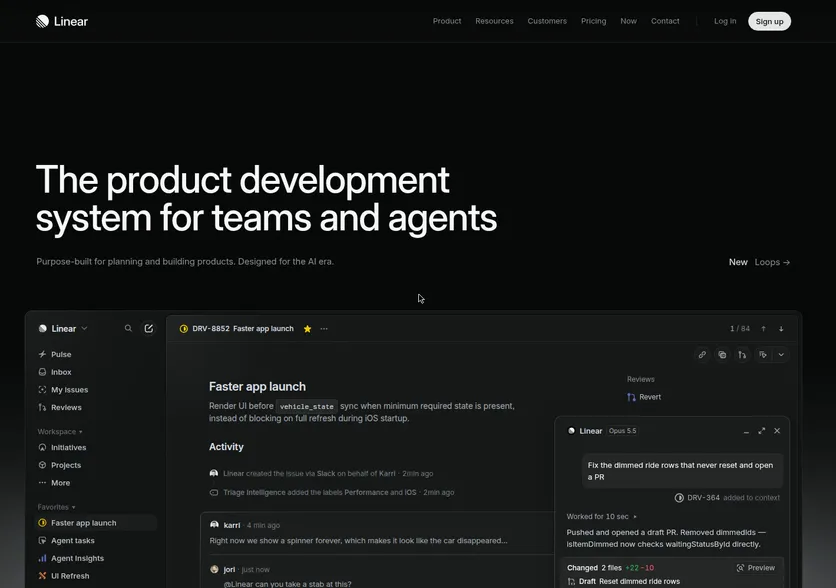
Linear is the issue tracker for teams that hate slow software, with a keyboard-first interface that moves at the speed of thought. This Linear Basic plan adds unlimited teams, guests and file uploads on top of the free issue tracker. A software team can triage bugs, plan cycles and ship without the lag that kills momentum.
What we like
- Fastest interface on this list
- Keyboard-first workflow for power users
- Cycles and triage built in
Watch out for
- Basic costs ten dollars a user a month
- Free plan is capped at two hundred and fifty issues
How to try it
- Open the Linear pricing page and start a trial
- Create a team and import your issues
- Plan a cycle and triage the backlog
8. Notion
Best for: Teams that want docs, wikis and tasks in one flexible workspace
Paid tool Starting price: $10/member/month · Plus plan, $10 a member a month billed annually or $12 billed monthly; Business $20 billed annually; free plan; Plus is free for students and educators
Free plan: Free plan available
Notion is the flexible workspace where docs, wikis and tasks live side by side, so a team can write the plan and track the work in the same page. This Notion Plus plan adds unlimited file uploads, version history and more guests on top of the free workspace. A team can build a wiki, a roadmap and a task board without buying three tools.

What we like
- Docs, wikis and tasks in one place
- Flexible pages fit any workflow
- Free plan for small teams
Watch out for
- Plus costs ten dollars a member a month billed annually
- Plus is free for students and educators
How to try it
- Open the Notion site and start a trial
- Create a workspace and build your first wiki page
- Add a task database and link it to your docs
9. Basecamp
Best for: Teams that want simple project management without per-seat pricing traps
Paid tool Starting price: $29/month · Freelancer plan, $29 a month flat; Pro $79 a month flat; Pro Unlimited $199 a month billed annually ($329 monthly); free tier with 1 project and 1 GB
Free plan: Free personal tier with 1 project and 1 GB
Basecamp keeps project management deliberately simple, with message boards, to-dos and schedules that anyone can understand. This Basecamp Freelancer plan covers 3 projects with message boards, to-dos and schedules for a flat monthly price. A team can run every project from one calm place and stop paying for features it never uses.

What we like
- Simple interface anyone can learn
- Simple flat monthly pricing
- Flat monthly price with no per-seat charges
Watch out for
- Freelancer covers 3 projects for a flat $29 a month
- Pro Unlimited is the only plan with an annual-billing option
How to try it
- Open the Basecamp pricing page and start a trial
- Create a project and invite your team and clients
- Set up to-dos and a schedule for the first week
Prices above were checked on each vendor’s own website on Nov 26, 2026 and can change — the vendor’s page is the final word. Vendor links are editorial: nobody paid to be listed or ranked here. Vendors who want a featured listing can see how it works on our Get listed page.
What dev team collaboration apps cost in 2026
Most collaboration apps charge per user, so the size of your team is the whole budget and the cheapest plan is usually the best deal. This list runs from four dollars a user a month for Microsoft Teams Essentials to twenty-nine dollars flat for Basecamp Freelancer, with Slack, ClickUp, Linear and Notion clustered between seven and ten dollars. The headline plan each vendor shows on its own pricing page is the number in the table above, checked on November 26, 2026.
Start with the free plan on two apps and run a real sprint through both. Compare how fast the team finds answers, how clean the task board looks, and how often people actually open the tool. A seven-dollar app your team lives in beats a fifteen-dollar app that sits empty.
Before you buy
- Count the seats first, because most plans charge per user and a team feels every extra seat.
- Check the seat minimum, because a three-seat minimum means paying for seats nobody uses.
- Test the tool on a real sprint, because a demo workspace never shows how it handles your deadlines.
- Ask whether chat, tasks and docs live together: Slack leads on chat, ClickUp packs everything in, and Notion leads on docs.
- Add up the tools it replaces, because one app that covers chat and tasks can retire two subscriptions.
Official websites
Official websites of the products reviewed above. Features and prices were checked against these sites when this guide was written, and they can change, so confirm on the vendor site before you buy.
Frequently asked questions
What is the best collaboration app for a dev team in 2026?
Slack Pro, at about seven dollars a user a month billed annually, is the safest default because it has the best integrations and unlimited message history. ClickUp is better when you want docs, tasks and chat in one place, at nine dollars a user a month. Notion wins when docs matter most, at ten dollars a member a month with a flexible workspace.
What is the cheapest collaboration app for a dev team?
Microsoft Teams Essentials, at four dollars a user a month billed annually, is the cheapest paid plan here and it includes chat, meetings and storage. ClickUp Core costs nine dollars a user a month and Slack Pro costs seven dollars a user a month, and both offer free plans. Monday Basic, at nine dollars a seat a month, is the next cheapest board-based option.
Can I use dev team collaboration apps for free?
Yes, on most tools here. Slack, ClickUp, Notion, Asana and Jira all offer free plans, and Microsoft Teams is free to start as well. Monday and Basecamp have no free tier, though both offer trials. Start free, run a real sprint, and pay only when you need history, guests or advanced views.
Which collaboration app is best for sprint planning?
Jira Standard is the strongest pick for sprint planning, because it was built for software teams with backlogs, sprints and bug tracking. Linear is better when you want the same planning with a faster interface, at ten dollars a user a month. ClickUp also handles sprints well, at nine dollars a user a month with docs and goals included.
Do I need separate tools for chat and tasks?
Not anymore. ClickUp and Notion both pack chat, tasks and docs into one workspace, and Slack now covers tasks through integrations. If your team lives in chat, start with Slack and add a task tool only when the channel gets messy. If your team lives in tasks, start with ClickUp and skip the second subscription.
Need everyday productivity help too? Try Toolsvine's free productivity tools for small teams right in your browser.
Browse Productivity Tools tools


