
On this page
A missed dependency can sink a project faster than a missed deadline, so the scheduling tool matters more than the task list around it. The eight tools below run from seven dollars per user a month to a fifty-nine dollars a month, and every price was checked on the vendor site on November 27, 2026. Most cover Gantt charts, dependencies and a critical path from the entry plan, so compare scheduling depth and seat rules rather than the headline price alone. GanttPRO is our first pick — the cheapest published per-user price with baselines and critical path on every plan.
How we researched this
We started with the project scheduling tools teams actually buy, then read each entry price on the vendor pricing page on November 27, 2026 and noted the free plan or trial each one carries. We judged them for a team that plans with timelines and dependencies and needs to see the critical path without paying enterprise prices, and we kept only tools with a published price. We dropped Oracle Primavera and LiquidPlanner because neither publishes a list price, and we dropped Zoho Projects because its scheduling depth is thinner than the tools kept here.
Compare the tools
| Name | Best for | Starting price | Free plan | |
|---|---|---|---|---|
 GanttPRO | Small teams that want pure Gantt power cheaply, with baselines and critical path on every plan | $7/user/month | No free plan; 14-day free trial | Visit |
 ClickUp | Small teams that want one cheap workspace for tasks, docs, goals and Gantt charts | $9/user/month | Free Forever plan | Visit |
 Monday | Visual teams that plan and execute in one place | $9/seat/month | Free plan for individuals | Visit |
 Smartsheet | Teams moving project plans off spreadsheets | $9/member/month | No free plan; 30-day free trial | Visit |
 Asana | Task-driven teams adding timeline scheduling | $10.99/user/month | Free Personal plan | Visit |
 Wrike | Mid-sized teams wanting Gantt charts plus workflow depth | $10/user/month | Free plan | Visit |
 Microsoft Project | Teams standardized on Microsoft 365 that need plans inside the Microsoft world | $10/user/month | No free plan; 30-day free trial | Visit |
 TeamGantt | Small teams that want one predictable monthly bill | $59/month | Free Personal plan, 1 user and 1 project | Visit |
The software for project scheduling, compared
1. GanttPRO
Best for: Small teams that want pure Gantt power cheaply, with baselines and critical path on every plan
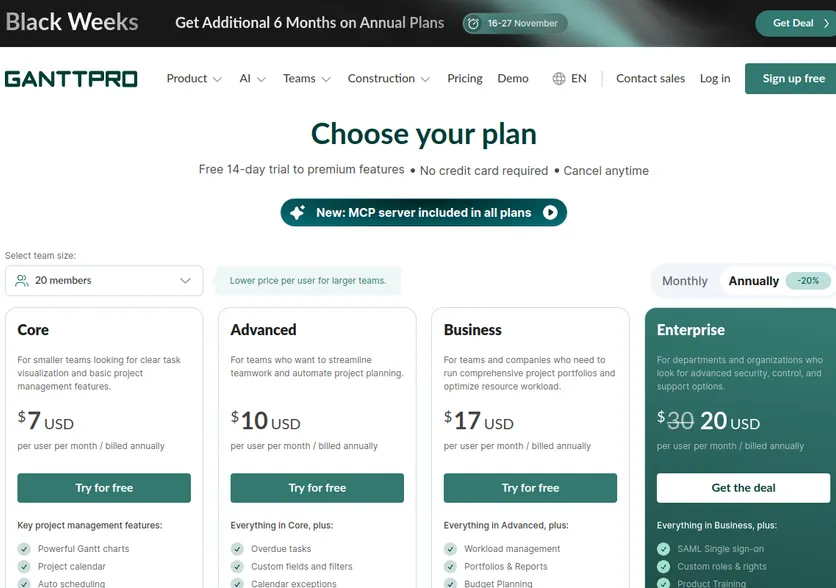
Paid tool Starting price: $7/user/month · Core plan, seven dollars per user a month billed yearly; Advanced costs ten dollars and Business seventeen dollars
Free plan: No free plan; 14-day free trial
GanttPRO does one thing and does it well: Gantt charts, with auto scheduling, dependencies, milestones, baselines and a critical path on every plan. This GanttPRO Core plan costs seven dollars per user a month billed yearly, the lowest published per-user price in this list. There is no permanent free plan, only a fourteen-day trial, but every plan carries unlimited projects and the entry plan already covers the scheduling depth most teams need.
What we like
- Lowest published per-user price in this comparison
- Baselines and critical path on every plan
- Auto scheduling with unlimited projects
Watch out for
- No permanent free plan, only a trial
- Workload management needs the Business plan
How to try it
- Open the GanttPRO pricing page and start the 14-day trial
- Build one real project with dependencies and a baseline
- Check the workload view on Business before you commit to a tier
2. ClickUp
Best for: Small teams that want one cheap workspace for tasks, docs, goals and Gantt charts
Paid tool Starting price: $9/user/month · Core plan, $9 a user a month billed annually ($12 billed monthly); Business $17 a user a month billed annually
Free plan: Free Forever plan
ClickUp packs tasks, docs, goals, time tracking and Gantt charts into one workspace, with unlimited storage and integrations from the first paid tier. This ClickUp Unlimited plan costs seven dollars per user a month billed yearly, matching the cheapest price here, and the free plan covers individuals and small teams. The breadth can feel busy, but for a team that wants one tool instead of four, the value is hard to beat.

What we like
- Cheapest price here alongside GanttPRO
- Gantt charts, docs and goals in one workspace
- Free plan with unlimited tasks for small teams
Watch out for
- The interface packs a lot in and can feel busy
- Dashboards and deeper automation need the Business plan
How to try it
- Open the ClickUp pricing page and claim the free plan
- Set up one Space with tasks, a Gantt view and a doc
- Trial Unlimited for a month and test the automations
3. Monday
Best for: Visual teams that plan and execute in one place
Paid tool Starting price: $9/seat/month · Basic plan, nine dollars per seat a month billed yearly, with a three-seat minimum; Standard costs twelve dollars
Free plan: Free plan for individuals
Monday sells itself as a work system rather than a scheduler, and that shows in how teams adopt it: boards, timelines and dashboards sit side by side. This Monday Basic plan costs nine dollars per seat a month billed yearly, with a three-seat minimum on paid plans, and the free plan covers freelancers and individuals. Dependencies, baselines and resource views exist but lack the rigor of the dedicated Gantt tools here.

What we like
- Visual boards that non-technical teams grasp fast
- Free plan for individuals and freelancers
- Strong dashboards and automations on paid plans
Watch out for
- Paid plans start at three seats, so solo buyers pay for three
- Scheduling depth is lighter than the dedicated Gantt tools
How to try it
- Open the Monday pricing page and start the free plan
- Build one board with a timeline view and dependencies
- Trial Standard when you need timelines with more depth
4. Smartsheet
Best for: Teams moving project plans off spreadsheets
Paid tool Starting price: $9/member/month · Pro plan, nine dollars per member a month billed yearly, capped at ten members; twelve dollars on monthly billing, with Business at nineteen dollars
Free plan: No free plan; 30-day free trial
Smartsheet is the least intimidating on-ramp to serious scheduling: anyone who can use a spreadsheet can build a plan with dependencies, a critical path and a Gantt view in an afternoon. This Smartsheet Pro plan costs nine dollars per member a month billed yearly, capped at ten members, with unlimited free contributors who only view or comment. True resource management and portfolios sit on the Business plan, so growing teams should expect the step up.

What we like
- Spreadsheet feel that new users learn in an afternoon
- Published per-member pricing with no seat games
- Contributors who only view ride free on Pro
Watch out for
- Pro caps at ten members, so bigger teams pay for Business
- Per-member pricing adds up quick on large teams
How to try it
- Open the Smartsheet pricing page and start the 30-day trial
- Build one sheet with dependencies and a Gantt view
- Check the ten-member cap on Pro before you roll it out
5. Asana
Best for: Task-driven teams adding timeline scheduling
Paid tool Starting price: $10.99/user/month · Starter plan, ten dollars and ninety-nine cents per user a month billed yearly; thirteen dollars and forty-nine cents on monthly billing, with Advanced at twenty-four dollars and ninety-nine cents
Free plan: Free Personal plan
Asana started as a task tracker and grew scheduling around it, which is exactly why plenty of teams pick it: tasks, boards and timelines live in one place. This Asana Starter plan costs ten dollars and ninety-nine cents per user a month billed yearly and brings Timeline and Gantt views with dependencies, reporting dashboards and automations. Portfolios, goals and resource management are gated on the Advanced plan, so the schedule is strong while the portfolio view costs more.

What we like
- Timeline and Gantt views start on the Starter plan
- Unlimited automations and free guests on Starter
- Strong reporting dashboards for growing teams
Watch out for
- Portfolios and resource management need the Advanced plan
- Scheduling analytics stay lighter than dedicated Gantt tools
How to try it
- Open the Asana pricing page and start the free Personal plan
- Build one project with a timeline view and dependencies
- Trial Starter and check the dashboards before you pay
6. Wrike
Best for: Mid-sized teams wanting Gantt charts plus workflow depth
Paid tool Starting price: $10/user/month · Team plan, ten dollars per user a month billed yearly, for two to fifteen users; Business costs twenty-five dollars
Free plan: Free plan
Wrike sits between the friendly work systems and the scheduling specialists, with interactive Gantt charts, dashboards and AI essentials from the Team plan. This Wrike Team plan costs ten dollars per user a month billed yearly and covers two to fifteen users. Business and above are annual-only, and the price jumps to twenty-five dollars a user once a team passes fifteen people, so growth planning matters here.

What we like
- Interactive Gantt charts with dashboards on Team
- AI essentials included from the first paid plan
- Free plan for getting started
Watch out for
- Team stops at fifteen users, then the price jumps to twenty-five dollars
- Business and above are annual-only
How to try it
- Open the Wrike pricing page and start the free plan
- Build one project with an interactive Gantt chart
- Check the fifteen-user cap on Team before your team grows past it
7. Microsoft Project
Best for: Teams standardized on Microsoft 365 that need plans inside the Microsoft world
Paid tool Starting price: $10/user/month · Plan 1, now sold as Planner Plan 1, ten dollars per user a month billed yearly; Plan 3 costs thirty dollars with the desktop client
Free plan: No free plan; 30-day free trial
Microsoft Project is the veteran scheduler, now sold as Planner Plan 1 for web-based planning with Gantt charts, dependencies and timesheets in the browser. This Microsoft Project Plan 1 costs ten dollars per user a month billed yearly, and the desktop client and resource management arrive on Plan 3 at thirty dollars. It is the natural pick when clients demand native Project files, though the web plan alone is lighter than the dedicated Gantt tools here.
What we like
- Native Project files that clients and contractors expect
- Web planning with Gantt charts and timesheets
- Mix licenses: managers on Plan 3, members on Plan 1
Watch out for
- No desktop client on Plan 1, so serious schedulers pay for Plan 3
- No free plan, only a trial
How to try it
- Open the Microsoft Project pricing page and start the 30-day trial
- Build one web project with dependencies and a timeline
- Check whether your team needs the Plan 3 desktop client before you buy
8. TeamGantt
Best for: Small teams that want one predictable monthly bill
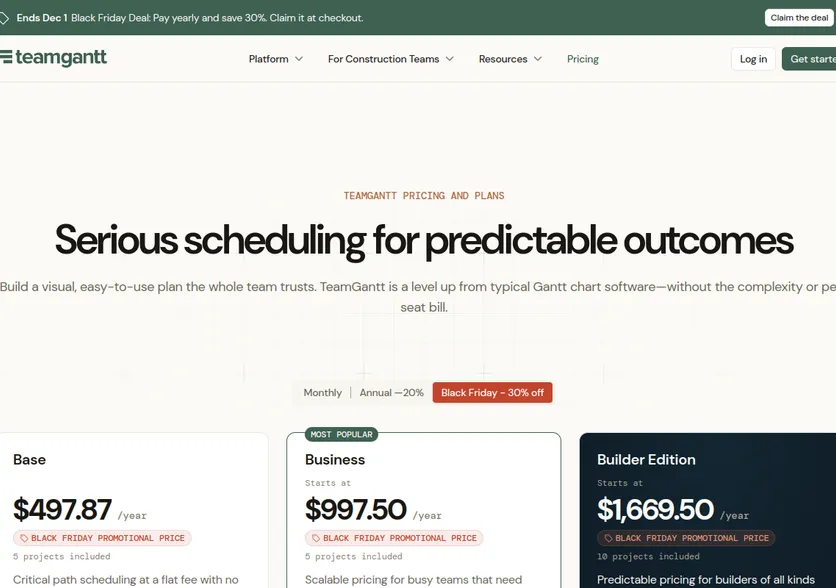
Paid tool Starting price: $59/month · Base plan, fifty-nine dollars a month flat for one manager, ten collaborators and five projects; yearly billing saves twenty percent
Free plan: Free Personal plan, 1 user and 1 project
TeamGantt is the only tool here that charges a flat monthly fee rather than per seat, which changes the buying conversation fully. This TeamGantt Base plan costs fifty-nine dollars a month flat and includes one manager and ten collaborators across five projects with critical path scheduling. Yearly billing saves twenty percent, and the Builder Edition adds construction-specific tools, though task limits per project cap at one hundred fifty on Base.
What we like
- Flat monthly fee with no per-seat math
- Critical path scheduling on every plan
- Exports to Microsoft Project format
Watch out for
- Task limits per project cap at one hundred fifty on Base
- Baselines need the Business plan
How to try it
- Open the TeamGantt pricing page and claim the free Personal plan
- Build one project with dependencies and a critical path
- Upgrade to Base when you need five projects and ten collaborators
Prices above were checked on each vendor’s own website on Nov 27, 2026 and can change — the vendor’s page is the final word. Vendor links are editorial: nobody paid to be listed or ranked here. Vendors who want a featured listing can see how it works on our Get listed page.
What project scheduling software costs in 2026
Most scheduling tools charge per user a month, so the bill is headcount times the seat price, and the cheapest headline is rarely the cheapest stack. A team of ten pays about seventy dollars a month for GanttPRO or ClickUp at the entry level and about one hundred ten dollars for Asana, while TeamGantt charges a flat fifty-nine dollars a month no matter how many collaborators watch the plan. Annual billing cuts roughly a fifth off the monthly rate on nearly every tool here, which makes the yearly commitment the first saving to claim.
Start with the free plan or trial on two tools and build one real schedule in each, with dependencies, a baseline and a critical path. Compare how fast the plan comes together, how the tool shows a slipped task, and whether the plan you buy covers the schedulers who actually use it. Pick the tool whose schedule your team trusts, because a plan nobody updates is money wasted.
Before you buy
- Count every seat before you buy, because per-user pricing multiplies with each planner you add.
- Check which plan holds the critical path and baselines, because some tools gate them behind a higher tier.
- Confirm the free plan or trial covers your real project, because caps on projects and tasks bite fast.
- Compare annual and monthly billing, because the yearly rate saves roughly a fifth on most tools here.
- Test a real schedule in the trial, because dragging a bar on live work shows more than any demo.
Official websites
Official websites of the products reviewed above. Features and prices were checked against these sites when this guide was written, and they can change, so confirm on the vendor site before you buy.
Frequently asked questions
Which project scheduling software is best in 2026?
GanttPRO is the best overall pick at seven dollars per user a month billed yearly, with baselines, critical path and auto scheduling on every plan. Asana is the best choice for task-driven teams at ten dollars and ninety-nine cents a user a month, adding timelines to strong task tracking. TeamGantt suits teams that want one flat fifty-nine-dollar monthly bill instead of per-seat pricing.
How much does project scheduling software cost?
Per-user prices in this list run from seven dollars to ten dollars and ninety-nine cents a month on annual billing, so a ten-person team pays roughly seventy to one hundred ten dollars a month for most tools here. TeamGantt is the exception at fifty-nine dollars a month flat for one manager and ten collaborators. Annual billing saves roughly a fifth over monthly on nearly every plan.
Is there free project scheduling software?
Yes, four of the eight tools here include a free plan: Asana, Monday, Wrike and ClickUp, plus TeamGantt with a one-user Personal plan. The caps decide whether free is usable: Monday covers individuals only, Wrike caps free plans at two hundred active tasks, and TeamGantt allows one project. GanttPRO and Smartsheet offer free trials instead.
Should I choose a Gantt specialist or an all-in-one tool?
It depends on the deliverable. If the schedule itself is the work, GanttPRO gives you baselines, critical path and auto scheduling from seven dollars a user a month. If tasks, docs and chat matter as much as the timeline, Asana or ClickUp cover more ground for a similar price. Teams that plan collaboratively and need visual boards will like Monday.
What should I look for in project scheduling software?
Look for dependencies, a critical path and baselines on the plan you would actually buy, because some tools gate them behind a higher tier. Check the seat rules too: Monday starts at three seats, Wrike Team stops at fifteen users, and Smartsheet Pro caps at ten members. Test the trial on a real project with real dates before you commit.
Need everyday productivity help too? Try Toolsvine's free productivity tools right in your browser.
Browse Productivity Tools tools


