
On this page
Remote teams live inside their task manager, and the right one keeps work visible across time zones without endless status meetings. The seven tools below run from five dollars per user a month to ten dollars and ninety-nine cents per user a month, and every price was checked on the vendor site on November 27, 2026. Most pair boards, lists and timelines with chat, docs and reporting, so compare per-user pricing, views and integrations rather than the headline price alone. ClickUp is our first pick — the most complete workspace for a remote team.
How we researched this
We started with the task tools remote teams actually buy, then read each price on the vendor pricing page on November 27, 2026 and noted the free trial each plan carries. We judged them for teams that plan, assign and track work across time zones, and we kept only tools with a published dollar price. We dropped Basecamp from this post because it prices by package rather than by seat, and it fits the small-business post better.
Compare the tools
| Name | Best for | Starting price | Free plan | |
|---|---|---|---|---|
 ClickUp | Remote teams that want docs, chat, goals and tasks in one workspace | $9/user/month | Free Forever plan available | Visit |
 Asana | Remote teams that want clear structure with timelines, goals and portfolios | $10.99/user/month | Free Personal plan for individuals and small teams | Visit |
 Todoist | Remote workers who want a fast personal task list with team features | $5/user/month | Free Beginner plan, five projects | Visit |
 Monday | Remote teams that want visual boards and dashboards everyone can read | $9/seat/month | Free plan for up to two seats | Visit |
 Trello | Remote teams that want the simplest kanban board for tracking work | $5/user/month | Free plan, ten boards and ten collaborators | Visit |
 Notion | Remote teams that want tasks, docs and wikis in one flexible workspace | $10/user/month | Free plan available | Visit |
 Wrike | Remote teams that want strong project tracking with approvals and proofing | $10/user/month | Free plan, two hundred active tasks | Visit |
The task management software for remote teams, compared
1. ClickUp
Best for: Remote teams that want docs, chat, goals and tasks in one workspace
Paid tool Starting price: $9/user/month · Core plan, nine dollars per user a month billed annually, or twelve dollars billed monthly; Core replaced the Unlimited plan in October 2026
Free plan: Free Forever plan available
ClickUp packs tasks, docs, chat, goals and whiteboards into one workspace, so a remote team can plan, discuss and deliver without switching tools. This ClickUp Core plan costs nine dollars per user a month billed annually and includes unlimited tasks, storage and integrations with time tracking. A remote team can run sprints, share docs and chat about work in the same place, then check progress on a dashboard everyone can see.

What we like
- Tasks, docs, chat and goals in one workspace
- Unlimited tasks and storage on the Core plan
- Strong views for boards, lists, timelines and calendars
Watch out for
- The interface can overwhelm a small team at first
- The Unlimited plan became Core at nine dollars in October 2026
How to try it
- Open the ClickUp pricing page and claim the Free Forever plan
- Set up a project with boards and a timeline view
- Invite your team and run one sprint before you buy
2. Asana
Best for: Remote teams that want clear structure with timelines, goals and portfolios
Paid tool Starting price: $10.99/user/month · Starter plan, ten dollars and ninety-nine cents per user a month billed annually, or thirteen dollars and forty-nine cents billed monthly
Free plan: Free Personal plan for individuals and small teams
Asana gives a remote team clear structure, turning goals into projects, projects into tasks and tasks into deadlines everyone can see. This Asana Starter plan costs ten dollars and ninety-nine cents per user a month billed annually and includes timeline, board and calendar views with automation. A distributed team can plan a launch, track dependencies and report progress to managers without a status meeting.

What we like
- Clear structure from goals down to tasks
- Timeline and portfolio views for managers
- Automation that removes routine admin work
Watch out for
- The priciest tool in this comparison
- Advanced reporting needs the pricier Advanced plan
How to try it
- Open the Asana pricing page and claim the free Personal plan
- Build a project with a timeline and dependencies
- Set up one automation and share the portfolio view
3. Todoist
Best for: Remote workers who want a fast personal task list with team features
Paid tool Starting price: $5/user/month · Pro plan, five dollars per user a month billed annually as sixty dollars a year, or seven dollars billed monthly
Free plan: Free Beginner plan, five projects
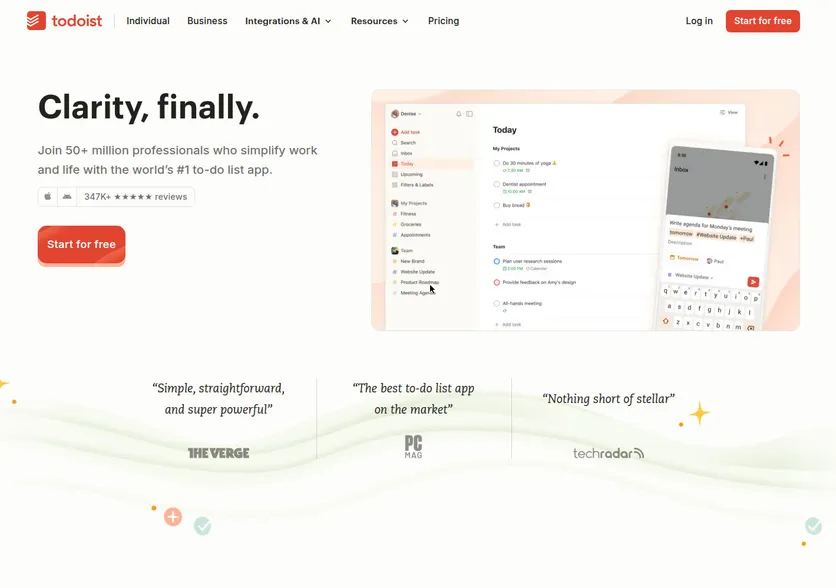
Todoist is the fastest task list in this comparison, with natural language dates, reminders and a clean interface that stays out of the way. This Todoist Pro plan costs five dollars per user a month billed annually and includes unlimited projects, reminders and team collaboration. A remote worker can capture tasks in seconds, share projects with teammates and keep personal and team work in one place.
What we like
- Fastest task capture with natural language dates
- Clean interface that stays out of the way
- Works on every device a remote worker owns
Watch out for
- Lighter on team reporting than the bigger platforms
- The price rose from four dollars during November 2026
How to try it
- Open the Todoist pricing page and claim the free Beginner plan
- Create a project and add tasks with natural language dates
- Share the project with a teammate and try reminders
4. Monday
Best for: Remote teams that want visual boards and dashboards everyone can read
Paid tool Starting price: $9/seat/month · Basic plan, nine dollars per seat a month billed annually, or twelve dollars billed monthly, with a three-seat minimum
Free plan: Free plan for up to two seats
Monday turns work into colourful boards and dashboards that a remote team can read at a glance, with status columns, timelines and automations built in. This Monday Basic plan costs nine dollars per seat a month billed annually and includes unlimited boards, docs and basic dashboards. A distributed team can track a project, a pipeline or a content calendar on one board, then automate the routine updates.

What we like
- Visual boards and dashboards anyone can read
- Unlimited boards and docs on the Basic plan
- Strong automations and integrations
Watch out for
- A three-seat minimum applies, so solo users pay for three
- Advanced dashboards need the pricier Standard plan
How to try it
- Open the Monday pricing page and claim the free plan
- Build a board for your current project
- Invite two teammates and set up one automation
5. Trello
Best for: Remote teams that want the simplest kanban board for tracking work
Paid tool Starting price: $5/user/month · Standard plan, five dollars per user a month billed annually, or six dollars billed monthly
Free plan: Free plan, ten boards and ten collaborators
Trello is the simplest board in this list, with cards, lists and checklists that a team can learn in minutes and use for almost anything. This Trello Standard plan costs five dollars per user a month billed annually and includes unlimited boards, advanced checklists and custom fields. A remote team can run a project, a content pipeline or a hiring process on a board everyone understands.

What we like
- The simplest kanban board a team can learn in minutes
- Free plan with ten boards and ten collaborators
- Power-Ups add calendars, timelines and integrations
Watch out for
- Light on reporting and workload views
- Large projects can outgrow the card format
How to try it
- Open the Trello pricing page and claim the free plan
- Build a board with lists for each stage of work
- Add checklists and due dates to your first cards
6. Notion
Best for: Remote teams that want tasks, docs and wikis in one flexible workspace
Paid tool Starting price: $10/user/month · Plus plan, ten dollars per user a month billed annually, or twelve dollars billed monthly
Free plan: Free plan available
Notion blends tasks, docs and wikis in one flexible workspace, so a remote team can plan work, write specs and keep knowledge in the same place. This Notion Plus plan costs ten dollars per user a month billed annually and includes unlimited blocks, version history and collaborative workspaces. A distributed team can run a project board next to the docs that explain it, then link everything together.

What we like
- Tasks, docs and wikis in one flexible workspace
- Unlimited blocks for teams on the Plus plan
- Templates for almost every remote team workflow
Watch out for
- Flexibility means setup takes longer than simpler tools
- Offline access is limited compared with rivals
How to try it
- Open the Notion pricing page and claim the free plan
- Start from a project template and add your tasks
- Link a doc to the board and share it with your team
7. Wrike
Best for: Remote teams that want strong project tracking with approvals and proofing
Paid tool Starting price: $10/user/month · Team plan, ten dollars per user a month billed annually for two to fifteen users
Free plan: Free plan, two hundred active tasks
Wrike is the most structured project tool in this list, with Gantt charts, approvals and proofing built for teams that deliver client work. This Wrike Team plan costs ten dollars per user a month billed annually and covers two to fifteen users with board, list and table views. A remote team can plan a campaign, route work for approval and track time without leaving the platform.

What we like
- Strong Gantt charts and project tracking
- Approvals and proofing for client work
- Time tracking built into the Team plan
Watch out for
- The Team plan caps the team at fifteen users
- The interface takes longer to learn than simpler boards
How to try it
- Open the Wrike pricing page and claim the free plan
- Build a project with a Gantt chart view
- Set up an approval workflow for one deliverable
Prices above were checked on each vendor’s own website on Nov 27, 2026 and can change — the vendor’s page is the final word. Vendor links are editorial: nobody paid to be listed or ranked here. Vendors who want a featured listing can see how it works on our Get listed page.
What task management software for remote teams costs in 2026
Task tools for remote teams price per user, so the monthly bill is the seat price times the team size, and a five-dollar gap per user doubles the bill for a ten-person team. Plans here run from five dollars to ten dollars and ninety-nine cents per user a month, and the gap usually buys views, automation and reporting rather than more tasks. A small remote team can run on the cheapest plans, while a team that needs timelines and portfolios should budget for the higher tiers.
Start with the free plan on two tools and run one real project on each. Compare how fast the team adopts it, how the views show progress and how the integrations fit your stack. Pick the tool the team actually opens every day, because a task manager nobody checks cannot coordinate a remote team.
Before you buy
- Count every teammate who needs a seat, because per-user pricing multiplies with each hire.
- Check the seat minimum, because Monday charges for three seats even for a solo user.
- Confirm the views you need are included, because timelines and Gantt charts sit on higher plans.
- Test the mobile app, because remote workers manage tasks from phones as often as laptops.
- Compare annual and monthly billing, because most tools here cut the price on annual billing.
Official websites
Official websites of the products reviewed above. Features and prices were checked against these sites when this guide was written, and they can change, so confirm on the vendor site before you buy.
Frequently asked questions
Which task management software is best for remote teams in 2026?
ClickUp is the best overall pick, with tasks, docs, chat and goals in one workspace from nine dollars per user a month. Asana is the best structure at ten dollars and ninety-nine cents a month, while Todoist is the cheapest at five dollars a month for a fast personal list with team features.
How much does task management software cost for a remote team?
Plans in this list run from five dollars to ten dollars and ninety-nine cents per user a month, so a ten-person team pays roughly fifty to one hundred ten dollars a month. Free plans cover small teams and personal use, while paid plans add views, automation and reporting. Annual billing cuts the monthly rate on most tools here.
What is the difference between a board, a list and a timeline?
A board shows work as cards moving through stages, which suits visual teams and simple projects. A list shows work as rows with details, which suits teams that need structure. A timeline shows work against dates with dependencies, which suits managers planning launches. Most tools here offer all three views.
Can I manage a remote team for free?
Yes, every tool here offers a free plan, though limits range from five projects on Todoist to ten boards on Trello and two hundred active tasks on Wrike. Free plans suit a small team or a trial, while paid plans add unlimited work, automation and reporting for a growing team.
Do I need time tracking in a task manager?
Time tracking suits teams that bill clients by the hour or want to see where the week goes. ClickUp and Wrike include it on paid plans, while Todoist, Trello and Notion rely on integrations. If your team bills by the hour, pick a tool with time tracking built in.
Need everyday productivity help too? Try Toolsvine's free productivity tools right in your browser.
Browse Productivity Tools tools


