
On this page
Good software for non-technical users does not need a training course, a manual or a support ticket to do the first useful thing. Monday is the pick that makes the first board feel obvious: visual project boards from $9 a seat a month, with a free plan for two seats. This guide compares seven tools for non-technical users, from a $9-a-seat board to a $20-a-user database, with live 2026 prices and free plans, so anyone can pick software that works on day one.
How we researched this
We checked the pricing page of every vendor on this list on November 26, 2026, and kept only tools that publish a real dollar price. Each tool had to be usable without technical skills: a visual interface, templates for common jobs, and a free plan that lets a beginner do real work before paying, and we compared entry prices, free limits and how the bill scales as the team grows.
Compare the tools
| Name | Best for | Starting price | Free plan | |
|---|---|---|---|---|
 Monday | Teams that want visual project boards anyone can read | $9/seat/month | Free plan up to 2 seats | Visit |
 Notion | People who want docs, wikis and databases in one workspace | $10/member/month | Free plan | Visit |
 Canva Pro | Anyone who needs professional-looking design without design skills | $144/year | Free plan | Visit |
 Airtable | Teams that want a spreadsheet that behaves like a database | $20/user/month | Free plan | Visit |
 Trello | Teams that want the simplest possible board for tracking work | $10/user/month | Free plan up to 10 collaborators | Visit |
 Asana | Teams that want project plans and deadlines with approval workflows | $10.99/user/month | Free plan | Visit |
 Calendly | Solo professionals and small teams that want booking without back-and-forth | $10/seat/month | Free plan | Visit |
The tools for non-technical users, compared
1. Monday
Best for: Teams that want visual project boards anyone can read
Paid tool Starting price: $9/seat/month · Basic $9 per seat a month billed annually; Standard $12 a month; Pro $19 a month
Free plan: Free plan up to 2 seats
Monday turns work into colorful boards where status, owner and deadline are visible at a glance, with no formulas or setup to learn first. This Monday Basic plan costs $9 per seat a month billed annually and covers unlimited boards, docs and viewers. It fits a team that wants project tracking a non-technical colleague can open and understand in thirty seconds.

What we like
- Boards anyone can read at a glance
- Templates for almost every workflow
- Viewers are free on paid plans
Watch out for
- Per-seat billing grows with the team
- Advanced automations need higher tiers
How to try it
- Open the Monday pricing page and start the free plan
- Pick a board template for the first project
- Invite the team and set the first statuses
2. Notion
Best for: People who want docs, wikis and databases in one workspace
Paid tool Starting price: $10/member/month · Plus $10 per member a month billed annually; Business $20 a month; Enterprise by quote
Free plan: Free plan
Notion hands a small team one workspace where it can plan, write and organize content in docs, wikis and databases, with templates for almost every job. This Notion Plus plan costs $10 per member a month on annual billing and adds charts, custom forms and collaborative blocks. It is the pick when the team wants one place for notes and projects instead of five separate apps.

What we like
- One workspace for docs and databases
- Huge template library
- Free plan for personal use
Watch out for
- Flexibility can feel overwhelming at first
- Full AI features need the Business plan
How to try it
- Open the Notion pricing page and start the free plan
- Pick a template for notes or projects
- Build the first database with a calendar view
3. Canva Pro
Best for: Anyone who needs professional-looking design without design skills
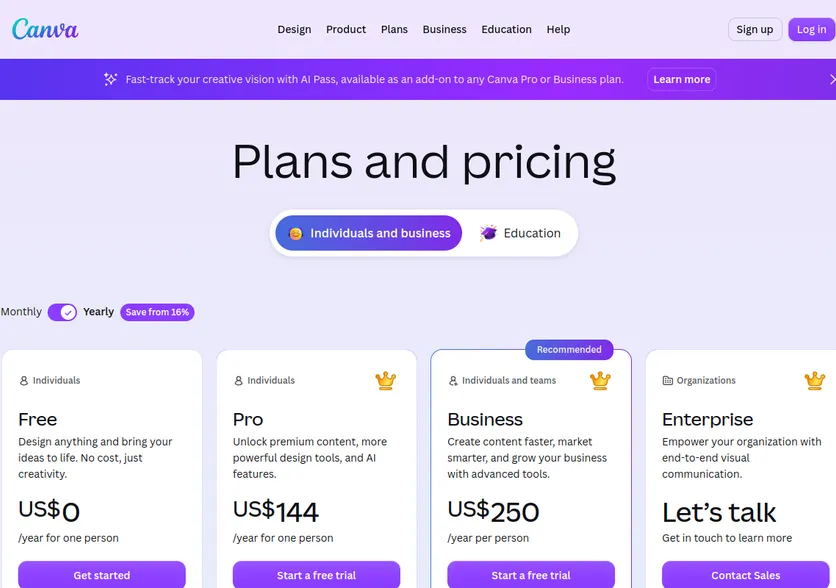
Paid tool Starting price: $144/year · Pro $144 a year for one person ($12 a month billed annually, or $18 a month billed monthly); Teams plans available for groups
Free plan: Free plan
Canva is design for people who are not designers, with templates, drag-and-drop editing and a brand kit that keeps every post on brand. This Canva Pro plan costs $144 a year for one person and unlocks premium templates, background removal and a million plus stock photos. It fits anyone who needs a social post, a flyer or a presentation that looks professional in minutes.
What we like
- Templates for almost every design job
- Drag-and-drop editing with no learning curve
- Huge stock photo and element library
Watch out for
- Teams pricing is per person
- Print and video features are limited
How to try it
- Open the Canva pricing page and start the free plan
- Pick a template for the first design
- Save the brand colors and logo in the brand kit
4. Airtable
Best for: Teams that want a spreadsheet that behaves like a database
Paid tool Starting price: $20/user/month · Team $20 per user a month billed annually; Business $45 a month; Enterprise by quote
Free plan: Free plan
Airtable looks like a spreadsheet and behaves like a database, with calendar, gallery and kanban views that turn rows into something a non-technical user can actually use. This Airtable Team plan costs $20 per user a month on annual billing and adds automations, extensions and sync integrations. It fits a team that outgrew spreadsheets but does not want to learn a database.

What we like
- Spreadsheet feel with database power
- Calendar, gallery and kanban views
- Read-only collaborators are free
Watch out for
- Highest entry price on this list
- Charges every user with edit permission
How to try it
- Open the Airtable pricing page and start the free plan
- Pick a base template for the first tracker
- Switch to calendar view to see the schedule
5. Trello
Best for: Teams that want the simplest possible board for tracking work
Paid tool Starting price: $10/user/month · Premium $10 per user a month billed annually; Standard $5 a month; Enterprise $17.50 a month
Free plan: Free plan up to 10 collaborators
Trello is the simplest board on this list: lists of cards that move from left to right, with checklists, due dates and attachments on each card. This Trello Premium plan costs $10 per user a month billed annually and adds the calendar view, unlimited automations and workspace views. It fits a team that wants the fastest possible start, because there is almost nothing to learn.

What we like
- Simplest board on this list
- Free for up to 10 collaborators
- Calendar view on Premium
Watch out for
- Limited reporting and structure
- Large projects outgrow boards fast
How to try it
- Open the Trello pricing page and start the free plan
- Create a board with three lists: to do, doing, done
- Add cards with due dates and checklists
6. Asana
Best for: Teams that want project plans and deadlines with approval workflows
Paid tool Starting price: $10.99/user/month · Starter $10.99 per user a month billed annually; Advanced $24.99 a month; Enterprise by quote
Free plan: Free plan
Asana is team task management with real project plans, deadlines and approvals, built so a non-technical user can follow a project without asking for a status update. This Asana Starter plan costs $10.99 per user a month billed annually and adds timeline, calendar and dashboard views. It fits a team that needs more structure than a simple board but still wants setup in an afternoon.

What we like
- Timeline and calendar views included
- Approvals and forms on Starter
- Free plan for small teams
Watch out for
- Per-user billing adds up fast
- Advanced features need the higher tier
How to try it
- Open the Asana pricing page and start the free plan
- Create a project from a template
- Assign tasks with due dates and owners
7. Calendly
Best for: Solo professionals and small teams that want booking without back-and-forth
Paid tool Starting price: $10/seat/month · Standard $10 per seat a month billed annually ($12 billed monthly); Teams $16 a month
Free plan: Free plan
Calendly ends the back-and-forth of scheduling: share a link, let the other person pick a time, and the meeting appears on both calendars. This Calendly Standard plan costs $10 per seat a month billed annually and adds unlimited event types, group events, payments and automations. It fits anyone who books meetings every day and wants the admin to disappear.

What we like
- Ends scheduling back-and-forth
- Unlimited event types on Standard
- Payments at booking included
Watch out for
- Per-seat billing for every host
- AI notetaker costs extra on Plus tiers
How to try it
- Open the Calendly pricing page and start the free plan
- Connect a calendar and create an event type
- Share the booking link instead of emailing times
Prices above were checked on each vendor’s own website on Nov 26, 2026 and can change — the vendor’s page is the final word. Vendor links are editorial: nobody paid to be listed or ranked here. Vendors who want a featured listing can see how it works on our Get listed page.
How to read the price before you commit
Prices on this list run from $9 a seat a month to $20 a user a month, and the billing unit is the whole story: per-seat tools charge for every person who edits, while viewers and guests are usually free. A $9 Monday seat looks cheap until the team has twenty editors, and a $20 Airtable seat looks steep until it replaces three separate apps. Before paying, count the editors separately from the viewers, then run the free plan on a real project for two weeks, because the first project shows whether the team actually opens the tool every day. Check whether templates, automations and calendar views are included or gated behind a higher tier.
Before you buy
- Count editors separately from viewers, because most tools charge only for people who edit.
- Confirm whether templates, automations and calendar views are included or gated behind a higher tier.
- Run the free plan on a real project for two weeks to see whether the team actually opens it daily.
- Check the free plan caps: seat counts, board limits and storage decide how long free lasts.
- Ask how the price changes when a third editor or a second workspace is added to the account.
Official websites
Official websites of the products reviewed above. Features and prices were checked against these sites when this guide was written, and they can change, so confirm on the vendor site before you buy.
Frequently asked questions
What is the easiest software for a non-technical person to learn?
Trello is the easiest tool here: three lists and cards that move from left to right, with almost nothing to learn. Monday is the other easy pick, with visual boards that anyone can read at a glance. Both have free plans, so a beginner can try the real tool on a real project before paying anything at all.
Do I need to pay for these tools or are the free plans enough?
Free plans cover real work for a solo user or a very small team: Trello is free for up to 10 collaborators, Monday for up to 2 seats, and Notion, Airtable and Asana all have free plans. Paid plans add automations, calendar views, more storage and admin controls, which matter once the team grows past about five people or needs approvals.
Which tool replaces spreadsheets for tracking work?
Airtable is the best spreadsheet replacement here: it looks like a spreadsheet and behaves like a database, with calendar, gallery and kanban views. Monday is the other strong pick, with boards that show status and owner at a glance. Both let a non-technical team track work without formulas, and both have free plans to test with.
Can non-technical users design professional graphics?
Yes, with Canva Pro. Templates, drag-and-drop editing and a brand kit let anyone produce a social post, flyer or presentation that looks professional in minutes, for $144 a year. The free plan covers basic design, while Pro adds premium templates, background removal and a much larger stock library.
Which tool is best for scheduling meetings without email chains?
Calendly is the best pick for scheduling: share a booking link, let the other person pick a time, and the meeting appears on both calendars. Standard costs $10 per seat a month billed annually and adds unlimited event types, group events and payments. The free plan covers one event type and one calendar connection, which suits a solo professional.
Still juggling sticky notes and spreadsheets? Try free productivity tools on Toolsvine right in your browser.
Browse Productivity Tools tools


