
On this page
WP Rocket is the easiest caching plugin to install, but at 60 dollars a year for one site it is one of the priciest ways to make a site fast. FlyingPress is the pick that matches it closely, with caching and front end optimisation from 59 dollars a year. This guide compares eight WordPress caching alternatives to WP Rocket, from a one dollar a month CDN to a 59 dollar a year all in one optimiser, with live 2026 prices and free plans, so you can pick by site count and how much work you want done for you.
How we researched this
We checked the pricing page of every vendor on this list on November 26, 2026, and kept only tools that publish a real dollar price. Each tool had to speed up a WordPress site through caching, file optimisation or a CDN, and we compared entry prices, free plans, site limits and whether the tool caches pages or only trims scripts.
Compare the tools
| Name | Best for | Starting price | Free plan | |
|---|---|---|---|---|
| FlyingPress | Site owners who want the closest WP Rocket replacement | $59/year | 14-day free trial | Visit |
| Perfmatters | Sites slowed by plugin bloat rather than raw server speed | $24.95/year | No free plan | Visit |
| WP-Optimize | Beginners who want database cleanup plus caching in one tool | $49/year | Free version with database cleanup and caching | Visit |
| NitroPack | Non technical owners who want hands off cloud optimisation | $8/month | Free plan with limited optimisation | Visit |
| WP Fastest Cache | Owners who want simple caching for a single payment | $49 one-time | Free version with basic caching | Visit |
| Cloudflare APO | Sites already on Cloudflare that want edge caching | $5/month | No free plan for APO itself | Visit |
| Swift Performance | Site owners who want AI driven optimisation on their own server | $49.99/year | No free plan | Visit |
| BunnyCDN | Global sites that need a cheap CDN beside a cache plugin | $1/month | 14-day free trial | Visit |
The WordPress caching plugins, compared
1. FlyingPress
Best for: Site owners who want the closest WP Rocket replacement
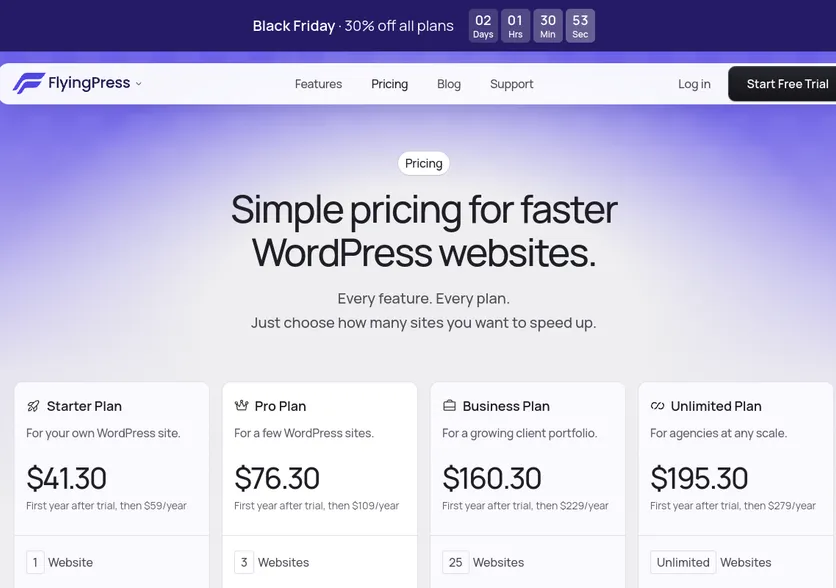
Paid tool Starting price: $59/year · Starter is $59 a year for 1 site after the first year; first year is $49 a year; 14-day free trial
Free plan: 14-day free trial
FlyingPress is the closest like for like replacement for WP Rocket, with premium caching, front end optimisation, image optimisation and Core Web Vitals tracking in one plugin. This FlyingPress Starter plan costs 59 dollars a year for one site and covers the full optimisation stack with no add ons needed. It suits a site owner who wants speed handled in one place.
What we like
- Closest WP Rocket feature match
- Core Web Vitals tracking built in
- Image optimisation included
Watch out for
- No free version at all
- Smaller team than WP Rocket
How to try it
- Open the FlyingPress pricing page and start the trial
- Install the plugin and run the first optimisation
- Check the Core Web Vitals score before and after
2. Perfmatters
Best for: Sites slowed by plugin bloat rather than raw server speed
Paid tool Starting price: $24.95/year · Personal is $24.95 a year for 1 site; Business is $59.95 a year for 3 sites; unlimited is $124.95 a year
Free plan: No free plan
Perfmatters attacks the half of slow WordPress that caching cannot touch, by disabling plugins and scripts on pages where they are not needed. This Perfmatters Personal plan costs about 25 dollars a year for one site and pairs with any cache plugin. It is the best value line item on this list when bloat is the diagnosis.
What we like
- Cuts page size by up to 40 percent
- Cheapest paid optimiser here
- Works beside any cache plugin
Watch out for
- Not a cache plugin on its own
- Needs a cache plugin alongside it
How to try it
- Open the Perfmatters pricing page and pick Personal
- Install it beside your existing cache plugin
- Disable unused scripts page by page
3. WP-Optimize
Best for: Beginners who want database cleanup plus caching in one tool
Paid tool Starting price: $49/year · Premium Starter is $49 a year for up to 2 sites; Premium Business is $99 a year; free version covers core cleanup
Free plan: Free version with database cleanup and caching
WP-Optimize combines database cleanup with caching and image compression, which makes it the best all in one for a neglected site. This WP-Optimize Premium Starter plan costs 49 dollars a year for up to two sites and adds lazy loading and premium image compression. It suits a site with years of post revisions and uncompressed images slowing it down.
What we like
- Database cleanup plus caching in one tool
- Free version does the core job
- Beginner friendly interface
Watch out for
- Cache is competent, not best in class
- Premium image tools cost extra
How to try it
- Open the WP-Optimize pricing page and install the free version
- Run a database cleanup on revisions and transients
- Upgrade to Premium for lazy loading and image tools
4. NitroPack
Best for: Non technical owners who want hands off cloud optimisation
Paid tool Starting price: $8/month · Starter is $8 a month billed monthly or $7 a month billed annually; Plus is $22 a month; free plan available
Free plan: Free plan with limited optimisation
NitroPack is a cloud service rather than a plugin, so optimisation runs outside the server and pages ship through a built in CDN. This NitroPack Starter plan costs eight dollars a month and covers a small site with automatic caching, minification and image optimisation. It suits an owner who wants speed without touching a setting.
What we like
- Fully automatic, no settings to learn
- Built in CDN with 310 locations
- Pricing follows pageviews, not sites
Watch out for
- Pageview limits cap busy sites fast
- Less control than a local plugin
How to try it
- Open the NitroPack pricing page and start the free plan
- Connect the site and let the cloud optimise it
- Check the speed score after the first pass
5. WP Fastest Cache
Best for: Owners who want simple caching for a single payment
Paid tool Starting price: $49 one-time · Premium is $49 one-time for 1 site; higher tiers cover more sites with the same one-time payment
Free plan: Free version with basic caching
WP Fastest Cache is the simple cache plugin that does the basics well, with static HTML files, minification and browser caching in a clean interface. This WP Fastest Cache Premium licence costs 49 dollars once for one site, with no yearly renewal to remember. It suits an owner who wants caching solved with a single payment.

What we like
- One time payment, no renewal
- Simple interface a beginner can use
- Free version covers the basics
Watch out for
- Fewer optimisation features than rivals
- No built in CDN included
How to try it
- Open the WP Fastest Cache premium page and install the free version
- Turn on caching and minification
- Buy Premium once for image optimisation and widgets
6. Cloudflare APO
Best for: Sites already on Cloudflare that want edge caching
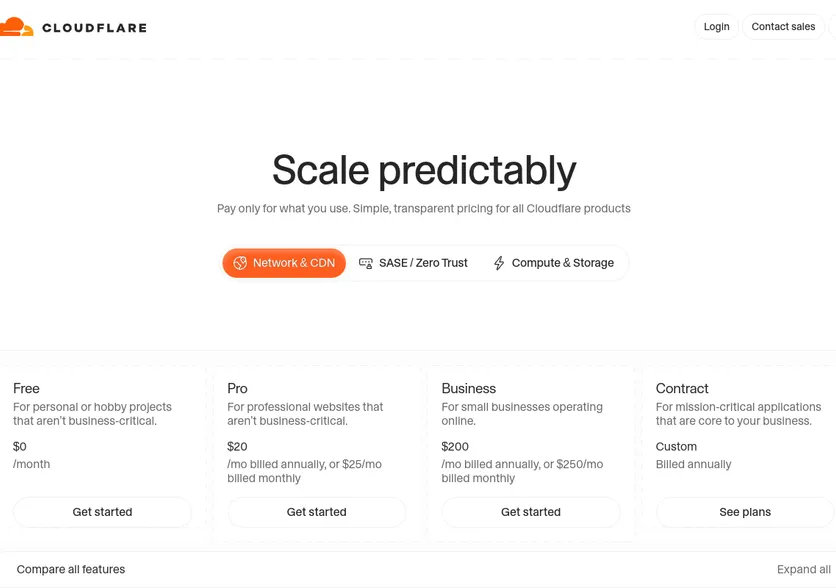
Paid tool Starting price: $5/month · Automatic Platform Optimization is $5 a month per domain, on top of a Cloudflare plan
Free plan: No free plan for APO itself
Cloudflare APO caches WordPress pages at the edge, so visitors get a fast page from a nearby server instead of waiting on the origin. This Cloudflare APO add on costs five dollars a month per domain and works with the free Cloudflare plan. It is the cheapest edge caching on this list for a site already behind Cloudflare.
What we like
- Edge caching from a global network
- Five dollars a month per domain
- Works with the free Cloudflare plan
Watch out for
- Needs Cloudflare DNS in front of the site
- No local optimisation features
How to try it
- Open the Cloudflare plans page and check the APO add on
- Turn on APO for the WordPress domain
- Test the site speed from a far away location
7. Swift Performance
Best for: Site owners who want AI driven optimisation on their own server
Paid tool Starting price: $49.99/year · Single is $49.99 a site a year; Multi is $99.99 a site a year; AI optimisation and critical CSS included
Free plan: No free plan
Swift Performance is a self hosted plugin that automates caching and front end optimisation with AI, including critical CSS and JavaScript optimisation. This Swift Performance Single plan costs about 50 dollars a site a year and adds WooCommerce support and free image optimisation. It suits a site owner who wants automation without sending traffic to a cloud service.
What we like
- AI optimisation with critical CSS
- Self hosted, no cloud dependency
- WooCommerce support included
Watch out for
- No free version to try first
- Newer vendor than WP Rocket
How to try it
- Open the Swift Performance pricing page and pick Single
- Install the plugin and run the AI optimisation
- Check the speed score and critical CSS output
8. BunnyCDN
Best for: Global sites that need a cheap CDN beside a cache plugin
Paid tool Starting price: $1/month · Usage based with a $1 a month minimum; bandwidth is $0.01 per GB in the EU and North America; 14-day free trial
Free plan: 14-day free trial
BunnyCDN is a low cost content delivery network that pairs with any cache plugin, delivering static files from edge locations close to each visitor. This BunnyCDN plan starts at a one dollar a month minimum with bandwidth at one cent per gigabyte in the EU and North America. It is the cheapest way to add global delivery to a WordPress site.

What we like
- One dollar a month minimum
- Bandwidth far cheaper than big clouds
- Pairs with any cache plugin
Watch out for
- CDN only, not a full optimiser
- No free tier, trial only
How to try it
- Open the BunnyCDN pricing page and start the trial
- Create a pull zone for the WordPress site
- Point the cache plugin at the CDN hostname
Prices above were checked on each vendor’s own website on Nov 26, 2026 and can change — the vendor’s page is the final word. Vendor links are editorial: nobody paid to be listed or ranked here. Vendors who want a featured listing can see how it works on our Get listed page.
How to read the price before you commit
Caching plugins bill by site, by pageview or by month, and the unit decides the real cost. FlyingPress, Perfmatters and WP-Optimize charge per site per year, NitroPack charges by monthly pageviews, and WP Fastest Cache charges once and never again. Before paying, count the sites you run, check whether the free version covers your needs, and measure the speed before and after, because a plugin that does not move the score is money wasted.
Before you buy
- Count the sites first, because most licences cover one site only.
- Check whether the tool caches pages or only trims scripts.
- Measure speed before and after so the purchase proves itself.
- Confirm the CDN is included or a separate purchase.
- Test on a staging copy before turning optimisation on live. A plugin that charges per site can cost more than a cloud service on a ten site portfolio, so multiply before you buy anything at all.
Official websites
Official websites of the products reviewed above. Features and prices were checked against these sites when this guide was written, and they can change, so confirm on the vendor site before you buy.
Frequently asked questions
What is the best free WP Rocket alternative?
WP-Optimize has the best free version, with database cleanup, caching and image compression at no cost, and WP Fastest Cache free covers basic caching. NitroPack free optimises a small site automatically. The free versions all lack premium features such as lazy loading and advanced image tools, so a busy site will still benefit from a paid plan.
Is Perfmatters a replacement for a cache plugin?
No, Perfmatters is not a cache plugin at all. It removes script bloat by disabling plugins and scripts on pages where they are not needed, which caching cannot do. It pairs with a cache plugin such as WP Fastest Cache or WP-Optimize rather than replacing one. Buy it as the second tool when bloat is the diagnosis, not the first.
How much does caching actually speed up a site?
A good cache plugin typically cuts load time by half or more on a shared host, because it serves static HTML instead of building every page from the database. Perfmatters can cut page size by up to 40 percent by stripping unused scripts. Always measure with a speed test before and after, because a slow host or unoptimised images can limit the gain.
Do I need a CDN as well as a cache plugin?
A cache plugin speeds up the server, while a CDN speeds up delivery to visitors far away, so they solve different halves of the problem. NitroPack and Cloudflare APO include a CDN, while FlyingPress assumes you add one separately. BunnyCDN at $1 a month minimum is the cheapest way to add global delivery to any cache plugin on this list.
Which caching plugin is best for WooCommerce?
FlyingPress is the best WooCommerce pick here, with full optimisation plus image handling that suits product pages, at $59 a year. Swift Performance also includes WooCommerce support at $49.99 a year. NitroPack works well for stores that want hands off optimisation, but its pageview pricing can climb fast on a busy shop.
Is your WordPress site slow? Try free speed, WordPress and developer tools on Toolsvine right in your browser.
Browse Developer Tools tools


