
Naming a JavaScript variable, a JSON key or a CSS property? This free camelCase converter turns any phrase — “user first name”, “user-first-name”, “UserFirstName” — into clean camelCase like userFirstName, ready to paste into code.
Conversion happens entirely in your browser, so your text never leaves your device. For the capitalized twin, use the PascalCase Converter, or clean up the casing first with the Sentence Case Converter.
How to use
- Type or paste your text into the box above.
- The camelCase version appears instantly in the output box.
- Use Copy result to copy it, or Clear to start over.
Why use Toolsvine
Variable names are read far more often than they are written, and camelCase is the house style of JavaScript, Java and most JSON APIs. This converter applies the rules the same way every time, so your names stay consistent across a whole project. The worked example shows exactly what happens to numbers, hyphens and acronyms, so there are no surprises.
What is camelCase?
camelCase is a naming style where words are joined with no spaces and each word after the first starts with a capital letter: userFirstName, getUserById, backgroundColor. The first word stays all lowercase, which is what makes the shape read like a camel's humps — a low start, then a rise at every word boundary.
The converter splits your text on spaces, hyphens, underscores and other separators, and also at lower-to-upper-case boundaries, so “userFirstName” and “user first name” give the same result. The first word is written all lowercase; every following word starts with a capital letter and the rest stays lowercase. Digits stay where they are — “version 2 update” becomes version2Update.
Where camelCase is used
| Place | Example |
|---|---|
| JavaScript variables | userFirstName |
| JSON keys | createdAt |
| CSS properties (in JS) | backgroundColor |
| Function names | getUserById |
camelCase vs PascalCase
The only difference is the first letter: camelCase starts lowercase (userName), PascalCase starts uppercase (UserName). JavaScript uses camelCase for variables and functions, and PascalCase for classes and components — mixing them up is a common beginner mistake.
Worked example: three phrases, three names
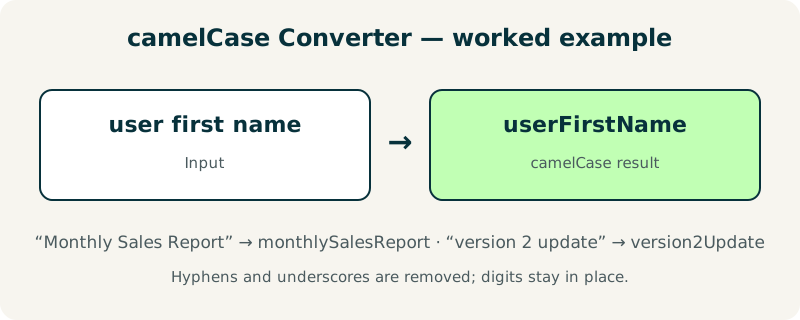
Type “user first name” and the converter returns userFirstName: the first word stays lowercase, “first” becomes “First” and “name” becomes “Name”, with nothing between them. Type “Monthly Sales Report” and the result is monthlySalesReport — the capitals you typed are ignored, because every word is lowercased first and then re-capitalized by position.
Numbers and separators behave the same way. “version 2 update” becomes version2Update, with the digit kept in place, and “user-first-name” or “user_first_name” both become userFirstName, because hyphens and underscores are treated as word separators and removed. An acronym shows the one surprise: “HTTPResponseCode” becomes httpResponseCode, because the whole run of capitals is lowered first and each word boundary is then re-capitalized by position.
| Input | camelCase |
|---|---|
| user first name | userFirstName |
| Monthly Sales Report | monthlySalesReport |
| version 2 update | version2Update |
| user-first-name | userFirstName |
| HTTPResponseCode | httpResponseCode |
What mistakes should I avoid with camelCase?
The most common mistake is using camelCase where PascalCase belongs. JavaScript classes, React components and C# types take PascalCase — UserAccount, LoginForm — while variables, functions and JSON keys take camelCase. A component named loginForm will not break your build, but it will confuse every developer who reads it, because the casing is the signal for what the name is.
A second mistake is feeding the tool acronyms and expecting them to survive. “HTTPResponseCode” becomes httpResponseCode, not HTTPResponseCode with HTTP intact, because the converter lowercases the whole acronym first. If an acronym must stay visible, rename by hand afterwards — or accept the lowered form, which is what most style guides recommend anyway.
Frequently asked questions
Is my text uploaded anywhere?
No. The conversion runs entirely in your browser with JavaScript. Your text never leaves your device, and the tool works offline once the page has loaded. That makes it safe for code names, project labels and any text you would never paste into a stranger's server.
What is camelCase?
A naming style where words are joined with no spaces and each word after the first starts with a capital letter: userFirstName, getUserById, backgroundColor. The first word stays lowercase, which is the only difference from PascalCase. It is the standard style for variables and functions in JavaScript and Java.
How are hyphens and underscores handled?
They are treated as word separators and removed. “user-first-name” and “user_first_name” both become userFirstName. The same applies to dots, slashes and other punctuation: any run of non-letter characters splits the words, so “user.first.name” becomes userFirstName as well. That is why mixed input such as “user first-name_here” still converts cleanly to a single name.
What happens to numbers?
Digits are kept in place. “version 2 update” becomes version2Update, and “html5 parser” becomes html5Parser. A digit does not start a new capitalized word, so “2” stays attached to the word before it and the word after it takes its capital from the normal rule.
What is the difference from PascalCase?
Only the first letter: camelCase starts lowercase (userName), PascalCase starts uppercase (UserName). Use the PascalCase Converter for class and component names, and camelCase for variables, functions and JSON keys. Mixing them up will not break a build, but it confuses anyone reading the code.