
Stuffing a keyword into a page used to work; today it reads badly and search engines ignore it. This free keyword density checker shows which words you actually use most, and what share of your text each one takes, so you can tune a page without overdoing it.
Analysis runs entirely in your browser — your draft never leaves your device. Check the overall length first with the Word Counter, then use the Readability Score Checker to see whether the page is easy to read.
How to use
- Paste your article or page text into the box above.
- Choose whether to ignore common stopwords such as “the” and “and”.
- Read the table: each word, how often it appears, and its density as a percentage.
- Use Copy result to copy the top keywords, or Clear to start over.
Why use Toolsvine
Keyword density is a diagnostic, not a target — the right number is the one that reads naturally. This checker shows you the honest frequencies in your own text so you can spot accidental repetition and keyword stuffing before Google does. The table includes two-word phrases, and the stopwords toggle lets you switch between the raw picture and the meaningful one.
How is keyword density calculated?
Density is simple division: a word's count divided by the total number of words, times 100. If “garden” appears 12 times in a 600-word article, its density is 2%. The table lists your ten most frequent words, with two-word phrases shown alongside them.
One detail matters: when the stopwords toggle is on — the default — the denominator is the count of words left after common words such as “the”, “and” and “of” are removed. That makes the percentages higher than a raw total-words division would, because the same count is divided by a smaller number. Turn the toggle off to see the raw picture instead.
What density should you aim for?
There is no official ideal, and Google has never published one. As a rule of thumb, a main keyword between 1% and 2% usually reads naturally; above 3% it often starts to feel forced. The real test is reading the page aloud — if the keyword jumps out, use it less.
Reading the table
| Column | What it means |
|---|---|
| Word | The word or two-word phrase |
| Count | How many times it appears |
| Density | Its share of all words, as a percentage |
Turn stopwords off if you want the raw picture, and on if you want to focus on meaningful words — “the” and “and” usually top the raw list on every page.
Worked example: a 92-word garden article
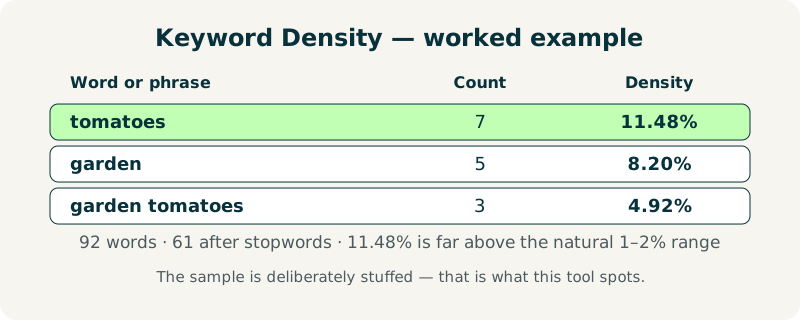
Paste this short article about growing tomatoes in Austin, with the stopwords toggle on, and the checker reports 92 words, 63 unique words, and 61 words after stopwords are removed. The top of the table is a warning sign: “tomatoes” appears 7 times, which is 11.48% of the 61 counted words, and “garden” appears 5 times, which is 8.20%.
That is far above the 1–2% range that reads naturally — the sample is deliberately stuffed, which is exactly what this tool is for. The two-word phrase “garden tomatoes” appears 3 times, or 4.92%, and “tomato” on its own appears 3 times, also 4.92%. Together they show the same idea repeated under three spellings, which is why the article feels forced.
| Word or phrase | Count | Density |
|---|---|---|
| tomatoes | 7 | 11.48% |
| garden | 5 | 8.20% |
| tomato | 3 | 4.92% |
| garden tomatoes | 3 | 4.92% |
| every | 2 | 3.28% |
| summer | 2 | 3.28% |
What mistakes should I avoid with keyword density?
The most common mistake is chasing a magic number. Google ranks pages on relevance and quality, not on hitting a percentage, so a page at 0.8% can outrank a page at 2.5% if it answers the question better. Use density to spot stuffing, not as a target to hit.
A second mistake is forgetting the stopwords toggle changes the denominator. The same text shows higher percentages with stopwords on, because the count is divided by fewer words. Compare two pages only with the same toggle setting, and pair the result with the Readability Score Checker to confirm the page is still easy to read.
Frequently asked questions
Is my text uploaded anywhere?
No. The analysis runs entirely in your browser with JavaScript. Your text never leaves your device, and the tool works offline once the page has loaded. That makes it safe for unpublished drafts, client pages and SEO work that you would never paste into a stranger's server.
What is a good keyword density?
There is no official number, and Google has never published one. Around 1–2% for a main keyword usually reads naturally; above 3% often feels stuffed. Read the page aloud — that test beats any percentage. If the keyword jumps out at you on a first read, use it less and replace some mentions with pronouns or synonyms.
What are stopwords?
Very common words like “the”, “and”, “of” and “is” that appear in almost every text. Ignoring them lets the table show the words that actually carry meaning. With the toggle on, the density denominator is the count of words left after stopwords are removed, so percentages run higher than a raw total-words division would.
Does the checker count two-word phrases?
Yes — the table includes the most frequent two-word phrases (bigrams) as well as single words, so you can spot repeated phrases like “best shoes” or “free tools”. Bigrams are formed from adjacent words after stopwords are removed, which is why a phrase split by “the” or “and” may not appear exactly as written in your text.
Does keyword density affect Google rankings?
Only indirectly. Google ranks pages on relevance and quality, not on hitting a magic percentage. Density is useful for spotting stuffing, not as a ranking target. A page that answers the searcher's question clearly beats a page tuned to a number, so fix the writing first and check the density second.