
Pasting a list into a form that allows only ten lines? Or checking how long a poem, a log file or a block of code really is? This free line counter counts every line in your text, separates the blank ones, and shows the length of your longest line.
Counting happens entirely in your browser, so lists, logs and private notes never leave your device. If you need to clean the list first, the Remove Duplicate Lines tool removes repeats, and the Word Counter gives you the word totals.
How to use
- Paste or type your text into the box above.
- Watch the line counts update live as you type or paste.
- Use Copy result to copy a one-line summary, or Clear to start over.
Why use Toolsvine
Line counts sound trivial until a form rejects your list or a script expects exactly one entry per line. This counter gives you the exact numbers — total, non-empty, blank and longest — in one glance, with nothing uploaded and nothing to install. Spaces-only lines count as blank, so stray whitespace never hides in your total.
How are lines counted?
A line is everything up to the next line break, and the count is the number of lines your text splits into. Empty lines — lines with no characters at all — are counted separately from lines that contain only spaces, which count as blank too. The longest line is measured in characters, including its spaces.
The split is literal: a text with no line breaks at all is one line, and a blank line in the middle is a real line, not a gap the tool skips. That matters for lists and data files, where an empty row is exactly the kind of thing that breaks an import. The longest-line figure tells you whether any line would overflow a limit.
When line counts matter
Line counts matter whenever a system reads text one line at a time: mailing lists, keyword lists, CSV rows, log files and code. A stray blank line in the middle of such a list can break an import, which is why the blank-line count is shown separately.
Line vs paragraph
| Unit | What it is |
|---|---|
| Line | Text up to one line break |
| Paragraph | Block of lines separated by a blank line |
| Sentence | Text up to a full stop or question mark |
A paragraph usually holds several lines, and a line can hold several sentences — they measure different things, so check the one your limit actually asks for.
Worked example: a seven-line shopping list
Paste this short list and the counter reports 7 lines in total, 5 non-empty lines, 2 blank lines, and a longest line of 10 characters. The blank lines are the empty row after “Buy eggs” and the row that holds only three spaces after the second “Buy milk”.
“Buy milk / Buy eggs / (blank) / Buy bread / Buy milk / (three spaces) / Buy butter” — the longest line is “Buy butter” at 10 characters, one ahead of “Buy bread” at 9. If you paste the same list with a blank line at the very end, the total rises to 8, because a trailing line break starts one more empty line.
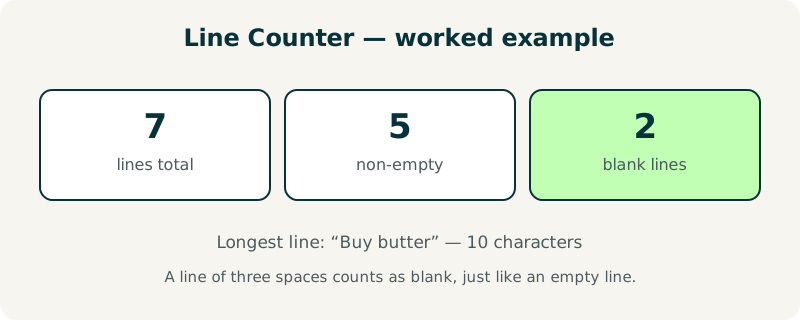
| Measure | Result |
|---|---|
| Total lines | 7 |
| Non-empty lines | 5 |
| Blank lines | 2 |
| Longest line | 10 characters (“Buy butter”) |
What mistakes should I avoid when counting lines?
The most common mistake is forgetting that a trailing line break creates a final empty line. Most editors add one when you save, so a file that looks like 100 lines often counts as 101 here. That extra blank line is real, but if your system ignores trailing blanks, subtract one from the total.
A second mistake is mixing up lines and records in a spreadsheet. A CSV row that wraps onto two display lines is still one line to this tool only if it has no line break inside it; a quoted field with an embedded line break splits into two lines here. For word totals on the same text, use the Word Counter instead.
Frequently asked questions
Is my text uploaded anywhere?
No. The counting runs entirely in your browser with JavaScript. Your text never leaves your device, and the tool works offline once the page has loaded. That makes it safe for mailing lists, log files, private notes and any list you would never paste into a stranger's server.
Do blank lines count?
Yes, in the total — and they are also shown separately as “blank lines”, so you can see how many of your lines are empty at a glance. A blank line in the middle of a mailing list can break an import, which is why the split matters. Use the Remove Duplicate Lines tool to drop them before pasting a list into a form.
Does a line with only spaces count as blank?
Yes. Lines that contain nothing but spaces or tabs are treated as blank lines, because they hold no visible content. They still count toward the total, and they are included in the blank-line figure, so a line of three spaces behaves exactly like an empty line here.
What is the longest line measured in?
Characters, including spaces. It tells you the widest line in your text, which is handy when a system limits line length. A line of 80 characters fits a classic terminal width, while a URL or a file path can run far longer than the other lines in the same list.
Can I count lines in a file?
Not directly — this tool counts text you paste in. Open the file, copy its contents, and paste them here. Watch for a trailing line break, which adds one final blank line to the total. For very large log files, paste a section at a time rather than the whole file.