
Need to fix a photo's date, add your name as the author, or set a copyright notice before you publish? This free EXIF editor changes the metadata inside a JPG photo — date taken, author, copyright, description, and GPS tags — without touching the pixels.
It runs entirely in your browser, so your photo is never uploaded. Fix a camera clock that was set wrong, credit yourself on a portfolio shot, or correct the location on a scanned family photo. To see what a photo currently contains, use the EXIF Data Viewer first, and to wipe everything instead, use the EXIF Remover.
How to use
- Drop a JPG photo into the tool (up to 50 MB) or click to choose one.
- The tool shows the current EXIF values: date, author, copyright, description, and GPS.
- Edit any field — fix the date, type your name, add a copyright line, or change the coordinates.
- Download the updated photo; the image itself is untouched, only the metadata changes.
Why use Toolsvine
Camera clocks drift, scanners write the wrong year, and portfolio photos go out with no credit at all. Re-shooting is impossible and most editors bury metadata tools three menus deep. This editor puts the fields that matter — date, author, copyright, location — on one screen, edits them in seconds, and never sends your photo to a server.
What can you edit in a photo's EXIF data?
You can change the date and time the photo was taken, the author name, the copyright notice, the image description, and the GPS latitude and longitude. These are the fields that people actually read: photo libraries sort by date, stock sites and clients check the author and copyright lines, and mapping tools read the GPS pair.
What you cannot edit here is the image itself — the pixels, the size, and the camera's exposure settings stay exactly as they were. The tool rewrites only the metadata block, so a photo edited this way is byte-for-byte the same picture, with a corrected record attached to it.
Fields this editor supports
| Field | Example value |
|---|---|
| Date taken | 03/15/2026, 4:32 PM |
| Author / Artist | Alex Morgan |
| Copyright | © 2026 Alex Morgan |
| Description | Downtown Austin at sunset |
| GPS latitude | 30.2672° N |
| GPS longitude | 97.7431° W |
Worked example: fixing a photo dated one day late
A camera with its clock set one day ahead stamps a wedding photo 01/06/2026 instead of the real date, 01/05/2026. Open the photo here, change the date-taken field back one day, set the author to Alex Morgan, add the copyright line © 2026 Alex Morgan, and clear the GPS tags that point at the venue.
The downloaded file shows the same 4,032 × 3,024 image, but its record now reads 01/05/2026, Alex Morgan, © 2026 Alex Morgan — and no location.
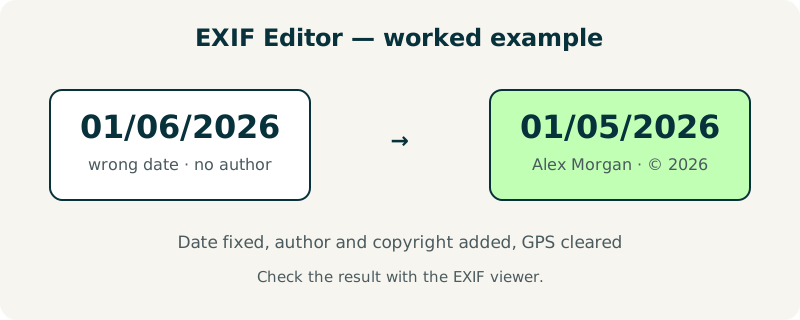
Try it on a photo with a wrong date: edit the field, download, then check the result with the EXIF viewer to confirm the new value stuck. The round trip is the best proof the edit worked.
When is editing EXIF data the wrong move?
Do not edit metadata on photos used as evidence — police reports, insurance claims, or legal disputes — because changing the date or location can destroy the photo's value as proof. And never add false location data to a photo to mislead someone; a corrected clock is honest, an invented location is not.
For everyday use, editing is safe and useful: fixing a camera clock, crediting your work, and adding a description so your library can find the shot later. If the goal is privacy rather than accuracy, strip the data entirely with the GPS Location Remover or the full EXIF Remover.
Frequently asked questions
Does editing EXIF data change the photo itself?
No. The pixels, dimensions, and colors are untouched — only the metadata block is rewritten. A photo that was 4,032 × 3,024 pixels and 3.1 MB before editing stays 4,032 × 3,024 pixels and about the same size afterwards. You can verify this by opening the edited file in any viewer: the picture looks identical, and only the date, author, or copyright fields differ.
Can I set the GPS location of a scanned old photo?
Yes. If you know where a scanned print was taken, you can type the latitude and longitude into the GPS fields, and mapping tools will then place the photo on the map. For example, a 1985 family photo from Austin could be tagged 30.2672° N, 97.7431° W. This is a genuine use case — archivists tag scanned photos this way every day.
Is my photo uploaded to a server while I edit it?
No. The file is processed entirely in your browser and never leaves your device. There is no account and nothing is stored after you close the page. This is especially important for an editor, because the photos people edit often contain personal details such as family events, home addresses, and copyrighted work.
Can I edit the camera model or exposure settings?
No — this editor covers the fields people legitimately need to change: date, author, copyright, description, and GPS. Camera model and exposure settings describe how the photo was actually taken, so changing them would falsify the record. The fields that are editable are the ones that are commonly wrong or missing, like a camera clock set to the wrong date.
What happens if a photo has no EXIF data at all?
The tool creates a fresh EXIF block with the values you enter. This is common with screenshots, downloads, and photos that were stripped by a messaging app. After editing, the file carries the date, author, and copyright you typed, even though it had nothing before — useful when you want to credit a screenshot or an exported image.