
Need a photo under 1 MB for email, a website upload, or a form with a generous limit? This free tool shrinks your image to 1 MB or less automatically — it searches for the highest quality that still fits, so the photo keeps almost all of its detail.
Everything runs in your browser, and your photo is never uploaded. For a tighter limit, use Compress Image to 200KB; to choose the quality yourself, use the Image Compressor. To shrink a photo's dimensions instead, use the Image Resizer.
How to use
- Drop a JPG, PNG, or WebP photo into the tool (up to 50 MB) or click to choose one.
- The tool searches quality levels from 95% down to 5% until the file fits under 1 MB.
- It reports the final size and the quality it settled on.
- Download the photo — 1 MB is 1,048,576 bytes, and the result is at or under that.
Why use Toolsvine
One megabyte is the most forgiving common limit: email providers cap attachments near it, and many upload forms draw the line there. A phone photo is often four or five times too big, and the fix should not cost visible quality. This tool finds the highest quality that fits under the line, so you keep the detail and lose only the excess.
How does the tool hit 1 MB?
The tool runs a binary search over JPEG quality, from 95% down to 5%. It tries a quality level, measures the resulting file, and narrows the range — too big means lower, fits with room means it can try higher — until it finds the highest quality that lands at or under 1,048,576 bytes.
That is the file you download, so the photo keeps the most detail the limit allows.
At 1 MB the search usually stops in the high 80s or low 90s, where JPEG quality loss is invisible to the eye. For most phone photos, the trip from 4 MB to 1 MB costs nothing you can see — the discarded detail was never visible on a screen in the first place.
The 1 MB target in numbers
| Size | Bytes |
|---|---|
| 1 MB target | 1,048,576 bytes |
| 5.6 MB photo | 5,872,025 bytes |
| Reduction needed | About 82.1% smaller |
Worked example: a 5.6 MB photo down to 1 MB
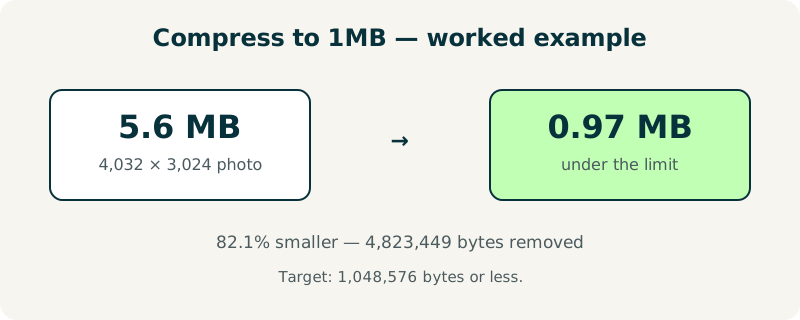
Take a 4,032 × 3,024 photo of 5.6 MB, or 5,872,025 bytes. To fit under 1 MB it must lose 4,823,449 bytes — an 82.1% reduction, since 4,823,449 ÷ 5,872,025 = 0.821. The search typically lands near quality 88 for a photo like this, and the result is a 0.97 MB file that is visually identical to the original.
The math is the same as the smaller targets — only the budget is bigger.
Try it with your own photo: a 5 MB original will usually land in the high 80s, and you will not be able to tell the two apart side by side. That is the point of a 1 MB budget — the compression becomes effectively free.
When is 1 MB the right target?
Choose 1 MB for email attachments, website uploads, and forms that cap uploads at a megabyte — the most common generous limit on the web. It is also the right target when you want to keep a photo that still looks good full-screen but do not need the original's full weight. For print or archiving, keep the original instead.
If the tool reports a quality above 90, the photo barely needed compressing — the original was already close to the limit. If it reports a low quality, resize first with the Image Resizer: fewer pixels need less quality loss. And for a batch of photos, the Bulk Image Compressor applies the same idea to dozens of files at once.
Frequently asked questions
What does 1 MB mean in bytes?
1 MB is 1,048,576 bytes, because computers count a megabyte as 1,024 × 1,024 bytes. The tool targets 1,048,576 bytes or less and shows the exact final size, so you can check it against your limit before uploading. Most sites that say 1 MB mean 1,048,576 bytes, and this tool's result will pass.
Will my photo look good at 1 MB?
Almost always, yes. A typical 5.6 MB photo lands near quality 88 at this budget, and JPEG quality in the high 80s is visually identical to the original on any screen. The only exception is an extremely detailed photo — a dense forest, for example — which may need quality in the 70s, and even then the difference is hard to spot.
Is my photo uploaded to a server?
No. The photo is processed entirely in your browser and never leaves your device. There is no account, no upload, and nothing stored after you close the page. Email attachments and work photos stay private, which is the safest way to handle images that show people, homes, or client work.
What file types can I compress to 1 MB?
JPG, PNG, and WebP files up to 50 MB. JPG is the best starting point for photographs. PNG files with sharp text or transparency may need resizing first, because PNG size comes mostly from dimensions and color count rather than a quality slider.
How is this different from Compress Image to 200KB?
Only the target differs. This tool aims for 1 MB — five times the room of 200 KB — so the search can stop at a much higher quality and the photo keeps nearly all its detail. The method is identical: a binary search over quality levels from 95% down to 5%. Use the target that matches your limit, and no smaller.