
Need a photo under 200 KB for a web page, a listing, or a form that allows a little more room? This free tool shrinks your image to 200 KB or less automatically — it searches for the highest quality that still fits, so the photo keeps as much detail as the limit allows.
Everything runs in your browser, and your photo is never uploaded. For a tighter limit, use Compress Image to 100KB; for more room, use Compress Image to 1MB. To pick the quality yourself, use the Image Compressor.
How to use
- Drop a JPG, PNG, or WebP photo into the tool (up to 50 MB) or click to choose one.
- The tool searches quality levels from 95% down to 5% until the file fits under 200 KB.
- It reports the final size and the quality it settled on.
- Download the photo — 200 KB is 204,800 bytes, and the result is at or under that.
Why use Toolsvine
Two hundred kilobytes is the workhorse limit for web images and marketplace listings: big enough for a photo to look genuinely good, small enough to load fast on a phone connection. A raw phone photo is twenty times too big, and hand-tuning quality is tedious. This tool finds the best quality that fits, in seconds, without an upload.
How does the tool hit 200 KB?
The tool runs a binary search over JPEG quality, from 95% down to 5%. It tries a quality level, measures the resulting file, and narrows the range — too big means lower, fits with room means it can try higher — until it finds the highest quality that lands at or under 204,800 bytes.
That is the file you download, so the photo keeps the most detail the limit allows.
At 200 KB the search usually stops at a high quality, often in the 80s, where the result is visually identical to the original on a screen. That is the advantage of a 200 KB budget: the quality loss needed to fit is small, and for most photos it is invisible.
The 200 KB target in numbers
| Size | Bytes |
|---|---|
| 200 KB target | 204,800 bytes |
| 4.2 MB photo | 4,404,019 bytes |
| Reduction needed | About 95.3% smaller |
Worked example: a 4.2 MB photo down to 200 KB
Take a 4,032 × 3,024 vacation photo of 4.2 MB, or 4,404,019 bytes. To fit under 200 KB it must lose 4,199,219 bytes — a 95.3% reduction, since 4,199,219 ÷ 4,404,019 = 0.953. The search typically lands near quality 82 for a photo like this.
The result is a 196.4 KB file that looks nearly identical to the original on a laptop screen.
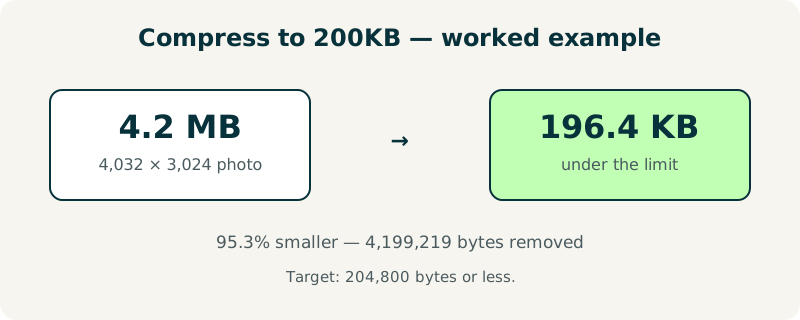
Try it with your own photo and check the quality number: if it lands in the 80s, the compression is effectively free — the eye cannot tell the difference. If it lands much lower, resize the dimensions first and run it again.
When is 200 KB the right target?
Choose 200 KB for product listing photos, blog images, and web pages where the photo is a featured image rather than a thumbnail. It is also a common limit on rental and marketplace sites. For tiny avatars, 200 KB is overkill — use 50 KB. For print or archive, 200 KB is too small — keep the original.
If the tool settles on a low quality, shrink the dimensions first with the Image Resizer. A photo resized to 1,600 pixels wide compresses to 200 KB at quality 85 or better, while a 4,000-pixel original needs a much lower quality to fit. And if you need more room still, Compress Image to 1MB gives you five times the budget.
Frequently asked questions
What does 200 KB mean in bytes?
200 KB is 204,800 bytes, because computers count a kilobyte as 1,024 bytes. The tool targets 204,800 bytes or less and shows the exact final size, so you can check it against your site's limit before uploading. Most sites that say 200 KB mean 204,800 bytes, and this tool's result will pass.
Will my photo look good at 200 KB?
Usually, yes — 200 KB is enough room for a photo to keep most of its detail. A typical 4.2 MB photo lands near quality 82 at this budget, which looks identical to the original on a screen. The result only looks rough when the original is very large or very detailed, and resizing the dimensions first fixes that in most cases.
Is my photo uploaded to a server?
No. The photo is processed entirely in your browser and never leaves your device. There is no account, no upload, and nothing stored after you close the page. Listing photos and product shots stay private, which matters when the images show your home, your products, or your inventory.
What file types can I compress to 200 KB?
JPG, PNG, and WebP files up to 50 MB. JPG is the best starting point for photographs, because it compresses efficiently at this size. PNG suits screenshots and graphics with sharp text, but a detailed PNG may need resizing first to fit under 200 KB.
How is this different from Compress Image to 100KB?
Only the target differs. This tool aims for 200 KB — twice the room — so the search can stop at a higher quality and the photo keeps more detail. The method is identical: a binary search over quality levels from 95% down to 5%. Use the target that matches your site's limit, and no larger.