
Convert PNG images to AVIF without uploading anything. Drop one file or a whole batch, and each picture is converted in your browser — the originals never leave your device. Download files one by one, or grab everything as a single ZIP.
AVIF is the newest mainstream image format, based on the AV1 video codec. It beats WebP on compression — often 30–50% smaller than PNG — while keeping transparency and wide color. If you need a different output first, the JPG to WebP Converter handles the most common swap, and the Image Compressor shrinks pictures before you convert them.
How to use
- Drop your PNG file(s) on the box above, or click to browse — you can add several at once.
- Set the AVIF quality — the default of 75 is a good balance; lower values shrink the file further.
- Each file converts automatically; watch the before-and-after sizes in the list. Big photos may take a few seconds.
- Download a single file, or use Download all (ZIP) for the whole batch. Press Start over to convert more files.
Why use Toolsvine
Every PNG file you drop here becomes an AVIF in seconds, with the real sizes shown. Most image converters upload your pictures to a server, queue them, and show you ads while you wait. This one converts locally with the same engines browsers use, reports the real before-and-after size of every file, and never asks for an account — your PNG files stay on your device from start to finish.
What is AVIF, and why is it so small?
AVIF is built on AV1, the open video codec from the Alliance for Open Media, and it inherits AV1's most powerful compression tricks: better prediction, smarter block splitting, and a more efficient way of storing smooth gradients. That is why an AVIF photo is often 30–50% smaller than the same image as a WebP, and far smaller than a PNG — at quality settings where the two look the same.
The price is encoding time. AVIF encodes more slowly than WebP because it squeezes harder; a large photo can take a few seconds. That trade is worth it for hero images and anywhere every kilobyte counts, and the first conversion also downloads the AVIF encoder as WebAssembly, which is then cached so later conversions start instantly.
PNG vs AVIF, at a glance
| Property | PNG | AVIF |
|---|---|---|
| Compression | Lossless only | Best of any web format |
| Transparency | Yes, full alpha | Yes, full alpha |
| Typical photo size | Baseline | 30–50% of PNG |
| Browser support | Everywhere | Chrome, Firefox, Safari 16+ |
Worked example: the same photo as AVIF
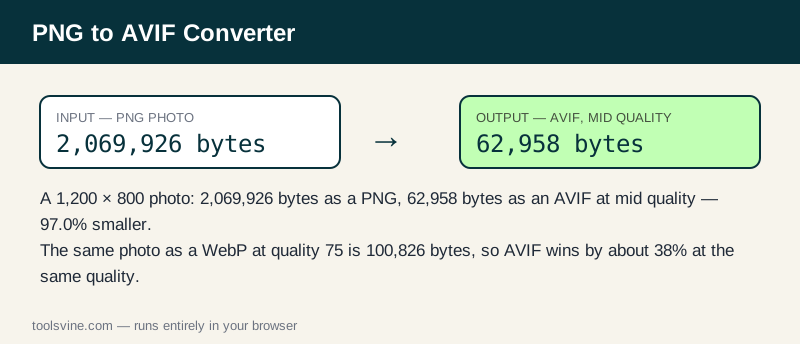
Take the same 1,200 × 800 test photo used for the other converters: as a PNG it is 2,069,926 bytes. Encoding it as AVIF at a mid-quality setting — comparable to the WebP quality-75 run — produces a file of 62,958 bytes, about 61 KB. That is 97.0% smaller than the PNG and roughly 38% smaller than the same photo as a WebP at quality 75, which was 100,826 bytes. The exact byte count varies slightly between AV1 encoders, but the order of magnitude is the point: AVIF is the smallest mainstream format available today.
| Version | Size | vs the PNG |
|---|---|---|
| PNG (original) | 2,069,926 bytes | — |
| WebP, quality 75 | 100,826 bytes | 95.1% smaller |
| AVIF, mid quality | 62,958 bytes | 97.0% smaller |
A mid-quality AVIF keeps fine detail well: at the default quality of 75 the picture stays clean on screen, and dropping to 60 still looks good for thumbnails. Because encoding is slower, convert one large batch at a time and let the encoder cache warm up — the first file takes the longest.
When is AVIF the wrong choice?
AVIF is the wrong choice when the image must open in older software. Safari only added AVIF in version 16, and many desktop apps, email clients, and printers still cannot open it at all. For a file you send to a person, a JPG or a WebP is safer; use AVIF for images served on a website, where you control the format — and keep a WebP fallback with the PNG to WebP Converter for the browsers that need one. AVIF is also not the tool for animations here: this converter makes still images only.
Frequently asked questions
Is converting PNG to AVIF free?
Yes — free, with no account and no limit on the number of files. Everything runs in your browser, so there is no server queue and no waiting for an upload. The AVIF encoder is a small WebAssembly file that downloads once and is then cached.
Will my PNG files be uploaded anywhere?
No. The conversion happens entirely on your device using browser technology. Your files never leave your computer or phone, and the tool keeps working offline once the page has loaded, so private screenshots and client work stay private at any stage of the process.
Can I convert several images at once?
Yes — drop as many PNG files as you like and they convert one after another. Use the Download all (ZIP) button to save the whole batch in one click instead of downloading files one by one. Large photos take a few seconds each, so be patient with big batches.
Why is my AVIF file bigger than the original PNG?
It is rare, but it happens with very small or very simple images, where PNG's lossless compression of flat colors beats AVIF's overhead. The list shows the real sizes for every file, so you can judge for yourself and keep whichever version is smaller.
What is the largest PNG file I can convert?
Files up to 50 MB each are accepted. Very large images are converted on a downscaled copy only if the browser runs low on memory — in practice, anything from a phone camera or a screenshot converts fine at full size.