
Convert PNG images to ICO without uploading anything. Drop one file or a whole batch, and each picture is converted in your browser — the originals never leave your device. Download files one by one, or grab everything as a single ZIP.
ICO is the icon format Windows uses for favicons, app icons and shortcuts. Modern ICO files simply embed a PNG inside, so the picture stays crisp at any size the icon is shown at. If you need a different output first, the Image Resizer handles the most common swap, and the PNG to JPG Converter shrinks pictures before you convert them.
How to use
- Drop your PNG file(s) on the box above, or click to browse — you can add several at once. Square logos work best.
- Each file converts automatically; images larger than 256 pixels on a side are scaled down first.
- Download a single file, or use Download all (ZIP) for the whole batch.
- Press Start over to clear the list and convert more files.
Why use Toolsvine
Every PNG file you drop here becomes an ICO in seconds, with the real sizes shown. Most image converters upload your pictures to a server, queue them, and show you ads while you wait. This one converts locally with the same engines browsers use, reports the real before-and-after size of every file, and never asks for an account — your PNG files stay on your device from start to finish.
What is an ICO file, really?
An ICO file is a small container, not an image format of its own. Inside it sits one or more pictures, and modern ICO files simply embed a PNG — the same pixels, the same compression — plus a 22-byte header that tells Windows the image size and color depth. That is why an ICO made from a PNG stays sharp: there is no second round of lossy compression, just a re-wrap.
The format has one hard limit: an ICO image cannot be larger than 256 × 256 pixels. If your PNG is bigger, this tool scales it down first, keeping the aspect ratio, so a 1,200 × 800 photo becomes a wide 256 × 170 icon rather than a cropped square. Start from a square logo for the best favicon result.
PNG vs ICO, at a glance
| Property | PNG | ICO |
|---|---|---|
| Largest size | Unlimited | 256 × 256 pixels |
| Transparency | Yes, full alpha | Yes, via embedded PNG |
| Contains | The picture itself | One embedded PNG + 22-byte header |
| Used for | Images everywhere | Favicons, app icons, shortcuts |
Worked example: a logo becomes a favicon
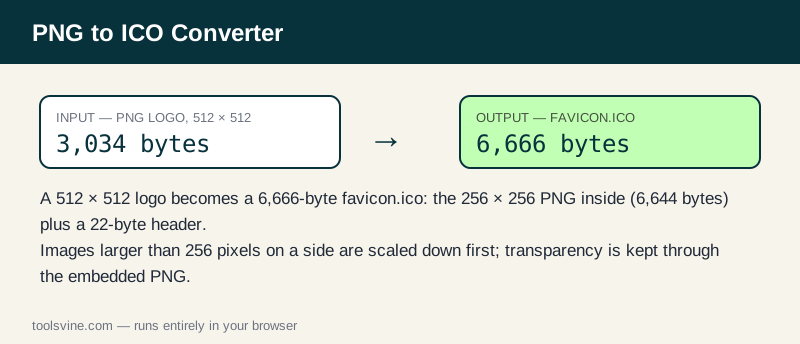
Take a square 512 × 512 logo — a teal square with a mint circle, saved as a PNG of 3,034 bytes. Converting it produces an ICO of about 6,666 bytes: the logo scaled to 256 × 256 as a PNG (6,644 bytes) plus the 22-byte ICO header. The icon is bigger than the original PNG only because the 256-pixel version has more detail per pixel than the flat original; for a busy logo the two sizes are usually close. A photo shows the scaling clearly: a 1,200 × 800 photo becomes a 256 × 170 PNG of 55,924 bytes inside an ICO of 55,946 bytes.
| Image | Source PNG | ICO size | Icon size |
|---|---|---|---|
| 512 × 512 square logo | 3,034 bytes | 6,666 bytes | 256 × 256 |
| 1,200 × 800 photo | 2,069,926 bytes | 55,946 bytes | 256 × 170 |
Transparency survives the trip: the embedded PNG keeps its alpha channel, so a logo with a see-through background still shows the page behind it in the browser tab. That is what makes ICO the right container for favicons, even though the pixels could live in a PNG alone.
How do I install the favicon?
Save the downloaded file as favicon.ico and upload it to the root of your website — the same folder as your homepage. Most browsers and servers look for /favicon.ico automatically, so no code change is needed. For modern sites, also keep a PNG favicon and a 180-pixel Apple touch icon: add a link tag in your page head pointing at each, and the Image Compressor can shrink the PNG versions first so they load fast.
Test it by opening your site in a fresh browser tab and looking at the tab icon. If the old icon still shows, hard-refresh the page — browsers cache favicons aggressively, and a stale one can linger for days.
Frequently asked questions
Is converting PNG to ICO free?
Yes — free, with no account and no limit on the number of files. Everything runs in your browser, so there is no server queue and no waiting for an upload. You can convert one logo or a whole set of icons in a single session.
Will my PNG files be uploaded anywhere?
No. The conversion happens entirely on your device using browser technology. Your files never leave your computer or phone, and the tool keeps working offline once the page has loaded, so private screenshots and client work stay private at any stage of the process.
Can I convert several images at once?
Yes — drop as many PNG files as you like and they convert one after another. Use the Download all (ZIP) button to save the whole batch in one click instead of downloading files one by one, which is handy when a site needs several icon sizes.
Why is my ICO file bigger than the original PNG?
A small logo can grow slightly, because the icon is re-encoded at 256 pixels with its own PNG compression and a 22-byte header. For photos the ICO is much smaller, since the image is scaled down first. The list shows the real sizes, so you can judge for yourself.
What is the largest PNG file I can convert?
Files up to 50 MB each are accepted. Very large images are converted on a downscaled copy only if the browser runs low on memory — in practice, anything from a phone camera or a screenshot converts fine, since icons are scaled to 256 pixels anyway.