
Convert PNG images to BMP without uploading anything. Drop one file or a whole batch, and each picture is converted in your browser — the originals never leave your device. Download files one by one, or grab everything as a single ZIP.
BMP is Windows' classic uncompressed bitmap format. Files are large because every pixel is stored raw, but the format is dead simple — almost any old software can read it. If you need a different output first, the Image Compressor handles the most common swap, and the Image Resizer shrinks pictures before you convert them.
How to use
- Drop your PNG file(s) on the box above, or click to browse — you can add several at once.
- Each file converts automatically; watch the before-and-after sizes in the list.
- Download a single file, or use Download all (ZIP) for the whole batch.
- Press Start over to clear the list and convert more files.
Why use Toolsvine
Every PNG file you drop here becomes a BMP in seconds, with the real sizes shown. Most image converters upload your pictures to a server, queue them, and show you ads while you wait. This one converts locally with the same engines browsers use, reports the real before-and-after size of every file, and never asks for an account — your PNG files stay on your device from start to finish.
Why are BMP files so big?
BMP does not compress at all — it stores every pixel as raw bytes, one after another, bottom row first. This tool writes a 32-bit uncompressed BMP, so each pixel takes exactly 4 bytes (blue, green, red, plus an alpha byte), and the file size is a plain formula: 54 bytes of header plus width × height × 4. There is no quality setting to tune, because nothing is thrown away or compressed.
That simplicity is the whole point of BMP. Software from the 1990s can read it without any decoder library, which is why legacy Windows programs, game asset pipelines, and embedded devices still ask for it. The cost is size: a BMP is always several times larger than the same image as a PNG.
PNG vs BMP, at a glance
| Property | PNG | BMP |
|---|---|---|
| Compression | Lossless | None — raw pixels |
| Transparency | Yes, full alpha | No (alpha is dropped) |
| Size formula | Varies with content | 54 + width × height × 4 |
| Best for | Web, screenshots | Legacy Windows software |
Worked example: a 1,200 × 800 photo as BMP
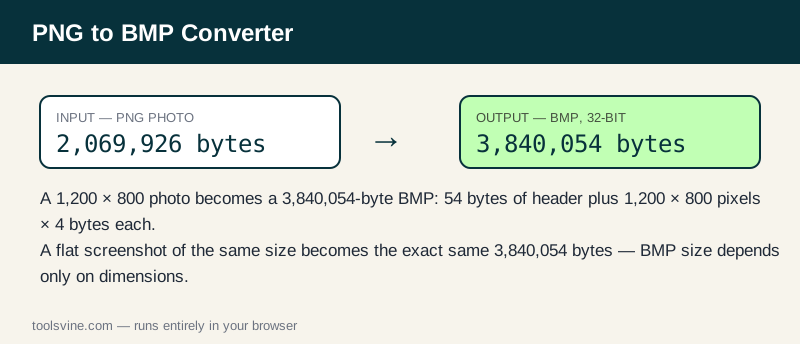
For a BMP, only the dimensions matter — the picture content is irrelevant, because every pixel costs exactly 4 bytes. Take the same 1,200 × 800 test photo used on the other converter pages: as a PNG it is 2,069,926 bytes, but as a 32-bit BMP it is 54 + 1,200 × 800 × 4 = 3,840,054 bytes, about 3.66 MB. A flat screenshot of the same dimensions, whose PNG is only 4,696 bytes, becomes exactly the same 3,840,054-byte BMP — 818 times larger than its PNG.
| Image | PNG size | BMP size (32-bit) | Change |
|---|---|---|---|
| 1,200 × 800 photo | 2,069,926 bytes | 3,840,054 bytes | 86% larger |
| 1,200 × 800 screenshot | 4,696 bytes | 3,840,054 bytes | 818× larger |
Transparent pixels are filled with white first, because BMP has no reliable alpha channel. If your PNG has transparency and you need it preserved, BMP is the wrong format — use PNG or TIFF instead.
When do I actually need a BMP?
Use BMP when a legacy program, a game asset pipeline, or an embedded device asks for it — and not otherwise. For the web, BMP is the worst choice available: the same picture as a PNG is usually several times smaller, and as a JPG or WebP it is smaller still. If you are converting to BMP only because a form asked for an image, try the PNG to JPG Converter first; most modern uploaders accept JPG and PNG happily, and your upload will finish far faster.
Frequently asked questions
Is converting PNG to BMP free?
Yes — free, with no account and no limit on the number of files. Everything runs in your browser, so there is no server queue and no waiting for an upload. You can convert one image or a whole folder of PNGs in a single session.
Will my PNG files be uploaded anywhere?
No. The conversion happens entirely on your device using browser technology. Your files never leave your computer or phone, and the tool keeps working offline once the page has loaded, so private screenshots and client work stay private at any stage of the process.
Can I convert several images at once?
Yes — drop as many PNG files as you like and they convert one after another. Use the Download all (ZIP) button to save the whole batch in one click instead of downloading files one by one, which is handy when a legacy tool needs a whole set of bitmaps.
Why is my BMP file so much bigger than the original PNG?
That is normal for BMP, not a bug. BMP stores every pixel as 4 raw bytes with no compression, so a 1,200 × 800 image is always 3,840,054 bytes regardless of what it shows. Only use BMP when a specific program requires it.
What happens to transparency in a BMP?
Transparent pixels are filled with white before the BMP is written, because BMP has no reliable alpha channel. If your image needs transparency, keep it as a PNG or convert it to TIFF instead, since both formats preserve the alpha channel.