
Where does each monthly payment actually go — interest or principal? This loan amortization schedule builds the full month-by-month table for any loan: payment, principal, interest, and remaining balance for every month, closing at exactly $0.00, with a CSV download for your spreadsheet.
It runs entirely in your browser with no sign-up. For the EMI alone, the Loan EMI Calculator is the general loan tool, and the Percentage Calculator can express the interest as a percentage of the loan, so the schedule and the headline numbers always agree.
How to use
- Enter the loan amount.
- Enter the annual interest rate.
- Enter the tenure in months.
- Read the monthly EMI and the full schedule instantly.
- Use “Download schedule (CSV)” to save the table, or Copy result for the summary.
Why use Toolsvine
An EMI figure hides the story of a loan: in the early years you are mostly paying interest, and the balance barely moves. The schedule makes that visible month by month — and the final balance closing at exactly zero is the check that the math is honest, not approximately right, so you can trust every row in between.
What is a loan amortization schedule?
A loan amortization schedule is the month-by-month ledger of a loan: for every payment it shows how much is interest, how much is principal, and what balance remains afterward. The payment stays the same each month, but the split changes — early payments are mostly interest because the balance is high, and later payments are mostly principal. The final month is adjusted so the balance closes at exactly $0.00.
Each month follows the same two steps. First, the interest is the balance times the monthly rate: interest = balance × r, where r is the annual rate divided by 12 and by 100. Second, the principal is the payment minus that interest, and the balance falls by the principal. That is the whole machine — repeat it for every month and the loan is gone.
Worked example
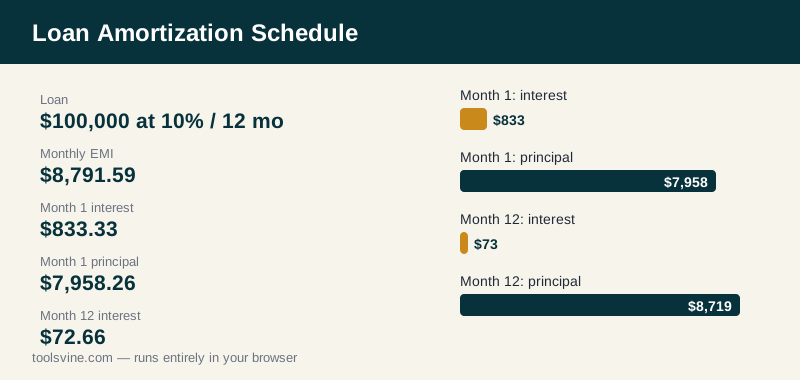
Borrow $100,000 at 10% a year for 12 months. The EMI is $8,791.59. In month 1, the interest is $100,000 × 0.008333 = $833.33 and the principal is $8,791.59 − $833.33 = $7,958.26, leaving a balance of $92,041.74. In month 2 the interest falls to $767.01 and the principal rises to $8,024.58, leaving $84,017.16. By month 12 the interest is only $72.66, the principal is $8,718.93, and the tool adjusts the final payment by three cents so the balance closes at exactly $0.00. Total interest is $5,499.08.
Reading the table
| Column | Meaning |
|---|---|
| Payment | The EMI — the same every month, except the final adjustment |
| Principal | The part that reduces what you owe — grows over time |
| Interest | The lender's charge that month — shrinks over time |
| Balance | What you still owe after that payment |
The schedule is also the honest way to see what an extra payment does: paying extra in an early month cuts the balance, so every later month's interest falls. The CSV download lets you keep the full table in a spreadsheet, model an extra payment in any month, and check the new payoff date yourself.
How do I use the schedule to pay off a loan faster?
Use the schedule to find the months where extra money saves the most. An extra $1,000 paid in month 1 of the example above cuts the balance to $91,041.74 instead of $92,041.74, so month 2's interest drops by $8.33 — and the savings repeat in every month after that, because the balance stays $1,000 lower for the rest of the loan. The same $1,000 paid in month 11 saves only a few dollars of interest.
That is the rule: extra money helps most when the balance is highest, which is always early. Before you pay extra, check whether your lender charges a prepayment fee and whether extra payments are applied to principal — some lenders apply them to future payments instead. Then download the CSV, add your extra payment to the month you plan, and watch the payoff date move earlier.
Frequently asked questions
What is a loan amortization schedule?
A loan amortization schedule lists every monthly payment on a loan: how much of each payment is interest, how much is principal, and what balance remains. The payment stays the same each month, but the split changes — early payments are mostly interest, because the balance is high, and later payments are mostly principal, until the balance reaches zero.
Why does the interest part fall every month?
Because interest is charged on the balance still owed, and the balance falls with every payment. On a $100,000 loan at 10%, month one charges $833.33 of interest, month two charges $767.01, and month twelve charges only $72.66. The payment stays at $8,791.59, so the principal part grows by exactly the amount the interest part shrinks.
Why is the final payment adjusted?
Because rounding each month's interest to cents leaves a few cents of balance after the last regular payment. In the example the balance after month twelve would be −$0.03, so the tool adjusts the final payment by three cents and closes the balance at exactly $0.00. A schedule that ends at zero is the check that every earlier row is correct.
How do I read the principal and interest columns?
The principal column is the part of the payment that reduces what you owe, and it grows over time; the interest column is the lender's charge that month, and it shrinks over time. Add any row's principal and interest together and you get the payment. Add the whole principal column and you get the original loan amount.
Can I download the schedule as a spreadsheet?
Yes. The tool offers a CSV download of the full table — one row per month with payment, principal, interest, and balance — which opens in Excel, Google Sheets, or any spreadsheet app. There is also a copy button for the summary. The file is generated in your browser, and nothing is sent to a server.
Is my loan information uploaded anywhere?
No. The loan amount, rate, and tenure are processed in your browser and never leave your device. Nothing is uploaded, stored, or shared, and there is no account or sign-up. The CSV file is created locally on your own computer, so your loan details stay yours.