
Type any password and get an honest verdict: a score from 0 to 4, an estimate of how long it would take to crack, and plain-language suggestions for making it stronger. The check runs locally in your browser with zxcvbn, the same estimator security teams use — your password is never sent anywhere.
The score looks at patterns, not just length: common words, dates, keyboard walks, and leet substitutions all count against you. If your password scores low, generate a fresh one with the Password Generator or build a memorable one with the Passphrase Generator (Diceware).
How to use
- Type or paste a password into the box — it is checked as you type.
- Read the score from 0 (very weak) to 4 (very strong).
- Check the crack-time estimate and the suggestions underneath.
- If the score is below 3, generate a new password and test that instead.
Why use Toolsvine
“Strong” is not a feeling, and a password that looks complicated can still be weak: a word from the dictionary with a dollar sign at the end is one guess away from the dictionary. This checker exists to replace the feeling with a number — a score, a crack-time estimate, and the specific reason the password is weak — so you can tell the difference between a password that looks strong and one that actually is.
How does the strength score work?
The checker runs zxcvbn, which estimates how many guesses an attacker would need by looking for dictionaries, names, dates, keyboard patterns, repeats, and common substitutions, then scores the password from 0 (very weak) to 4 (very strong). It also shows the crack time for an offline attack at 10,000 guesses a second.
That is the speed of a slow, properly hashed password file.
Length usually beats cleverness: each extra character multiplies the guesses, while a symbol swapped into a common word barely changes them, because zxcvbn knows the substitution trick. The estimator loads on your first keystroke, checks as you type with a short delay, and never uploads the password — the whole calculation happens on your device.
Worked example
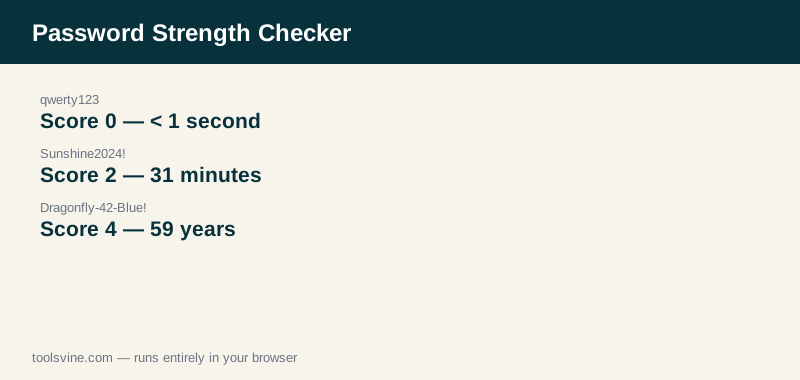
“qwerty123” scores 0 — Very weak — and would fall in less than a second. “Sunshine2024!” scores 2 — Moderate — with an offline crack time of 31 minutes: a name, a year, and a symbol, all of them predictable. “Tr0ub4dor&3” scores 4 — Very strong — at 4 months, and “Dragonfly-42-Blue!” also scores 4, at 59 years: three unrelated words plus digits and symbols, with nothing in a dictionary in that order.
Why is a common password with symbols still weak?
Because attackers do not guess character by character — they guess patterns, and “Sunshine2024!” is a pattern: a common name, a recent year, and the most predictable symbol in the most predictable place. The checker sees the word, the year, and the symbol as three small guesses, not fifteen random characters.
And that is exactly how an attacker's dictionary works too.
Real strength comes from unpredictability, which is why a long random password or a passphrase of unrelated words scores so much higher: there is no dictionary entry or pattern that produces them. If your password contains any word a stranger could guess — your name, your team, your pet — it is weaker than it looks, whatever the symbol count says.
Frequently asked questions
Is my password uploaded anywhere?
No. The check runs entirely in your browser: zxcvbn loads from the site's own files and the password never leaves your device. Nothing is logged, nothing is sent to a server, and you can run the check offline once the page has loaded. That is the whole point of a local checker — a password should never travel to be judged.
What is offline slow hashing?
It is the crack-time estimate for an attacker who stole a properly hashed password file and can try about 10,000 guesses a second — the realistic speed against a strong hash such as bcrypt. A fast hash lets an attacker try billions of guesses a second, so the slow-hashing number is the conservative, honest figure, and it is the one this tool shows.
What score should I aim for?
Four — Very strong — for anything that matters, such as email, banking, and your password manager. A score of 3 is acceptable for a low-value account, and anything at 2 or below should be replaced. The score is the floor, not the ceiling: a 4 built from a long passphrase is far stronger than a 4 built from a short trick.
Why does length beat complexity?
Because every extra character multiplies the number of possible passwords by the size of the character set, while a symbol swapped into a known word only adds a handful of guesses — attackers already try those swaps. Eight characters of any kind is a small space; sixteen characters of any kind is an enormous one, and that is why length is the single most effective choice.
Can a strong password still be unsafe?
Yes, if it is reused. A unique, strong password on one site becomes worthless the moment the same password leaks from another site, because attackers try leaked passwords everywhere. Strength protects against guessing; only uniqueness protects against breaches, which is why every account needs its own password, kept in a manager.