
A delivery note travels with the goods: it tells the receiver what is in the box, how many of each item, and which order it belongs to, so the delivery can be checked on arrival. This free delivery note generator builds one as a clean Letter PDF, with the quantities and values worked out for you.
Fill in your business details, the receiver, the delivery note number and the order it relates to, then list the items being sent. Download the PDF and send it with the shipment. The order it answers is usually a Purchase Order Generator document, and the payment it leads to is confirmed with the Payment Receipt Generator.
How to use
- Fill in your business and receiver details, the delivery note number and the date.
- Add the items being delivered with quantities and rates.
- Download the PDF delivery note, or print it to travel with the goods.
- Print two copies when goods travel by hand — one stays with the receiver, one comes back signed.
Why use Toolsvine
A delivery note is a check-list with a signature line — it only works if it is clear and complete. This generator lists every item with its quantity, shows the totals plainly, and keeps the whole thing on your device: no account, no upload, no lost paperwork trail. It lists every item with its quantity and shows the totals plainly, so the receiver can check each line against the boxes before signing. The signature turns a list into proof of delivery, and the PDF is the record you can file.
What goes on a delivery note
A delivery note names the sender, the receiver, a unique delivery note number and the date, and lists the goods being delivered with quantities. It often references the purchase order or invoice number it belongs to — put that in the notes field — and leaves room for the receiver to sign, which is the proof the goods arrived.
How the totals are worked out
Each line total is quantity × rate, the subtotal is the sum of the lines, tax is a percentage of the subtotal, discount is a percentage of the subtotal, and the total is subtotal + tax − discount. The PDF shows the same figures as the on-screen preview.
Worked example: notebooks and pens
Fifty packs of notebooks at $2 and ten boxes of pens at $3 give a subtotal of $130.00. With 10% tax, the total value of the delivery is $130.00 + $13.00 = $143.00. The receiver can check each line against the boxes before signing.
| Item | Qty × rate | Line total |
|---|---|---|
| Notebooks (packs) | 50 × $2.00 | $100.00 |
| Pens (boxes) | 10 × $3.00 | $30.00 |
| Subtotal | $130.00 | |
| Tax (10%) | $13.00 | |
| Total value | $143.00 |
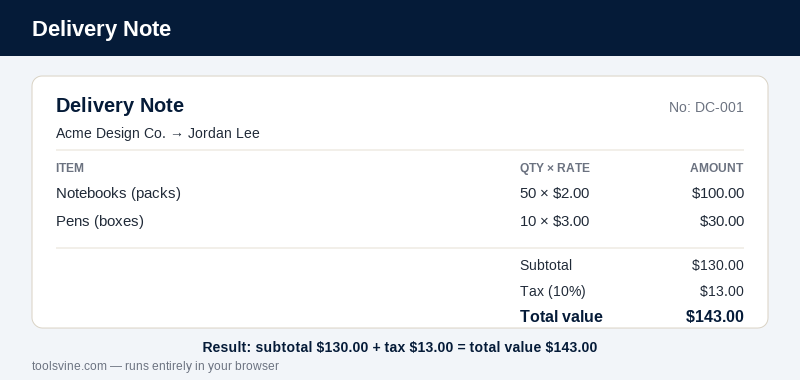
The tool opens with this example loaded: Acme Design Co. delivering to Jordan Lee, document DC-001, with notebooks and pens already listed. Set the rates to zero if you want quantities only — the note still works, and the totals simply read $0.00.
How should the receiver check a delivery?
The receiver reads each line on the note and counts the goods in the boxes, line by line, before signing. If a quantity is short or an item is missing, it should be written on the note before the signature — a signed note with no remark is proof the delivery was complete.
Print two copies when goods travel by hand — one stays with the receiver, one comes back signed. If a quantity is short, the receiver should note it on the delivery note before signing, so the shortage is on record from the start.
Frequently asked questions
What is a delivery note?
A document that travels with goods, listing what is being delivered and in what quantity. The receiver checks the goods against it and signs — that signature is the proof of delivery. It is the record both sides point to if anything is short or damaged.
Is a delivery note the same as an invoice?
No. An invoice asks for payment; a delivery note records a delivery. A delivery note often accompanies goods sent against an earlier order or invoice, and it may show values or quantities only. It proves goods arrived — it does not ask anyone to pay.
Should the delivery note show prices?
It can show either. Many businesses include values so the receiver can verify the shipment's worth; others list quantities only. This generator includes rates and totals — set rates to zero if you want quantities only, and the note still works.
What currency does it use?
US dollars ($). All amounts — on screen and in the PDF — are shown in USD. There is no currency selector: enter your rates in dollars and the note shows dollars, the same as the order and invoice it travels with.
Does the tool store my delivery notes?
No. Everything runs in your browser and nothing is uploaded or stored. Download the PDF before closing the page, and keep a signed copy for your records — the tool cannot recover a note you closed without saving. File it with the purchase order it answers.