
An invoice is how a small business asks to be paid, and it should look the part. This free invoice generator lets you fill in your business details, your client's details and your line items, then downloads a clean, printable Letter PDF — with subtotal, tax, discount and total worked out for you.
Everything happens in your browser, so client names and prices never touch a server. Add as many items as you need, and print or save the PDF. If the work was quoted first, make the quote with the Quotation / Estimate Generator, and when a client pays, confirm it with the Payment Receipt Generator.
How to use
- Fill in your business name and your client's name, plus the invoice number and date.
- Add line items with a description, quantity and rate — the totals update as you type.
- Set the tax and discount, then download the PDF or print it directly.
- Check the totals on screen — they are the same numbers that go into the PDF, so what you see is what your client gets.
Why use Toolsvine
Small businesses should not need an accounting subscription to send a proper invoice. This generator gives you a clean Letter document with honest arithmetic, no account, no watermark and no upload — your client list and your prices stay on your own device. It lays the document out as one clean page, so the person paying can see at a glance what the money is for. Tax and discount are percentages of the subtotal, and the arithmetic is printed with the document so there is nothing to take on trust.
What goes on the invoice
A good invoice has six things: who is billing, who is being billed, a unique invoice number, the date, a list of what was supplied with quantities and rates, and the amount due. This generator asks for each of them and lays them out on one clean Letter page.
How the totals are worked out
Each line total is quantity × rate. The subtotal is the sum of the lines. Tax is charged on the subtotal, discount is taken off the subtotal, and the total due is subtotal + tax − discount. The on-screen preview shows the same numbers that go into the PDF, so what you see is what your client gets.
Worked example: two hours of design plus hosting
Two hours of design work at $50 and one hosting setup at $25 give a subtotal of $125.00. With 10% tax the total is $125.00 + $12.50 = $137.50. Add a discount and it comes off the subtotal before the total is struck.
| Item | Qty × rate | Line total |
|---|---|---|
| Design work | 2 × $50.00 | $100.00 |
| Hosting setup | 1 × $25.00 | $25.00 |
| Subtotal | $125.00 | |
| Tax (10%) | $12.50 | |
| Total due | $137.50 |
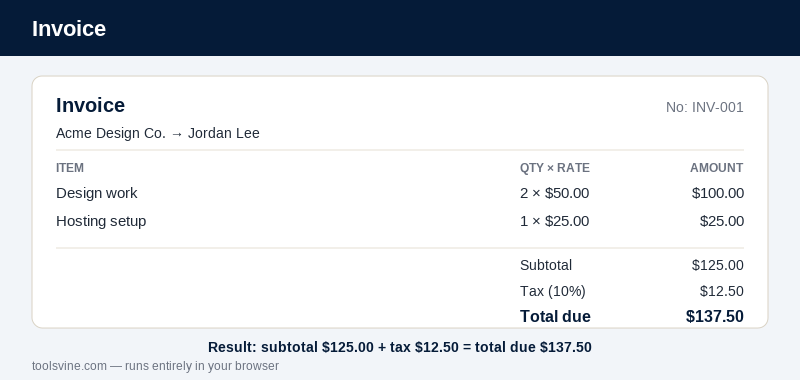
The tool opens with exactly this example loaded: Acme Design Co. billing Jordan Lee, invoice INV-001, with design work and hosting setup already in the items. Change the tax to 0 and the total drops to $125.00; add a 10% discount and the total becomes $112.50 — the discount comes off the subtotal, not off the tax. Press Reset any time to come back to this example.
How do I handle tax, discounts and payment terms?
Tax and discount are both percentages of the subtotal, and they apply in that order: add the tax, take off the discount, and the result is the total due. Payment terms are not a field on the invoice — put them in the notes, for example “Payment due within 14 days”, so the client sees them on the PDF.
Keep your invoice numbers in sequence and save a copy of every PDF you send — a tidy numbering habit is what turns a pile of invoices into a set of books. This tool does not store anything, so the copy you download is the only copy: file it where you keep your accounts. If the work was quoted before it was done, start from the Quotation / Estimate Generator so the invoice matches the quote the client accepted.
Frequently asked questions
Is the PDF really free with no watermark?
Yes. The PDF is generated in your browser with no watermark, no account and no limit. It is yours to send, print or file however you like, for as many invoices as you need — there is no free tier to run out of, because there is no server and no charge at all.
What currency does it use?
US dollars ($). All amounts — on screen and in the PDF — are shown in USD. The tool is built for US businesses, so there is no currency selector and no conversion: enter your prices in dollars and the document shows dollars.
How is tax calculated?
Tax is a percentage of the subtotal, which is the sum of the line items. Enter 0 if no tax applies. Discount is also a percentage of the subtotal and is taken off before the total is struck. With a $125 subtotal, 10% tax and no discount, the total due is $137.50.
Does the tool save my invoices?
No. Nothing is uploaded or stored. Your business and client details exist only in the page until you close it, so download the PDF before you leave. The tool cannot recover a document you closed without saving — keep a copy in your own files, the way you would with any paper invoice.
Can I add more than three line items?
Yes. Use the Add item button to add as many rows as you need, and remove any row you do not want with the × button on that row. The totals update automatically as you type, and the PDF grows to fit — a long invoice simply runs to a second page when it needs to.