
A purchase order is the document that turns a phone call into an agreement: it tells your supplier exactly what you want, how many, at what price, and by when. This free purchase order generator builds one as a clean Letter PDF, with the items, quantities, rates and totals worked out for you.
Fill in your business details as the buyer, your supplier as the recipient, and the items you are ordering. The PDF is ready to email or print. When the goods arrive, check them against this order with a Delivery Note Generator document, and once you pay, keep the proof with the Payment Receipt Generator.
How to use
- Fill in your business details, the supplier's details, the order number and date.
- Add the items you are ordering with quantities and rates.
- Set the tax and discount, then download the PDF purchase order.
- Add the delivery date or any special instructions in the notes field, so the supplier has everything in one document.
Why use Toolsvine
A purchase order protects both sides — the supplier knows what to deliver and you know what you agreed to pay. This generator produces a clear, numbered Letter order with honest totals, no account and no upload, so your supplier terms stay private. It numbers the order and prints the totals the supplier will invoice against, so the invoice can be checked line by line when it arrives. A PO agreed by email is a hope; a numbered PO is a record both sides can point to.
What goes on a purchase order
A purchase order names the buyer, the supplier, a unique PO number and the date, then lists the goods or services ordered with quantities and unit rates. It should also carry delivery instructions or a required date — use the notes field for that — so the supplier has everything in one document.
How the totals are worked out
Each line total is quantity × rate, the subtotal is the sum of the lines, tax is a percentage of the subtotal, discount is a percentage of the subtotal, and the total is subtotal + tax − discount. The preview on screen matches the PDF exactly.
Worked example: paper and ink for the office
Twenty reams of paper at $4 and four ink cartridges at $18 give a subtotal of $152.00. With 10% tax, the order total is $152.00 + $15.20 = $167.20. That is the amount the supplier should invoice against — and the amount you should check the invoice against when it arrives.
| Item | Qty × rate | Line total |
|---|---|---|
| Printer paper (reams) | 20 × $4.00 | $80.00 |
| Ink cartridges | 4 × $18.00 | $72.00 |
| Subtotal | $152.00 | |
| Tax (10%) | $15.20 | |
| Total order value | $167.20 |
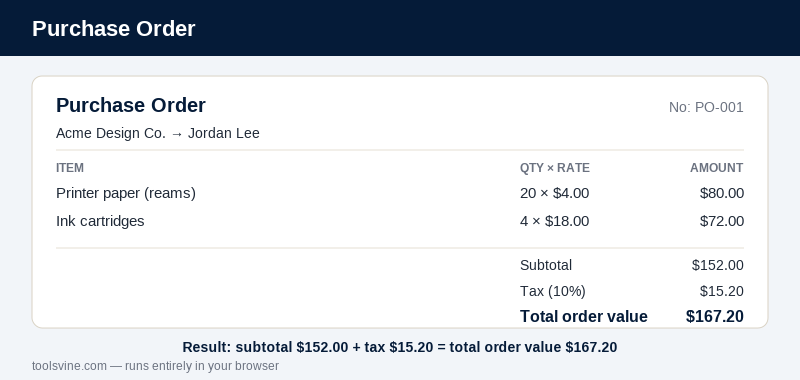
The tool opens with this example loaded: Acme Design Co. ordering from Jordan Lee, document PO-001, with printer paper and ink cartridges already listed. Add a third item and the subtotal and tax update at once; the total the supplier invoices against is always the total on screen.
What happens after I send a purchase order?
The supplier accepts the order, delivers against it, then invoices for the agreed amount. Check the delivery against the PO, then the invoice against the PO, before you pay: quantities, rates and totals should match at each step. A mismatch at delivery is a note on the record; a mismatch on an invoice is a query, not a payment.
Keep PO numbers in sequence and keep a copy of every order you send. When the goods arrive, check the delivery against the PO before you pay the invoice: quantities, rates and totals should match. This tool stores nothing, so download and file the PDF yourself.
Frequently asked questions
What is a purchase order for?
It is a buyer's written order to a supplier: what to deliver, how many, at what price. Once the supplier accepts it, it becomes the agreement both sides work from. It turns a phone call or an email thread into a numbered document that can be checked when the goods arrive.
Is a purchase order legally binding?
It can be, once accepted — it is evidence of the agreed terms. The exact legal effect depends on your jurisdiction and your contract terms, so treat it as a real commitment, not a casual note. If the order is large or unusual, get the terms in writing with your supplier first.
What currency are orders in?
US dollars ($). All amounts — on screen and in the PDF — are shown in USD. There is no currency selector: enter your rates in dollars and the order shows dollars, so the supplier invoices in the same currency you ordered in.
Does the tool save my purchase orders?
No. Everything runs in your browser and nothing is uploaded or stored. Download the PDF before closing the page, and keep a copy in your own files — the tool cannot recover an order you closed without saving. Keep the PDF with the delivery note and the supplier's invoice for the order.
Can I add more items?
Yes — the Add item button adds rows without limit, and each row can be removed with the × button on that row. Totals update as you type, and the PDF grows to fit the list, running to a second page when a long order needs the room.