
A proforma invoice looks like an invoice but is not a demand for payment — it is a preview of what an invoice will say, used to get approval, arrange an advance payment, or clear goods through customs. This free proforma invoice generator builds one as a clean Letter PDF, with the word “Proforma” on it so nobody mistakes it for a real invoice.
Fill in your business and client details, the items and their values, and download the PDF. The totals use the same honest arithmetic as a normal invoice. If the sale goes ahead, bill it with the Invoice Generator, or quote it first with the Quotation / Estimate Generator.
How to use
- Fill in your business and client details, the proforma number and the date.
- Add the items with quantities and rates, then set tax and discount.
- Download the PDF proforma invoice, or print it.
- Add any customs or import details in the notes field — weights, country of origin, or a declaration — before you download.
Why use Toolsvine
A proforma invoice is a document of trust — a client or customs officer relies on its figures before any money moves. This generator lays it out cleanly, labels it “Proforma” so it cannot be mistaken for a tax invoice, and keeps every figure on your device. It prints “Proforma Invoice” at the top in plain sight, so the document cannot be filed as a sale by mistake. The figures are the same ones the real invoice will carry, so the buyer approves a number that will not move later.
What a proforma invoice is for
Proforma invoices are used when a buyer needs the details of a sale before paying: to approve a purchase, to arrange an advance, to apply for an import license, or to declare goods at customs. It carries the same details as an invoice — seller, buyer, items, values, totals — but it is not a request for payment.
How the totals are worked out
Each line total is quantity × rate, the subtotal is the sum of the lines, tax is a percentage of the subtotal, discount is a percentage of the subtotal, and the total is subtotal + tax − discount. The PDF is marked “Proforma Invoice” at the top so its status is unmistakable.
Worked example: ten banners and delivery
Ten banners at $12 plus $15 delivery give a subtotal of $135.00. With 10% tax, the proforma total is $135.00 + $13.50 = $148.50. That is the value the buyer approves or declares — the real invoice, when it comes, should match it.
| Item | Qty × rate | Line total |
|---|---|---|
| Printed banners | 10 × $12.00 | $120.00 |
| Delivery | 1 × $15.00 | $15.00 |
| Subtotal | $135.00 | |
| Tax (10%) | $13.50 | |
| Total | $148.50 |
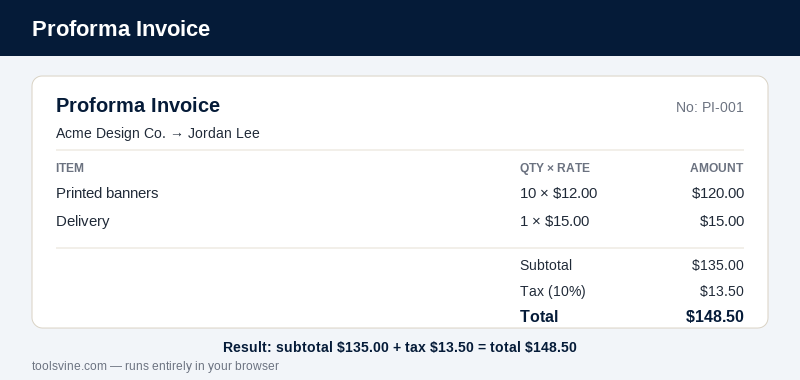
The tool opens with this example loaded: Acme Design Co. billing Jordan Lee, document PI-001, with ten printed banners and the delivery already listed. Change the tax to 0 and the total is $135.00 — the value the buyer approves, and the value the real invoice should match.
When should I use a proforma invoice instead of a normal one?
Use a proforma when the buyer needs the details before any money moves: to approve a purchase, arrange an advance, or declare goods at customs. Use a normal invoice when payment is actually due. The proforma promises the figures; the invoice demands the money — and the two should agree to the cent.
For customs use, check what your country requires on a proforma — some want weights, country of origin, or a declaration that the document is not a commercial invoice. This tool gives you the core document; add any required notes in the notes field before downloading. Once the buyer approves, the shipment goes with a Delivery Note Generator document listing what is in the box.
Frequently asked questions
Is a proforma invoice a real invoice?
No. It is a preview of a sale, not a demand for payment. It should be clearly marked “Proforma” and must not be recorded as a sale in your accounts until the real invoice is issued. If it is filed as a sale, your books will show income you have not earned yet.
When do I need a proforma invoice?
Common uses: getting a client's approval before work, arranging an advance payment, applying for an import license, and declaring goods at customs before shipment. Any time the buyer or an official needs the full details of a sale before paying, a proforma is the right document.
Can I use it for customs?
Often, yes — customs officers commonly accept proforma invoices for valuation. Check your destination country's requirements first; some ask for extra details such as weights or country of origin. Add whatever is required in the notes field before you download the PDF.
What currency does it use?
US dollars ($). The PDF shows all amounts in USD, and there is no currency selector. Enter your item values in dollars and the proforma shows dollars — the same figure the real invoice will carry when the sale goes ahead.
Does the tool store my documents?
No. Everything runs in your browser and nothing is uploaded or stored. Download the PDF before closing the page — there is no saved copy anywhere, so the file you download is the only copy of the document. Keep it with the real invoice when the sale goes ahead.