
Before a client says yes, they usually want a number in writing. This free quotation and estimate generator turns your price into a professional Letter PDF: your business details, the client's details, a validity note, and every item with its quantity and rate — with the totals worked out for you.
A quotation is not an invoice: it is a promise of a price, usually valid for a set number of days, and the client accepts it before work starts. Fill it in here, download the PDF and send it. When the work is done, bill it with the Invoice Generator, or see the preview-of-sale version in the Proforma Invoice Generator.
How to use
- Fill in your business and client details, the quotation number and the date.
- Add each item with quantity and rate, and set the tax and discount.
- Download the PDF quotation, or print it to send on paper.
- Put a validity period in the notes — 15 or 30 days is common — so the client knows the price does not last forever.
Why use Toolsvine
A quotation is often the first document a client sees from you, so it should look careful. This generator gives you a clean, honest Letter quotation with no account, no watermark and no upload — the price you quote stays between you and your client. It also asks for the validity in the notes, because a price without an expiry date is a promise with no end. The totals use the same arithmetic as an invoice, so the number the client accepts is the number you later bill.
What goes on a quotation
A quotation names the business, the client, a unique quotation number, the date, and the items being quoted with quantities and rates. It should also say how long the price is valid — a line this generator includes as a note — so the client knows the offer does not last forever.
How the totals are worked out
Each line total is quantity × rate, and the subtotal is the sum of the lines. Tax is a percentage of the subtotal, discount is a percentage of the subtotal, and the total is subtotal + tax − discount. The same numbers appear on screen and in the PDF, so there are no surprises when the client opens it.
Worked example: a $480 website quote
A website build at $400 plus a logo at $80 gives a subtotal of $480.00. With the default 10% tax, $48.00 is added and the quoted total is $528.00. Set a discount instead and it comes off the subtotal before the total is struck.
| Item | Qty × rate | Line total |
|---|---|---|
| Website build | 1 × $400.00 | $400.00 |
| Logo design | 1 × $80.00 | $80.00 |
| Subtotal | $480.00 | |
| Tax (10%) | $48.00 | |
| Total quoted | $528.00 |
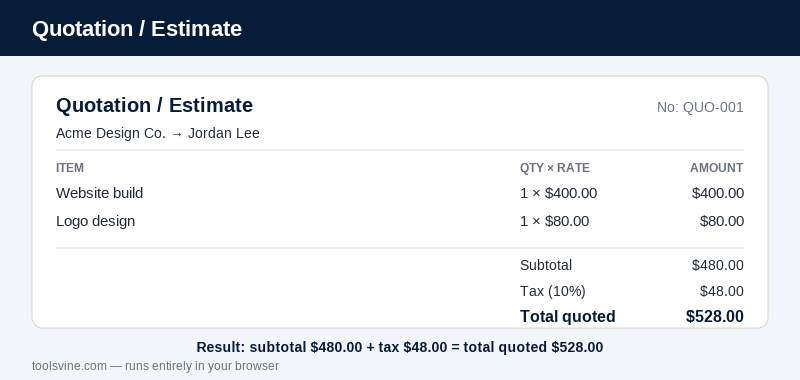
The tool opens with this example loaded: Acme Design Co. quoting Jordan Lee, document QUO-001, with the website build and logo design already entered. Set the tax to 0 and the total is $480.00; add a 5% discount and $24.00 comes off, leaving $456.00. The discount and the tax are both percentages of the subtotal, so either one is easy to test.
How do I turn a quotation into an invoice?
When the client accepts the quote, the work goes ahead and the invoice follows the same figures: the same items, the same rates, the same total. Build it with the Invoice Generator so the numbers match the quote exactly — a client who agreed to $528 should never be billed $550 for the same work.
Put a validity period on every quotation — 15 or 30 days is common — and keep a copy of what you sent. Prices change, and a dated quote protects both sides. Nothing is stored by this tool, so download the PDF and file it yourself.
Frequently asked questions
What is the difference between a quotation and an invoice?
A quotation is a price offered before the work — the client accepts it first. An invoice is a demand for payment after the work, or after an agreed milestone. This tool makes quotations; use the invoice generator once the work is done, and keep the figures the same so the invoice matches what the client accepted.
How long should a quotation be valid?
15 to 30 days is common for services. Put the validity in the notes field so the client can see it, and re-quote if prices change after it expires. A quote with no expiry date can come back months later, when your costs have moved and the price no longer works.
What currency are quotes in?
US dollars ($). All amounts — on screen and in the PDF — are shown in USD. There is no currency selector: enter your prices in dollars and the quote shows dollars, the same as every other document tool on this site.
Does the tool save my quotations?
No. Everything runs in your browser and nothing is uploaded or stored. Download the PDF before closing the page, and keep a copy in your own files — the tool cannot recover a quotation you closed without saving. File it where you keep your other business documents.
Can I add more items?
Yes — the Add item button adds rows without limit, and each row can be removed with the × button on that row. Totals update as you type, and the PDF grows to fit the list, running to a second page when a long quote needs the room.