
When a customer pays, they deserve proof — and your books deserve a record. This free payment receipt generator builds a clean Letter receipt PDF for your business: who paid, what the payment was for, how much, and when, with the totals worked out from the items you list.
Fill in your business details and the payer's name, add the items or services the payment covers, and download the PDF to hand over or email. The payment it confirms usually settles an Invoice Generator document, and if the payment was only a deposit, the goods may still be on their way under a Delivery Note Generator document.
How to use
- Fill in your business details, the payer's name, the receipt number and the date.
- Add the items the payment covers, with quantities and rates.
- Set the tax and discount, then download the PDF receipt or print it.
- If the payment was partial, note the balance in the notes field so the receipt is not mistaken for payment in full.
Why use Toolsvine
A receipt is a small document with a big job: it proves money changed hands. This generator makes one that is clear, numbered and honest about its totals, with no account and no upload — your customers' payment details stay private. It numbers the receipt, names the payer and the items, and prints the total received as one clear figure — the three facts any proof of payment needs. The PDF is the copy the payer keeps and the record your books need.
What goes on a payment receipt
A payment receipt names the business receiving the payment, the person or business paying, a unique receipt number and the date, then lists what the payment covers — items or services with quantities and rates — and the total received. It is the payer's proof of payment and your record of income in one document.
How the totals are worked out
Each line total is quantity × rate, the subtotal is the sum of the lines, tax is a percentage of the subtotal, discount is a percentage of the subtotal, and the total received is subtotal + tax − discount. The PDF shows the same figures as the preview, and the amount is written as a total so there is no doubt what was paid.
Worked example: a March tuition payment
A March tuition fee of $100 plus $25 of study materials gives a subtotal of $125.00. With 10% tax, the total received is $125.00 + $12.50 = $137.50 — the amount the receipt confirms. If the payment was partial, note the balance in the notes field so the receipt is not mistaken for payment in full.
| Item | Qty × rate | Line total |
|---|---|---|
| Tuition fee — March | 1 × $100.00 | $100.00 |
| Study materials | 1 × $25.00 | $25.00 |
| Subtotal | $125.00 | |
| Tax (10%) | $12.50 | |
| Total received | $137.50 |
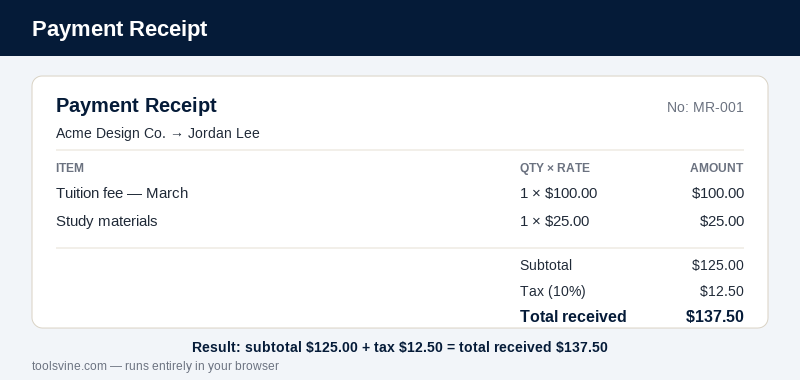
The tool opens with this example loaded: Acme Design Co. receiving from Jordan Lee, document MR-001, with the tuition fee and study materials already listed. Change the tax to 0 and the total received is $125.00; the receipt still confirms exactly what was paid.
What should I do after issuing a receipt?
File your copy with your accounts and keep the numbering unbroken — a gap in the sequence is the first thing an auditor asks about. The payer keeps their copy as proof, and your copy is the record of income when the books are done.
Number receipts in sequence and keep a copy of each one; a gap in the numbers is the first thing an auditor asks about. This tool stores nothing, so download the PDF and file it with your accounts.
Frequently asked questions
What is a payment receipt?
A written acknowledgement that a business received a payment: who paid, how much, for what, and when. It is the payer's proof and the business's record of income. Without one, a customer has no evidence they paid and the business has no record of the money coming in.
Is a receipt the same as an invoice?
No. An invoice asks for payment before it happens; a receipt confirms payment after it happens. A customer who has paid should get a receipt, not another invoice. Sending an invoice after payment is the most common paperwork mistake small businesses make.
Should a receipt show tax?
If tax was charged on the payment, yes — show it as a separate line so the payer can see what was tax and what was the price. Enter 0% if no tax applies. The total received should always equal the amount that actually changed hands.
What currency are receipts in?
US dollars ($). All amounts — on screen and in the PDF — are shown in USD. There is no currency selector: enter your prices in dollars and the receipt shows dollars, matching the invoice it settles. The total received is always the amount that changed hands.
Does the tool save my receipts?
No. Everything runs in your browser and nothing is uploaded or stored. Download the PDF before closing the page, and file your copy with your accounts — the tool cannot recover a receipt you closed without saving. Keep the numbering unbroken.