
Paste JSON data and get a Markdown table back instantly — no upload, no account, no waiting. The conversion runs in your browser, so your data never leaves your device. Copy the result, or download it as a .md file ready for a README, a wiki, or a docs page.
A Markdown table is the fastest way to show JSON records in a README, a GitHub issue, or a docs site: pipes and dashes, no HTML needed. The converter writes the header row, the separator row, and one row per record. For a web page instead, JSON to HTML Table builds the same grid in markup, and JSON to CSV hands the data to a spreadsheet.
How to use
- Paste your JSON data into the input box, or press Sample to load two example customer records.
- The Markdown table appears automatically as you type — header, separator, then one row per record.
- Copy the result, or download it as a .md file with the Download button.
- If the input is invalid, a plain-English error names the line with the problem — fix it and the output updates.
Why use Toolsvine
Writing a Markdown table by hand means counting pipes and dashes on every row, and one missing pipe breaks the whole table in most renderers. This converter builds the table locally in your browser, escapes any pipe characters inside your data so they never split a cell, and gives you a file you can paste straight into a README or a wiki page.
How does JSON to Markdown Table work?
JSON to Markdown Table turns each object in your JSON array into one table row: the object's keys become the header cells, a separator row of dashes follows, and each value becomes a cell in its row. The output is plain Markdown — pipes between cells, dashes under each header — so any Markdown renderer turns it into a table.
Pipe characters inside your data are escaped with a backslash, so a value like A | B stays one cell instead of splitting the row in two. Line breaks inside a value become spaces for the same reason. Nested values become JSON text in the cell, and a missing key leaves an empty cell, so every row keeps the same number of columns.
What happens to tricky values
| Detail | How it is handled |
|---|---|
| Headers | Keys from the first row, as the first line |
| Separator | One --- per column, under the headers |
| Rows | One line per object, cells joined with | |
| Pipes in values | Escaped as \| |
| Line breaks in values | Replaced with a space |
The separator row uses three dashes per column, which is the minimum most renderers accept — GitHub, GitLab, and most docs tools all read it. If a table renders as plain text instead, check that the separator row is present and that every row has the same number of pipes: a missing pipe is the usual cause.
Worked example: two customers become a Markdown table
Start with the same two customer records the Sample button loads: Alex, 28, Austin and Jordan, 31, Dallas. The converter writes four lines — a header, a separator, and two data rows — in a three-column table. Count the pipes on any row: four pipes make three columns, one at each end and one between every pair.
Example input:
[{"name":"Alex","age":28,"city":"Austin"},{"name":"Jordan","age":31,"city":"Dallas"}]
Becomes:
| name | age | city |\n| --- | --- | --- |\n| Alex | 28 | Austin |\n| Jordan | 31 | Dallas |
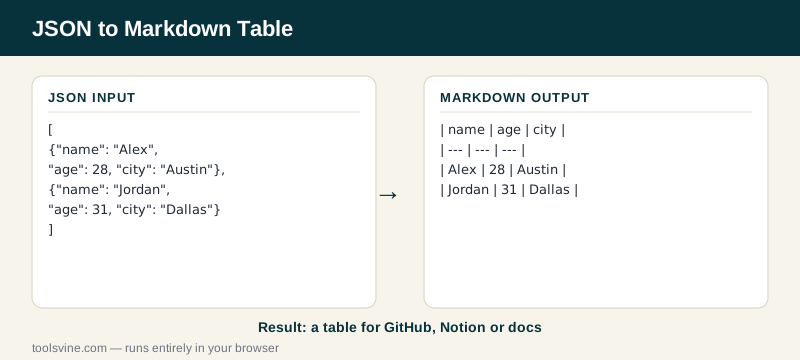
Try it yourself: add a third record for Taylor in Houston and watch a fourth line appear in the output. Then paste the table into a GitHub README preview — it renders immediately, which is the fastest way to confirm every pipe is in place. For the same grid as a web page, the JSON to HTML Table converter builds it in markup.
Where can I paste a Markdown table?
Almost anywhere that renders Markdown: GitHub README files and issues, GitLab wikis, Notion, Obsidian, and most documentation sites built with Docusaurus or MkDocs. If a page shows the raw pipes instead of a table, the page probably does not render Markdown — paste the same data into the JSON to HTML Table converter instead.
Markdown tables suit short, human-readable grids — a dozen rows at most. Beyond that, readers scroll past the data and the file gets hard to edit, so a spreadsheet or a real HTML table is the better home. The converter handles long arrays anyway: every record becomes one line, no matter how many there are.
Frequently asked questions
Is converting JSON to Markdown Table free?
Yes — completely free, with no account, no upload limits, and no watermark on the output. The conversion runs entirely in your browser, so there is no server involved and no cost to pass on. You can convert one record or a thousand rows and the price stays the same: nothing.
Is my JSON data uploaded anywhere?
No. The Markdown table is built on your device by JavaScript running in the page, and nothing is sent anywhere. That matters when the records hold customer names, email addresses, or internal IDs — data you would never paste into a stranger's server stays safe here because it never leaves your browser.
What happens if my JSON is invalid?
The tool shows a plain-English error naming the line with the problem — a missing quote, a trailing comma, or an unclosed bracket, for example — and leaves the output empty instead of guessing. Fix the error in the input box and the table rebuilds automatically, usually before you finish typing the correction.
Why does my table show as plain text instead of a table?
Usually the separator row is missing or a row has the wrong number of pipes. Every row needs the same pipe count — four pipes for three columns — and the separator row needs three dashes under each header. Paste the output into a Markdown preview to find the bad row: the table appears only when every row matches.
What happens to pipe characters in my data?
They are escaped with a backslash, so a value like A | B becomes A \| B and stays in one cell instead of splitting the row. Line breaks inside a value are replaced with a space for the same reason. The text a reader sees is almost unchanged — the backslash is invisible once the table renders.